
Class waitlist management that actually fills your seats
! Hands managing blocks representing class waitlist
Use integrated scheduling software with auto-promotion, eligibility checks and automated notifications to turn class waitlists into enrolments without chasing people manually.
Picture this: You've just poured yourself a much-needed coffee, thinking about the day ahead, when your phone buzzes. It's a student, frantic, asking if they can still get into tonight's fully booked reformer class. You manually check, realise a spot just opened up, and the scramble begins: who's next on the list? Did you text the right person? Have they paid? Is it even fair to the others?
That chaotic flurry of manual checks, chasing payments, and hoping someone, anyone, claims the spot before class starts? It's the daily reality for countless Australian wellness and fitness studio owners wrestling with waitlists that feel more like holding pens than active revenue streams.
But what if that empty spot automatically found its next occupant, processed the payment, and updated your books, all without you lifting a finger? That's not a pipe dream; it's smart class waitlist management that actually fills your seats.

It works whether you're running a boutique, 12-spot Pilates studio, managing a packed schedule for a multi-location spa, or coordinating full-week dance timetables. The goal isn't just to have a waitlist; it's to have one that converts.
Here's the short version of how to get there this week:
- Create a dedicated waitlist for each class (not just your whole timetable). Set its capacity.
- Enable auto-promotion with clear eligibility checks. Automatically skip anyone with an unpaid balance, an active membership hold, or a scheduling conflict.
- Set a tight claim window. Give promoted students a few hours (say, 4 to 24) to confirm before the spot automatically passes to the next in line.
Platforms like Revively handle this natively, seamlessly linking auto-promotion to Stripe for instant payment processing and connecting to Xero for flawless reconciliation. You ditch the patchwork of spreadsheets, reminder calls, and manual invoices. This isn't just about convenience; it's about making your waitlist a reliable, revenue-generating machine.
Why Your Waitlist is More Than Just a "Back-Up Plan"
A well-optimised waitlist does three powerful things for your Australian studio:
- Fills empty spots faster: Minimises revenue loss from last-minute cancellations.
- Keeps students engaged: Prevents potential clients from ghosting you and booking elsewhere.
- Acts as a demand signal: Shows you exactly which classes are consistently oversubscribed, helping you plan new sessions or adjust pricing with real data.
When your Tuesday 6pm Vinyasa class consistently waitlists within an hour of opening, that's a clear signal to consider adding a second session or reallocating an instructor. It's akin to how top Australian universities manage enrolment demand - not just about "not losing the sale," but about maximising capacity and reducing the administrative burden that bogs down your team.
At its core, waitlist management boils down to three primary models:
- First-come, first-served: The simplest, most transparent option, ideal for open-enrolment classes.
- Priority or resequenced queues: Favours existing members, pack holders, or students progressing through a specific syllabus.
- Manual approval: A human gatekeeper reviews each promotion, suitable for health-sensitive sessions or trial classes.
Studios that automate promotion, especially using multi-resource studio scheduling software, generally see the highest conversion rates and the biggest drop in no-shows. Why? Because the offer reaches the student while the class is still top-of-mind, not a day later when they've moved on.
Unpicking the Best Waitlist Model for Your Studio
Choosing the right waitlist model isn't academic; it's practical. It depends on your class sizes, how competitive your bookings are, and whether certain students genuinely need to jump the queue.
- First-come, first-served (FCFS): Best for smaller classes with predictable, steady demand - think most Pilates mat classes, beginner yoga, or casual dance drop-ins. It's universally understood and the easiest to automate effectively.
- Priority or resequenced queues: Essential for high-demand sessions, specialised programs, or Mindbody alternatives Australia that cater to members and pack holders. This is common in graded dance programs, where a student must complete a prerequisite level before advancing. It ensures loyalty is rewarded and progression is managed.
- Manual approval: Reserved for sensitive cohorts like trial classes, rehab-focused sessions, or anything requiring a thorough health screening (which is why digital intake forms are crucial) before enrolment can be confirmed.
Crucially, define your eligibility rules before you flick the automation switch. Common disqualifiers include unmet prerequisites, an active account hold, an outstanding invoice, or a scheduling conflict. Just as the Office of the Registrar at CU Boulder clarifies: automated and resequenced waitlists rely on these checks to skip ineligible students. Transparency here is key: tell students upfront what could disqualify them.
Lock in your policy choices early: set maximum waitlist lengths, enrolment deadlines, claim window durations, and decide what happens if a promoted student wants to swap instead of confirming. This proactive approach saves countless headaches.
Setting Up Your Waitlist: A Step-by-Step Blueprint
Setting up your waitlist correctly from the get-go saves you from frantic mid-term adjustments. Work through this sequence:
- Create the waitlist and link it directly to the specific class or session, not just a broad program. Immediately set a hard capacity limit.
- Configure auto-promotion rules: Decide if it's strict FCFS or priority-based. Crucially, wire in your eligibility checks (holds, prerequisites, scheduling conflicts).
- Craft clear notification templates for every stage: "You're on the waitlist," "Spot open - claim now," "Claim expiring soon," and "Enrolment confirmed."
- Set the claim window: Most Australian studios find 4 to 24 hours works best, depending on how far out the class is.
- Define swap and drop rules: Decide whether a student who drops a confirmed spot re-triggers auto-promotion for the next person on the waitlist.
- Decide on payment timing: Do you charge the moment a spot is claimed, or do you simply hold a card authorisation and charge closer to the class? Charging on claim generally reduces no-shows.
- Run a dry test! Use a dummy class before going live. Crucially, document the workflow for all staff members who might cover reception.
UNSW's enrolment waitlisting guide offers a robust procedural reference. While designed for a university, its mechanics for adding students, combining lists, and administrative access points translate directly to a studio timetable.
Pro Tip: Before rolling out, test your claim window with a staff member acting as a "student." If they find the confirmation email confusing, rushed, or unclear, your actual clients will too. Adjust until it's crystal clear.
Automation & Notifications: The Conversion Game-Changers
The difference between a waitlist that truly fills itself and one that requires constant administrative babysitting often boils down to precise timing and sequencing, not just the software itself.
- On-add confirmation: Sent the moment a student joins, stating their position.
- Promotion notice with claim window: Sent immediately when a spot opens, with an unambiguous deadline (4-24 hours).
- Claim-expiry reminder: A gentle nudge sent partway through the window if they haven't confirmed.
- Enrolment confirmation: Sent once payment and confirmation are locked in, reinforcing their commitment.
Large-scale waitlists, like those run by university registrar offices, often run hourly seat-availability checks. While a 15-person Pilates class doesn't need hourly checks, the principle holds: the faster the offer goes out, the higher the claim rate.
On payments: decide upfront if you charge the moment a student claims their spot or authorise a hold. Charging on claim tends to significantly reduce no-shows because the financial commitment is already made. Critically, automate refunds for early drops to pre-empt billing disputes. The most common mistake studios make is running waitlist promotion and manual bookings through separate, disconnected systems. This almost guarantees double-bookings when both processes try to fill the same spot simultaneously. An all-in-one spa booking software prevents this.
Keeping Your Waitlist Healthy: KPIs and Troubleshooting
Three key metrics reveal almost everything about the health and efficiency of your waitlist:
- Conversion rate: The percentage of waitlisted students who successfully enrol.
- Time-to-fill: How long a spot remains open before it's claimed.
- No-show rate: Specifically among students who were promoted from the waitlist.
A fourth, often overlooked metric, is notification open rates. An email promoting a spot that no one opens is functionally the same as never sending it at all.
When your waitlist system stumbles, it's typically due to one of these culprits:
- Promotions getting skipped: Double-check your eligibility rules. An overlooked hold or unpaid balance might be silently blocking qualified students.
- Overlapping enrolments: Enforce swap rules rigorously. Ensure a student can't be double-booked into two sessions at once through different booking pathways.
- Late drops leaving gaps: Tighten your claim window. Unclaimed spots need to recycle faster to minimise lost revenue.
Make a monthly audit part of your routine: send a test notification to yourself, review the previous month's conversion numbers, and check your refund logs for any discrepancies. This proactive approach helps maintain a GST compliant studio software workflow.
Revively: Your Australian-Made Solution for Seamless Waitlist Management
Revively, designed specifically for spas, yoga, Pilates, and dance studios across Australia, seamlessly integrates this entire checklist into a single, unified platform - no clunky, stitched-together systems required.
- Native auto-promotion with comprehensive eligibility checks built directly into the class waitlist management. This means an account with a hold or an unpaid class pack won't accidentally jump the queue.
- Stripe-powered payments trigger the precise moment a claim is confirmed, automatically closing the loop between promotion and payment.
- Flawless Xero reconciliation happens natively, directly mapping 10% GST calculations, revenue accounts, and liabilities. This removes the manual, error-prone matching of waitlist payments against your books, guaranteeing 100% legal tax compliance and audit-proof quarterly Business Activity Statements (BAS).
- Dynamic foyer display boards show live class status, so your front-desk staff aren't fielding "Am I in?" questions all day.
- Integrated digital intake forms capture any essential health screens or waivers before a promoted student's first class.
A typical setup with Revively involves enabling auto-promotion, setting a claim window of several hours to half a day, and letting the display board and your books update in real-time as spots fill.
Integrating payments and robust accounting with Xero integration for BAS accuracy closes the loop for Australian studio operators. It completely removes the manual reconciliation work that otherwise falls on whoever manages your front desk, ensuring your financials are always spotless and compliant.
Beyond the Queue: Keeping Waitlisted Students Engaged
A waitlisted student who hears nothing for two weeks isn't just waiting; they're likely booking somewhere else. The silence between joining a waitlist and getting promoted is where most studios quietly lose potential clients without ever seeing it in their numbers.
Content previews are a powerful tool here. If a student is waiting for a popular Vinyasa or Barre class, send them a short practice clip, a curated playlist, or a technique breakdown from the instructor. This keeps your studio top-of-mind and transforms anticipation into engagement.

Consider early community access, especially for dance programs with progressive levels. Invite waitlisted students to a related open studio session, a low-stakes drop-in, or a community class chat. It reframes the wait as part of the overall studio experience, not just dead time.
Timing is as vital as the content itself. A single "You're still on the list, we haven't forgotten you!" touchpoint at the halfway mark of a typical wait period can significantly reduce the feeling of being ignored. Automating this message ensures consistency, rather than relying on someone remembering to send it.
The most successful studios treat their waitlist as a warm audience, not merely a holding pen. This shift in perspective translates directly into higher claim rates when a spot eventually opens.
Fairness and Transparency: Building Trust on the Waitlist
Most waitlist fairness complaints stem from one issue: students don't understand why they were skipped. If your priority queue genuinely favours members or pack holders over casual bookers, state this clearly and publicly before anyone joins the list, not after they've been passed over.
Transparency starts with self-service visibility. Allowing a student to check their own position, rather than having to email or call, dramatically reduces admin load and eliminates any perception of favouritism. Many specialist waitlist platforms like WaitlistPlus build this in as a core feature precisely to reduce disputes.
Document your eligibility rules in an easily accessible location: prerequisites, hold conditions, and how priority is assigned. If a student is skipped due to an unpaid invoice or a missing waiver, that specific reason should be clearly stated in the promotion notification, not left for them to guess.
Furthermore, establish a simple appeal path. If a student believes they were skipped in error, there should be one clear way to raise the issue (e.g., a reply-to email, a dedicated support inbox) and a commitment to review it within a defined timeframe. Studios that skip this step often handle disputes reactively, which nearly always looks worse than a well-documented process, even if the original decision was correct.
Fairness doesn't mean every queue has to be strictly first-come, first-served. It means the rules are visible, applied consistently, and thoroughly explainable when questioned.
Data Privacy Down Under: Protecting Waitlist Information
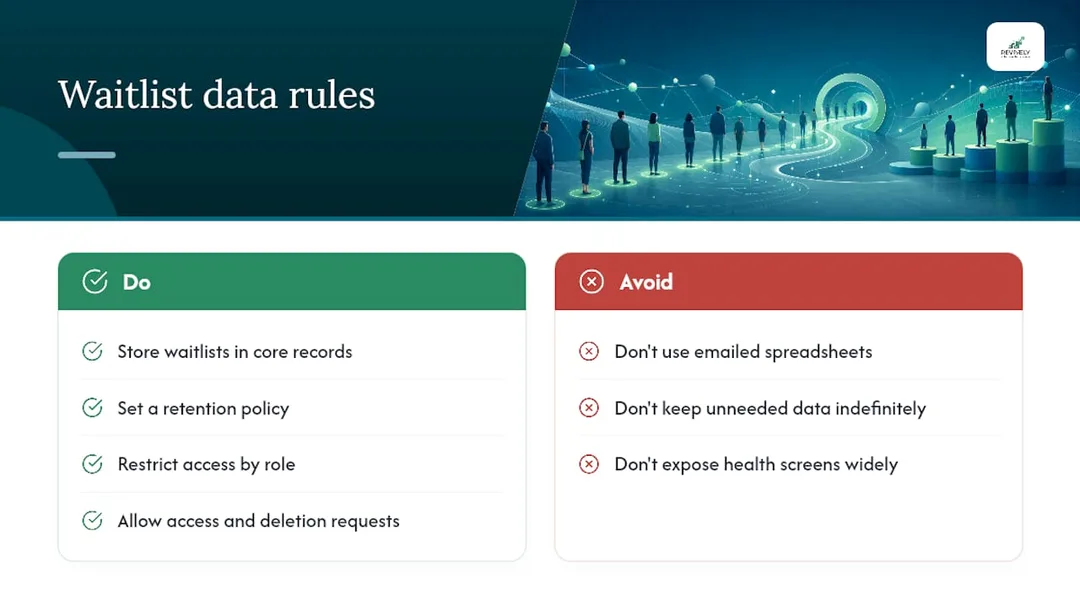
A class waitlist in Australia often holds more personal information than many administrators realise: names, contact details, payment status, and potentially sensitive health information from intake forms (especially for rehab-focused or restorative classes). This data demands the same rigorous handling and privacy discipline as your main enrolment records, fully complying with the Australian Privacy Principles (APPs).
Crucially, store all waitlist data within your secure, Australian-based cloud command centre - not in a shared spreadsheet. Spreadsheets are far more susceptible to being emailed, forwarded, and left open on shared screens, making them a common source of accidental data exposure in smaller studios. Revively ensures client data, booking histories, and sensitive health intake forms are stored locally in Australia, adhering to the strictest privacy standards.
Establish a clear retention policy. If a student never gets promoted and the class concludes, define how long their waitlist entry and any linked intake data remains in your system before it's securely archived or deleted. Indefinite retention of unneeded contact and health details creates unnecessary risk without any operational benefit.
Implement role-based access. Front-desk staff typically need contact details and eligibility status; they rarely require the specifics of a health screen. Your scheduling platform should restrict sensitive fields to only those who need access for specific decisions, further protecting client privacy.
If a student requests to view their data or be removed from a waitlist and its associated records, you need a straightforward, auditable way to action that request. Building this into your standard operating procedures now is significantly less painful than scrambling under pressure later.
Scaling Up: Waitlists Across Multiple Classes, Sessions, and Locations
A single waitlist for one Tuesday class is straightforward. Managing waitlists across a full weekly timetable, multiple instructors, and potentially several studio locations is a fundamentally different challenge, and it's where manual processes collapse fastest.
The core issue at scale is consistency. If one instructor manually approves waitlist promotions while another relies on the system's auto-promote feature, students receive an inconsistent experience depending on the class they've joined. Your administrative team then spends valuable time remembering exceptions instead of following a streamlined workflow. Standardise your rules across every class first, then allow deliberate, documented exceptions only where a genuine need exists (e.g., a graded dance syllabus requiring manual sign-off).
Studios with multiple locations face an added layer of complexity: should a student waitlisted at one site automatically be offered a spot at a sister location running the same class? This is a policy decision, not a technical one, and it needs to be made explicitly rather than left to default system configurations.
Robust reporting becomes invaluable as you scale. Once you're running waitlists for ten or twenty classes a week, conversion rates and time-to-fill data, broken down by class type or location, begin to reveal powerful patterns. For example, consistently waitlisted time slots versus under-filled ones. This kind of insight should directly inform how you build next term's timetable, rather than just gathering dust in a report.
Daily Admin: Adding, Removing, and Checking Waitlist Positions
Day-to-day waitlist administration boils down to a handful of core operations. Getting the access model right ensures your front-desk team can handle these tasks efficiently without escalating every query to a manager.
Adding a student is usually the simplest action: they join via your multi-resource scheduler booking portal when a class is full, or staff add them manually if the request comes by phone or in person. Removing someone should be equally effortless, whether they've requested removal or been manually skipped due to an eligibility reason that needs logging.
Checking waitlist position matters more than most studios initially anticipate. A student who can see they're third in line behaves very differently from one left wondering if they're even on the list. Where your platform supports it, offering students self-service visibility into their own position significantly reduces "where am I on the list?" enquiries.
The larger decision is always between manual approval and auto-enrolment, and it doesn't have to be an all-or-nothing choice. Many Australian studios effectively run auto-enrolment as the default for standard classes, reserving manual approval for cases demanding a human check, a health screen review, or a syllabus prerequisite confirmation. Deliberately setting this split, rather than defaulting to manual "just in case," is often what separates a waitlist that truly runs itself from one that still requires constant oversight.
Integrating Your Waitlist with Existing Systems
If your studio already uses a learning management system (LMS) for course content, syllabus tracking, or online modules alongside in-person classes, your waitlist shouldn't operate in a separate silo. Manually re-entering a student's enrolment status between two systems is precisely the kind of redundant task that automation exists to eliminate.
The practical goal is a single source of truth for enrolment status. When a waitlisted student is promoted and confirmed, that status should automatically update everywhere else it's tracked - whether it's a syllabus platform for a graded dance program or a content library for online yoga sessions. Without this seamless link, you end up with confusing discrepancies: students showing as "enrolled" in one system and "waitlisted" in another, leading to frustration for both staff and students.
Payment and accounting integration is equally critical. Platforms like Revively that connect natively to Stripe for payment processing and Xero for reconciliation eliminate a second major manual step: matching who paid, when, against who is actually enrolled. Doing this by hand across even a modest weekly timetable adds up to hours of administrative work a month that a proper integration eliminates by design, ensuring flawless GST & tax invoice handling and compliance.
The fewer systems a promoted enrolment has to pass through, the fewer points of potential failure. That's the real argument for integration: not just novelty, but vastly improved operational efficiency and accuracy between a student claiming a spot and that spot being securely locked in on your books.
When should you automate versus keep it manual?
Automate once a class type experiences consistent demand, or once the administrative time spent manually chasing waitlists costs more than a dedicated software subscription. Below that threshold, manual approval can still be feasible.
Start small. Test auto-promotion, eligibility rules, and your claim window on a single popular session before rolling it out across your entire timetable. The three actions outlined in the opening section are exactly where to begin.
Set Up Your Smart Waitlist with Revively Today
Everything discussed above - auto-promotion, eligibility checks, intelligent claim windows, integrated payment handling, and seamless accounting - maps directly onto features Revively builds specifically for spas, yoga, Pilates, and dance studios. Revively is the unified cloud command centre designed for Australian studios, handling everything from CRM to multi-resource scheduling.

Class waitlist management in Revively natively handles auto-promotion and eligibility checks, so you're not trying to stitch together a scheduling tool, a payment processor, and a spreadsheet just to run one Tuesday class efficiently. Class packs and memberships tie directly into the same eligibility rules that gate promotion. Stripe payments fire the moment a claim is confirmed, and Xero reconciliation happens effortlessly, ensuring flawless GST & tax invoice handling without anyone matching numbers by hand at month-end. Our foyer display boards show live class status, and digital intake forms capture essential waivers before a promoted student's first session, all while maintaining strict Australian data residency and privacy.
If you're currently managing even a single class waitlist on a spreadsheet, the fastest way to experience the difference is to configure one real class inside a Revively free trial and watch a waitlist fill itself. Take control of your bookings and empower your studio with GST compliant studio software today.
Sources
- Enrolment waitlisting | Current Students
- Waitlist for a closed class | Office of the Registrar | University of Colorado Boulder
- WaitlistPlus - Custom wait list management software
- Australian Privacy Principles (implied reference, linking to OAIC for authority if needed in a more formal context).