
4 Decisions to Make Class Schedule Displays Work Like a Concierge
! Class schedule display in studio foyer
The right class schedule display is a screen fed live by your booking system, running on commercial-grade hardware with content caching switched on, so it never shows stale times or a blank screen during a dropout.
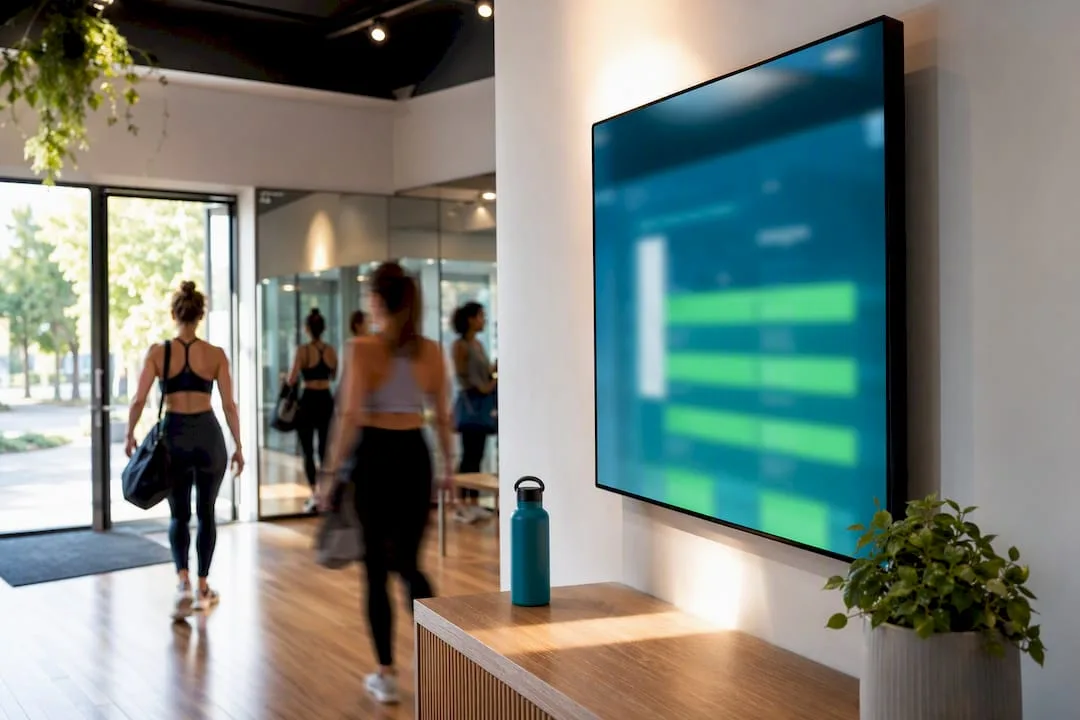
Ever watched a client squint at your lobby screen, then walk straight to reception to ask "Is the 6 pm yoga still on?" Or perhaps you've seen a frustrated member tapping a frozen display, convinced their favourite class got cancelled (when it simply wasn't updating).
The truth is, an outdated, unreliable class schedule display isn't just an eyesore; it's an active drain on your front desk team and a chipper at client trust. You didn't open a wellness studio or dance school to babysit digital signage.
But imagine a display that answers every "what's on?" question before it's even asked. A screen so accurate, so seamlessly integrated with your booking system, that it effortlessly guides clients, promotes open spots, and even manages last-minute changes without a single frantic phone call or manual update.
That's not just a screen; it's a digital concierge. And getting it right comes down to four critical decisions.
Too busy to read? Here's the essential rundown for your studio's display strategy:
- Integrate, don't approximate: Your display needs a direct, live feed from your booking system. Anything less means stale info, missed classes, and frustrated clients.
- Invest in durability: Consumer TVs are for binge-watching, not 18-hour shifts in a hot yoga studio. Commercial-grade screens handle the grind (and the heat) without conking out.
- Clarity over cleverness: Static, large-font displays beat fancy animations every time. Clients need to read, not be entertained, from a distance.
- Power and cabling matter: Don't skimp here. PoE simplifies installation, proper ventilation saves your hardware, and a tidy setup prevents trip hazards.
- Lock it down: Role-based permissions for updates and physical security for the device itself prevent accidental (or malicious) changes.
Table of Contents
- Your Studio's Digital Concierge: A Setup Checklist
- Designing for Glance-and-Go: Readability Essentials
- Built to Last: Why Hardware Durability Isn't Optional
- Always Accurate: Zero-Admin Schedule Management
- Harmonising Tech and Zen: Strategic Display Placement
- Beyond a Billboard: The True Power of Your Lobby Screen
- The Unseen Heroes: Power and Cabling Done Right
- Empowering Your Team: Effortless Schedule Updates
- Access Control: Who Manages What (and How)
- Beyond the Screen: Tracking Display Engagement
- Troubleshooting 101: Common Display Glitches and Quick Fixes
- Why Your Display is as Critical as Your Booking System
- Revively's Display Boards: Your Checklist, Our Solution
- Further Reading & Resources
- Frequently Asked Questions (FAQs)
- Recommended Reading from Revively
Your Studio's Digital Concierge: A Setup Checklist
Before you drop a single dollar on hardware, let's nail down four foundational decisions. Skipping this step often leads to buying the wrong screen, only to realise your wellness studio booking system can't actually talk to it. Big waste of time and money, right?
- Map Your Client Journey: Grab a pen and walk your studio. Where do clients naturally pause? The lobby? Outside a studio door? Near the change rooms? Each "zone" needs a specific screen size and content layout. Don't just clone the same slide deck everywhere; think tailored information delivery.
- Choose Your Data Source (Wisely): This is non-negotiable. A native, direct connection between your booking platform (like Revively, designed as an all-in-one studio management solution) and your display is the only way cancellations, instructor swaps, and waitlist movements show up instantly. Calendar or iCal feeds? They're a clunky workaround, not a solution for a dynamic multi-resource studio scheduling environment.
- Hardware for Hard Work: Lobby displays clock serious hours. That demands commercial-grade panels, not the TV you'd buy for your lounge room. For smaller, room-door panels, 10 to 24-inch screens often run efficiently on Android media players or streaming sticks, offering a cost-effective alternative to full-blown signage boxes.
- Budget for the Entire Solution: Don't just eyeball the screen price. Factor in the hardware, the software's recurring display feature fee, mounting brackets, specialised cabling, and professional installation labour. Many studios using Mindbody alternatives Australia often forget this, leading to unexpected invoices months later.
Get these core elements right - your zones and your data source - and the rest of your display rollout becomes a straightforward hardware procurement task, not a draining, headache-inducing project.
Designing for Glance-and-Go: Readability Essentials
A display that demands a client stop, stare, and decipher is doing it wrong. Your goal isn't just a pretty screen; it's a glance-and-go experience. Design guidance for gym and studio signage is clear: minimum 24pt type for class names and 18pt for details, calibrated for three to five metres viewing. Anything smaller and you've just installed a digital billboard for ants.
Think about how your clients move. A lobby display, where members plan their entire visit, benefits from a full-day grid. But a corridor panel outside Studio 2? That client only cares about what's now and next in that specific room. Don't overwhelm them with the 7 pm spin class across the building.
Regardless of layout, every display needs these core details, presented crisply:
- Class Name & Duration
- Instructor Name
- Room or Studio Number
- Start Time
- Live Availability or Waitlist Badge (Crucial for driving bookings!)
And here's a non-negotiable: cancelled classes need a clear status badge, not to simply vanish. Promotional content should have its own separate, infrequent rotation slot. It never bumps a class time off-screen.
Pro Tip: Resist the urge for fancy animations. A schedule that scrolls, fades, or blinks every ten seconds is harder to read than a static grid. Your clients are juggling coffee, gym bags, and mental to-do lists; they need information, not a light show.
Built to Last: Why Hardware Durability Isn't Optional
Let's be blunt: consumer televisions aren't built for your studio. Industry guidance on fitness signage universally agrees. Lounge room TVs aren't rated for 18-24 hour daily operation. Stick one in a steamy hot yoga studio or near a Pilates room running heaters, especially during an Australian summer, and watch it conk out prematurely. Commercial-grade displays cost more upfront, yes, but they're engineered to handle the relentless duty cycle and ambient conditions of a busy studio, offering vastly superior longevity and uptime.
Often, it's not the screen itself that fails, but the connectivity. A dropped internet connection or a flaky router shouldn't leave your clients staring at a blank screen or a frustrating error message. This is where local content caching becomes your best mate: the display intelligently holds the last known schedule, continuing to show it accurately until the connection is restored. No panic, no blank panels.
How your display receives updates is just as crucial as what it shows:
- Native API/Webhook connections: These push updates in 30-60 seconds, making them ideal for instant cancellations or urgent instructor swaps. Think of it as direct, real-time communication.
- Polling-based integrations (e.g., calendar feeds): These refresh every 5-15 minutes. Fine for a static weekly timetable, but utterly useless for live capacity changes or a last-minute class merge.
- Static Timetables: If your schedule truly never changes, longer refresh cycles are acceptable. But how many studios run that way?
For smaller panels, Power over Ethernet (PoE) is a game-changer. One cable delivers both power and data, often removing the need for an electrician to install a new power outlet. This simplifies installation, particularly in older Australian buildings or heritage-listed premises where electrical work can be a costly, drawn-out affair. Always mount media players with airflow in mind, especially near heated zones, and ensure cabling is neatly tucked away to prevent trip hazards and maintain studio aesthetics.
Always Accurate: Zero-Admin Schedule Management
Let's get real: a stunning, expensive display showing yesterday's schedule is worse than no display at all. It actively erodes client trust and creates more work for your team. The real magic isn't in the screen's resolution; it's in the workflow that keeps it accurate, automatically.
Here's how to ensure your display is a source of truth, not frustration:
- Direct from the Source: Your display absolutely must pull data directly from your wellness studio software or all-in-one spa booking software. When clients book, cancel, or join a waitlist, capacity and waitlist counts must update instantly on screen. No manual refreshes, no spreadsheets, no human error.
- Public vs. Internal: Don't clutter your public display with internal operational details like staff training, maintenance blocks, or instructor-only holds. Show only what's relevant to a client: bookable spots and genuine waitlist numbers. A live waitlist is a powerful demand signal, encouraging earlier bookings - but only if it's accurate.
- Define Emergency Protocol: Who has authority to push a last-minute override banner if a teacher calls in sick? Crucially, can they do it quickly and easily from their phone? A responsive Pilates studio software Australia should make this seamless.
- The "Pre-Open" Glance: A quick, two-minute visual check against the day's actual timetable, just before opening, is a smart habit. It catches any rogue issues before clients do.
Pro Tip: Designate one senior staff member (or a very small, trained group) with the power to push emergency overrides. Too many cooks spoil the broth, and too many hands on the override button often results in a "Studio 3 closed for cleaning" message lingering for days.
Manual Updates vs. Integrated Automation: The Studio Reality Check
| Feature/Task | Manual (Spreadsheet/Calendar Feed) | Integrated (Revively/Booking System) |
|---|---|---|
| Schedule Updates | Requires manual data entry, prone to human error, delays | Automated from booking system, real-time, zero admin |
| Cancellations/Swaps | Staff must manually update, often lags, causes client confusion | Instant propagation across all displays |
| Waitlist Visibility | Usually static, outdated, or absent on public displays | Dynamic, real-time waitlist numbers, drives demand |
| Promo Content Mgmt. | Separate system, risk of overriding schedule | Dedicated rotation slot, always prioritises schedule |
| Error Potential | High - mismatched data, typos, forgotten updates | Low - single source of truth, system consistency |
| Staff Time Invested | Significant, daily check-ins, troubleshooting | Minimal, occasional verification, proactive issue alerts |
| Client Trust Impact | Can erode trust if information is consistently out of date | Builds confidence through consistent, accurate information |
Harmonising Tech and Zen: Strategic Display Placement
Your studio's atmosphere is part of its brand. So, where do these digital concierges earn their keep without wrecking the vibe?
Lobby and Foyer: These are prime zones. Clients naturally pause here, scanning for their next class or planning their visit. A well-placed lobby screen is invaluable. However, keep large, glowing panels out of your actual practice rooms. A bright, constantly updating screen in a serene yoga or Pilates space instantly undercuts the calm and focus you're working so hard to cultivate.
Corridor Panels: These solve the "last-mile problem." Someone outside Studio 3 doesn't need to see the entire building's schedule; they just want to confirm their 6 pm class. Mount these smaller panels at eye height, with crystal-clear contrast, so information is digestible without stopping.
Crucial policy rules protect both client privacy and your studio's ambience:
- Privacy First: Absolutely never display personal booking identifiers, client names, or contact details on any public-facing screen. This is non-negotiable for client trust and Australian Privacy Principles (APPs) compliance.
- Promo with Purpose: Promotional content has its place, but in its own rotation slot, and never at the expense of class schedule visibility. Balance promotion with pure utility.
- Climate Considerations: In warm, humid studio zones - common across Australia - rigorously check the display's operating temperature and ventilation ratings before mounting near heaters, steam rooms, or direct sunlight.
- Accessibility: Ensure screens meet basic accessibility standards for height and colour contrast. If only your reception staff can read it, it's not truly serving its purpose.
Beyond a Billboard: The True Power of Your Lobby Screen
Many studios still view their display as a glorified marketing slide deck. That's a fundamental misstep. A lobby screen, intelligently fed by real-time booking data, is far more than an advertisement; it's a proactive digital concierge. It quietly, efficiently answers every walk-in's core questions: What's on? When? Is there room? This frees your front desk team to focus on meaningful client interactions, not repetitive queries.
Revively's display boards were engineered with this precise operational reality in mind. They pull class name, instructor, room, and live availability directly from the same unified cloud command centre - your CRM + multi-resource scheduler - that your front desk uses. This ensures the screen and your team are always showing the same, single version of the truth.
For Australian studio owners, this means peace of mind. Client data, booking histories, and sensitive health intake forms are stored locally in Australia, fully complying with the Australian Privacy Principles (APPs). Furthermore, any financial transactions displayed or referenced are implicitly supported by Revively's native handling of 10% GST calculations and automatic issuance of legally compliant Australian Tax Invoices - a critical detail often overlooked by generic software. Your display becomes an extension of a system designed for the specific realities of running a modern, compliant Australian wellness or fitness studio.
The Unseen Heroes: Power and Cabling Done Right
Let's talk about the unsung, unglamorous part of any display project: power and cabling. There's nothing worse than unboxing a gorgeous new screen only to realise there's nowhere sensible to plug it in. Plan this before installation day, not during it.
For fixed lobby screens close to an existing power outlet, a standard mains connection with a slim, in-wall cable channel keeps things neat and prevents hazardous trailing cords. For smaller room-door panels, Power over Ethernet (PoE) is often the smarter move. One cable handles both power and data, sidestepping the need for an electrician to run a new power outlet. This is particularly valuable in older Australian buildings or heritage-listed premises, where adding new electrical points can involve weeks of permits and significant cost.
Cable management isn't just about aesthetics; it's about safety and longevity. Loose cables near a studio entrance is a genuine trip hazard. And those heat-generating media players tucked behind a sealed panel with zero airflow? They're practically begging to die prematurely, especially during a scorching Australian summer. Always ensure a small ventilation gap behind any enclosed mount, and route cables through proper wall channels or trays.
Finally, if you're installing new cabling or mounting anything above head height, budget for a qualified installer. A DIY job might save a few dollars upfront, but a screen falling off a wall bracket isn't just an inconvenience; it's a serious liability problem.
Empowering Your Team: Effortless Schedule Updates
The hallmark of truly excellent display software? Your least tech-savvy team member can update it without breaking a sweat or calling for backup. If altering a class time or pushing an urgent message means logging into a separate CMS with a different interface and another password, you've created a bottleneck. One person "owns the screens," and when they're off, chaos reigns.
An integrated approach sidesteps this nightmare. Because Revively's class scheduling, resource booking, and display features live within the same unified dashboard, any change - a class time adjustment, an instructor swap, a room change - automatically updates the public display. No extra publishing step. Your team manages the timetable they're already familiar with, and the display simply reflects the truth, instantly.
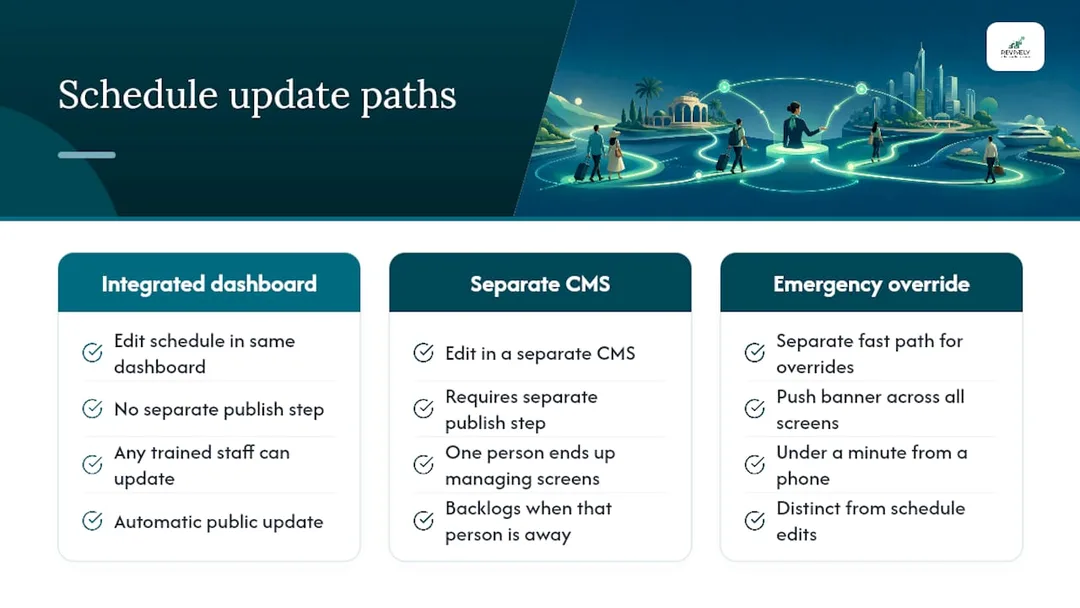
Emergency overrides need their own lightning-fast path. Imagine a burst pipe in Studio 1 an hour before opening. The staff member on shift needs to push an urgent banner across relevant screens in under a minute, ideally from their phone, not a clunky desktop admin panel back in the office. Look for fitness studio management systems that clearly separate "edit the schedule" from "push an urgent message" into two distinct, rapid actions. Merging them into a single, complex workflow is how critical override messages get delayed until it's far too late.
Access Control: Who Manages What (and How)
Every public-facing, editable display is a potential security vulnerability waiting to be exploited - or simply messed up - if ignored. You need to consider two distinct layers of access: who can change what appears on screen, and who can physically tamper with the device itself.
Software Side: Role-Based Permissions are Non-Negotiable.
This is where proper all-in-one studio management software shines. A schedule display is client-facing, so granular, role-based permissions are paramount. Your front-desk staff likely need to push an emergency banner, but should they be able to delete an entire recurring class series? Probably not. Full scheduling control should be reserved for managers and owners. Crucially, your system needs a clear audit trail - who changed what, and when - because tracing how that "cancelled" class mysteriously reappeared is a nightmare without it.
Hardware Side: Physical Security Matters.
This is often entirely overlooked. That media player feeding your lobby screen? It's usually accessible to anyone. Lock it down. Mount it in a secure enclosure, or high enough to deter curious hands. Implement a device PIN or admin lock, separate from your software login. You don't want a curious client (or a bored teenager waiting for their sibling's dance school class) rebooting your display into a settings menu. If your chosen studio software with display support offers remote device management, use it. The ability to check status or restart a frozen panel from your phone beats a late-night drive to the studio any day.
Beyond the Screen: Tracking Display Engagement
Most studios install a schedule display and then... forget about it from a data perspective. That's a massive missed opportunity for valuable business intelligence. Basic analytics on display usage can tell you two critical things: Is the screen actually doing its job, and when does your studio truly get busy?
Metrics like view counts and dwell time (if your platform supports them) reveal whether clients are stopping to read or simply walking past. This is invaluable feedback for optimising placement or text size. Even more powerfully, peak-time data pulled from the same booking system feeding the display can expose subtle patterns you'd never spot from the floor - like that Tuesday 5:30 pm class quietly becoming the busiest slot of the week for your yoga studio booking platform AU without anyone noticing.
This data becomes truly impactful when it's intrinsically linked to actual booking behaviour. A display showing rising waitlist numbers for a popular class is a far stronger predictor of demand (and potential revenue) than any raw foot traffic count. It's clients actively responding to what they see. When your booking platform and display run on separate, disconnected systems, this crucial cross-referencing typically involves exporting multiple spreadsheets and tedious manual comparisons - a task most busy studio owners simply don't have time for.
Troubleshooting 101: Common Display Glitches and Quick Fixes
When your digital concierge decides to take a coffee break, it's usually one of a few predictable culprits. Knowing these quick fixes can save you a frantic phone call during the Monday morning rush.
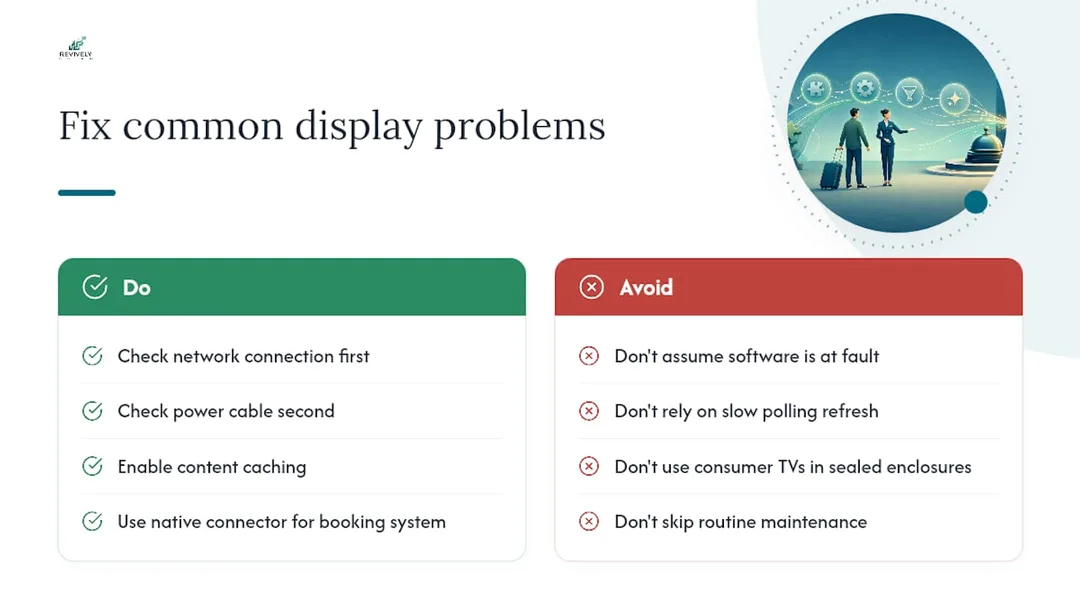
- Frozen or Blank Screen: Almost always a connectivity or power issue, rarely a software fault. Check the network connection first, then the power cable. This is precisely why content caching is non-negotiable: a properly cached display will continue to show the last known schedule during an outage, rather than freezing on an error message.
- Lagging Schedule Data: If your display is showing yesterday's info or lagging significantly behind real-time bookings, it's likely a slow, polling-based integration. This isn't a "fault" to fix, but a design flaw. The solution? Upgrade to a native, direct connection from your recovery centre scheduling software. That's the fix, not a support ticket.
- Overheating/Mid-Afternoon Shutdowns: This screams hardware and ventilation problems. It's common with consumer-grade TVs or media players suffocating in sealed enclosures. It's the strongest argument for investing in commercial-grade panels, particularly in any studio with heaters or humid treatment rooms.
Proactive maintenance is your best defence. Implement a simple weekly routine: a quick screen wipe, a visual confirmation that the timetable matches reality, and a media player restart if it's been running non-stop for several days. Five minutes now can prevent hours of frustration later.
Why Your Display is as Critical as Your Booking System
It's a common mistake: viewing your booking software as critical infrastructure and your lobby display as mere decoration. This mindset is fundamentally flawed. A screen delivering live, accurate class information is performing the same vital function as your best front-desk staff: anticipating and answering "What's on? Is there room?" before anyone even needs to ask. It's an indispensable component of your unified cloud command centre.
The tired advice - "just buy a nice TV and update it manually" - completely ignores the points of failure. The problem is never the screen's resolution. It's always the disconnect between what your software knows and what your glass shows. It's the spreadsheet that wasn't updated, the calendar feed that lags, the human error that creeps in. Every technical decision we've discussed - caching, native integration, refresh intervals - exists to bridge that gap.
So, if you take one thing away: prioritise the data connection over the hardware spec sheet. A modest screen flawlessly fed live from your GST compliant studio software will always outperform a premium panel running a manually exported calendar. Nail that integration first. The rest - placement, font size, mounting - then becomes a straightforward, logical decision, not a recurring operational headache.
Revively's Display Boards: Your Checklist, Our Solution
Consider your checklist: native integration, robust content caching, commercial-grade readiness, granular admin filters. Most standalone signage tools nail the "screen" part but fall flat on the crucial "data feeding it" aspect. Revively bridges that gap, comprehensively.

Our display boards pull live data directly from the very same unified cloud command centre that handles your class scheduling, online bookings, and client management. This means zero synchronisation headaches between disparate systems. Furthermore, as an Australian-made CRM, Revively ensures:
- Australian Data Residency: Your client data, sensitive health intake forms, and booking histories are all stored locally in Australia, guaranteeing full compliance with the strict Australian Privacy Principles (APPs).
- Flawless GST & Tax Invoice Handling: Revively natively manages all 10% GST calculations across casual classes, memberships, and multi-resource packages. It automatically issues legally compliant Australian Tax Invoices to your clients, every single time.
- 100% Legal Xero Integration: Our automated two-way mapping of tax codes, revenue accounts, and liabilities directly to Xero guarantees your quarterly Business Activity Statements (BAS) are accurate, audit-proof, and completely free from manual spreadsheet errors. This is crucial for Australian tax compliance and peace of mind.
For yoga, Pilates, spa, or recovery centres specifically, this means class packs, waitlist promotions, and live availability show on your lobby screen exactly as booked, without a single manual export step. If you're weighing a generic signage subscription against a purpose-built, Australian all-in-one studio management platform, start with a trial. Book a walkthrough of the display board feature or explore the Revively platform to see your existing timetable brought to life, accurately and effortlessly, before committing to any hardware.
Further Reading & Resources
Dig deeper into the world of digital signage and studio operations with these expert resources:
- Digital signage for gyms | Display Australia
- Gym class digital signage | CastHub
- Class schedule digital signage | Digital Signage Hub
- Fitness solutions | Mood Media Australia
Frequently Asked Questions (FAQs)
Got a quick question about getting your studio's display strategy right? We've got answers.
What exactly is a class schedule display for a studio?
It's a digital screen, typically mounted in a studio's lobby or outside specific rooms, that shows live upcoming class times, instructor details, and real-time booking availability, all pulled directly from your studio's booking system.
What's the ideal screen size for my lobby class timetable?
For a comprehensive lobby display, larger screens work best with a full-day grid layout. For panels outside individual rooms, a smaller 10 to 24-inch screen is usually sufficient, focusing on "now/next" class information.
Should I invest in a regular TV or a commercial display for my studio?
Always opt for a commercial-grade display. Standard consumer TVs aren't designed for the 18 to 24-hour daily operation common in studios, nor do they withstand the warmer, more humid conditions often found in yoga or Pilates spaces. They'll fail much faster, costing you more in the long run. Consumer TVs aren't rated for fitness signage in these environments.
How quickly should my digital class timetable update?
With a native, direct integration, updates should reflect changes within 30 to 60 seconds. Older, polling-based (calendar) integrations are much slower, typically refreshing only every 5 to 15 minutes - far too slow for dynamic studio environments.
What happens to my display if the internet connection drops out?
A properly configured display with content caching will continue to show the last known accurate timetable during an internet outage, rather than going blank or displaying an error message. This feature is non-negotiable for maintaining client trust and smooth operations.
Does Revively.app offer class schedule display support for Australian studios?
Yes! Revively's display boards are fully integrated, pulling live, accurate data directly from the same Australian-made booking and class scheduling system your studio already uses. This means your foyer and room displays always reflect real-time availability and changes without any separate content feed or manual intervention, ensuring compliance with local standards like GST handling and Australian Privacy Principles (APPs).
Recommended Reading from Revively
Dive deeper into optimising your studio's operations with these insightful articles:
- Stop the Studio Mayhem: How to Really Reduce Double Bookings (Without More Admin Headaches)
- Stop the Studio Scheduling Circus: Your Blueprint for a Unified Command Centre
- Fill Every Spot: How Smart Waitlists Boost Studio Revenue (Without the Admin)
- Stop the Studio Scramble: Mastering Spa & Wellness Bookings Without the Mayhem