
Stripe invoicing for small businesses: 2026 guide
! Woman reviewing Stripe invoices at home desk
Stripe Invoicing is a billing platform that lets small businesses and freelancers create, send, and collect payment on professional invoices, either manually or through full automation.
It's 9 PM. You've just finished teaching your last Pilates class, the studio is finally quiet, and you're staring down a pile of admin. Membership renewals, casual class payments, that overdue invoice for the corporate wellness workshop you ran last month. Sound familiar? For Australian wellness and fitness studio owners, navigating payments isn't just about collecting money; it's about staying compliant, keeping clients happy, and reclaiming precious hours from manual reconciliation. This is where a robust invoicing system, like Stripe Invoicing, becomes less of a 'nice-to-have' and more of a non-negotiable.

Stripe Invoicing offers a powerful billing platform, empowering small businesses and freelancers to craft, send, and collect payments on professional invoices. Whether you prefer a manual, hands-on approach or full automation, Stripe integrates directly with its payment processing. This means clients pay straight from the invoice email, no separate portal logins required. The platform automatically handles invoice status tracking, moving each invoice from draft through to paid, and it syncs with accounting tools to keep your books pristine. For Australian studios managing GST, memberships, or recurring clients, that seamless integration with your payment processor and accounting tools truly matters for your BAS.
Ready to Roll? What You Need Before You Start
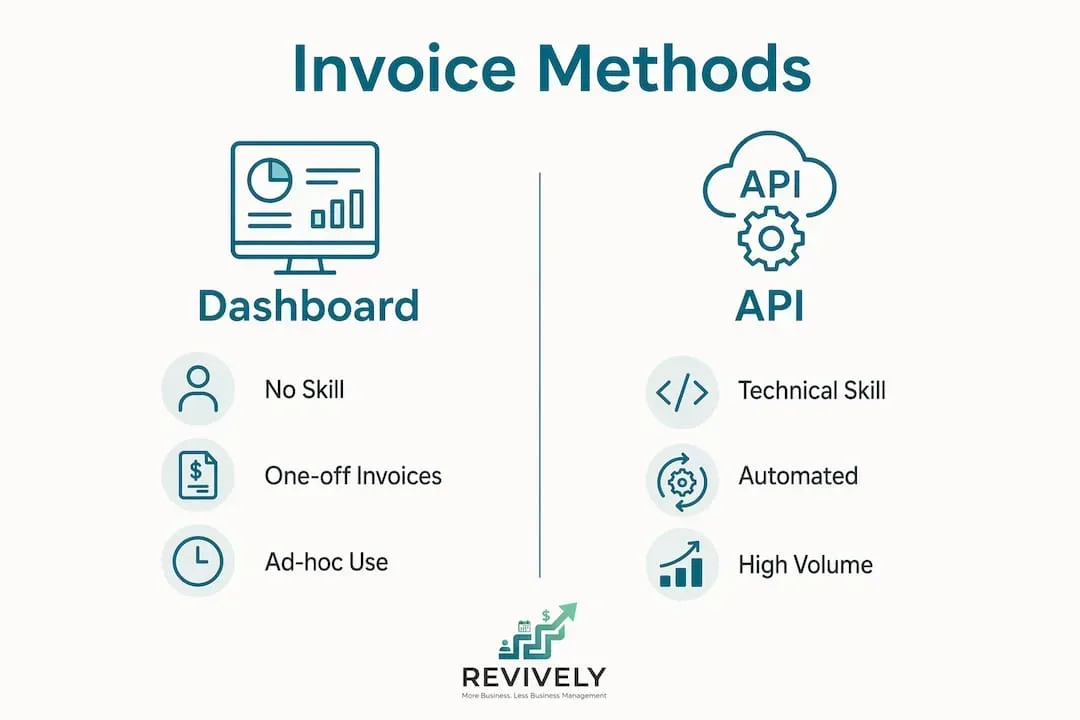
Stripe Invoicing offers two distinct methods for billing: the Dashboard for ad-hoc, manual invoices, and the Invoicing API for automated, high-volume needs. Choosing the right method depends on your billing volume and technical comfort.
Before you send your first tax-compliant invoice, ensure you have these essentials in place:
- A verified Stripe account: Complete identity verification and link an Australian bank account for seamless payouts.
- Client records: Gather names, email addresses, and currency preferences. Stripe stores these as Customer objects, ready for future use.
- Service catalogue: Prepare detailed descriptions and pricing for your offerings, ready to add as line items.
- GST settings: Crucial for Australian compliance. Configure your tax settings and attach GST rates to individual line items or entire invoices as needed.
- Branding assets: Upload your logo and preferred brand colours once in Dashboard settings to automatically apply them to every invoice, maintaining a professional look.
The table below outlines which method best suits different studio situations.
| Method | Technical Skill Needed | Best For |
|---|---|---|
| Stripe Dashboard | None | One-off invoices, ad-hoc client billing |
| Invoicing API | Developer/API experience | Subscriptions, high-volume, automated billing |
| Stripe Billing (recurring) | Moderate | Recurring charges on a fixed schedule |
Pro Tip: If you're sending fewer than ten invoices a month, start with the Dashboard. You can easily migrate to the API later without losing any customer or invoice history.
Manual Magic: Crafting One-Off Invoices with the Stripe Dashboard
The Dashboard method is perfect for any Australian studio owner or freelancer needing to bill a client quickly, without a single line of code. Customers receive a hosted payment page that's mobile-friendly, allowing them to pay by card or bank transfer in under a minute.
Follow these steps to dispatch your first invoice:
- Log In & Create: Head to your Stripe Dashboard, navigate to Billing > Invoices, and click "Create invoice."
- Pick Your Payer: Search for an existing client or enter a new name and email address. Stripe saves this record for future invoices.
- Detail the Service: Click "Add item," then enter a description, quantity, and unit price. Add as many lines as the job requires.
- Set the Deadline: Choose a specific due date or a net payment term, such as Net 30. Stripe displays this clearly on the invoice.
- Add Your Notes: Utilise the memo field for project references or specific payment instructions. The footer is ideal for legal disclaimers or your ABN details.
- Apply Australian GST: Select your pre-configured GST rate to attach it to individual line items or the entire invoice, ensuring compliance.
- Review, Confirm, Send: Click "Review invoice," double-check all details, then hit "Send invoice." Stripe emails your client instantly.
Once sent, the invoice shifts from draft to open status and becomes locked. You can then monitor its status from your Invoices list in real-time.
Pro Tip: Always preview the invoice before sending. Confirm the customer's email address is correct and that line item descriptions are clear enough for your client to approve payment without needing to call you.

Scale & Automate: Powering Recurring Billing with the Stripe Invoicing API
When your billing volume ramps up, or you need invoices generated without manual input, the Invoicing API is your essential tool. API invoicing eliminates manual errors and slashes operational overhead as your studio grows. This is a practical advantage for studios running memberships, selling class packs, or any operation with recurring client charges.
The API operates using three core objects: Customer, InvoiceItem, and Invoice. Here's the standard workflow:
- Identify or Create Customer: Use the client's email and name to create or retrieve a Customer object. Stripe returns a customer ID you'll reuse for every future transaction.
- Add Invoice Items: Create InvoiceItem objects and attach them to the customer. Each item includes a description, amount (in cents), and currency code.
- Generate Invoice: Create an Invoice object for that customer. Stripe automatically collects all pending InvoiceItems and attaches them.
- Define Collection Method & Due Date: Specify how the invoice will be collected. Use
send_invoicefor emailed invoices orcharge_automaticallyfor card-on-file billing. - Finalise and Dispatch: Call the finalise endpoint, then the send endpoint. Finalising an invoice is irreversible and locks all line items, so meticulously review the draft before this critical step.
The Invoicing API lets you enforce due dates, memos, footers, and Australian tax rules programmatically on every invoice. That consistency is incredibly difficult to achieve manually at scale, and it protects you from compliance gaps when branding or tax requirements change, ensuring your GST calculations are always precise.
Utilise webhooks to track payment events in real-time. The invoice.paid event triggers upon client payment, allowing you to automate fulfilment, update your CRM, or send a receipt without any manual intervention.
Pro Tip: Set up a webhook listener in your test environment before going live. Catching missed payment events early prevents revenue leakage and client confusion, especially for recurring memberships.
From Sent to Settled: How Stripe Manages Payments & Tracking
Stripe embeds a secure payment link within every invoice email. Clients simply click the link and land on a hosted payment page that accepts credit/debit cards, bank transfers, and other local payment methods. For Australian businesses, BECS Direct Debit is available for bank-to-bank transfers, a preferred option for many clients who choose not to pay by card.
Every invoice progresses through a defined status lifecycle:
- Draft: Editable. Line items can only be modified while the invoice is in this state.
- Open: Sent to the client and locked. Payment is outstanding.
- Paid: Payment received and matched automatically by Stripe.
- Void: Cancelled before payment. Use this instead of deleting to preserve your audit trail.
- Uncollectible: Marked as bad debt. The invoice remains in records for reconciliation purposes.
Stripe automatically sends payment reminders to clients with open invoices. You can configure the reminder schedule in Dashboard settings, choosing how many days before and after the due date reminders are dispatched. This feature alone drastically reduces the time you spend chasing payments. Stripe also syncs paid invoice data with accounting tools, including Xero, which is particularly useful for Australian businesses reconciling GST and ensuring their Business Activity Statements (BAS) are always on point.
Common Pitfalls: Invoicing Mistakes to Sidestep
Most billing errors in Stripe stem from a small set of repeatable mistakes. Knowing them in advance saves you from awkward conversations with clients and messy reconciliation, especially when dealing with Australian tax compliance.
- The Cents Trap: Stripe processes amounts in the smallest currency unit, meaning cents for AUD. A $20 invoice must be entered as 2000, not 20. Entering 20 bills the client $0.20 - a common and frustrating error!
- Premature Finalisation: Finalising locks all line items permanently. Keep invoices in draft until you have meticulously reviewed every detail.
- Subscription vs. Invoice Logic: Subscriptions generate invoices automatically but are distinct objects. Editing a subscription does not alter an already-generated invoice.
- Rogue InvoiceItems: InvoiceItems not attached to a specific invoice remain pending and roll into the next invoice cycle. Clients can receive unexpected charges if you don't clear these regularly.
- Skipping the Test Drive: Stripe offers a full test environment with test card numbers. Always run your entire invoice workflow in test mode before billing real clients.
Pro Tip: Create a simple checklist for every invoice cycle: verify currency units, review pending items, confirm customer email, and preview the draft. Five minutes of checking prevents hours of fixing - and avoids GST nightmares.
Key Takeaways for Your Studio
Stripe Invoicing provides Australian small businesses and freelancers with a complete billing system, from one-off manual invoices to fully automated, API-driven billing at scale.
| Point | Details |
|---|---|
| Two methods available | Use the Dashboard for ad-hoc invoices; transition to the API for automated or high-volume billing for memberships. |
| Invoice status lifecycle | Invoices move through draft, open, paid, void, and uncollectible states, providing clear visibility. |
| Currency unit accuracy | Always enter AUD amounts in cents (e.g., $20 as 2000) to avoid billing errors. |
| Finalisation is permanent | Review every invoice meticulously in draft before finalising, as line items cannot be changed afterwards. |
| Automation reduces errors | API invoicing and webhooks remove manual steps and enforce consistent billing rules, crucial for compliance. |
Why Many Australian Studios Delay Automation (and Why You Shouldn't)
Most freelancers and small business owners I speak with start with Dashboard invoicing and stay there far longer than they should. The manual process feels safe because you can see every invoice before it goes out. That visibility is genuinely useful when you're starting out, or for truly unique, one-off projects.
But manual processes don't scale. Once you're sending more than a handful of invoices a month, the time cost adds up, and so does the error rate. I've seen businesses lose money not because the work wasn't done, but because an invoice sat in draft, a reminder never went out, or a pending item rolled into the wrong billing cycle - all leading to unnecessary stress at BAS time.
My recommendation is straightforward for Australian studio owners. Start with the Dashboard, get comfortable with how Stripe handles statuses and reminders, then move to the API as soon as volume justifies it. Use Stripe's built-in reminder scheduling from day one to keep payments flowing. Connect to Xero early so your GST reconciliation is automatic rather than a monthly headache. The businesses that get this right treat invoicing as a system, not a task. This is the bedrock of a financially healthy, APPs-compliant operation.
Revively: Your Unified Command Centre for Australian Studio Billing

While Stripe offers powerful invoicing, integrating it seamlessly into the daily rhythm of your Australian wellness or fitness studio is where Revively truly shines. We're an Australian-made, unified cloud command center (CRM + multi-resource scheduler) built specifically for businesses like yours.
With Revively, all your client data, booking histories, and sensitive health intake forms are stored locally in Australia, ensuring full compliance with the Australian Privacy Principles (APPs) - a massive trust factor for your clients. We natively handle 10% GST calculations across casual classes, memberships, and multi-resource packages, automatically issuing legally compliant Australian Tax Invoices directly to your clients.
Our 100% legal Xero integration isn't just a sync tool; it's a guarantee of tax compliance. Automated two-way mapping of tax codes, revenue accounts, and liabilities ensures your quarterly Business Activity Statements (BAS) are flawless and audit-proof, eliminating those manual spreadsheet errors that keep you up at night.
Revively connects Stripe payments and invoicing directly to your booking calendar, membership management, and class scheduling on one dashboard. That means a client books a class, pays through Stripe, and the invoice reconciles automatically without you touching it. We also handle automated payment reminders and deposits to cut no-shows. If you run memberships or class packs, Stripe-powered recurring billing is built in from day one. Visit Revively to see how it fits your studio's workflow and simplifies your operations.
FAQ
What is Stripe Invoicing?
Stripe Invoicing is a billing tool that lets businesses create, send, and collect payment on professional invoices manually via the Dashboard or automatically through the Invoicing API.
How do I send an invoice with Stripe?
Go to Billing > Invoices > Create invoice in your Stripe Dashboard, add a customer and line items, set a due date, and click "Send invoice." Stripe emails the client a secure payment link.
What payment methods do Stripe invoices support in Australia?
Stripe invoices in Australia support credit and debit cards, bank transfers, and BECS Direct Debit for AUD transactions.
What happens if I finalise an invoice by mistake?
Finalising is irreversible and locks all line items. If the invoice has not been paid, you can void it and create a new one with the correct details.
When should I use the Stripe Invoicing API instead of the Dashboard?
Use the API when you need to automate invoice creation, handle subscriptions, or process high volumes of invoices where manual entry would introduce errors or delays.