

IT Leads: Five Phase Data Migration Checklist With Runbook Proof
! Engineer monitoring a data migration cutover
Use a five-phase, evidence-led checklist to plan, rehearse and cut over a data migration without data loss.
- The Studio Owner's Migration Playbook: A Phase-by-Phase Checklist
- Unearthing Your Studio's Digital Footprint: Inventory and Mapping
- Your Studio's Migration Blueprint: Choosing the Right Strategy
- The Dry Run: Rehearsing Your Studio's Data Migration for a Smooth Cutover
- The Grand Audit: Proving Your Studio's Data Is Ready for Go-Live
- The "All Clear" Signal: Hypercare and Decommissioning Your Old System
- Navigating the Minefield: Common Data Migration Risks for Studios
- How Long Does a Studio Data Migration Actually Take?
- Choosing Your Migration Partner: Tools, Tactics, and Trust
- This Isn't Just IT Theory: Why This Checklist Matters for Your Studio
- Beyond the Blueprint: Non-Obvious Lessons for a Smooth Studio Switch
- Ready for a Seamless Switch? Let Revively Handle the Heavy Lifting.
- Resources for Your Migration Journey
- Keep Learning and Growing
The Studio Owner's Migration Playbook: A Phase-by-Phase Checklist
Jumping from one studio management system to another (hello, Mindbody alternatives Australia!) can feel like changing the engine of a plane mid-flight. But with a solid, evidence-led checklist that prioritises proof, not just good intentions, you can navigate the switch confidently. Every item here demands an owner and tangible evidence before you tick it off - whether that's a signed report, a reconciliation log, or a user acceptance testing (UAT) signoff.
This five-phase lifecycle - assessment, planning, execution, validation, and post-migration - is designed to dramatically reduce risk at every handover point. Skipping a phase, or rushing it, is where most migration headaches begin.
Assessment (before you plan anything):
- Inventory every data source. This means your primary booking system, but also those "critical" spreadsheets someone in reception uses for waiting lists, and any shadow systems holding contact details or specific preferences.
- Profile your data. How many active bookings? How many members? Are there gaps in your client contact details? Are sensitive health intake forms stored securely and separately, ready for Australian Privacy Principles (APPs) compliance?
- Map dependencies. What relies on your current system? Think staff rostering, automated client communications, your Xero integration, or even your public class display boards.
Planning (before you build anything):
- Select a migration pattern per workload. A "big bang" cutover for smaller studios with limited downtime tolerance, or a phased approach for larger operations with complex multi-resource scheduling.
- Sequence waves by risk and business criticality. Start with less critical data, like past client history, before tackling active memberships and future bookings.
- Name go/no-go decision owners and rollback triggers. Who gets the final say on launch night? What are the non-negotiable conditions that would trigger a rollback? Get it in writing.
Execution (before cutover):
- Run staged rehearsals at increasing data volumes. Practise moving data against a test environment first, at a small scale, then something closer to your full client base. This isn't just about speed; it's about finding errors before they impact your clients.
- Confirm network throughput. Can your internet handle transferring years of client data, booking histories, and Australian tax invoices within your planned downtime window?
- Stand up real-time monitoring dashboards. Keep an eye on the transfer progress and error rates. If things go off-track, you need to know immediately, not after the fact.
Validation (before you call it done):
- Reconcile record counts, checksums, and aggregate totals. Do the numbers match? Especially for class pack balances, membership payment histories, and crucial GST totals.
- Run user acceptance testing (UAT) against real business workflows. Get your front desk staff, instructors, and managers to run through typical daily tasks. Can they book a class? Process a membership renewal? Issue a legally compliant Australian Tax Invoice?
- Collect formal signoff from business data owners. Get written approval from your operations manager or financial officer. This isn't just a formality; it's a crucial step, especially when dealing with financial records and Australian tax compliance.
Post-migration (before you switch anything off):
- Run a defined hypercare window. This is like a soft launch for your new system, typically 1 to 4 weeks, with a named owner and clear service level agreements (SLAs) for issue triage.
- Keep the source system read-only. Never fully offline until you've successfully completed at least one full business cycle (e.g., a monthly membership renewal cycle) and a preliminary BAS reconciliation via Xero in the new system.
- Schedule the formal decommission date. Once you're confident, set a firm date to finally turn off the old platform and update your runbooks with what actually happened.
- Run a knowledge transfer session. Ensure your support staff aren't relying on the migration team's memory six months down the track.
Nothing in the execution or validation phases should touch production data until the assessment and planning gates above are signed off. That sequencing discipline, more than any specific tool, is what separates a clean studio system migration from a scramble.
Unearthing Your Studio's Digital Footprint: Inventory and Mapping
Assessment is detective work before it's operational work. You're trying to answer one crucial question for your studio: what data actually exists, and what depends on it?
Start by cataloguing every source system, not just the obvious booking database. That means existing CRM platforms (Mindbody alternatives Australia you might be leaving), third-party APIs for marketing, file shares with client documents, scheduled reporting, and yes, that essential spreadsheet someone in finance uses to reconcile monthly totals. Miss one of these, and it resurfaces mid-cutover as a broken integration nobody flagged.
- List every source system and its owner. Assign a named business or technical owner to each, not just a department.
- Profile the data. Capture row counts, missing data (null rates), value distributions, and how data links between tables or objects. Are client addresses complete for marketing? Are emergency contacts captured for all members?
- Map dependencies. Trace which systems read from or write to each source. How does your booking system talk to your email marketing, your accounting software (hello, Xero!), your staff communication app, or your payment gateway?
- Classify by criticality. Tag each system as core (active bookings, memberships), supporting (past client history, marketing data), or legacy (old archived data) to inform your migration sequence later.
- Document evidence. Produce a clear dependency map and a profiling report that a second pair of eyes can review independently.
Dependency mapping is the primary failure point in most migrations. Systems that seem standalone often feed a report someone relies on weekly, and that dependency only surfaces once it breaks.
Crucial for Aussie Studios: This mapping isn't just about technology; it's about protecting your clients' sensitive information. For Australian studios, this means ensuring your new platform can uphold Australian Data Residency & Privacy by storing client data, booking histories, and health intake forms locally, fully complying with the Australian Privacy Principles (APPs). This must be a non-negotiable.
Pro Tip: Don't just trust what your previous provider says is connected. Before committing, do a full audit of your payment gateways, email tools, and Xero integration settings. Config files can lie about what's actually in production.
The profiling step also shapes your migration scope. If your client contact table has 40% null values in the email field, that's a data quality decision you need to make now, not during validation when it's much harder to unwind.
Your Studio's Migration Blueprint: Choosing the Right Strategy
Not every dataset, or every studio, needs the same cutover strategy. Picking the wrong one is expensive, both in time and potential business disruption. Your planning phase is where you match the right migration pattern to your studio's risk tolerance and build the detailed runbook that will govern the entire process.
- Big bang: Move everything in one scheduled window. This works for smaller studios where downtime is acceptable (e.g., during a public holiday or quiet weekend) and rollback is relatively simple.
- Phased (wave-based): Migrate in sequenced groups, starting with low-risk data before tackling core business systems. This is ideal for larger studios with complex multi-resource scheduling or a significant client base.
- Trickle or continuous replication: Sync data incrementally with minimal downtime. Suited to systems that cannot tolerate any outage window, allowing for a near-zero impact transition.
A practical wave structure for a studio might run foundational client details first, then low-risk historical data, then active memberships and class packs, and finally, complex stateful workloads like recurring bookings or multi-resource appointment grids. Each wave gets its own discovery, rehearsal, validation, and hypercare cycle rather than one giant, risky push.
Wave sequencing should always follow criticality, not convenience. Migrate the systems where failure is cheap to test your process, then apply what you learned to the systems where failure is expensive (like your active booking schedule or financial data linked to GST).
Every runbook needs three things clearly spelled out before execution starts:
- A named person with the authority to call go or no-go - not a committee.
- Numeric acceptance tolerances (e.g., reconciliation within 0.01% of source totals for your GST figures).
- Explicit rollback triggers, written as clear conditions, not judgement calls to be made under pressure.
Successful migrations are decided long before work begins. The clear go/no-go criteria you set here are what stop a shaky cutover from turning into a live incident impacting your clients and revenue.
The Dry Run: Rehearsing Your Studio's Data Migration for a Smooth Cutover
Execution is where your plan meets reality, and rehearsal is non-negotiable. Think of it like rehearsing a complex dance routine before opening night: you wouldn't perform it live without countless practice sessions. You need to run your migration jobs against a staging copy first, at a small data volume, then again at something close to production scale. Each rehearsal should validate a sample of records against your source data before you trust the full run.
- Run at least two rehearsals: One at 10% scale, and another at near-full scale, before touching your live production data.
- Validate a random sample of migrated records against your source on every rehearsal, not just the first. This catches new errors as your data volume increases.
- Time each rehearsal run to accurately forecast your actual cutover window. How long will your clients be unable to book or your staff unable to access records?
- Log every error and its root cause. Fix the pipeline before the next rehearsal, not during cutover when panic sets in.
Network throughput matters more than most teams budget for. Imagine hundreds, or even thousands, of client profiles, booking histories, multi-resource schedule data, and payment records moving across. On a 1 Gbps link, moving 1 GB takes roughly 8 seconds under ideal conditions, but real-world overhead usually cuts that in half or worse. Do the arithmetic on your actual dataset size before you commit to an online transfer window.
A terabyte of data on a 1 Gbps link, even at theoretical maximum throughput, takes over two hours. And that's before accounting for contention from other internet usage, retries, or any business-hours bandwidth limits. For multi-terabyte datasets (common for studios with years of history), physical seeding followed by a delta sync over the network is often faster and safer than a single online transfer. Seriously, calculate this!
During cutover itself, monitor transfer rates, error rates, and reconciliation progress on a live dashboard. If your error rate climbs past your pre-agreed tolerance - say, more than a handful of failed transfers for memberships or class pack purchases - that's a rollback trigger, not a judgement call to push through hoping for the best.
The Grand Audit: Proving Your Studio's Data Is Ready for Go-Live
Validation is where you prove the migration actually worked, and that proof must exist before you flip the switch to production. Define your tolerances by data criticality upfront: your financial records for GST will need exact reconciliation, while marketing preference data might tolerate a wider margin.
- Run technical checks first. Compare record counts (are all your clients, classes, and bookings there?), run checksums on file-based transfers, and verify that related data (e.g., a client linked to their membership) is intact.
- Reconcile aggregate totals. Sum key financial or operational fields in both your old and new systems. This is where your GST figures, total membership revenue, and class pack sales must match, down to the cent. Think BAS time! Flag anything outside your agreed tolerance.
- Run user acceptance testing (UAT). Get your front desk staff, managers, and instructors to work through real workflows in the new system before clients do. Can Sarah at reception easily book a client into a spin class and sell them a new yoga mat?
- Compare reports. Run the same critical reports (e.g., end-of-day sales, weekly membership report, and critically, your Xero-ready GST report) against both the old and new systems and reconcile any variance line by line.
- Collect formal signoff. Get written approval from the business data owner (e.g., your operations manager or financial director), not just a thumbs up in a chat message. This sign-off isn't just a formality; it's a crucial step, especially when dealing with financial records and Australian tax compliance.
The safest migrations are planned around evidence: inventory, mapping, reconciliation, and recovery proof form the checklist backbone. Cutover decisions should always trace back to a documented agreement, not a memory.
| Validation Layer | What You Check (Studio Context) | Evidence Produced | Australian Compliance Focus |
|---|---|---|---|
| Technical | Client counts, booking integrity, membership details | Reconciliation report, data integrity log | Australian Data Residency of client details, APPs |
| Financial | Aggregate revenue, membership totals, class pack sales | Variance report, financial reconciliation | 10% GST calculations, Xero integration alignment |
| Business | Staff workflow UAT, client booking experience | Signed UAT, operational readiness | Legally compliant Tax Invoices, correct pricing |
| Governance | Go/no-go decision, rollback triggers | Written approval from named owner | Adherence to Australian Privacy Principles |
The "All Clear" Signal: Hypercare and Decommissioning Your Old System
Post-migration isn't a victory lap; it's a critical monitored window with its own rules. Define hypercare ownership before go-live, not after, including who's on call and what response time applies to each severity level.
- Run a hypercare window (typically one to four weeks). This is like a soft launch for your new system, with a named owner and a defined SLA for issue triage. Your team is on high alert for any unexpected behaviour.
- Keep the source system read-only. Never fully offline until you've successfully completed at least one full business cycle (e.g., a monthly membership renewal cycle) and a preliminary BAS reconciliation via Xero in the new system.
- Schedule the formal decommission date. Once you're confident, set a firm date to finally turn off the old platform and update your runbooks with what actually happened.
- Run a knowledge transfer session. Ensure your support staff aren't relying on the migration team's memory six months down the track.
The temptation is to decommission the old system quickly to stop paying for two platforms. Resist it until you've reconciled at least one full reporting cycle and, crucially, confirmed your Xero integration is flowing correctly. This is usually when the subtle data gaps everyone missed during validation finally surface.
Navigating the Minefield: Common Data Migration Risks for Studios
Every migration carries the same handful of risks, and most have a known mitigation if you build it into your runbook early, rather than reacting to it mid-cutover. Imagine losing all your upcoming multi-resource bookings or discovering your membership prices migrated incorrectly. That's a studio owner's worst nightmare.
- Data Loss: Your most critical fear. Mitigate with checksummed transfers, multiple backups, and a mandatory restore test on every backup before cutover.
- Integrity Errors: Incorrect membership start dates, misaligned class pack expiry dates, or worse, flawed GST calculations that could lead to BAS headaches. Mitigate with rigorous referential integrity checks run against every rehearsal, not just the final run.
- Hidden Dependencies: That old spreadsheet for waitlists, or a custom report someone uses daily. Mitigate with a thorough dependency map from the assessment phase, verified again immediately before cutover.
- Downtime Overrun: Your clients can't book, your staff can't operate. Mitigate with a rehearsed timing baseline and a hard cutoff that triggers rollback automatically if the migration isn't completing on schedule.
- Security Exposure: Protecting client data is paramount, especially under Australian Privacy Principles. Mitigate with encrypted transfer channels, access logging on both source and target during the window, and by choosing a platform offering Australian Data Residency.
- Unclear Ownership: Who makes the final call? Mitigate with named go/no-go owners documented in the runbook, not assumed on the day.
- Untested Rollback: You need a plan B, but if you've never practised it, it's not a plan. Mitigate with a full rollback rehearsal, not just a written procedure nobody has run.
Hidden dependencies and untested rollback plans are the pitfalls that catch even experienced teams out, because they look fine right up until cutover night.
Pro Tip: If your rollback rehearsal has never actually been run end to end, treat your rollback plan as untested, no matter how detailed the document looks. Don't gamble with your studio's operations.
How Long Does a Studio Data Migration Actually Take?
Timelines vary enormously by the scale and complexity of your studio, but the pattern is consistent: most of the time sits in assessment and planning, not the actual data move.
- A small studio migration (single booking system, limited integrations) can run in a few weeks. Think a compact yoga studio moving a straightforward client list and class schedule.
- Larger, enterprise-grade migrations with multiple sources, complex multi-resource scheduling, and intricate dependencies commonly stretch past six months. A larger clinic with detailed health intake forms and multiple membership tiers could easily see a multi-month project.
- Core roles aren't just IT. For a studio, these include a migration lead (often the operations manager), business data owners (e.g., front desk manager, finance), and your Revively support team for hypercare.
- Compressing the planning phase correlates directly with higher cost overruns and schedule slippage later.
Budget planning time as an investment, not overhead. Studios that rush assessment to "get to the real work" almost always pay for it during validation, when unresolved data quality issues (especially around GST, Xero, and Australian Privacy Principles) turn into weeks of rework instead of days.
Choosing Your Migration Partner: Tools, Tactics, and Trust
Matching the right tool to your studio's unique migration problem is key. You're not just moving data; you're transitioning your entire business operation.
- Built-in importers are fine for smaller, well-structured datasets with few transformation rules. Think simple client lists and basic class schedules.
- Specialist tooling earns its cost once you're handling terabyte-scale volumes, complex mapping, or continuous replication - crucial for multi-resource scheduling, intricate membership logic, and accurate GST compliant studio software.
- Blue-green cutover keeps both environments live and switches traffic seamlessly. This is useful when rollback needs to be instant and downtime is unacceptable for clients.
- Canary cutover moves a small segment of users or data first. Ideal for testing new booking flows with loyal clients before rolling out to your entire base.
- Continuous replication (Y-write/read) keeps source and target in sync during a longer transition window, useful for systems that can't tolerate a hard cutover date.
Your migration partner should deeply understand the nuances of wellness and fitness studios, particularly the financial and privacy compliance aspects specific to Australia.
This Isn't Just IT Theory: Why This Checklist Matters for Your Studio
For Australian wellness and fitness studios - be it a yoga studio, Pilates centre, busy spa, recovery centre, clinic, or a bustling dance school - your data isn't just rows in a spreadsheet. It's the lifeblood of your business. We're talking about:
- Your clients' sensitive information: Names, contact details, payment history, and critical health intake forms. (Australian Privacy Principles & Data Residency Alert!)
- Your revenue streams: Class pack balances, recurring memberships, casual class sales, and private appointment bookings. (Hello, 10% GST and flawless Xero alignment for BAS!)
- Your operational backbone: Multi-resource scheduling across rooms and equipment, staff rosters, waitlists, and historical attendance data.
This is exactly why Revively.app, an Australian-made, unified cloud command centre, was built. We understand these specific challenges when studios look for Mindbody alternatives Australia and other systems. Our data import tooling isn't just a generic file upload; it's engineered to correctly bring across:
- Client data: Including historical activity and consent forms, with a clear path to Australian Data Residency by storing all client information securely in Australia, fully complying with APPs.
- Complex scheduling: From recurring classes to intricate multi-resource appointments (think treatment rooms, reformer machines, or specific equipment).
- Financial records: Ensuring your class packs, memberships, and casual sales are accurately transferred, with native handling for 10% GST calculations and automatic issuance of legally compliant Australian Tax Invoices.
- Flawless Xero Integration: Revively's deep, 100% legal Xero integration ensures automated, two-way mapping of tax codes, revenue accounts, and liabilities. This means your quarterly Business Activity Statements (BAS) are always accurate and audit-proof, eliminating manual spreadsheet errors and headaches.
Explore our guide on switching your studio schedule for a realistic timeline without losing bookings mid-transition. For studios migrating client consent records, our digital intake forms feature is worth checking against your compliance requirements before cutover, not after.
Beyond the Blueprint: Non-Obvious Lessons for a Smooth Studio Switch
Rehearsal discipline is the difference between a calm cutover and a frantic firefight. Don't just assume your backups work; verify they actually restore. And rehearse rollback the same way you rehearse the migration itself. It's not just bytes moving; it's your business reputation on the line.
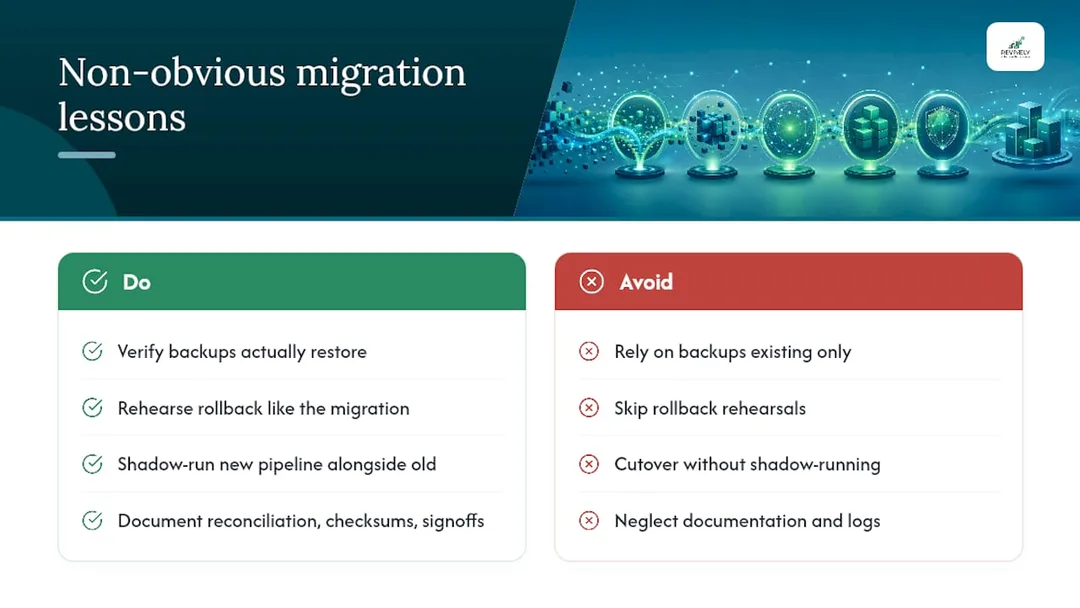
One habit pays off more than any tool choice: shadow-running your new system alongside the old one for critical workflows before you commit to cutover. This "dual operation" approach for a short period surfaces timing and integration issues no amount of documentation or isolated testing will catch. It gives you real-world confidence.
Finally, document your evidence as you go: reconciliation reports, checksum logs, signoffs. Your future self (and any future auditors, especially for BAS) will thank you for it. This isn't just about finishing the migration; it's about building a robust, auditable foundation for your studio's future.
Ready for a Seamless Switch? Let Revively Handle the Heavy Lifting.
You're not just moving data; you're moving your business. And for Australian wellness and fitness studios, that means safeguarding client privacy with Australian Data Residency, ensuring flawless GST calculations and legally compliant Tax Invoices, and maintaining audit-proof Xero integration for BAS accuracy. Don't gamble with your studio's future or spend countless hours on manual data entry that's prone to error.

Revively.app offers a unified, all-in-one spa booking software solution, purpose-built for the unique demands of your Pilates, yoga, spa, clinic, or dance school. Our specialised data import tooling is designed to transition your entire operational history - from complex multi-resource scheduling and class packs to recurring memberships and digital intake forms - smoothly, securely, and with a keen eye on your Australian compliance needs.
Stop patching together disparate systems. See how Revively consolidates your operations onto one intuitive dashboard, making migrations less about IT headaches and more about business growth.
Ready to optimise your operations and ditch the migration dread? Start a free trial today to explore how your data maps, or book a demo to see our full suite of GST compliant studio software features in action. Let us help you make the switch effortlessly.
Resources for Your Migration Journey
- Data migration framework - Interactive
- Cloud migration checklist - Ardura Consulting
- How to calculate transfer time over LAN - Superuser
- Data migration checklist: mapping, validation, cutover and rollback - NextPageIT