
Switch Your Studio Schedule From a Website in 2 - 4 Weeks
! Studio manager reviewing imported booking schedule
Yes, you can import your schedule from your website into new booking software, provided you export the right files, map every field correctly and run a staged cutover.
Picture this: It's Monday morning. Your coffee's gone cold, the booking system just crashed again, and a client is calling about a missing class credit from three months ago. You're wrestling with a patchwork of spreadsheets and outdated software that feels like it's actively sabotaging your studio's growth. Sound familiar?
The idea of switching your core booking and client management system probably feels like performing open-heart surgery on your business while juggling flaming torches. It's daunting, riddled with "what-ifs," and the horror stories of lost data and missed payments are enough to make anyone stick with the devil they know.
But what if moving your studio's entire schedule, client database, and membership credits didn't have to be a nightmare? What if you could upgrade to a system that deeply understands the chaos of running an Australian wellness or fitness centre - from multi-resource bookings (hello, saunas and treatment rooms!) to flawless GST and audit-proof BAS reporting - all while preserving your precious client history?
It's entirely possible. You can import your entire schedule from an old website or legacy booking system into new, powerful software. The trick? Exporting the right raw files, meticulous field mapping, and a staged, strategic cutover. This isn't a weekend hack; it's a two-to-four-week operational sprint that, when done right, sets your studio up for years of seamless growth.

Let's cut through the noise. Here's how to optimise your studio's migration from a clunky old system to a modern, unified command centre like Revively, without losing a single client, booking, or dollar.
The Hard Truth Upfront: Rushed migrations sink studios. You must export raw CSV or Excel files (summary reports are useless), conduct a full-scope test import before go-live, implement a "cutover freeze" window, and validate every critical data point - especially if you're managing multiple resources like reformer rooms or recovery saunas. And for Australian studios, this entire process needs to guarantee data residency, GST compliance, and seamless Xero integration for BAS accuracy.
From Chaos to Control: What to Audit & Export Before the Big Move
Before you even think about an import tool, you need a complete, unvarnished inventory of what's living in your old system. Miss a critical category here, and you'll spend weeks chasing down missing class-pack balances or fielding client complaints instead of growing your studio.
Your mission: Pull raw data exports for every single one of these. Don't settle for summary reports; you need the granular detail to rebuild your database accurately.
- Client Records: Full names, contact details, emergency contacts, notes, and - crucially for Australian studios - any sensitive health intake forms that require Australian Privacy Principles (APP) compliance for local data storage.
- Future Bookings & Reservations: Every single class, appointment, or resource booking already on your calendar. This includes recurring series and one-off events.
- Memberships & Class-Pack Credits: Details of every active membership, remaining class credits, expiration dates, and recurring billing schedules.
- Waitlists: For those perpetually popular classes, make sure these come across so clients don't miss out.
- Staff Profiles & Rosters: Instructor details, their availability, and assigned shifts.
- Rooms & Resources: Your yoga studios, reformer rooms, saunas, treatment spaces, and any associated cleaning or turnover buffers.
- Signed Waivers & Intake Forms: Essential for legal compliance.
- Payment Records & Billing History: For reconciliation and auditing purposes.
Crucial Point: Always ask your current provider for raw CSV or Excel exports. A "summary report" that tells you "142 active members" is useless for migration. You need the row-level detail an import tool needs to correctly reconstruct every single client account.
Once those files are in hand, it's time to get surgical about your project setup:
- Assign a Migration Owner: Even if it's you, give one person ultimate responsibility.
- Set a Realistic Timeline: Most Australian studios need two to four weeks for a proper, stress-free migration, not a frantic weekend.
- Book Your Test Import Window: Coordinate with your new vendor - Revively, for example, prioritises dedicated test import slots.
- Agree on the Cutover Freeze Date & Time: This is the absolute latest point you'll allow changes in your old system.
Pro Tip for Australian Studios: Use this export phase as a golden opportunity to purge expired memberships and clean up duplicate client records. Porting a messy database into a clean system just recreates the same mess. This clean-up is particularly valuable for accurate BAS reporting down the line. Check out Revively's recurring class timetable guide for useful naming conventions if your current calendar has devolved into a labyrinth over the years.
The Import Blueprint: Your Step-by-Step Action Plan
Files exported and tidied? Good. Now, the import itself. Treat this as a meticulously controlled data migration, not a casual copy-paste. This mindset shift alone will help you sidestep the common pitfalls studios report after a rushed switch.
1. Confirm Your Export Inventory
Before anything else, do a final headcount:
- How many active clients?
- How many future bookings?
- Total class-pack and membership credits?
- Full staff roster and resource list?
Most vendor import templates specify exact column orders. Deviate from this, and you'll break the import mapping entirely. Don't guess.
2. Clean and Standardise Your Data
This is where you prevent future headaches.
- Standardise Class Names: "Vinyasa Flow" vs. "vinyasa flow" vs. "VF" are three different classes to a computer. Make them consistent to avoid duplicates.
- Remove Duplicates: Especially client rows.
- Normalise Dates & Times: Ensure all date and time formats are consistent.
- Tag Recurring Series: Clearly identify which sessions are part of a recurring series versus one-off bookings.
3. Map Every Single Field
This is where your old data meets your new system's structure. Common mappings include:
Old System: Class Name→New System: Service NameOld System: Instructor→New System: Staff IDOld System: Room→New System: Resource ID
Watch out for these recurring pitfalls, especially for Australian operations:
- Timezone Mismatches: Crucial for accurate scheduling, particularly if your studio operates across daylight saving boundaries or caters to clients in different states.
- Flattened Recurring Series: When recurring bookings accidentally convert into dozens of individual, disconnected events.
- Special Characters: Names or descriptions with unusual characters can corrupt during import.
4. Run a FULL-SCOPE Test Import (Seriously, Don't Skip This)
This is the step studios most often skip, and it's also the step that catches 90% of future problems. A test import must mirror your real export scope. Why? Because duplicate client records, linked family accounts, multi-resource booking quirks, and subtle formatting errors only surface when you run the import at full volume.
Studios that test with just a handful of sample rows routinely discover, only after the real cutover, that:
- 15-20% of client records were duplicated.
- Recurring Pilates reformer series fractured into dozens of one-off bookings.
- Crucial client notes vanished.
5. Validate EVERYTHING Before You Trust It
Post-test import, get your magnifying glass out. Check:
| Data Point | Old System Value | New System (Test Import) Value | Status (Match/Mismatch) | Notes/Action Required |
|---|---|---|---|---|
| Active Client Count | 1250 | 1248 | Mismatch | Investigate 2 missing clients |
| Future Bookings Total | 870 | 870 | Match | |
| Class-Pack Credits (Overall) | 3,500 | 3,495 | Mismatch | Reconcile 5 missing credits |
| Unpaid Balances Carried | $5,200 (15 clients) | $5,200 (15 clients) | Match | |
| Upcoming Reservations (Staff) | Correct | Correct | Match | |
| Staff Schedules Intact | Correct | Correct | Match | |
| GST Calculation Preview | N/A | Correct (10%) | N/A | Confirm auto-calculation |
| Xero Tax Code Mapping | N/A | Correct | N/A | Confirm integration |
If your studio manages complex multi-resource grids (e.g., a sauna, three treatment rooms, and a cleaning buffer all interacting), or you need payment tokens transferred securely without asking every client to re-enter card details, this is the exact moment to loop in your vendor support or a migration specialist. Don't try to push through this complexity alone.
The Cutover Freeze: Protecting Bookings During the Switch
The riskiest hours of any migration are the 'in-between' phase: after your final export from the old system, but before your new system is officially live. This is when changes inevitably happen - a client reschedules, a new booking comes in, or an instructor calls in sick - and if these changes aren't tracked, they're lost.
You need a cutover freeze. This is a defined window (usually 24-72 hours, depending on your studio's activity) where staff stop making any changes to bookings, memberships, or staff rosters in the old system.
Anything that must happen during this freeze (e.g., an urgent client cancellation, an instructor swap, a new sign-up for tomorrow's class) doesn't get entered into either system yet. Instead, it gets meticulously recorded in a cutover tracker.
Your tracker needs to be simple but comprehensive:
| Timestamp | Action Taken | Who Logged It | Old System ID (if applicable) | New System ID (after entry) | Resolution Status |
|---|---|---|---|---|---|
| 2024-03-15 14:00 AEDT | Client 'Jane Doe' cancelled Reformer 16:00 | Sarah (Front Desk) | C-1234 | P-9876 | Pending Entry in Revively |
| 2024-03-15 15:30 AEDT | New booking for Yoga Flow 17:00: 'Mark Smith' | David (Manager) | N/A | N/A | Entered, Confirmed |
| 2024-03-16 09:00 AEDT | Instructor 'Emily R.' swapped from Mon 18:00 | David (Manager) | I-005 | I-010 | Entered, Confirmed |
Payment checks deserve particular attention here. Payment tokens are notorious for failing to transfer cleanly with recurring memberships. Before you announce go-live, validate the next-bill dates and payment status for every active membership, not after your first billing run fails.
Pro Tip for Go-Live: Set crystal-clear go-live acceptance criteria in advance. For example, "100% of active memberships show correct credit balances and accurate next-bill dates in the new system." If you don't hit these criteria, delay launch by a day rather than opening the doors to a firefight with your clients. Always have a basic rollback plan ready, just in case a major class of records fails validation.
The First 30 Days: Sticking the Landing After Go-Live
The first month after your migration is where everything either solidifies or quietly unravels. Front-desk staff, under pressure, will naturally default to the old system if the new one feels unfamiliar or clunky. This period is as much about behavioural habit-forming as it is about data accuracy.
Run these checks diligently, daily or weekly:
- Reconcile Daily Attendance: Compare actual attendance against expected bookings.
- Confirm Credit Deductions: Ensure class-pack and membership credits are deducting correctly after classes.
- Flag Failed Payments: Immediately investigate and resolve any unprocessed or failed payments.
- Track Migration Exceptions: Create a tag for support tickets related to the migration. Escalate anything touching money or bookings within 24 hours.
- Targeted Staff Training: Focus front-desk staff training on the two or three tasks they'll perform most frequently (checking in a client, applying a class-pack credit, booking a new client). This builds confidence and removes any perceived need to reopen the old platform.
Keep read-only access to your original exports for at least 30 days. You'll want them if a client disputes a credit balance or if you need to reconcile an end-of-month report against the old system's numbers.
Revively's Approach: Migration Designed for Australian Studios
Revively was born from the exact operational frustrations this article addresses: Australian studios wrestling with multi-resource bookings (saunas, treatment rooms, reformer studios), intricate class packs, and diverse memberships across a cobbled-together mess of old tools.
Our unified cloud command centre understands that your scheduling engine needs to handle recurring timetables and resource buffers natively. It knows waitlists should promote automatically, not sit there requiring manual intervention. And it knows that for Australian studio owners, flawless GST calculation, automatic compliant Australian Tax Invoice generation, and 100% legal Xero integration for audit-proof BAS reporting aren't 'nice-to-haves' - they're non-negotiable legal requirements.
We provide detailed migration checklists and import templates as a starting point for studios moving off a legacy website or basic booking tool. For those particularly nervous about multi-resource complexity or large client databases, our team offers assisted import support. We're not just providing software; we're providing a pathway to peace of mind, locally built and compliant.
Revively: Taking the Risk Out of Your Studio's Switch
Everything covered above - raw exports, meticulous mapping, full-scope test imports, and dedicated cutover trackers - is manageable. But if you're running a bustling spa with multiple treatment rooms and cleaning buffers, a Pilates studio juggling a complex reformer schedule, or a dance school navigating recital season alongside term classes, your margin for error shrinks rapidly.
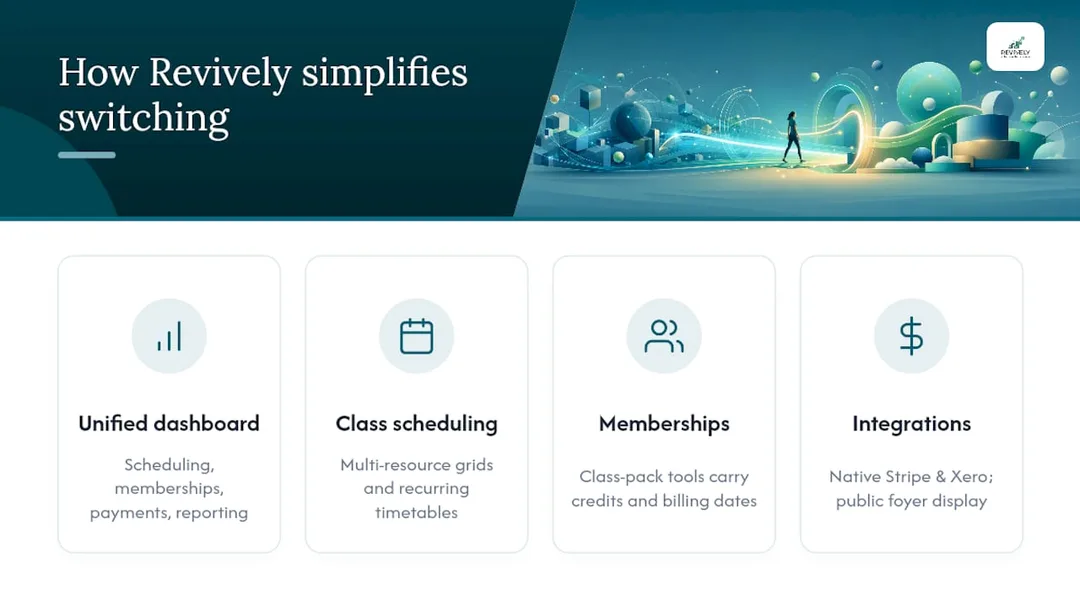
Revively is engineered precisely for that complexity. It's a single, unified dashboard for scheduling, memberships, payments, and reporting, ensuring your migrated data doesn't just land somewhere; it lands in a system where every piece of information seamlessly communicates with every other.

Revively's multi-resource scheduling capabilities handle complex grids and recurring timetables without the clunky workarounds spreadsheets demand. Our membership and class-pack tools are purpose-built to carry credits and billing dates across cleanly during a switch. Pair that with native Stripe integration (for secure payment token transfer) and a direct Xero integration for flawless two-way mapping of tax codes, revenue accounts, and liabilities for your BAS, and your studio runs from one screen instead of four separate logins. We even offer a public display board for your foyer, all within the Revively ecosystem.
Don't leave your studio's future to chance. Book a demo through Revively today and ask about our assisted migration support if you want a second set of expert Australian eyes on your export before cutover day.
What Actually Goes Wrong: Real-World Migration Mistakes Studios Make
Most migration advice, particularly generic international guides, frames this as a purely technical exercise: "export file A, map to field B, done." This framing catastrophically undersells the actual risk for busy Australian studio owners.
The failures we see repeatedly aren't formatting errors; they're organisational breakdowns and human error. A studio owner might export the data perfectly, run a seemingly clean test import, and still end up with angry clients in week three because:
- Nobody clearly owned the "cutover freeze" process.
- A staff member, out of habit, kept editing bookings in the old system two days after go-live.
- The Xero integration wasn't properly set up, leading to BAS reconciliation nightmares.
- The data was stored offshore, creating APP compliance headaches.
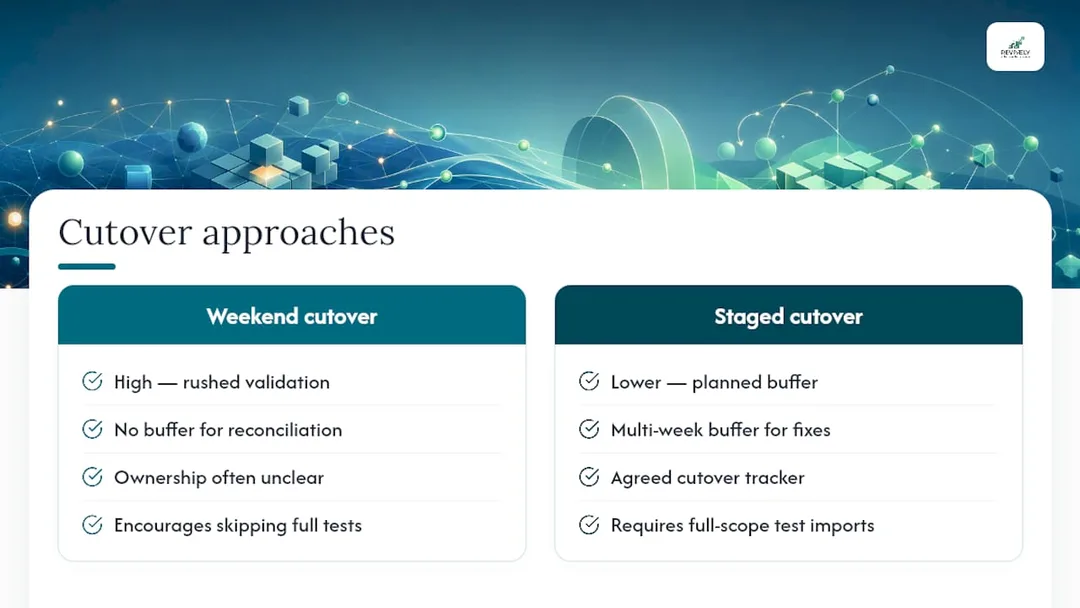
The conventional wisdom often says, "back up your data and pick a good weekend." That's backwards. A frantic weekend cutover is exactly how you end up rushing validation because you've given yourself no buffer if the numbers don't reconcile. For a 40-class-a-week yoga studio or a busy multi-resource recovery centre, a staged, multi-week approach with a proper cutover tracker isn't bureaucratic overkill; it's the only thing standing between you and a Monday morning where three clients discover their class-pack credits have vanished, and your GST figures are a mess.
The other significantly underestimated risk is treating the initial data export as the finish line, rather than the starting pistol. Getting clean CSV files out of your old system feels like progress, and it is. But the studios that struggle are the ones who stop there instead of diligently running a full-scope test import and meticulously checking every single credit balance, recurring membership, and multi-resource booking against the original numbers. Cleaner, validated data beats simply having more data, every single time.
"Migrations are messy, but they don't have to be catastrophic. The studios that thrive are the ones who treat it like a strategic operation, not a hurried chore. Prioritise validation, empower your team, and partner with a system built for Australian compliance, not against it."
- Andreea, Revively Co-founder*
Further Reading & Resources
For deeper technical detail on robust data transfers, explore frameworks for staged cutovers. If your studio's existing website genuinely offers no export option at all, be aware that scraping tools for public class schedules exist to reconstruct listed times, though you must verify accuracy and legality before using them.
Recommended for Australian Studio Owners
- No More Double-Bookings: The Australian-Made Multi-Resource Studio Scheduler That Stops Operational Chaos Cold
- How to Avoid Double Booking: A Studio Owner's Checklist
- Seamless Studio Flow: Mastering Class Waitlists with Automation in Australia
- The Australian Studio's Guide to Integrated Stripe Booking Software