

4 - 8 Week Plan to Switch from Mindbody for Spas, Yoga and Dance Studios
! Studio owner reviewing software migration
Yes, you can switch from Mindbody, and for most yoga, Pilates, spa and dance studios it's a manageable project rather than a risk.
- Why Australian Studios are Ditching Mindbody
- What Actually Migrates from Mindbody (and What Doesn't)
- How to Actually Run the Migration: A Step-by-Step Playbook
- Getting Payments Across Without Losing Your Loyal Members
- Keeping Xero, Stripe, and Your BAS Filings Flawless (Especially for AU Studios)
- Final Readiness Checks Before You Flip the Switch
- What the Switch Should Actually Cost You (No Hidden Surprises)
- What to Look for in a Mindbody Alternative (Beyond Basic Bookings)
- The Smart Questions to Ask Before Signing Anything
- Navigating Your Exit from Mindbody (Without the Drama)
- Getting Your Team Comfortable with the New System
- The Hidden Hurdles Studio Owners Consistently Underestimate
- Need a Hand? How Revively Supports Your Mindbody Migration
- Sources
- FAQ
Why Australian Studios are Ditching Mindbody
You know the drill: the constant dread of an email announcing new pricing tiers, the endless hold music when you desperately need support, and a booking system that feels like it was designed by committee in the 90s. These aren't just abstract complaints for Australian studio owners; they're daily operational headaches that eat into your time, profit, and patience.
Across platforms like Capterra and G2, a clear pattern emerges: unexpected fee increases, glacial support response times, and contract terms that feel designed to trap you.
For a busy studio on Aussie shores, these aren't minor gripes:
- Cashflow Carnage: Surprise pricing hikes directly impact your bottom line, especially for smaller yoga, Pilates, or recovery centres running on tight margins.
- Front-Desk Frustration: Slow support means your team is stuck on hold during peak times instead of warmly greeting clients or resolving immediate issues. That's lost connection, lost revenue.
- Clunky Client Experience: A convoluted booking process leads to abandoned bookings, frustrated clients, and an inevitable surge of admin calls that nobody has time for.
Ask yourself if these resonate with your own experience:
- Did your pricing plan or add-on fees mysteriously creep up after you signed on, often without clear, upfront notice?
- Are you waiting days for a genuinely helpful response from support, especially when you're in the thick of things?
- Does your booking interface require extra staff training just to manage basic tasks, slowing down check-ins and increasing errors?
- Are you losing revenue to marketplace commissions that feel disproportionate to the client acquisition they actually deliver?
If two or three of these sound painfully familiar, you've got a solid case for exploring Mindbody alternatives in Australia. Don't wait for things to improve; take control.
What Actually Migrates from Mindbody (and What Doesn't)
Good news: most of your studio's vital operational history can make the jump cleanly, provided you export the right reports before you even think about cancelling. These are the records that matter most for Australian businesses:
- Client List: Names, emails, phone numbers, and dates of birth (essential for waivers or age-restricted services).
- Membership & Subscription Records: Plan names, start dates, billing frequency, and any remaining class pack balances.
- Payment History Report: Your full ledger of past transactions for crucial financial reconciliation and dispute handling.
- Class Schedule: Recurring timetables, instructor assignments, and any room or resource bookings.
- Service & Product Catalogue: All your pricing, categories, and bundled offers.
- Staff Roster: Permissions, roles, and rostered hours.
- Tax & Merchant Statement Reports: Non-negotiable for GST reconciliation and maintaining clean historical bookkeeping.
The catch? Some things are simply non-transferable due to industry standards and security protocols.
- Card Tokens: These stay tethered to Mindbody's payment processor and, crucially, cannot be transferred to a new provider. This is about PCI compliance and card network rules, not a technical oversight. Every client will need to re-enter their card details.
- Mindbody Marketplace Bookings: Any bookings made through Mindbody's own marketplace often don't map neatly to a new platform's client records.
- Bespoke Integrations: If you've got custom app connections or niche loyalty tools, be prepared to rebuild or reconfigure them.
Before you even think about cancellation, meticulously cross-check every single export against your live client count and current membership numbers. If the numbers don't match, chase down that discrepancy first. Cancelling without confirming a complete data set is the single biggest regret Australian studio owners report after a migration.
How to Actually Run the Migration: A Step-by-Step Playbook
Think of a studio migration as a short, focused project, not a terrifying overnight switch. This sequence is designed to keep your risk at an absolute minimum:
-
Audit Before You Touch Anything
List every single integration connected to Mindbody (Xero, marketing platforms, waiver apps). Confirm your current payment processor and, critically, identify your busiest billing week. You absolutely do not want to cut over during that period.
-
Export Everything, Then Store it Securely
Pull your client list, payment history, membership records, schedule, and staff roster as CSVs. For Australian studios, remember the sensitive nature of this data. Keep these files in a secure, restricted-access shared drive, never scattered across individual laptops. Data residency and privacy are paramount.
-
Build the New System From Scratch
Don't import a single record yet. First, set up a skeleton timetable, create staff accounts with the correct permissions, and configure all your service and product categories within the new platform. Get the foundation right.
-
Import and Test with a Small Batch
Bring across a handful of client records and perhaps one week of your schedule. Then, meticulously check every field to ensure it lines up perfectly before you dare to import your full, precious data set.
-
Run Parallel Operations (1-2 Weeks)
Keep Mindbody live in a read-only mode while your new system handles all real-time bookings and transactions. This provides a crucial fallback if, god forbid, something doesn't reconcile properly.
-
Communicate the Cutover Date Clearly
Send emails and SMS messages to all members with the exact switch date, what they need to do (primarily re-enter their payment details), and who to contact if they hit a snag. Clarity prevents panic.
-
Execute Cutover Day with a Written Run Sheet
Assign specific roles: one person monitoring bookings, another handling payment queries, and a third dedicated to answering member questions in real-time. A clear plan reduces stress and reactive chaos.
You might be surprised: the actual hands-on time for a studio owner is often lighter than anticipated. Many vendors, including Revively, offer concierge migration support, meaning the heavy lifting of data import and reconciliation happens in the background, leaving you to focus on the strategic aspects and your clients.
Pro Tip: Always schedule your cutover for a Tuesday or Wednesday. This gives your team a full day or two to troubleshoot any unforeseen issues before the busy weekend rush, rather than throwing them into the deep end on a frantic Monday.
Getting Payments Across Without Losing Your Loyal Members
Here's the unavoidable truth: card-on-file tokens are inextricably linked to the specific payment processor that issued them. They simply do not transfer when you switch platforms. This isn't a glitch; it's fundamental to PCI compliance and processor agreements. Translation: every single one of your members will need to re-enter their card details.
The success of your migration, and your member retention, hinges on how you ask them to do this. Here are the most effective, low-friction methods for Australian studios:
- SMS Verification Link: A single text message with a one-tap link to a secure payment form. No app downloads, no login gymnastics required. This is by far the fastest and most popular method.
- In-Person Card Update: When a member visits for their next class or treatment, your front-desk team can efficiently capture their new card details. Make it part of the check-in process.
- Scheduled Email with One-Click Payment Portal: Send this a few days before your cutover, with a clear call to action and a firm deadline. Make the path to payment as simple as possible.
Remember, low-friction options like SMS or direct web links consistently outperform anything that demands an app download or a lengthy sign-up form. People will choose the path of least resistance every single time.
Crucially, time your re-authorisation requests carefully. Sending them too close to an existing billing date is a recipe for disaster (and double charges). Aim to send these requests just after a billing cycle closes. This ensures the next charge processed through your new system is the first one, avoiding member confusion and potential churn.
Pro Tip: Build a simple, shared spreadsheet to track who has successfully re-authorised their payments. Three days before cutover, cross-reference it with your active membership list. For anyone outstanding, a personal phone call can make all the difference. It's tedious, yes, but it's a proven tactic to prevent silent churn.
Keeping Xero, Stripe, and Your BAS Filings Flawless (Especially for AU Studios)
This is where studio migrations often quietly go sideways if no one is explicitly owning the financial checklist. For Australian businesses, getting this right isn't just about neat books; it's about 100% legal tax compliance and avoiding BAS audit nightmares.
Before your cutover, tick off these vital points:
- Stripe Connection: Connect your Stripe account to the new platform immediately. Run a few test transactions to confirm everything processes correctly.
- Xero Account Mapping: This is non-negotiable for BAS accuracy. Map every single service and product SKU in your new system to the precise, correct Xero account category. Do not dump everything into a generic "sales" bucket. This precise mapping ensures flawless GST calculations.
- Outstanding Invoices: If your new platform supports it, import any outstanding invoices and receipts from Mindbody.
- GST Confirmation: Process at least one transaction per product category (casual class, membership, retail product) and confirm that 10% GST is applying correctly and automatically. Your system must be capable of automatically issuing legally compliant Australian Tax Invoices to your clients.
Once live, run a full day of real transactions through both systems in parallel before fully committing to the cutover. Compare the totals line by line. Refunds are a common trap: if one processed in Mindbody mid-migration, ensure it's reflected once (not twice) in your new ledger. Marketplace commissions and mid-month membership freezes also cause reconciliation headaches.
This is precisely where an all-in-one platform with native Xero integration built from the ground up, specifically for Australian businesses, becomes invaluable. Automated two-way mapping of tax codes, revenue accounts, and liabilities ensures your quarterly Business Activity Statements (BAS) are audit-proof, eliminating manual spreadsheet errors and hours of painstaking work.
Final Readiness Checks Before You Flip the Switch
Hold your horses! Before you commit to that cutover date, ensure these absolutely critical items are genuinely done, not just pencilled in:
| Readiness Check | What "Ready" Looks Like |
|---|---|
| Data Exports (AU Privacy) | All seven required reports pulled, record counts match live dashboard, stored securely in Australia. |
| Payment Path | Test transaction processed successfully on the new payment processor. |
| Staff Training | At least one full booking cycle practised on the new system, confident in key tasks. |
| Member Communications | Cutover date, re-authorisation instructions, and clear support contact sent and confirmed received. |
| Rollback Plan | Mindbody accessible in read-only mode for at least one week post-cutover. |
| AU Compliance Checks | GST applying correctly, Xero mapping verified, Australian Tax Invoices confirmed. |
Immediate Hard Stops:
- Incomplete Exports: If your exported record counts don't match your live dashboard, you stop. Full stop.
- Unresolved Disputes: Any outstanding exit fee dispute with Mindbody that isn't formally resolved and in writing is a hard stop.
- Vague Migration Partner: If your migration partner can't clearly describe their import process in specific, actionable steps (beyond vague reassurances), consider it a red flag.
A soft launch - running your new system for real bookings while keeping Mindbody accessible in read-only mode - provides a crucial rollback option if something unexpected occurs on day one. Resist the urge to cancel Mindbody the same week you cut over, no matter how confident the migration felt.
What the Switch Should Actually Cost You (No Hidden Surprises)
The shape of the pricing matters far more than the headline figure. A platform that looks dirt-cheap at signup but then nickel-and-dimes you for every extra staff login, SMS credit, or percentage point on payment processing can quickly become more expensive than Mindbody ever was. When evaluating Mindbody alternatives for Australian studios, pricing transparency and consistent, local support are the two non-negotiable factors once core features are on par.
Keep a sharp eye out for these common pricing traps:
- Tiered Pricing based on Staff Count: This can quickly escalate costs if you hire more team members, regardless of your client volume.
- Add-on Fees for Standard Features: Waitlists, digital intake forms, or client communication tools should be standard, not extra.
- Buried Payment Processing Rates: Look for clear, upfront percentages, not rates hidden in the fine print.
An honest, month-to-month plan with no lock-in contract is often worth a slightly higher upfront fee. It means you're not trapped again if the new platform turns out to be another disappointment.
Demand a written, itemised quote from every vendor. This quote must include staff seats, SMS/email credits, payment processing percentages, and any setup or migration fees. Compare that total, not the advertised "starting at" figure, against what you currently pay Mindbody across a full month, including any marketplace commissions you're currently being charged.
What to Look for in a Mindbody Alternative (Beyond Basic Bookings)
Feature parity is merely the baseline; it's not the differentiator. Every serious platform handles basic class bookings and payments. The real difference lies in the granular details that directly impact your specific type of Australian studio.
- For a Spa or Recovery Centre: This means genuine multi-resource scheduling that can track a specific treatment room, a sauna, and a mandatory cleaning buffer simultaneously on the same visual grid, not just a generic staff calendar.
- For a Dance or Pilates Studio: You need robust group class management with automatic waitlist promotion, so a cancelled spot instantly fills itself without a staff member needing to manually ring down a list.
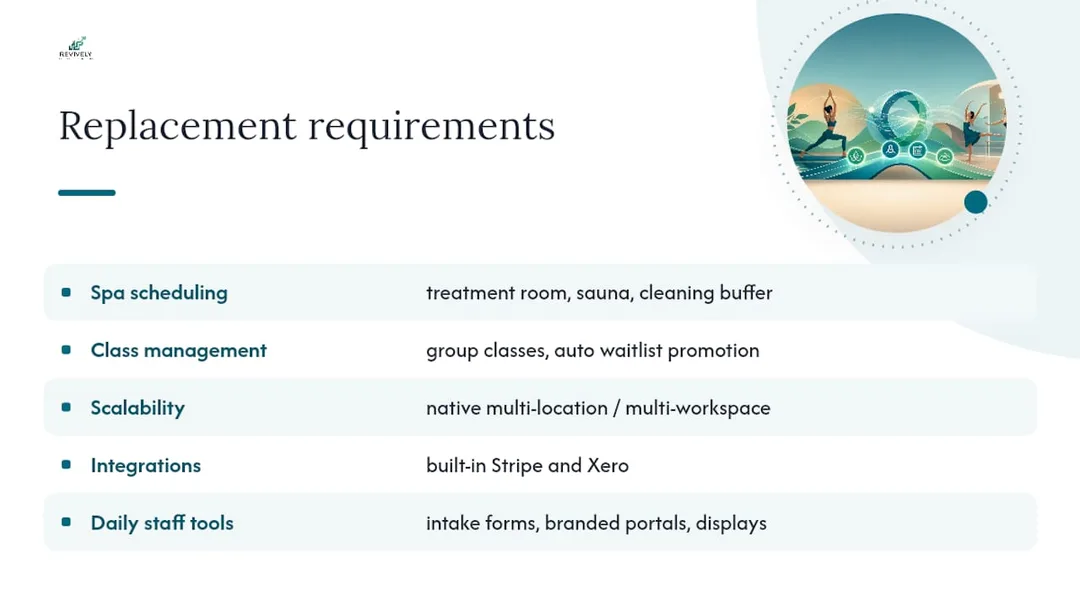
Scalability matters immensely if you envision adding a second location, expanding your services, or bringing on more team members within the next year or two. Ask explicitly if the platform supports multi-location or multi-workspace management natively, rather than requiring clunky workarounds.
Integrations are just as crucial. Confirm that essential connections like Stripe and Xero are built-in, not reliant on a third-party connector that could become another point of failure. For Australian studios, a reliable, robust Xero integration for BAS accuracy is non-negotiable.
Smaller features like branded booking portals, fully digital intake forms, and public display boards for class or treatment room status might seem minor, but these are the tools your staff will interact with daily. A platform that handles these intuitively will significantly reduce front-desk admin; one that treats them as an afterthought will simply create ongoing friction.
The Smart Questions to Ask Before Signing Anything
The questions that truly separate a smooth migration from a stressful one rarely revolve around a flashy feature list. They're about the process and the support.
Ask directly: Does the vendor offer guided migration support, or are you expected to tackle the data import entirely on your own? Confirming migration support before signing is cited by independent buyer guides as a significant factor in reducing operational risk. Get a realistic estimate in writing for how long a typical migration takes for a studio of your size, not just a verbal guess.
Ask what happens to your data if you decide the new platform isn't the right fit after three, six, or twelve months. A vendor confident in their product will have a transparent and clear export policy of their own.
Inquire about support response times, specifically, not just "we offer great support." Ask if that support is based in a timezone that genuinely overlaps with your Australian business hours.
Finally, ask about the pricing structure at double your current staff count and client base. This helps you avoid nasty surprises from scaling costs a year down the track.
Navigating Your Exit from Mindbody (Without the Drama)
Do not cancel Mindbody until you have confirmed every single data export, and your new system has successfully run at least one full billing cycle. Seriously.
Mindbody's contract terms, like most subscription software, typically require written notice ahead of your renewal date. Some may also include an early exit fee if you're cancelling mid-term. Reread your contract closely and understand the terms.
Request your final invoice in writing before you officially cancel. Cross-check it against your own records for any pending disputes or credits owed.
Keep your Mindbody login active in a read-only capacity for at least a month after cutover. You will inevitably need to reference historical data for tax time, or if a client disputes a past charge. Once you are absolutely confident your new system is stable, reconciled, and your data is safe, then submit your cancellation request in writing and keep a copy of the confirmation for your records.
Getting Your Team Comfortable with the New System
For staff who've only ever navigated Mindbody's labyrinthine interface, the switch will require a genuine adjustment period, not just a quick walkthrough.
Prioritise a dedicated training session before cutover day. Ideally, leverage that parallel-running period to let staff practise on real bookings without the pressure of a live-only system.
Focus training on the core, high-frequency tasks: checking someone in, processing a walk-in payment, and handling a reschedule or cancellation. These are the moments where a confused staff member creates a visible hiccup directly in front of a client, so they deserve ample practice time over, say, obscure back-end reporting features.
Provide each team member with a simple, one-page reference sheet outlining their most common tasks. Trying to remember a full training session under the pressure of a busy studio floor on day one is unrealistic.
Schedule a short, daily check-in for the first week post-cutover - five minutes, tops. This dedicated time allows staff to flag anything that felt clunky or confusing. Small friction points caught early are easy to fix; the same issues left to compound for a month become a reason staff resent the new system rather than embrace it.
The Hidden Hurdles Studio Owners Consistently Underestimate
The technical heavy lifting of a migration - the exports, the imports, the field mapping - is rarely what trips up Australian studios. It's almost always the human side: meticulous member communication and the critical process of payment re-onboarding. A studio could execute every data export flawlessly and still lose a chunk of its client base if the card re-authorisation request feels like spam or lands without proper context and clear instructions.
What genuinely surprises most owners is how significantly smoother things run when the new platform is purpose-built for the actual resources they manage, rather than a generic calendar retrofitted for wellness. A spa juggling multiple treatment rooms, hydrotherapy pools, and essential cleaning buffers operates with entirely different scheduling logic than a dance studio running back-to-back group classes with dynamic waitlists. Revively's approach to multi-resource scheduling and automatic waitlist promotion was born directly from observing Australian studios trying to force-fit their unique operations into tools that simply weren't designed for them.
The crucial lesson? Plan the payment conversation with the same diligence and care as you plan your data export. Failing to master one without the other is how migrations stall, and client relationships fray.
-
- Andreea
Need a Hand? How Revively Supports Your Mindbody Migration
Revively is an Australian-made, direct route off Mindbody, purpose-built for spas, yoga studios, Pilates studios, recovery centres, and dance schools that demand more than just a generic booking calendar. Instead of forcing a one-size-fits-all fitness-class scheduler to manage your treatment rooms or dance floor, Revively handles multi-resource scheduling natively, tracking saunas, massage rooms, and mandatory cleaning buffers on the same intuitive grid as your group classes.

For Australian studios, Revively ensures client data, booking histories, and sensitive health intake forms are stored locally in Australia, fully complying with the Australian Privacy Principles (APPs). This isn't just a feature; it's a fundamental trust pillar.
Migrations onto Revively often include concierge-style data import support, meaning your client list, memberships, and schedule can be set up with expert team support, rather than leaving you to struggle alone. Payments and accounting software integration are typically configured as part of onboarding, ensuring your financial reconciliation, including flawless 10% GST calculations and automatic Australian Tax Invoice issuance, is clean and audit-proof from day one. Our 100% legal Xero integration ensures automated two-way mapping of tax codes, revenue accounts, and liabilities for utterly accurate BAS filings. Group classes benefit from automatic waitlist promotion, meaning a cancelled spot fills itself without any manual intervention from your team.
If you're an Australian spa, yoga, Pilates, or dance studio weighing up a move, why not start a free trial? See firsthand how the online booking experience compares for your members, or how seamlessly class packs and memberships map across from your current setup. As you prepare member communications for the switch, Revively's team can also help update your booking widgets and marketing pages to perfectly match your new, streamlined platform.
Sources
- Best Mindbody Alternatives 2026: 8 top studio & gym options
- You've been thinking about leaving Mindbody. Here's what's stopping you.
- MINDBODY reviews | Capterra
FAQ
What is better than Mindbody for an Australian studio?
There's no single universal "better" answer, as the ideal replacement hinges on your specific studio type and operational needs. However, for Australian spas, yoga, Pilates, and dance studios, platforms designed for multi-resource scheduling, native GST compliance, robust Xero integration, Australian data residency, and automatic waitlist management, like Revively, generally offer a more tailored and efficient experience than generic fitness-class software.
How do I deactivate my Mindbody account securely?
First, confirm that all your data exports are complete, verified, and securely stored, and that your new system has run at least one full billing cycle successfully. Carefully review your Mindbody contract for the required notice period. Then, request cancellation in writing and ask for a final invoice to review before the account is formally closed. Keep your login active in read-only mode for at least a month post-cutover for historical reference.
What are the main pros and cons of Mindbody for Australian studios?
Mindbody offers broad name recognition and a large consumer marketplace, which can provide some visibility. However, consistent feedback from Australian user reviews highlights frequent complaints about unpredictable pricing changes, slow customer support, and difficulties when attempting to cancel contracts. Studio owners must weigh the potential for marketplace exposure against these ongoing operational friction points.
Is Mindbody the same as ClassPass?
No, they serve different functions. Mindbody is a comprehensive business management software that studios utilise to manage scheduling, payments, client records, and staff. ClassPass, by contrast, is a consumer subscription app that allows members to book classes across various partner studios. Many studios use both simultaneously, leveraging Mindbody for their core operations and ClassPass as an additional marketing or client acquisition channel.
How long does a typical migration from Mindbody take for an Australian studio?
Most migrations for Australian studios typically take between 4 to 8 weeks from the initial data audit to a full, successful cutover. This timeline can vary depending on the volume of data being moved and the number of integrations that need reconfiguring. Crucially, the owner's hands-on time within that window is often under an hour in total if a dedicated migration team (like Revively's) handles the bulk of the data import and reconciliation work.
Recommended
- Beyond Mindbody: Finding the Right Fit for Australian Wellness Studios
- Ditching the Dread: Top 4 All-in-One Studio Management Alternatives for Australian Wellness Businesses
- The Essential Australian Guide to Choosing a Yoga Studio Booking System
- Ditch the Daily Chaos: Why Your Australian Studio Needs More Than Just a Booking System