
Cancellation policy studio setup: an automation playbook
! Hands connecting cables in studio setup
Set your studio's cancellation policy up as an automated booking workflow, not a paragraph on a webpage.
The frantic phone call. The empty mat. The gaping hole in your schedule that should have been generating revenue, but instead, it's just costing you. You've got a cancellation policy, sure. It's probably a paragraph on your website, or maybe tacked to the front desk. But is it actually working? Or is it just a polite suggestion your clients often ignore, leaving you to chase fees, juggle waitlists, and silently seethe?
It's time to stop treating your cancellation policy as a static statement and start seeing it as an automated workflow - a set of clear, software-enforced conditions that protect your time, your income, and your sanity. Because in the dynamic world of wellness and fitness, an unenforceable policy isn't a policy at all; it's just a prayer.
A robust, automated cancellation system doesn't just mitigate no-shows; it transforms your operational efficiency. We're talking about a unified cloud command centre that handles every scenario, from a last-minute yoga class cancellation to a no-show for a premium spa treatment, with zero manual intervention. This means your booking software automatically applies the right charge, deducts the correct package credit, and even promotes your waitlist - all while ensuring 10% GST is correctly applied and your client receives a legally compliant Australian Tax Invoice.
This isn't just about recovering lost revenue; it's about setting clear expectations, valuing your studio's resources, and ensuring your client data, including sensitive health intake forms, is securely stored right here in Australia, fully complying with the Australian Privacy Principles (APPs).
Table of Contents
- What a cancellation policy studio setup must cover
- Step‑by‑step: configuring cancellation rules in your booking software
- Building automation workflows with conditional branches
- Payments and enforceability: card‑on‑file, deposits and refunds
- Reminders, confirmations and waitlist backfill
- Monitoring, reporting and repeat‑offender rules
- Why consistent automation beats ad‑hoc enforcement
- Implementation checklist and how Revively supports each step
- Get your cancellation policy running on autopilot
- Sources
What a cancellation policy studio setup must cover
Your cancellation policy needs to be more than just words on a page. It needs to be a living, breathing set of conditions your booking software actually enforces. Think of it as translating every possible client action - from rescheduling a Pilates session to a complete no-show for a 90-minute spa treatment - into a specific, testable, and automated outcome. This is where a truly unified cloud command centre shines, particularly for Australian multi-resource studio scheduling.
Start by defining crystal-clear time windows for each service type. A bustling dance studio's group class might demand a much tighter cancellation window than a high-value 90-minute facial at a recovery centre. Why? Because the room, staff, and product costs differ wildly. Here's how typical bands should look:
- More than 48 hours out: Full refund or free reschedule, zero penalty. This keeps client goodwill high.
- 24 to 48 hours out: Partial charge, typically 50% of the session value. This acknowledges some lost opportunity.
- Under 24 hours or a no-show: Full charge or a complete package credit deduction. This covers your costs entirely.
Crucially, each window needs a single, software-executable outcome, not a vague instruction for your busy front desk staff to interpret. And don't forget the exceptions! Staff-initiated cancellations, genuine illness, or family emergencies should trigger a separate "forgiveness" branch, ensuring your automated system doesn't accidentally penalise clients for circumstances beyond their control or your own operational changes.
Finally, your policy needs to be front-and-centre, not buried in fine print. Make it visible at three critical points: the booking screen, checkout, and the confirmation message. If clients only stumble upon it later, don't expect it to magically change their behaviour.
Step-by-step: configuring cancellation rules in your booking software
Setting up an automated, GST-compliant studio software cancellation policy isn't a week-long ordeal. With a structured approach, you can have it dialled in by the end of an afternoon.
- Define specific windows and outcomes for every service and resource. A dedicated treatment room, a sauna slot, or a lively group dance class each have unique cost implications and demand different cut-off times. Avoid a one-size-fits-all approach across your entire studio; drill down to individual service types.
- Integrate your policy into the booking flow and confirmation messages. Embed it as an unavoidable checkbox or a clear, visible statement at checkout. Then, reiterate it in the confirmation email or SMS. Platforms, much like MakeMusic Studio's cancellation guide, typically show these toggles residing within the booking product's admin panel, often alongside auto-remove settings for cancelled slots.
- Mandate card-on-file or a deposit with explicit charge authorisation. Without secure, stored payment details, your meticulously crafted policy remains just a suggestion. This is non-negotiable for true enforceability, especially for an Australian-made, all-in-one spa booking software.
- Enable automatic enforcement. Configure your system to charge the stored card, deduct a package credit, or generate an invoice the instant a cancellation falls within the penalty window. No more manual follow-ups.
- Establish staff forgiveness flows and admin overrides. Empower your front-of-house team with a simple, one-click method to waive a fee for legitimate exceptions. Crucially, ensure these overrides are logged for later review and auditing.
Pro Tip: Build a specific override reason code (e.g., "staff error," "medical emergency," "goodwill gesture") into every forgiveness action. This transforms scattered, manual exceptions into reportable patterns you can actually audit later, ensuring fair and consistent application of your cancellation policy across your studio team.
Building automation workflows with conditional branches

The true power of software-driven enforcement lies in its nuance. It doesn't treat a 47-hour cancellation the same way it treats a no-show. Conditional branches enable your system to respond proportionately, ensuring your policy is perceived as fair and preventing clients from feeling unfairly "nickel-and-dimed" over a minor scheduling slip. This sophisticated logic is a hallmark of top-tier Mindbody alternatives Australia-wide.
A typical, highly effective branch structure looks something like this:
- Branch one, 48+ hours: Automatic, seamless free reschedule or full refund. No fee is applied, and your waitlist is immediately notified if the spot opens up.
- Branch two, 24 to 48 hours: A partial charge is automatically applied, and the client receives a clear notification of the deduction.
- Branch three, under 24 hours or no-show: A full charge or package deduction is triggered, and the client is automatically tagged within your CRM for future reference.
- Branch four, repeat behaviour: Clients tagged two or more times within a 90-day period are automatically flagged for mandatory prepayment on all future bookings. This proactive measure significantly reduces ongoing no-shows.
Layer a logical sequence of communications on top of this logic: an immediate booking confirmation, a 48-hour reminder, a 24-hour two-way confirmation request, followed by enforcement if no action is taken. Every branch should also automatically trigger a waitlist promotion and a staff notification, ensuring a cancelled Pilates mat class can literally fill itself without anyone having to touch the calendar.
Payments and enforceability: card-on-file, deposits and refunds
A cancellation policy is only as robust as your ability to collect on it. For Australian studios, this starts with securing explicit client consent to charge for late cancellations and no-shows, captured unequivocally at the point of booking - not awkwardly requested after the fact.
- Card-on-file is typically the smoothest option for most recurring clients, keeping friction low at checkout for casual classes or ongoing memberships.
- Deposits are ideal for new clients or higher-value bookings like elaborate spa packages or multi-resource appointments. Studio scheduling guidance often suggests testing 50% for 24 to 48-hour cancellations and 100% for under 24 hours or no-shows as a starting point, then adjusting based on your studio's specific no-show data.
- Automate refunds and package deductions completely. A cancelled class should credit back to a client's pack or wallet without requiring any manual reconciliation from your team. This is crucial for efficient multi-resource studio scheduling.
- Integrate an admin forgiveness workflow seamlessly. This handles the genuine exceptions your policy branches already anticipate, providing a clear, auditable path for waivers.
One significant structural advantage for Australian studio owners: enforced cancellation fees and deductions flow directly into your books when your booking system integrates seamlessly with Xero. This guarantees that your 10% GST reconciliation is always accurate, and your quarterly Business Activity Statements (BAS) are flawless and audit-proof, eliminating the headaches and potential errors of manual spreadsheet tracking. Your client data is also stored locally, adhering to Australian Privacy Principles (APPs), adding another layer of trust and compliance.
Reminders, confirmations and waitlist backfill
Prevention is always better than cure. While enforcement is vital, an effective cancellation policy also relies heavily on preventing the gap in the first place. A layered reminder sequence, expertly paired with automatic waitlist backfill, is what a truly prevention-focused approach to no-shows advocates, far above relying solely on penalties.
Consider this robust, layered reminder strategy:
- Immediate Confirmation: Sent the moment a booking is made, reiterating details and policy.
- 48-Hour Reminder: Includes a one-tap reschedule link, offering flexibility before penalties apply.
- 24-Hour Two-Way Confirmation Request: Sent via SMS, requiring a direct reply (e.g., "Y" to confirm, "N" to cancel) to reconfirm attendance. This is incredibly effective.
- Morning-of Reminder: A final, gentle nudge just a few hours before the session.
A documented reminder and reschedule sequence built around one-tap confirm and reschedule links consistently lifts reschedule rates and reduces no-shows. Pair this with immediate, automatic waitlist promotion using a tight 30 to 60-minute claim window. This ensures that a newly freed slot doesn't sit empty, waiting on a manual phone call, but rather gets instantly offered to the next eager client.
Monitoring, reporting and repeat-offender rules
A cancellation policy without rigorous reporting is akin to a guess dressed up as a system. To truly optimise your operations, you need to track your no-show rates, late-cancel rates, recovered revenue from enforced fees, and waitlist conversion rates weekly, not quarterly.
- Review tagged repeat offenders every single week. Confirm that your mandatory-prepayment branch actually triggered and that the system is doing its job.
- Generate an automated report on fees waived versus fees charged, sorted by staff member. This helps identify any instances of selective enforcement before they become ingrained patterns, ensuring consistency across your team.
- Implement a written Standard Operating Procedure (SOP) for all waivers and forgiveness scenarios. This removes the burden of making subjective judgement calls from your front-desk staff, promoting fairness and consistency for every client.
Tagging and automatically escalating repeat offenders is one of the most powerful, yet often underutilised, monitoring habits for studios. It's the difference between a policy that exists merely on paper and one that actually shapes client behaviour, particularly among the small group responsible for the bulk of your cancellations. This is where an advanced multi-resource studio scheduling platform truly proves its worth.
Why consistent automation beats ad-hoc enforcement
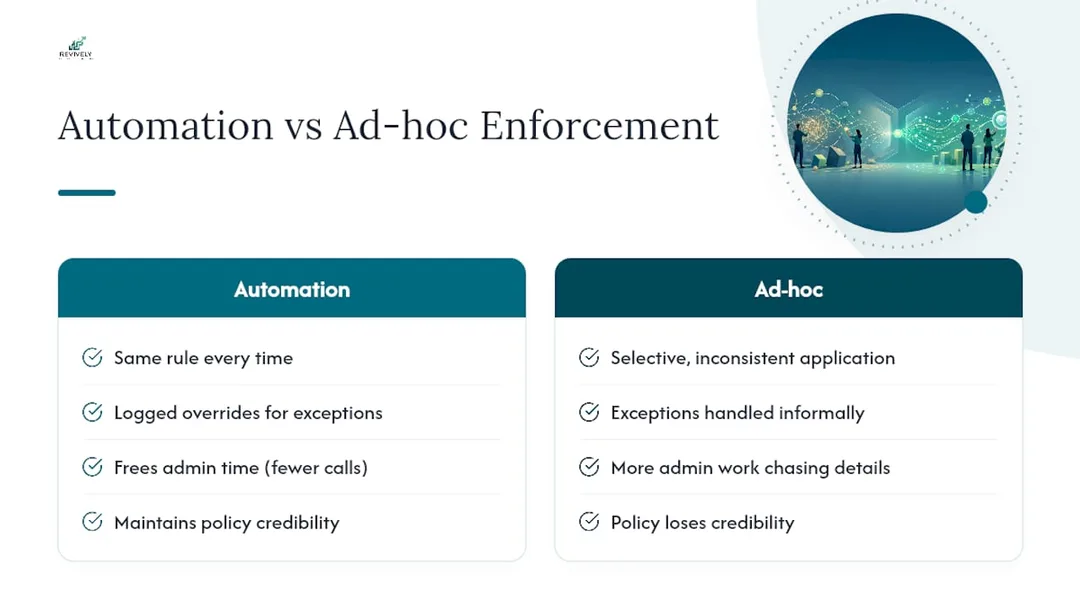
Let's be blunt: selective enforcement is the fastest way to render any cancellation policy utterly worthless. The moment one regular client gets waved through for a late cancellation while another is charged for the exact same 20-hour window, the entire policy loses credibility with both your team and your client base. This erodes trust, fosters resentment, and ultimately undermines your operational integrity.
Automation is the antidote. It ensures the same rule is applied every single time, without favouritism or human error, while still providing a clear, logged override path for genuine exceptions. Beyond fairness, automation frees up countless hours of valuable admin time that used to be spent on awkward phone calls, chasing card details, or manually adjusting schedules after the fact.
My advice for any Australian studio owner looking for a Mindbody alternative Australia solution: pilot a change to your cancellation windows or deposit percentage for 60 days. Monitor your no-show cost calculator numbers weekly, and adjust based on real data rather than just guessing at the 'right' structure upfront.
- Andreea, Head of Product at Revively
Implementation checklist and how Revively supports each step
Before your cancellation policy can truly run on autopilot, six crucial elements must be in place and seamlessly integrated: clearly defined windows, mapped outcomes, secure card details, precisely configured reminders, an active waitlist, and robust reporting.
Here's a quick checklist for your GST compliant studio software setup:
- Define windows and outcomes across every service and resource - from private treatment rooms to bustling group class spots.
- Capture card-on-file at the point of booking through secure, Stripe-powered payments.
- Configure reminders on a cadence that directly correlates with your studio's unique no-show risk profile.
- Enable waitlist auto-promotion so cancelled spots immediately refill without any manual staff intervention.
- Turn on comprehensive reporting to consistently track and audit your enforcement consistency over time.
Revively's booking platform maps directly onto this critical checklist. Our Australian-made, unified cloud command centre provides multi-resource scheduling for rooms, staff, and equipment, fully integrated Stripe payments for secure card-on-file and deposits, and native Xero integration for automatic 10% GST reconciliation on collected fees. Plus, our built-in waitlist and staff forgiveness workflows ensure a truly seamless, automated operational experience.
Pro Tip: If your multi-resource studio scheduling software allows, run your first month of automated enforcement in a "log only" or "simulation" mode. This allows you to see precisely what would have been charged without actually processing live transactions, giving you confidence before you fully activate live charging.
Get your cancellation policy running on autopilot
Revively is the practical, purpose-built solution to transform everything discussed above into a working, automated system, rather than just a document nobody reads. Booking rules, secure card-on-file capture, waitlist auto-promotion, and Xero-synced fee tracking for flawless BAS accuracy all reside within one intuitive dashboard. This means a cancelled Pilates class or spa treatment automatically triggers the correct outcome - generating a legally compliant Australian Tax Invoice - without a single staff member having to touch a spreadsheet.

If you're currently chasing no-show fees manually, wrestling with multiple systems, or relying on your busy staff to remember the nuances of your policy, Revively's online booking software handles the enforcement automatically. Our sophisticated class scheduling with waitlist management fills those empty gaps the moment a spot opens up, protecting your revenue and freeing up your team.
Ready to reclaim your time and revenue? Start a free trial with Revively today and configure your first automated cancellation window. Your studio, your staff, and your bank account will thank you.
Sources
The reminder cadences, deposit bands, and prevention-stack logic in this guide draw on the Zero No-Show Playbook, NoShowCalc's guide to reducing no-shows, and Studio Hero's scheduling best practices. For setting up SMS confirmations alongside your policy, see Revively's guide to SMS confirmations, and for deposit-specific configuration, do booking deposits actually stop cancellations? covers the numbers in more detail. Studios weighing broader automation options may also find ChatzyBot's overview of booking automation benefits useful background reading.
- How to Reduce No-Shows | NoShowCalc
- Setup my cancellation policy on MakeMusic Studio and avoid last minute cancellations | MakeMusic Studio Help Center
- Zero No-Show Playbook: Automation Guide (2026) | SchedulingKit
- Studio scheduling best practices: booking, calendar & resource management (2026) | Studio Hero
Recommended for Australian Studio Owners
Dive deeper into optimising your studio operations with these handpicked Revively resources:
- Do Booking Deposits Actually Stop Cancellations? The Aussie Studio Owner's Guide - Revively
- Stop the Studio Scramble: How Smart Automation Rescues Your Client Reminders (and Your Sanity) - Revively
- The Australian Studio's Guide to Integrated Stripe Booking Software - Revively
- Seamless Studio Flow: Mastering Class Waitlists with Automation in Australia - Revively