
The best WordPress booking widget for studios in 2026
! Hands plugging charger into device at studio desk
If you run a spa, yoga studio, Pilates space, or dance school, the best approach is a studio-aware booking plugin or widget that lives inside WordPress, not a bolted-on external embed.
Picture this: it's 6 AM. Your first Pilates class is in two hours, the instructor for the 9 AM yoga session just called in sick, and your "simple" WordPress booking widget is now showing double-bookings for the reformer room. Meanwhile, your Xero dashboard is screaming about unreconciled payments, and you still haven't manually issued half a dozen GST-compliant invoices from yesterday's casual drop-ins.
Sound familiar?
For Aussie wellness and fitness studio owners - spas, recovery centres, yoga/Pilates studios, clinics, or dance schools - the "best" WordPress booking widget isn't just about getting clients to click "Book Now." It's about surviving the daily operational chaos without losing your mind, your clients, or your accountant's goodwill.
The truth? A standalone booking plugin for WordPress might solve one problem, but it usually creates three more. You're not running a single-chair hair salon; you're orchestrating multi-resource scheduling, managing memberships, tracking class packs, and navigating Australia's unique tax landscape. You need more than a bolted-on embed. You need an integrated command centre.

A truly effective solution - whether a powerful WordPress-native plugin or a unified cloud platform like Revively - keeps clients glued to your brand, handles the messy stuff (multi-resource scheduling, class packs, waitlists that actually work), and crucially, ensures your Aussie studio stays compliant. Because let's be honest, those manual spreadsheet errors during BAS season? That's where the real pain lives.
Quick Scan: What Every Aussie Studio Needs to Know About Online Booking
| Point | Your Studio's Reality | Why It Matters Down Under |
|---|---|---|
| Native vs. Embedded | Keep clients on your site with a plugin or integrated platform, not a third-party page. | Branding & Trust: Aussie clients expect a seamless, professional experience from local businesses. Diverting them to a generic, foreign-looking page erodes confidence. |
| Buffer Management | Set cleaning/changeover buffers to prevent booking clashes for rooms, equipment, or therapists. | Operational Flow: Vital for spas (sanitisation), recovery centres (equipment resets), and studios (room flips) to maintain hygiene and client experience standards. |
| Feature Matching | Prioritise multi-resource scheduling, waitlist automation, class packs, and proper membership management. | Profitability & Efficiency: Generic appointment tools miss the mark. Aussie studios need features built for classes, not just one-on-ones, to maximise capacity and retain members. |
| Pre-Launch Testing | Run full booking flows on desktop and mobile, checking confirmation emails and calendar sync. | Client Experience: A buggy system frustrates clients, leads to no-shows, and tarnishes your studio's reputation. First impressions count. |
| Upgrade Signal | When manual admin for bookings, payments, and Xero reconciliation outweighs cost savings. | Compliance & Growth: Revively unifies scheduling, Stripe payments, and Xero integration, ensuring 100% legal BAS accuracy and freeing you to focus on growth, not manual data entry. |
Diving Deeper: Your Studio's Blueprint for Online Booking Success
- Why a WordPress booking plugin beats an external embed for studios
- How do you add a booking widget to WordPress?
- What features does a studio booking widget actually need?
- Australian Compliance Deep Dive: Data, GST & Xero Integration
- How do you customise a booking widget without it looking bolted on?
- Setting up the widget for classes, one-on-ones, and shared spaces
- Keeping your booking system reliable
- [Why studios eventually outgrow a simple widget](#why-studios- eventually-outgrow-a-simple-widget)
- Revively: The Australian-Made Solution That Covers Your Checklist
Why a WordPress booking plugin beats an external embed for studios
Every savvy studio owner eventually hits the same fork in the road: do I plug a booking tool into WordPress, or do I punt clients off to a hosted booking page on someone else's server? For Aussie studios, keeping it native almost always wins out.
Think about it from your client's perspective. They're on your beautifully designed, brand-consistent yoga studio website. They click "Book Now" and are suddenly whisked away to a different domain, sporting different fonts, colours, and a generic logo. Instantly, a tiny seed of doubt is planted: "Did I click the right link? Is this secure? Who is this other company?" This subtle erosion of trust can be the difference between a conversion and an abandoned booking.
Research, like Zapier's testing of booking plugins, consistently finds that solutions built directly into WordPress keep the entire client journey on your site, preserve your branding, and often prove more cost-effective than standalone hosted apps charging per booking or per seat.
Here's the breakdown for studios:
- Seamless Branding & Client Trust: A plugin renders inside your existing pages. Your serene teal-and-cream Pilates site stays that way, from home page to checkout. No jarring redirects, no third-party branding stealing your spotlight.
- Predictable Costs: Hosted embeds often tack on per-booking or per-user fees, ballooning your monthly spend as you grow. A solid plugin licence is usually a flat, predictable cost, making budgeting much simpler.
- Data Sovereignty & Security: Client intake forms, health notes, payment histories, and all that sensitive personal information stay tethered to your system. With a third-party embed, your precious data often lives on servers you don't control, potentially outside of Australia.
- Studio-Specific Functionality: True studio tools feature class packs, waitlists, recurring timetables, and multi-instructor rosters at their core. Generic embeds treat every business like a single-service appointment shop, leaving you to hack together workarounds for your unique operational needs.
Performance isn't just an afterthought either. A clunky booking plugin can drag down your page speed, and an iframe embed might clash with your theme's mobile breakpoints. Always, always test any plugin on a staging copy of your site before it goes live. This isn't just good practice; it's essential for maintaining a professional online presence.
Pro Tip: Before you even glance at feature lists, map out your actual weekly bookings. How many are group classes? How many are one-on-one sessions? Which ones require a specific room or piece of equipment? This realistic inventory will tell you more about which widget truly fits your studio than any marketing blurb ever will.
How do you add a booking widget to WordPress?
Getting a booking system live doesn't require a developer, but it absolutely demands a checklist. Skip a step, and you'll find out about it the hard way - usually when a client somehow double-books your only treatment room.
Before you even open WordPress, get these ducks in a row:
- Choose Your Weapon: Select your preferred plugin or hosted widget connector. Install it from the WordPress plugin directory or the provider's own package.
- Initial Setup: Activate the plugin and breeze through the setup wizard. This usually involves defining your business hours, time zone (critical for avoiding booking clashes!), and your primary services.
- Staff & Availability: Add your instructors or therapists, carefully setting their individual availability windows.
- Buffer Up: Crucially, set buffers between bookings. Think cleaning time for a treatment room, or changeover time for a dance studio floor. This prevents frantic rushes and maintains a pristine client experience.
- Payment Gateway: Connect a reliable payment gateway. Stripe is the industry standard for most WordPress booking tools, handling deposits, full payments, and refunds smoothly.
Placing the Widget on Your Page:
Most WordPress booking plugins offer flexible ways to embed the widget itself. As plugin directories commonly document, you'll typically find these options:
- Gutenberg Block: For most modern WordPress 6.x sites, simply search for the plugin's dedicated block in the block inserter and drop it onto your page. This is usually the cleanest, most integrated option.
- Shortcode: If you're running an older theme or Classic Editor, paste a shortcode like
[booking_form]into your page or widget area. - Elementor Widget: For those building pages visually with Elementor, drag the booking widget directly into an Elementor section, offering more granular layout control.
- Iframe or Embed Code: For hosted booking portals, you'll usually paste an embed snippet. Be aware, this offers the least styling control and carries the branding/data implications discussed earlier.
Once the widget is in place, the real work begins: rigorous testing. Book a test appointment on desktop, then repeat it on your phone. Check that the confirmation email lands in your inbox, that the appointment correctly syncs with your calendar, and that a cancellation properly frees up the slot. If you're using WooCommerce Bookings, remember that bookings go through the same cart and checkout flow as other products, which is great if you sell retail but can add an unnecessary step for pure service studios.
Run this test twice: once as a brand-new client (no saved details), and once as a returning client (to check pre-filled fields). This ensures both pathways are frictionless.
What features does a studio booking widget actually need?
A generic appointment plugin, built for a single hairdresser or a dentist, will have a busy yoga studio tearing its hair out within a week. Group classes, multi-tiered memberships, shared equipment, and varied pricing structures demand features that single-service tools simply weren't built for.
Your Studio's Non-Negotiable Must-Haves:
- Multi-Resource Scheduling: This is your holy grail. The ability to book a room, an instructor, and a specific piece of equipment as one linked appointment. No more manual cross-referencing.
- Robust Class Timetable: Recurring sessions, not just one-off appointment slots. Think weekly yoga flows, monthly workshops, and seasonal courses.
- Waitlist Auto-Promotion: When someone cancels, the next person in line is automatically offered the spot. This isn't a "nice-to-have"; it's a monumental time-saver and revenue protector.
- Client Profiles with Digital Intake Forms: Essential for spas, clinics, and recovery centres needing health history or consent forms before a treatment. All securely stored, of course.
- Stripe Payment Processing: With comprehensive support for full payments, deposits, and smooth refund/partial-refund capabilities.
Operational Controls That Will Liberate Your Admin Team:
- Configurable Buffers & Turnover Time: Because a sauna needs longer to reset than a quick consult room. Tailor these precisely for each service.
- Capacity Limits: Set per-class limits with the flexibility to override for private hires or special events.
- Granular Staff Assignment Rules: Ensure instructors only get booked within their actual availability windows, respecting their off-time and preventing burnout.
Integrations Worth Their Weight in Gold (Especially for Australian Businesses):
- Xero Integration: For studios that demand bookings reconcile automatically with GST and tax reporting, rather than being re-entered by hand. Crucial for flawless BAS.
- Google Calendar or iCal Sync: So staff see their latest bookings on the calendar they already use.
- Public Display Boards: For your foyer or reception, showing today's class schedule in real-time without anyone manually updating a whiteboard.
- Automated Email & SMS Notifications: Confirmations, reminders, waitlist alerts. These are the unsung heroes for reducing no-shows.
Editorial roundups on booking plugins consistently highlight mobile-optimised forms and automated reminders as the top features for reducing no-shows and improving client satisfaction. If a plugin's mobile checkout feels like an afterthought, consider it a red flag. Your clients live on their phones.
Finally, compatibility matters. Confirm the plugin is actively maintained and compatible with your current WordPress and PHP versions. An abandoned plugin, not updated in two years, isn't just outdated; it's a security vulnerability waiting to be exploited.
Australian Compliance Deep Dive: Data, GST & Xero Integration
This isn't just about managing bookings; it's about running a legitimate, compliant Australian business. Any booking system you choose needs to understand the local landscape.
Australian Data Residency & Privacy: Protecting Your Clients (and Yourself)
Your clients trust you with deeply personal information: their health history, payment details, contact information, and booking patterns. In Australia, this data is protected by the Australian Privacy Principles (APPs) under the Privacy Act 1988.
Critical Mandate: Your booking software must store client data, booking histories, and sensitive health intake forms locally in Australia. This ensures full compliance with APPs, provides an extra layer of security and trust for your clients, and simplifies any potential data access requests or regulatory audits. Relying on overseas servers for sensitive client data is a risk few Aussie studios can afford.
Flawless GST & Tax Invoice Handling: No More Spreadsheet Scrambles
The 10% Goods and Services Tax (GST) is part of life for Australian businesses. Your booking system needs to handle it natively, without you having to manually adjust figures.
Revively's Advantage: A robust system like Revively automatically calculates 10% GST across all transactions - casual classes, memberships, multi-resource packages. More importantly, it issues legally compliant Australian Tax Invoices directly to your clients, every single time. This removes the risk of human error, ensures transparency, and keeps your financial records pristine for the ATO.
100% Legal Xero Integration for BAS Accuracy: Audit-Proof Your Finances
Xero is the backbone for countless Australian small businesses. Your booking system needs to integrate seamlessly, or you're just creating more work for yourself (and your bookkeeper).
The Compliance Difference: Revively's integration with Xero isn't just about pushing numbers. It's a guarantee of 100% legal tax compliance. This means automated, two-way mapping of:
- Tax Codes: Correctly assigning GST (or GST-free) to every transaction.
- Revenue Accounts: Ensuring income hits the right ledger accounts.
- Liabilities: Accurately tracking GST owed and received.
This precision ensures your quarterly Business Activity Statements (BAS) are flawless, audit-proof, and completed without manual spreadsheet errors or frantic re-entry. It turns what's often a dreaded task into a smooth, automated process.
How do you customise a booking widget without it looking bolted on?
A booking widget that screams "I'm from another website!" is the fastest way to lose a hesitant client at the crucial last click. The fix usually boils down to a handful of practical, design-conscious adjustments.
Prioritise native blocks (Gutenberg) or Elementor widgets over raw iframes wherever possible. An iframe is essentially a window into someone else's webpage; you have minimal control over its fonts, colours, or spacing. A native block or Elementor widget, however, can inherit much of your theme's styling automatically. Even Elementor-native booking tools are specifically built to help studios keep the checkout experience visually consistent with the rest of their site.
Beyond the technical, ruthless simplicity is your friend. Trim the booking form down to what you genuinely need. Every extra field is an opportunity for a client to abandon the form. If a client has booked before, their saved profile should ideally prefill their name, phone, and payment details for a lightning-fast rebooking.
A few habits that cement a professional, integrated look:
- Design Mobile-First: Most studio bookings happen on a phone, often squeezed into a five-minute break. If it doesn't look perfect on mobile, it's not perfect.
- Clear Call-to-Action: Place a prominent, single "Book Now" button above the fold. Don't bury it under paragraphs of studio history.
- Subtle Trust Signals: Near checkout, show a small note like "Secure Payments Powered by Stripe" or a one-line privacy statement referencing your adherence to Australian Privacy Principles.
- Staging Site First: Always preview every change on a staging site. Adjust CSS for brand colours and fonts before pushing anything live for paying clients.
Pro Tip: Match your booking button's colour to your primary brand colour, not a loud accent colour. Studios often find that a jarring "Book Now" button can be subconsciously read as an ad rather than a functional part of the site, which can quietly impact click-through rates.
Setting up the widget for classes, one-on-ones, and shared spaces
The settings screen of any booking system looks similar until you start inputting your actual schedule. This is where the configuration truly diverges based on your studio's offerings.

Group classes demand a capacity limit per session, a waitlist that promotes automatically when a spot opens, and a seamless way to recognise class-pack or membership holders so they aren't double-charged at checkout. Get the auto-promotion setting wrong, and you'll be back to manual emails - completely defeating the purpose of automation.
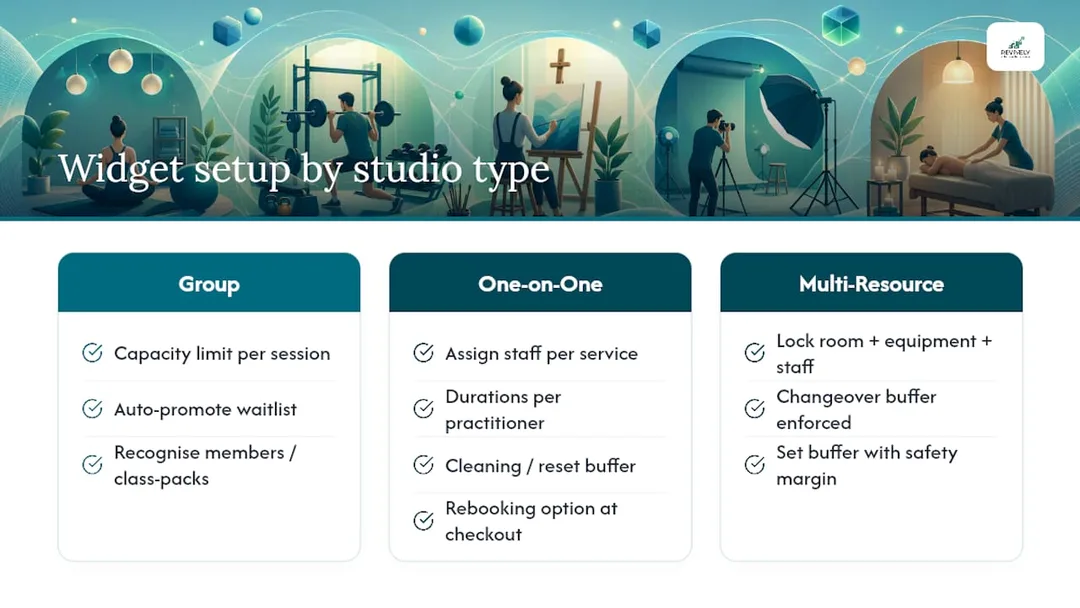
One-on-one services, such as a remedial massage therapist's column or a private Pilates reformer session, require individual staff assignments, service durations set per practitioner (not a blanket 60 minutes for everyone), and a cleaning or reset buffer built into the schedule. Many studios also enable a simple rebooking option at checkout, allowing a client leaving one session to lock in the next before they've even stepped out the door.
Multi-resource bookings are the most complex to configure and the easiest to botch. A hot yoga class isn't just an instructor; it needs the room, the heater cycle, and the instructor locked together as one unit. A spa treatment requires the room and the therapist tied together, with a mandatory changeover buffer enforced between bookings. If your plugin allows assigning buffers and resources via a configuration panel, always set the buffer slightly longer than you initially think. Fifteen minutes always evaporates faster in practice than it looks on a settings screen.
These configuration choices also dictate where the widget best lives on your site. A single studio schedule might thrive as one dedicated page showing the entire week. A spa with distinct treatments, however, often benefits from a widget on each service page, so a client booking a facial isn't scrolling past a dozen massage variants first.
Keeping your booking system reliable
A booking widget that sails perfectly on launch day can quietly unravel six months later after a WordPress update, a theme change, or a plugin conflict. A simple, consistent maintenance routine catches most problems before your clients do.
- Staging First, Always: Test any plugin or theme update in a staging environment. Never directly on your live, revenue-generating site.
- Stay Updated: Keep WordPress core, PHP, and the booking plugin itself meticulously updated. Schedule a full backup immediately before any major upgrade.
- Monitor Payments: Check your failed payment logs weekly. Confirm your email or SMS retry rules are actually firing when a card declines.
- Reconcile Regularly: Reconcile bookings against your accounting platform (Xero, if you're smart) monthly. Don't let mismatches pile up, especially with GST implications.
- Troubleshoot Double-Bookings: If double-bookings suddenly appear, check time zone settings first. It's the most common culprit, followed by buffer misconfiguration and resource assignment conflicts.
If these steps don't resolve the issue, contact your plugin's support team. Provide a screenshot of the exact booking conflict, the date, time, and services involved. Vague bug reports get vague answers.
Why studios eventually outgrow a simple widget
A booking widget brilliantly solves the first problem every studio faces: letting clients book online instead of jamming up your front desk phone. But it rarely solves the second problem, which inevitably surfaces six months later when you're running fifteen classes a week across three rooms, with a waitlist that needs manual attention every single day, and your accountant is asking why your BAS report doesn't match your booking records.
This is where a unified system, built around your actual operational reality, fundamentally changes the game. Automatic waitlist promotion alone removes a task that devours real time every week for a busy studio. Multi-resource scheduling and waitlist automation are consistently the features that slash the most admin hours for studios running both classes and one-on-one services, precisely because they eliminate the tedious manual matching that a generic widget leaves entirely up to you.
The honest answer to "when should I upgrade" is simple: when you're spending more time managing your booking system than the system is saving you. If Xero reconciliation, chasing waitlist emails, manually issuing Australian Tax Invoices, and endlessly juggling staff rosters has become a second full-time job, that's your undeniable signal. It's not about a specific revenue number or client count; it's about reclaiming your time and sanity.
"Running a studio is complex enough without fighting your own software. You need a system that truly understands the rhythm of your business, especially in Australia with our unique compliance needs."
- Andreea, Revively Founder
Revively: The Australian-Made Solution That Covers Your Checklist
Revively is the intelligent, Australian-made alternative to Frankenstein-ing together three separate tools for scheduling, memberships, payments, and accounting. Instead of a WordPress plugin plus a spreadsheet plus a separate payments dashboard, you get one connected cloud command centre built specifically for wellness and fitness studios across Australia - spas, yoga, Pilates, clinics, and dance schools.

Run through the exhaustive features checklist from earlier, and Revively matches it directly: robust multi-resource scheduling for rooms, equipment, and staff, working in perfect synchronicity. Automatic waitlist promotion for group classes that actually works. Integrated Stripe-powered payments and memberships that handle 10% GST calculations and issue compliant Australian Tax Invoices. Crucially, it boasts native Xero integration so your BAS reconciliation happens without anyone re-entering numbers by hand, ensuring audit-proof financial records.
Beyond the essentials, public display boards handle your foyer schedule automatically, and class packs and recurring timetables are built-in features, not clunky add-ons. If you're weighing up a simple plugin against a full, unified platform designed for Aussie studios, this comparison walks through the trade-offs in more depth. For studios desiring a truly custom-styled booking page beyond what a plugin allows, Revively partners with design experts like Coleman Web Designs to achieve the exact layout and branding you envision.
Stop the operational chaos. Start a free trial of Revively's booking platform and import your existing schedule to see it running perfectly before you commit to anything. No credit card required.
Insights & Further Reading
For detailed plugin comparisons, Zapier's booking plugin roundup and WPBeginner's appointment plugin guide offer excellent feature trade-offs. For e-commerce-linked bookings, WooCommerce Bookings documentation explains how bookable products flow through checkout. For studio-specific operations and critical Xero reconciliation tailored for Australia, Revively's product pages outline how a unified platform handles what a basic plugin typically can't.
- The 10 best WordPress booking plugins in 2026
- Booking - WordPress Class Scheduling Plugin | Gather Grove
Recommended Reading from Revively
- Beyond the Widget: Why a Branded Online Booking System is Your Studio's Secret Weapon - Revively
- Integrated Booking Software: The Smart Way to Unify Your Australian Studio - Revively
- Stop the Leakage: 10 Operational Fixes to Supercharge Your Studio Bookings - Revively
- How to Avoid Double Booking: A Studio Owner's Checklist - Revively