
Stripe instant payouts in Australia: what studio owners need to know
! Hands holding phone for Stripe payout
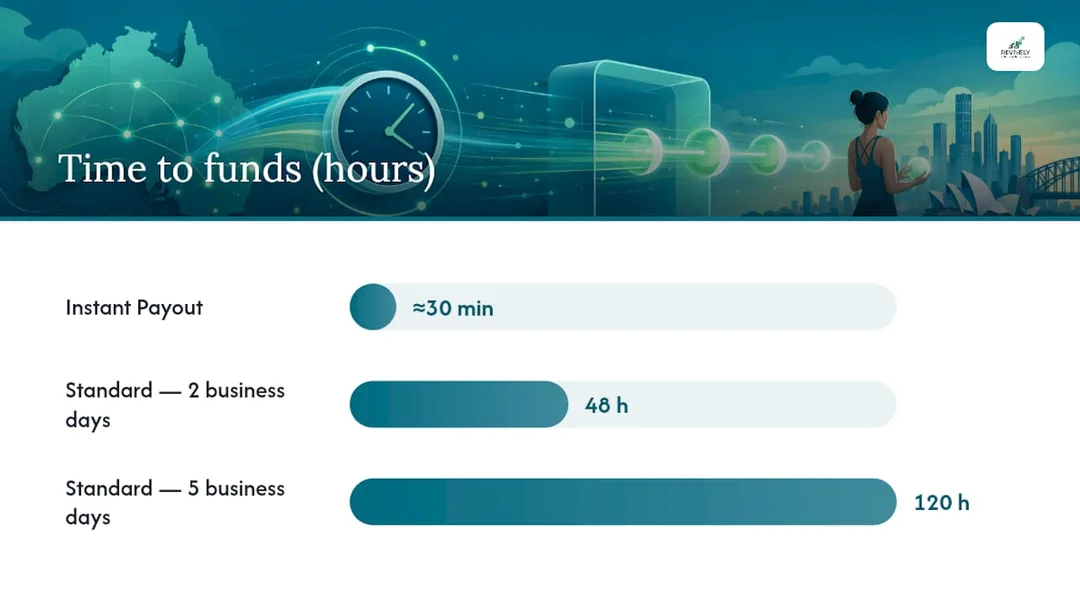
Stripe Instant Payouts let eligible Australian Stripe accounts move their available balance to an eligible debit card or supported bank account, with funds typically appearing within 30 minutes.
It's 4:30 PM on a Friday. Your yoga studio just wrapped up its busiest week, and the equipment supplier calls: an urgent payment is due today for that new Pilates reformer, or delivery's delayed. Your standard Stripe payout won't hit your bank until Tuesday. Panic stations? Not if you've got Stripe Instant Payouts in your toolkit.
For Australian wellness and fitness studio owners, navigating cashflow means mastering every tool available. Instant Payouts from Stripe can be a lifesaver when you need funds now, but they come with nuances. This isn't your everyday transfer option; it's a strategic move to be used wisely.
Here's the sharp, no-nonsense rundown on what Australian studio owners need to know about getting your Stripe funds faster.

The Gist: Instant Payouts for Australian Studios
Stripe Instant Payouts allow eligible Australian Stripe accounts to transfer their available balance to a supported debit card or bank account, with funds usually landing within 30 minutes. Before you tap that "instant" button, three critical facts demand your attention:
- Check your Stripe Dashboard for eligibility first. New accounts often go through a review period. If you don't see the Instant Payout option, you're not yet approved.
- The Australian fee is 1.5% of the payout amount, with a minimum of A$0.50 per transaction. This is clearly outlined on Stripe's Australian pricing page. That A$0.50 minimum can make smaller payouts surprisingly expensive in percentage terms.
- Funds commonly arrive within ~30 minutes, but daily volume limits apply, and your specific bank or card issuer must support instant routing.
Warning: The A$0.50 Minimum Bites Hard on Small Amounts.
An A$10 Instant Payout costs A$0.50 - that's an effective rate of 5%. If you're only pulling out small amounts, consolidate them. Waiting and doing one larger transfer will significantly optimise your fees.
Key Takeaways for Busy Studio Owners
| Point | Deets for Aussie Studios |
|---|---|
| Eligibility First | Dive into your Stripe Dashboard: Balances → Payouts. Look for Pay out funds instantly. If it's there, you're in. |
| AU Fee Structure | 1.5% per payout, with a minimum A$0.50. Payouts below A$33.34 mean you're paying more than 1.5%. |
| Speedy Settlement | Funds typically arrive in ~30 minutes, 24/7, even weekends. Daily limits reset at midnight Sydney time. |
| Reconciliation Hack | Automate your Stripe-to-Xero mapping from the get-go. This is non-negotiable to avoid manual headaches. |
| Revively Advantage | Revively's native Xero and Stripe integration handles these transaction mappings automatically for Australian studios, saving you hours. |
Table of Contents
- How do Stripe Instant Payouts actually work for Australian businesses?
- Is your Australian Stripe account eligible for Instant Payouts?
- Which payout methods does Stripe support for Instant Payouts in Australia?
- What does Stripe charge for Instant Payouts in Australia? (The Fee Lowdown)
- How to request an Instant Payout from the Stripe Dashboard and mobile app
- Timing, daily limits, and what to do when an Instant Payout fails
- Bookkeeping and Xero reconciliation for Australian studios using Instant Payouts
- When should Australian studios actually use Instant Payouts?
- Revively makes Stripe payouts simpler for Australian studios
- Sources
How do Stripe Instant Payouts actually work for Australian businesses?
An Instant Payout lets you pull funds from your available Stripe balance on demand. Think of it as hitting the accelerator on your cashflow. Standard payouts, by contrast, follow your account's regular, usually free, automatic schedule. The fundamental trade-off is simple: speed versus cost.
Here's the quick flow:
- Your studio's class and membership revenue settles into your Stripe balance (after initial processing).
- You request an Instant Payout via the Stripe Dashboard or mobile app.
- Stripe authorises the transfer and routes the funds to your pre-selected, eligible debit card or supported bank account.
- Funds are typically visible within [~30 minutes](https://docs.stripe.com/payouts), though your financial institution's processing times can occasionally add a slight delay.
Let's lay out how the two payout types stack up for a studio operator:
| Feature | Instant Payout | Standard Payout |
|---|---|---|
| Speed | ~30 minutes | 2 - 5 business days (typical AU schedule) |
| Cost | 1.5%, min A$0.50 | Free |
| Availability | 24/7, including weekends & public holidays | Business days, scheduled |
| Reconciliation | Can create immediate timing mismatches, requiring careful Xero matching. | Easier to batch-reconcile, aligns with typical business banking. |
| Best Use Case | Emergency cashflow, urgent supplier payments for Australian operations. | Routine payroll, regular operational expenses. |
Savvy Studio Tip: Reserve Instant Payouts for genuine, short-term liquidity needs. Think covering a last-minute equipment hire or a local supplier who needs payment today. Using them for routine weekly transfers turns a genuinely useful tool into an unnecessary ongoing cost, eating into your bottom line.
Is your Australian Stripe account eligible for Instant Payouts?
While Instant Payouts are certainly available down under, eligibility isn't a given for every account. New accounts are often placed under an initial review period, meaning you won't even see the option until Stripe's systems deem your account eligible.
Here's how to quickly check:
Steps to confirm eligibility in your Stripe Dashboard:
- Log in to your Stripe Dashboard at dashboard.stripe.com.
- Navigate to Balances in the left-hand menu.
- Select the Payouts tab.
- Look for a prominent "Pay out funds instantly" button or link. If it's visible, congratulations - your account is eligible!
- If the option is missing, scour your Dashboard for notifications or banner messages regarding outstanding verification requirements.
According to Stripe's eligibility support documentation, common reasons an account might not qualify include:
- The account is fresh and still within Stripe's initial review phase.
- Identity or business verification details are incomplete or unresolved.
- The account's country or currency doesn't align with Instant Payout requirements (for Australia, you must be using AUD).
- The nominated payout method (debit card or bank account) isn't supported for instant routing.
- You've already bumped up against your daily volume limits.
Stripe consistently updates its list of supported financial institutions. Always double-check the "add payout method" flow in your Dashboard to confirm your specific Australian bank or card is compatible before you rely on instant access.
Which payout methods does Stripe support for Instant Payouts in Australia?
For Australian businesses, debit cards are the primary go-to for Instant Payouts. Some bank accounts are also supported, but this is a bit more variable and institution-dependent. You'll need to verify compatibility through your Dashboard.
Commonly supported methods:
- Visa and Mastercard debit cards issued by Australia's major banks.
- Certain bank accounts at institutions that support near real-time routing, thanks to Australia's New Payments Platform (NPP).
- Business debit cards directly linked to your studio's primary operating account.
It's crucial to understand that not every card or account will cut it. During the "add payout method" process in your Stripe Dashboard, the system will explicitly tell you if your chosen card or account is eligible for instant routing. No guesswork required.
How to add a debit card or bank account for Instant Payouts:
- In the Stripe Dashboard, head to Settings → Bank accounts and scheduling.
- Click Add payout method.
- Select either Debit card or Bank account.
- Enter the required card or account details and complete any verification steps Stripe throws your way.
- Once successfully added, this method will appear as an option when you initiate an Instant Payout.
Pro Tip: Once you've added a new payout method, perform a small test Instant Payout before you're in a high-pressure, urgent situation. Also, tighten up your Stripe Dashboard security: configure settings to restrict which team members can add or modify payout methods, especially important if multiple staff have administrative access.
What does Stripe charge for Instant Payouts in Australia? (The Fee Lowdown)
Let's talk numbers. The headline rate is 1.5% of the payout volume, with a staunch minimum fee of A$0.50 per transaction. There's also typically a per-payout maximum, often around A$9,999, but it's wise to confirm your specific account's limit in your Dashboard, as this can vary.
What that A$0.50 minimum actually means for your studio:
That minimum fee only becomes insignificant once your payout clears A$33.34. Below that threshold, the effective rate skyrockets. For example, a A$10 payout costs A$0.50 (5%), a A$20 payout costs A$0.50 (2.5%), and a A$30 payout still costs A$0.50 (1.67%). Only from A$33.34 onwards does the 1.5% rate truly kick in.
A few practical points for sharp Australian studio owners:
- Standard payouts are always free. Instant Payouts are a premium, convenience-driven option, not the default. Use them with purpose.
- Consolidate your transfers. If you urgently need A$80, make one A$80 payout instead of four A$20 transfers. Four transfers would cost A$2.00 (4 x A$0.50), whereas one A$80 transfer costs just A$1.20. That's money saved, not wasted.
- Connect pricing might differ. The 1.5% / A$0.50 rate applies to direct Dashboard users. If your studio operates through a platform using Stripe Connect (like some Mindbody alternatives Australia), verify that platform's specific fee structure.
For a deeper dive into how Stripe fees interlace with GST reporting for Australian studios, our dedicated Stripe fees and GST guide for Australian studios covers the precise accounting treatment in detail.
How to request an Instant Payout from the Stripe Dashboard and mobile app
When the clock's ticking, knowing these steps cold can save you precious minutes.
Desktop steps
Follow Stripe's official Dashboard sequence to initiate a payout:
- Log in to your Stripe Dashboard.
- Click Balances in the left navigation panel.
- Select the Payouts tab.
- Click "Pay out funds instantly."
- Enter the exact amount you wish to transfer.
- Select your eligible payout method (debit card or supported bank account).
- Review the fee displayed and then confirm the payout.
Stripe will transparently show you the applicable fee before you finalise the transaction, so you're never caught by surprise.
Mobile app steps (iOS and Android)
On the go, the Stripe mobile app is your friend:
- Open the Stripe Dashboard app on your device.
- Tap Balances from the home screen.
- Tap Pay out or the equivalent payout option shown.
- Enter the amount and select your chosen payout method.
- Confirm the transaction.
The mobile interface is a streamlined version of the desktop, but the core steps remain consistent. The "Pay out funds instantly" label might appear as a toggle or a button, depending on your app version.
Before you confirm any Instant Payout, always double-check:
- That your available balance covers the amount requested.
- That the selected payout method is indeed eligible for instant routing.
- That you haven't already hit your daily Instant Payout limit.

Timing, daily limits, and what to do when an Instant Payout fails
Generally, funds will materialise within 30 minutes of a confirmed Instant Payout request. A significant advantage is that Stripe processes these transfers 24 hours a day, seven days a week, including weekends and Australian public holidays. That's true anytime, anywhere access to your funds.
Daily limits are in place and reset at midnight Sydney time (AEDT/AEST, depending on the season). If you hit your limit, you'll simply need to wait for the reset before initiating another Instant Payout. Your specific daily limit is always visible within your Dashboard and can vary by account.
Common failure modes and how to troubleshoot:
- "Unsupported card" error: Your chosen debit card isn't on Stripe's list for instant routing. Try adding a different eligible card or consult the supported banks list.
- "Card tokenisation failed": The card details weren't verified correctly. Remove the card, re-add it, and meticulously complete any verification steps before attempting again.
- "Account not eligible": Your account is likely still under review, or there's an unresolved verification issue. Review your Dashboard notifications and complete any outstanding steps.
- "Daily limit exceeded": This is straightforward. Wait until midnight Sydney time for the limit to reset, or if it's consistently hindering your operations, contact Stripe support to discuss your account's limit.
- Funds delayed beyond 30 minutes: Typically, this falls on your bank's processing time, not Stripe's. Your first port of call should be your bank. If the issue persists for several hours, then open a Stripe support request.
How to contact Stripe support:
- Log in to your Stripe Dashboard.
- Click the ? (Help) icon in the bottom-left corner.
- Search for your specific issue or click Contact support.
- Choose your preferred contact method: chat, email, or phone, depending on your account type and the urgency.
Stripe's comprehensive support articles are also searchable at support.stripe.com, offering step-by-step guides for most common Instant Payout issues.
Bookkeeping and Xero reconciliation for Australian studios using Instant Payouts
Here's where it gets interesting for our highly organised Australian studio owners, especially those focused on GST compliant studio software and accurate BAS reporting. Instant Payouts create a timing mismatch between your Stripe balance and your bank feed. A payout requested at 11 PM on a Friday might land in your bank account within 30 minutes, but your Xero bank feed may not pick it up until the next business day. Without automated matching, that seemingly innocent gap transforms into a manual reconciliation headache every single time you use the feature.

The smartest fix is automation. Studios that seamlessly sync Stripe transactions and fees directly into Xero, with robust rules mapping payout types and fee lines to the correct General Ledger (GL) accounts, sidestep most of this manual work. Finance hyper-automation tools can take this further by automatically categorising and matching high-volume transactions, a huge advantage when you're juggling memberships, class packs, multi-resource studio scheduling, and casual drop-in bookings simultaneously.
Your reconciliation checklist for Australian studios:
- Consolidate Instant Payouts where practical to minimise the number of individual transactions you need to match.
- Label each payout method clearly in Stripe (e.g., "Studio operating account," rather than just a card number) so your Xero rules can precisely target the right account.
- Ensure automatic bank feeds are enabled in Xero so payout transactions appear without manual imports.
- Create smart Xero bank rules that recognise Stripe Instant Payout descriptions and route them directly to your revenue clearing account. Map Stripe fees to a dedicated payment processing expense line.
- Record Instant Payout fees (the 1.5% / A$0.50 charge) as a separate expense line, never netting it against your revenue. This keeps your GST reporting flawless and compliant with the ATO.
Steps to set up Stripe-to-Xero mapping for Instant Payouts and BAS accuracy:
- Connect your Stripe account to Xero via the Xero App Store or through a robust
all-in-one spa booking softwareor studio management platform like Revively. - Set up intelligent bank rules in Xero that intelligently recognise Stripe payout descriptions and correctly route them to the relevant accounts.
- Create a distinct expense account for Stripe fees (e.g., "Payment Processing Fees") and ensure Stripe's fee transactions are mapped here.
- Reconcile weekly rather than daily if you're using Instant Payouts infrequently, making the task manageable and less intrusive.
- Review your reconciliation report monthly to catch any unmatched transactions before they snowball into a BAS nightmare.
GST Compliance Alert for Australian Studio Owners:
For GST purposes, Stripe's Instant Payout fee is typically considered a financial supply in Australia. This means it's generally input-taxed, and you usually cannot claim a GST credit on it. Always record it as a separate expense in your accounts, not netted against revenue. Crucially, confirm this treatment with your accountant, as specifics can depend on your studio's GST registration and reporting method to ensure your quarterly Business Activity Statements (BAS) are accurate and audit-proof.
For studios utilising Revively, our native Xero integration automates Stripe transaction mapping, eliminating the bulk of this manual setup. You can also explore our Xero integration resources on the Revively blog for common mapping scenarios involving class, membership, and multi-resource revenue.
When should Australian studios actually use Instant Payouts?
Let's be blunt: Instant Payouts are a liquidity tool, not a routine payment method. That [1.5%](https://www.acodei.com/blog/stripe-instant-payout-quickbooks) fee racks up swiftly if you're using them for every transfer, and the reconciliation overhead multiplies with frequency.
The scenarios where they genuinely earn their cost are precise but critical:
- Urgent Supplier Payments: A key supplier demands payment before your next standard payout cycle, and waiting isn't an option.
- Unexpected Equipment Expenses: That essential piece of studio equipment broke down, and the repair can't wait three business days for funds to clear.
- Short-Term Cash Gaps: You had a blockbuster weekend, but need to bridge a small gap before your scheduled payout to cover an unexpected utility bill or staff emergency.
In these moments, paying A$15 on a A$1,000 transfer is a completely reasonable, justifiable cost of doing business. It prevents larger disruptions or penalties.
Where they absolutely don't make sense:
- Routine Payroll: Stick to scheduled, free payouts for predictable expenses.
- Regular Supplier Runs: Plan these for your standard payout schedule.
- Any Transfer Below A$33.34: The minimum A$0.50 fee distorts the effective rate to an uneconomical degree.
Studios with predictable revenue streams, a healthy operating buffer, and efficient multi-resource studio scheduling often find they rarely need Instant Payouts at all. They've already mastered their cashflow.
A swift decision-check for studio finance managers:
- Is this genuinely urgent?
- Do you have automated reconciliation in place to seamlessly handle the timing mismatch and keep your BAS accurate?
If the answer to either of those is "no," then a standard, free payout is almost always the smarter choice.
Revively makes Stripe payouts simpler for Australian studios
Running payments across memberships, class packs, multi-resource bookings, and retail for your Australian dance, yoga, Pilates, or spa studio generates a mountain of transactions. Revively is purpose-built for Australian wellness and fitness studios, seamlessly connecting your Stripe payments directly to Xero. This means your payout reconciliation happens automatically - not manually.
When you strategically use Instant Payouts through a Stripe account connected to Revively, the fee lines, payout deposits, and revenue transactions are all accurately mapped to the right Xero accounts. No more tedious spreadsheet fixes or Mindbody alternatives Australia forcing you into convoluted workarounds. Class revenue, recurring membership billing, and one-off payments stay perfectly matched to the correct General Ledger lines, ensuring your GST reporting reflects actual figures rather than best-guess estimates.
Revively's robust Stripe payments feature expertly handles the connection between your studio's bookings, all-in-one spa booking software and your bank. The result? You spend less time wrestling with the Dashboard and more time doing what you love: running incredible classes and nurturing your community.
Start a free trial at Revively today to discover how effortlessly it fits into your studio's workflow and boosts your financial clarity.
Sources
These official references let you verify eligibility, pricing, and setup steps directly:
This article provides general information and should not be considered a substitute for tailored advice from a qualified financial advisor or accountant. Always consult a professional about your specific circumstances before making financial decisions.
Recommended for Australian Studio Owners
- The Australian Studio's Guide to Smarter Invoicing with Stripe - Revively
- The Australian Studio Owner's Guide to Stripe Fees & GST Compliance - Revively
- The Australian Studio's Guide to Integrated Stripe Booking Software - Revively
- Seamless Studio Flow: Mastering Class Waitlists with Automation in Australia - Revively