
Get a Google Booking Link Live in 24 - 48 Hours for Studios
! Studio owner setting up Google booking link
Add a manual booking URL to your Google Business Profile, or create a Google Calendar appointment schedule and share that link instead.
You're juggling client calls, managing a waitlist, trying to figure out if the reformer class is overbooked, and then, bang, another email asking, "How do I book a session?" It's a daily reality for Australian studio owners: the constant push-pull between delivering exceptional client experiences and the relentless admin grind. You know you need an easy way for people to book you online, and often, the first thought is Google.
Getting a Google booking link up and running quickly can be a game-changer for visibility. It's a fast track to getting a "Book" button next to your studio's name in Google Search and Maps. Most small studios start here, using a direct link from their Business Profile for immediate presence, or a Google Calendar appointment schedule for a simple, Google-hosted booking page. Manual links typically go live within 24 to 48 hours - a welcome pace in a busy world. Provider integrations, however, can take about a week.
But here's the kicker: for a growing Australian wellness or fitness studio - be it a yoga studio, Pilates centre, recovery clinic, or dance school - a basic Google booking link is often just the first step. It solves visibility, but rarely the deep, localised operational complexity you face every day.
What We'll Cover: Your Quick Guide to Google Bookings (and Beyond)
- How to add a booking link to your Google Business Profile
- How to create a Google Calendar appointment-schedule link
- Embed, share, and track your Google booking link
- [Your pre-share checklist and common setup issues](#your-pre-share-checklist and common setup issues)
- Why a single booking link won't cut it for growing Australian studios
- How Revively simplifies comprehensive booking and studio management
How to Add a Booking Link to Your Google Business Profile
Want a straightforward "Book" option right next to your studio's name? Your Google Business Profile is the fastest route. First, you'll need to claim and verify your profile, ensuring you have administrative access.
- Head to your dashboard: Navigate to business.google.com and select your studio's location.
- Find the 'Info' tab: Click on it to access your business details.
- Locate 'Appointment links': This might sometimes appear as "Add link."
- Paste your direct booking page URL: Crucially, this should be the specific page where clients book, not your general homepage.
- Save your changes: Google will then review the update.
A quick note on how it works: Google requires these edits to be done directly within the Business Profile dashboard. There are no bulk shortcuts via API or spreadsheet uploads, so you'll need to handle it manually.
Before You Hit Save, Double-Check:
- Directness is key: Make sure the link points straight to your booking page. A general contact page creates unnecessary friction.
- Permissions matter: Confirm you have owner or manager access to the profile; otherwise, your edits might not stick.
- Service-area studios: If you're a mobile Pilates instructor or a home-visit therapist, you can add manual links in exactly the same way.
- Reserve with Google: If a Google partner operates in your specific category and country (like Australia), a provider integration can also display a native "Book" button. Just remember, these take longer to appear than a manual link.
Once saved, manual links typically appear within 24 to 48 hours. Provider-based integrations, on the other hand, can take up to a week, so manage your expectations there.
How to Create a Google Calendar Appointment Schedule Link
If you'd prefer Google to host the booking page itself, a Calendar appointment schedule is your solution. It generates a public-facing page where clients can pick a time, with Google managing the underlying calendar logic automatically.
Setting Up Your Appointment Schedule (on Desktop):
- Open Google Calendar: From your desktop, select Create.
- Choose 'Appointment schedule': This option will launch the setup wizard.
- Define your parameters: Set the duration for each session and your available hours.
- Customise the booking form: Tailor the questions clients will answer when making a booking.
- Save your schedule: Google automatically generates a public link.
Grabbing and Sharing Your Link:
- Access the 'Booking pages' panel: In Google Calendar, this is where your schedules live.
- Hover and copy: Simply hover over the schedule you've created and select Copy link.
- Website embed option: For seamless integration on your studio's website, use Sharing options > Website embed to create a button or an inline booking page.
Important Considerations: This feature's availability and limits depend on your Google account type. Personal Google accounts differ from Google Workspace subscriptions, so check your plan before building your entire workflow around it. Also, be aware that appointment schedules replaced the older "appointment slots" feature in August 2024, so any older tutorials you find are likely outdated.
Essential Pre-Share Configurations:
- Buffer time: Set realistic gaps between bookings to avoid back-to-back client collisions, giving you time to reset treatment rooms or studio floors. Our buffer time guide offers more detail on getting this crucial aspect right.
- Daily booking cap: Implement a maximum number of bookings per day to prevent your page from showing availability you simply can't deliver.
- Recurring schedule dates: If you're running a term-based timetable for classes, define the start and end dates for your schedule.
Embed, Share, and Track Your Google Booking Link
How you distribute your shiny new booking link is just as vital as creating it. A website embed works beautifully for studios with their own site, offering a button or an inline booking page. A direct link, however, is perfect for social media bios, email signatures, or a quick QR code at reception.
- Button embed: Ideal when you want the booking page to open in a new tab or as a pop-up, keeping clients on your site initially.
- Inline embed: Great for allowing clients to book without ever leaving your website, creating a seamless user experience.
- Plain link: Use this anywhere a visual embed isn't practical - think Instagram bios, newsletters, or printed materials.
Reporting is where things diverge. Bookings made through Reserve with Google partners are tracked within Reserve with Google's own reporting. However, a custom manual link or a Google Calendar appointment schedule won't natively surface performance data there. If you need to pinpoint booking origins, add UTM parameters to your links and monitor the resulting events in your analytics tool. Given the shift away from Universal Analytics, ensure your current tracking setup is still operational.
One final detail before you publish: the booking page will display the account name and profile photo tied to the Google account that created it. Make sure this reflects your studio's brand, not just a personal name, to maintain professionalism.
Pro Tip for Australian Studios: Test the entire booking path yourself from a different device before sharing the link publicly. Walk through it exactly as a client would, from clicking the link to receiving a confirmation, to ensure a smooth, professional experience.
Your Pre-Share Checklist and Common Setup Issues
A few quick checks before going live can save you a mountain of cleanup later.
- Calendar prep: Block out holidays, staff shifts, and any personal appointments in your calendar first.
- Capacity management: Set buffer times and a realistic daily booking cap that aligns with your studio's true capacity.
- Test drive: Personally walk through the full booking flow from start to finish.
- Spam prevention: Turn on email verification to minimise unwanted or spam bookings.
- Category check: Confirm your Google Business Profile category actually supports a 'Bookings' tab before relying on it.
Manual booking links typically appear within 24 to 48 hours, while provider integrations via Reserve with Google can take closer to a week. If the 'Bookings' option isn't showing up at all, meticulously check your account permissions, your Business Profile category, and confirm that Reserve with Google is even available in your region and for your specific category. All three factors must align.
For a deeper dive into preventing booking overlaps and ensuring smooth operations, our double booking checklist covers critical ground from the studio owner's perspective.
Why a Single Booking Link Won't Cut It for Growing Australian Studios
Getting a Google booking link live is a great start for visibility. But here's the cold, hard truth: it doesn't solve what happens after a client actually books.
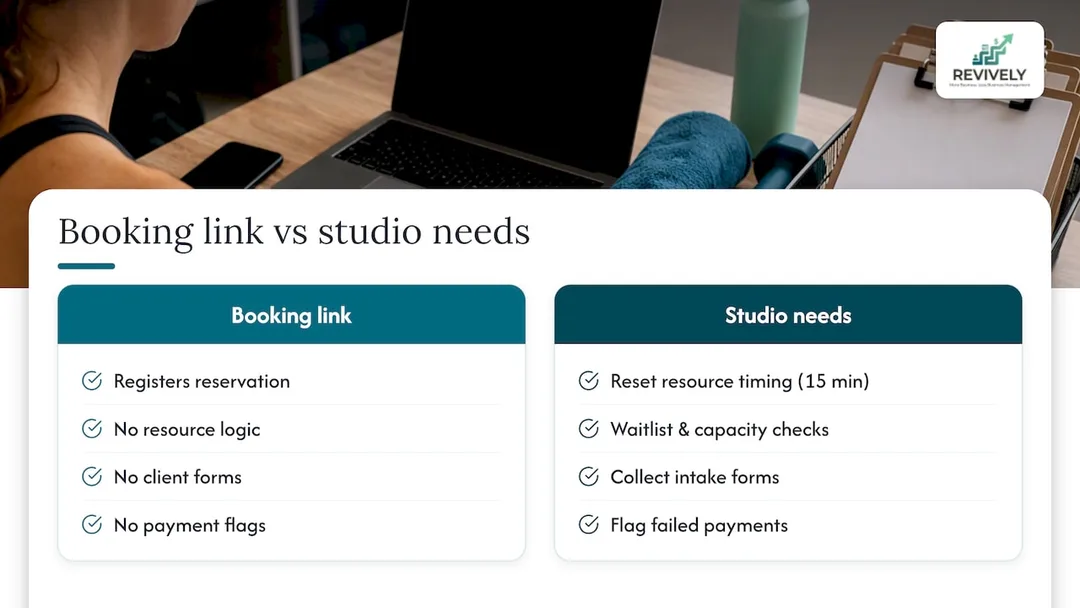
A standalone Google Calendar link is blissfully unaware that:
- Your infrared sauna requires a fifteen-minute cleaning buffer between clients.
- Your Monday Pilates reformer class already has six people on a waitlist and needs automated management.
- A new client needs to sign a specific health intake form before their first appointment.
- A client's membership payment failed last week, and they can't book until it's resolved.
- You need to issue a 100% legally compliant Australian Tax Invoice for their casual class or membership purchase, complete with 10% GST.
This is the operational gap we see time and again with Australian spa, yoga, Pilates, recovery, and dance studios. The Google link gets the booking in the door, but the actual day-to-day running of the studio is still a manual, spreadsheet-driven, chaotic mess.
"A basic Google booking link is a marketing tool for acquisition. It's not an operational backbone for your studio. As soon as you scale beyond a handful of clients or offer more than one service, you'll hit a wall."
- Andreea, Founder of Revively
How Revively simplifies comprehensive booking and studio management
Revively exists for that exact moment when a simple booking link is no longer enough. Instead of endlessly juggling a Google Business Profile link, a separate Google Calendar page, a spreadsheet for waitlists, and a separate accounting system, everything is unified on one intuitive dashboard - purpose-built for wellness and fitness studios across Australia.

Here's how Revively steps up where Google links fall short, with a keen eye on Australian studio needs:
| Feature Area | Basic Google Booking Link | Revively: Unified Cloud Command Centre |
|---|---|---|
| Booking Scope | Single appointments/classes, one resource (e.g., your time). | Multi-resource scheduling: Tracks rooms, saunas, equipment, and staff simultaneously, with built-in cleaning buffers. |
| Client Management | None beyond name/email. | Full CRM: Client profiles, booking history, attendance tracking, contact details, payment info. |
| Australian Compliance | Not applicable. | Australian Data Residency & Privacy: Client data, booking histories, and sensitive health intake forms stored locally, fully APPs compliant. |
| Financials & Tax | Manual invoicing, manual GST calculation. | Flawless GST & Tax Invoice Handling: Natively calculates 10% GST, issues legally compliant Australian Tax Invoices automatically. |
| Accounting Integration | None. | 100% Legal Xero Integration: Automated two-way mapping of tax codes, revenue accounts, and liabilities for flawless, audit-proof BAS. |
| Membership Handling | Not possible. | Rolling memberships & class packs: Automates recurring payments via Stripe, reconciles seamlessly with Xero. |
| Waitlist Management | Manual process via external tools. | Automated waitlists: Promotes clients automatically when a spot opens, notifying them instantly. |
| Client Onboarding | Manual forms or third-party links. | Digital intake forms: Collects waivers and health history before the first visit, stored securely with APPs compliance. |
| Automation | None. | Automated reminders, follow-ups, payment processing, membership renewals. |
| Reporting | Basic (if any) via UTMs & Google Analytics. | Comprehensive business analytics, client retention, revenue trends. |
A studio running a single, simple weekly timetable might manage fine on a Google Calendar link for a while. But an Australian studio running multiple class types, several treatment rooms (hot yoga, infrared saunas, massage rooms), diverse equipment (reformer Pilates, spin bikes), and a growing membership base usually hits the ceiling of those basic tools faster than expected.
If that sounds like your studio - growing, complex, and needing a robust Mindbody alternative designed for the Australian market - then explore our online booking solutions page to see how Revively transforms your booking experience. Ready to see the difference? Our pricing page outlines the Solo, Growth, and Pro plans, so you can easily find the perfect fit for your team size and operational needs.
Official Guides and Support Pages
- Google Business Profile Help: Manage your local business links for adding and editing appointment links.
- Google Calendar Help: Learn how to Create an appointment schedule and share your appointment schedule.
- Community Guide: Boost local visibility with Google Business Profile offers insights into provider links versus custom links.
Sources
- Manage your local business links - Google Business Profile Help
- Create an appointment schedule - Google Calendar Help
- Share your appointment schedule - Google Calendar Help
FAQ: Your Google Booking Link Questions Answered
How do I add a booking link to Google for my Australian studio?
You can either add a manual URL under Info > Appointment links in your Google Business Profile or create an appointment schedule in Google Calendar and share that link. Manual Business Profile links typically appear within 24 to 48 hours of saving.
How do I create a Google booking link for my spa or wellness centre?
In Google Calendar, select Create > Appointment schedule. Set your session duration, availability, and the booking form questions clients need to answer. Once saved, Google automatically generates the link, which you can then copy from the 'Booking pages' panel to share or embed on your website.
Is it possible to make reservations automatically link to a Google calendar?
Yes. A Google Calendar appointment schedule books directly onto your calendar the moment a client selects a time, eliminating manual entry. You can control your availability by setting buffer times and daily booking limits when you build the schedule.
How do I create a Google scheduling link for my Pilates studio?
Build an appointment schedule in Google Calendar. Configure the duration of your sessions, your studio's availability, and any required client fields. Save it, then copy the resulting link from the 'Booking pages' panel. You can also use the 'Website embed' option to integrate it as a button or inline page on your website.
Does a custom booking link show up in Google's reporting?
No. While Reserve with Google provider bookings are tracked in Reserve with Google's own reporting, a manual Business Profile link or a Google Calendar appointment schedule link does not appear there. If you need to track where bookings originated, add UTM parameters to your link and monitor your analytics tool.
Recommended for Australian Studio Owners
- Ditch the WordPress Booking Headache: Why Studios Need a CRM, Not Just a Widget (Especially in Australia)
- Stop the Leakage: 10 Operational Fixes to Supercharge Your Studio Bookings
- How to Avoid Double Booking: A Studio Owner's Checklist
- Stop the Booking Chaos: Your Australian Studio Deserves Smarter Online Bookings