
Prevent Late Starts With Appointment Buffer Times for Studios (10 - 60 Minute Blocks)
! Therapist resetting a clean treatment room
Appointment buffer time is the extra chunk of minutes you add before or after a booking so one appointment doesn't run straight into the next.
Picture this: your 10 AM client breezes in 5 minutes late, runs 5 minutes over, and then settles in for a chat at reception. Suddenly, your 11 AM client is waiting, the massage therapist is fuming, and the entire day's schedule has started to unravel, one frustrated glance at the clock at a time. Sound familiar?
That's the domino effect of a studio operating without a buffer.
Appointment buffer time isn't some fancy corporate buzzword. It's the essential, invisible padding you build into your schedule - a strategic chunk of minutes before or after a booking. It prevents one appointment from slamming directly into the next, giving your team breathing room to reset, prep, or simply take a moment. We're talking anywhere from a quick 5-minute pause to a more substantial 60-minute reset, depending on what your service, staff, and space actually need.

The simplest rule? Start with some buffer. Make it a short, non-zero block - say, 5 to 15 minutes. Whether it sits before, after, or both depends entirely on your service. Ignoring it isn't optimising your day; it's asking for chaos.
TL;DR - Get Your Studio Schedule Under Control:
- Stop booking back-to-back: Most Australian studios need a 5 to 15-minute buffer after appointments. Don't guess; audit your actual overrun data for a month.
- Customise your calm: Build unique buffers for each resource (room, reformer, sauna) or service type. Massage rooms need longer cleaning times than a quick consultation.
- Trust your tech (but verify): Automated booking systems often hide buffers from clients. Ensure your buffers apply across all booking channels and adjust slot lengths accordingly.
- Don't just buffer, remind: Pair smart buffer settings with automated reminders. This cuts no-shows and manages capacity effectively.
- Lock it in with Revively: Software that enforces your buffer policies automatically prevents double-booking and streamlines multi-resource scheduling for rooms and staff.
Table of Contents
- Why your Australian studio needs appointment buffer time
- Common buffer patterns for spas, yoga studios, and clinics
- How do you calibrate the right buffer for your studio?
- Buffers in your booking software: where to find and set them
- Buffers, reminders, and no-show management: a powerful trio
- Real-world buffer numbers from Australian wellness and fitness centres
- When to be conservative versus agile with your buffers
- Enforce your buffers automatically with Revively: The Australian-made Solution
- Sources
- FAQ
Why your Australian studio needs appointment buffer time
Think of buffer minutes as the quiet hero of your studio's operations. Most scheduling tools treat this as invisible padding. Your client sees a relaxing 60-minute massage on your booking page, but behind the scenes, your booking system might block out 75 or even 90 minutes. That extra time? It's for your therapist to reset the room, tidy up, grab a glass of water, and review notes before the next client arrives. As even giants like Microsoft Bookings confirm, a 1-hour appointment with a 15-minute pre-buffer truly requires a 75-minute calendar slot, yet the customer never sees or edits that number.
Skipping the buffer entirely is a direct route to burnout and customer frustration. One client running a touch late, one stubborn mark on a yoga mat, one unexpected conversation at reception - and every single booking after it for the rest of the day slides back. Not only does this stress your team and irk your clients, but it can also hit your bottom line when you inevitably run out of time for that final booking.
On the flip side, going too far with buffers means you're bleeding valuable bookable capacity. It's a delicate balance.
Beyond operational efficiency, there's a human element. Research (like that summarised by Harvard Business Review) shows that short breaks between tasks lead to better cognitive recovery and sharper output. For your staff, who are switching between clients, services, and personalities all day, these small pockets of time aren't a luxury; they're essential for sustained quality of service and their own wellbeing.
Here's the quick take on different buffer approaches:
| Buffer Strategy | Impact on Bookable Slots | Impact on Delays & Stress |
|---|---|---|
| Zero Buffer | Maximises bookable slots (theoretically) | Guarantees delays compound; high staff stress; poor client experience |
| Small Buffer (5-15 mins) | Absorbs typical overruns; minor capacity reduction | Manages minor delays; improved flow; staff feel less rushed |
| Large Buffer (30+ mins) | Protects thorough resets; significant capacity reduction | Ideal for complex cleanups or travel; minimises all delays |
Common buffer patterns for spas, yoga studios, and clinics
When it comes to buffer patterns, most studio scheduling falls into three main categories. The most common, and often the best default for an Australian studio, is a fixed buffer after every appointment. It's predictable, easy for staff to understand, and simple to audit when you're looking to optimise.
The second approach involves clustering several bookings back-to-back, then inserting one longer reset block. This works well for a massage therapist performing four 30-minute treatments consecutively before a single, substantial 20-minute break.
The third method is to set buffers per service rather than uniformly. This allows you to give longer changeover times to treatments that genuinely demand it (like a full body scrub requiring a shower clean) and no buffer at all to quick, virtual consultations.
According to NoShowCalc's guidance, a 5 to 15-minute range is generally calibrated for most service businesses, with adjustments per specific service. Here are some sensible starting points for Australian studios:
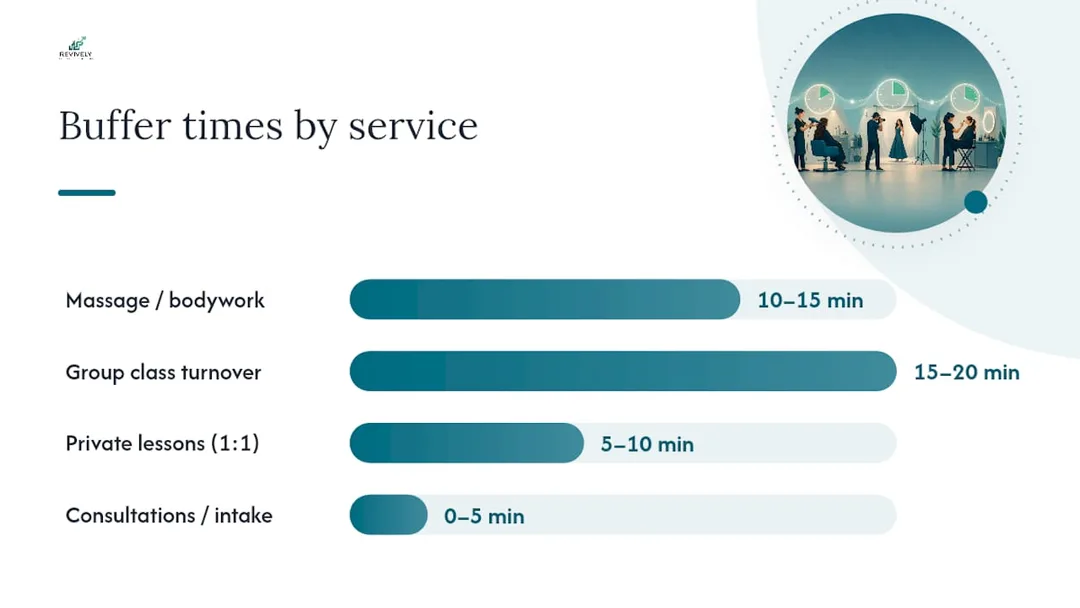
- Massage or bodywork: 10 to 15 minutes for linen change, sanitisation, and room reset.
- Group class turnover (yoga, Pilates, dance): 15 to 20 minutes, especially if equipment needs wiping down, mats rearranging, or the studio needs a quick sweep.
- Private lessons or 1:1 sessions: 5 to 10 minutes for client notes, quick chat, and setting up for the next client.
- Consultations or intake appointments: 5 minutes, sometimes even zero if it's a very quick, streamlined virtual format where no physical reset is needed.
Other scheduling guides, like Voksha's appointment booking guide, echo this sentiment, recommending the same 10 to 15-minute range specifically to reduce rushing and protect service quality. The message is clear: don't book back-to-back all day, every day.
How do you calibrate the right buffer for your studio?
Guessing is the most common mistake. Instead of pulling a number out of thin air, run a simple one-month audit. It costs you nothing but a spreadsheet and a little focused attention.
- Track: For an entire month, meticulously record the scheduled end time versus the actual end time for every appointment. Note separately if a client arrived late versus if the service itself ran over.
- Calculate Overrun Frequency: What percentage of your bookings consistently run past their scheduled end?
- Calculate Average Overrun Length: When appointments did run over, by how many minutes, on average?
- Set Your Starting Buffer: Use this hard data. If your deep tissue massages overrun by an average of 8 minutes on 40% of bookings, a 10-minute buffer is a solid, data-driven starting point, not a random guess.
- Re-audit & Adjust: After another month with your new buffers, repeat the audit. If overruns are still frequent, either lengthen the buffer or genuinely reassess the service duration. A buffer simply papering over an undersized service slot won't fix the root cause.
Pro Tip for Australian Studios: Run this audit separately for each staff member and each service type. Lumping everyone together hides the real problem areas in your multi-resource studio scheduling.
Buffers in your booking software: where to find and set them
While vendor language might vary, the core concept remains consistent. When you're looking to configure buffer times, search for settings like "buffer time," "prep and finish time," or "before/after appointment" toggles within your scheduling software. These are typically nested within individual service details or general booking preferences, rather than being visible on the main calendar screen itself.
The process is almost universally the same across platforms: open the specific service you want to adjust, locate the buffer or preparation time field, set separate 'before' and 'after' values if your tool allows it, then save. From that moment on, every new booking for that service will automatically reserve that extra time on your calendar. Setmore's help documentation explicitly confirms that buffer minutes are added to the service duration on the backend, while the booking page a client sees still only displays the plain service length.
This crucial gap between what the client sees and what's actually blocked on your calendar needs careful attention:
- Confirm universal application: Ensure buffers apply to all your booking channels - your direct website, third-party aggregators, and your internal admin calendar.
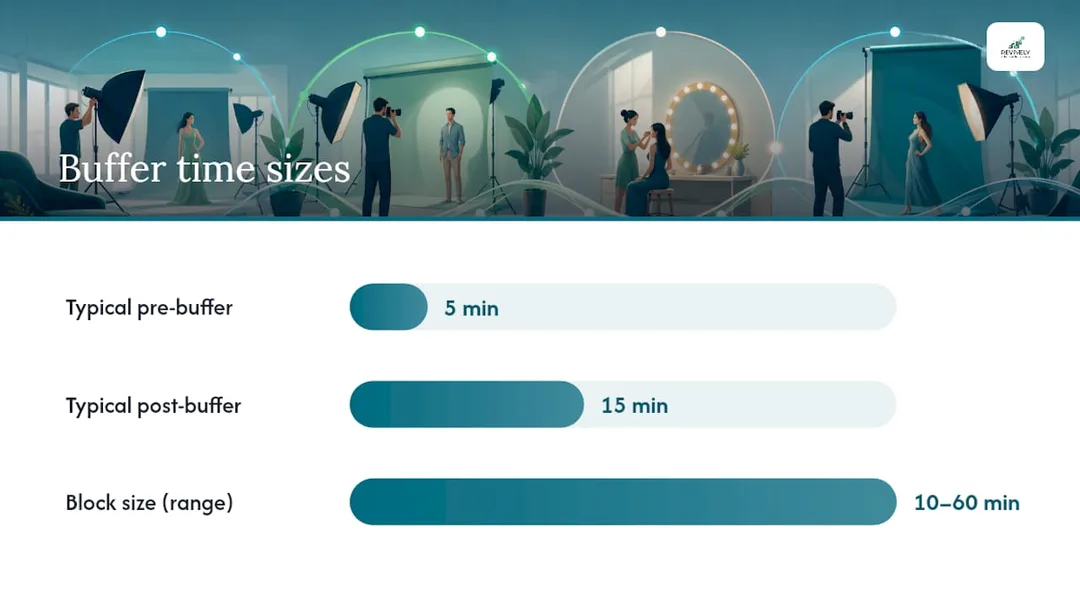
- Flexible padding: Check if your system allows for different 'before' and 'after' buffers (e.g., a 5-minute pre-buffer for client arrival, but a 15-minute post-buffer for thorough room reset).
- Capacity impact: Always re-check the total slot length after adjusting buffers. A seemingly small buffer change can silently shift how many appointments realistically fit into your day.
- Overrides: Be wary of staff-specific or resource-specific overrides that might inadvertently conflict with your studio-wide default buffer policies. This is especially true for multi-resource studio scheduling.
Buffers, reminders, and no-show management: a powerful trio
Buffers absorb delays. They don't, however, magically stop no-shows from happening. That's the critical job of automated reminders, and the two functions work best when treated as a combined system rather than separate problems. A practical cadence for Australian studios often involves a reminder roughly 24 hours before the appointment, followed by a second one 1 to 2 hours prior. This gives clients ample opportunity to confirm, reschedule, or cancel, preventing late cancellations and simple "forgot-about-it" no-shows.
When a client does no-show, a buffer already baked into your schedule provides crucial breathing room. It gives you space to potentially backfill the slot from a waitlist without affecting the next client, who remains blissfully unaware anything went wrong. Without that pre-allocated slack, a no-show leaves either a dead, revenue-losing gap or triggers a frantic scramble that stresses your team.
- Pair wisely: Every service buffer should be paired with at least one automated reminder.
- Quantify the cost: Use a no-show cost calculator to truly understand what late cancellations are costing your studio before you decide how much buffer or deposit protection is worth integrating.
- System thinking: Treat buffers and reminders as two integrated parts of a single, client-centric scheduling system.
Real-world buffer numbers from Australian wellness and fitness centres
Australian studios, much like their global counterparts, enforce buffers far more rigidly than many solo practitioners realise. A treatment room after a hot stone massage, for instance, genuinely needs the sheets changed, the oils wiped down, and the room aired out. A Pilates reformer studio running back-to-back classes requires equipment to be meticulously wiped and reset before the next group walks in. Revively's own operational notes, based on real studio insights, place typical enforced cleaning buffers between 10 and 60 minutes, depending on the room, the service, and the level of sanitisation required.
Class turnover also introduces its own unique wrinkle: waitlist promotion. A busy dance studio running a full 6 PM contemporary class needs its buffer to cover not just the physical room reset, but also the crucial administrative moment where a cancelled spot gets automatically offered to the next person waiting. This swift, automated action turns potential lost revenue into a retained booking.
- Resource-first thinking: Assign buffers per resource (treatment room, reformer, sauna, studio space), not just per staff member.
- Onboarding clarity: Brief all staff on buffer expectations during their onboarding, not after the first double-booking complaint or stressed client incident.
- Transparency is key: Consider displaying live buffer status on foyer screens or digital signage. This subtly manages client expectations and shows why the next session hasn't started precisely on the dot.
- Quarterly review: Review your booking page settings and buffer allocations quarterly. Your service mix changes, client demands evolve, and your buffers should adapt too.
When to be conservative versus agile with your buffers
The fundamental trade-off never disappears: bigger buffers protect client experience and staff sanity, while smaller ones protect how many appointments you can sell in a day. It's a strategic decision for every all-in-one spa booking software user.
Go conservative (i.e., use larger buffers) for:
- Sanitation-heavy services: Anything involving extensive cleaning, linen changes, or equipment sterilisation (e.g., deep facials, body treatments, post-sweat classes).
- Multi-room travel: If staff need to move between different rooms or locations within your centre.
- Services prone to overruns: Treatments that regularly run long, complex consultations, or bespoke personal training sessions where clients often ask extra questions.
- High-value services: Where a flawless client experience is paramount.
Go agile (i.e., use tighter or no buffers) for:
- Virtual consultations: No physical reset needed, purely time-based.
- Quick check-ins: Under 20 minutes, where the client barely has time to settle before it's over.
- Automated group sessions: Where entry/exit is self-managed and equipment is minimal.
- Services with strict time limits: Where the service must end on time, regardless of client conversation.
Finding your studio's sweet spot requires understanding your workflow, listening to your team, and observing client behaviour. It's an ongoing process of optimising for both profitability and wellbeing.
Enforce your buffers automatically with Revively: The Australian-made Solution
Manually policing buffer times across multiple rooms, saunas, staff calendars, and equipment schedules is precisely the kind of mind-numbing admin that eats a manager's afternoon. That's why Revively, your Australian-made unified cloud command centre, is built for this specific mess. It lets you lock in enforced cleaning and turnover buffers of 10 to 60 minutes across every resource, ensuring a treatment room, reformer studio, or sauna can't be double-booked before its reset time is genuinely up.

Revively isn't just about buffers. This robust system handles comprehensive multi-resource studio scheduling across rooms and equipment, automates waitlist promotions when a class spot opens up, and integrates natively with Stripe and Xero. This means payments and flawless GST reconciliation stay perfectly in sync, eliminating the need for a second tool or manual spreadsheet errors.
Australian Compliance Mandate:
Data Residency & Privacy: Rest easy knowing your client data, booking histories, and sensitive health intake forms are stored locally in Australia, fully complying with the Australian Privacy Principles (APPs). Your clients' privacy is paramount.
GST & Tax Invoice Handling: Revively natively handles 10% GST calculations across casual classes, memberships, and multi-resource packages. It automatically issues legally compliant Australian Tax Invoices directly to your clients, every single time.
Xero Integration for BAS Accuracy: Our two-way Xero integration guarantees 100% legal tax compliance. Automated mapping of tax codes, revenue accounts, and liabilities ensures your quarterly Business Activity Statements (BAS) are always flawless and audit-proof, removing manual spreadsheet errors and saving your accountant headaches.
Studios currently juggling a generic booking app, a separate reminder system, and a desperate spreadsheet for cleaning schedules tend to feel the Revively difference fastest. If enforced buffers, an all-in-one spa booking software, and one connected, GST compliant studio software calendar sound like what your wellness or fitness centre needs, explore our online booking solution or compare plans on the Revively pricing page to see which tier fits your team size and studio ambition. It's a powerful Mindbody alternative Australia can truly rely on.
Sources
- Appointment Buffer Time: How Much, When, and Why | NoShowCalc
- Add buffer time between appointments | Support - Setmore
FAQ
What Does Buffer Time Mean in Bookings for Australian Studios?
In the context of Australian studio bookings, buffer time is the extra, invisible duration added to a service's calendar block (before, after, or both). This padding gives staff crucial room to reset, sanitise, travel between rooms, or simply catch up before the next client. While your clients booking online typically only see the service's advertised length, the buffer discreetly expands the slot behind the scenes, as confirmed by providers like Setmore.
What Does Buffer Mean in Scheduling Software Specifically?
In scheduling software, "buffer" refers to a configurable setting, often labelled "buffer time," "prep/finish time," or "changeover period." This feature allows you to pad a service's duration on the calendar without altering what your client sees on the public booking page. Systems like Microsoft Bookings even allow you to set distinct buffer periods before and after each service, giving you granular control over your studio's operational flow.
What Is the Purpose of a Buffer Period Between Appointments in a Wellness Centre?
The primary purpose of a buffer period is to absorb minor overruns, accommodate essential cleaning and sanitisation, or account for staff travel time between different treatment rooms or areas. This prevents one late finish from cascading and pushing back every subsequent booking for the rest of the day. A well-calibrated buffer, typically 5 to 15 minutes for most services, effectively protects both staff pace and the overall client experience without sacrificing excessive bookable capacity.
How Much Buffer Time Should an Australian Studio Use?
The ideal buffer time for an Australian studio depends heavily on the specific service. Massage or treatment rooms often require 10 to 15 minutes for thorough reset and sanitisation, while group class turnover might benefit from 15 to 20 minutes for equipment wipe-down and rearrangement. Quick consultations, especially virtual ones, might need no buffer at all. To determine your studio's precise needs, conducting a one-month audit of actual overruns provides a data-driven figure, far more reliable than a mere guess.
Does Revively Let You Set Different Buffers Per Service or Resource?
Yes, Revively is engineered to support enforced cleaning and turnover buffers per resource (e.g., specific rooms, reformers, saunas) and per service, with fully configurable times. This allows Australian studios to tailor buffers based on the unique requirements of each space and offering, ensuring efficient operations and superior client experience. For details on current pricing plans that include this feature, please visit the Revively pricing page.