
Full billing preview: Migrate class data for Australian studios
! Studio manager reviewing secure data export
Yes, you can migrate class schedules, attendees, waitlists and membership billing with minimal disruption.
You know the feeling. The crumpled receipts, the "temporary" spreadsheet for memberships, the booking system that's more a patchwork quilt than a unified command centre. You're ready to switch. Ready to optimise. Ready to reclaim your evenings. But then the cold sweat starts: the migration.
Moving your studio's entire operational brain - from class schedules and attendee lists to sacred payment details and client waivers - into a new system feels like open-heart surgery on your business. You're not just moving data; you're moving trust, compliance, and your livelihood. And in Australia, that means navigating a very specific set of requirements around GST, data privacy, and robust accounting.
Good news: it doesn't have to be a disaster. With the right strategy and a vendor who genuinely understands the Australian studio landscape, you can migrate class schedules, attendees, waitlists, and membership billing with minimal disruption. It starts with exporting a full copy of your critical records and getting a written, record-by-record migration scope from your incoming vendor. The riskiest step isn't the export itself. It's the billing preview, and that's precisely where most studios need to slow down and get forensic.

TL;DR: Don't wing it, mate. Your studio's migration success hinges on:
- Forensic Billing Preview: Manually audit every active member's billing. This prevents post-migration GST nightmares and ensures legally compliant Australian Tax Invoices from day one.
- Comprehensive Export: Pull all critical data - client profiles, waivers, memberships, future bookings, and transaction reports - before touching a new system. Archive it securely.
- Data Housekeeping: Map, normalise, merge duplicates, and decide which historical data to archive separately for a smooth import into your shiny new system.
- Strategic Cutover: Enforce a strict freeze window, limit old system access, and equip staff with clear scripts to handle member questions.
- Post-Migration Vigilance: Reconcile daily for the first two billing cycles. Keep archived exports for at least 90 days to verify any discrepancies and ensure 100% BAS accuracy.
- Australian Compliance Focus: Ensure your new system handles Australian Data Residency & Privacy (APPs), GST calculations, and seamless Xero integration for audit-proof BAS.
Table of Contents
- What is the class data migration process for studios?
- What data should you export before switching systems?
- How do you map and clean data before importing?
- How does a billing preview prevent import disaster?
- What's the safest way to handle cutover day?
- What does post-migration verification actually involve?
- How should you communicate the switch to members and staff?
- Why does data security matter before you even start?
- What privacy and compliance issues come up during migration?
- What tools help studios manage the migration itself?
- [What are the most common migration mistakes to avoid?](#what-are-the-most-common-migration-mistakes to-avoid)
- How do you keep large data sets from slowing down the migration?
- A short note on what actually breaks migrations
- Ready for a guided migration instead of doing it solo?
- Sources
- FAQ
What is the class data migration process for studios?
Migrating your studio's data isn't just about moving timetables. It's about seamlessly shifting everything - class definitions, enrolled attendees, waitlists, multi-resource bookings, class packs, and all the critical billing data tied to them - into a new unified cloud command centre. Most studio owners tackling this aren't doing it out of curiosity; they're staring down a deadline and a mountain of operational stress.
Here's the working checklist, in the order it actually needs to happen, to ensure your wellness or fitness studio avoids costly errors:
- Export & Archive: Pull every critical record: client profiles, active memberships, class packs, future bookings, waivers, attendance history, and staff records. Securely archive this before you even look at the new system.
- Get the Vendor's Scope in Writing: Demand a record-by-record migration scope. This isn't a vague "we transfer everything" promise; it's a detailed list marking each data type as 'transfers fully,' 'partially transfers,' or 'does not transfer.'
- Run a Full Billing Preview: Not a sample. Not a demo. A full, actual billing preview covering every active member, in a sandbox environment, using your exported data. This is non-negotiable for GST compliance and accurate Australian Tax Invoices.
- Plan the Cutover Precisely: Define your freeze window, craft staff scripts, and prepare crystal-clear member notices.
- Reconcile Daily: For the first two billing cycles post-launch, meticulously reconcile payments, bookings, and permissions. This is crucial for BAS accuracy and catching discrepancies early.
Pro Tip: Before you sign anything, ask your vendor one blunt question: "What happens, procedurally and financially, if the first billing cycle after go-live fails for a significant chunk of members?" Their answer will tell you more about their commitment than any feature list ever could.
What data should you export before switching systems?
The export list is often longer than most studio owners expect. Skipping a category is how you end up chasing missing waivers or incorrect membership start dates weeks after go-live. Pull these essential records before you even touch your new system:
- Client profiles & contact details: The basics, but ensure every field is captured.
- Consent forms & waiver PDFs: Crucial for legal compliance.
- Membership contracts: Full details, including unused class pack credits and any unique legacy pricing.
- Attendance history: Useful for reporting and member loyalty programmes, though less critical for day-one operations.
- Future bookings & waitlist positions: Absolutely vital for maintaining continuity.
- Transaction & payout reports: At least the last 12 months for financial reconciliation and BAS preparation.
- Staff records: Roles, permission levels, and contact information.
Crucially, every export needs metadata: who ran it, when, its exact scope, and the report name generated by your old system. This detail might seem fussy now, but it's invaluable when a vendor asks, "Which export are you referencing?" three weeks into the project, and you can pinpoint it instantly.
Maintain an independent, encrypted archive of the full export while your old subscription is still active. This isn't optional caution; it's fundamental. As system export guidance from AVEVA emphasises for a completely different industry: once you lose platform access, you lose the ability to prove what was in it. A local encrypted drive or a cloud folder you control, separate from either vendor, is the cheapest insurance you'll buy this year.
How do you map and clean data before importing?
Raw exports rarely match a new system's import template field-for-field. This is where most migration delays happen. Before you upload anything to your new all-in-one spa booking software or multi-resource studio scheduler:
- Normalise date & time fields: Mixed
dd/mm/yyyyandmm/dd/yyyyentries are the single most common import failure. Pick one format (e.g.,YYYY-MM-DD) and standardise everything. - Merge duplicate client records: Especially where family accounts share a phone number or payment method, or members have accidentally created multiple profiles.
- Flag special or legacy pricing: Ensure it doesn't silently import as the current list price, triggering incorrect charges.
- Decide on historical data: Determine which historical fields are genuinely needed for daily operations (e.g., active memberships) versus those that can be archived purely for reporting (e.g., five years of past attendance).
Pro Tip: Import active bookings and current pack balances as operational data, but archive five years of attendance history as a static reference file. Forcing all historical data into the new system's live database often just slows down every search without providing daily value.
Always validate a handful of sample rows against the vendor's import template before committing the full file. A 20-row test catches formatting problems that a 2,000-row upload will only reveal as a frustrating stream of errors after the fact.
How does a billing preview prevent import disaster?
Run the test import in a sandbox environment using your real exported files, not tidy demo data. Praxium's guide to switching studio software makes a crucial point: a staged test import using actual files exposes formatting quirks and membership edge cases that pristine sample data will completely hide.
Then comes the step that separates a smooth transition from a billing nightmare, especially for GST compliant studio software in Australia:
- Generate a billing preview covering your entire active member base, not just a sample.
- Manually audit that preview member-by-member. Check the billed amount, the next charge date, and the payment method against your old system. Verify that the 10% GST calculation is correct for every membership, casual class, and package.
- Confirm future bookings carried across correctly, waitlists preserved their exact order, and class pack balances match.
- Verify staff roster permissions match what each role genuinely needs.
- Log every single discrepancy and get the vendor's written commitment on fix timelines before go-live. This is your guarantee against BAS inaccuracies.
Skipping this full, forensic audit to save a few hours is the single most common regret owners report after a rushed cutover. It's how incorrect Australian Tax Invoices are issued, leading to client disputes and potential compliance headaches.
| Feature | Outcome with Full Billing Preview Audit | Risk without Billing Preview Audit |
|---|---|---|
| Membership Billing | Accurate 10% GST calculations confirmed for every member; correct monthly fees & charge dates. | Incorrect billing, GST errors, non-compliant invoices, over/undercharging, immediate member complaints. |
| Future Bookings | All class spots, multi-resource appointments, & waitlist positions accurately transferred & confirmed. | Lost bookings, double bookings, scrambled waitlist order, missed appointments, frustrated members. |
| Payment Methods | Clear plan for re-collecting tokenised cards (if not transferable); minimal member friction. | Surprise card re-entry requests at checkout; frustrating experience for members & staff; payment processing delays. |
| Staff Permissions | Role-based access verified; staff can perform duties securely & efficiently. | Staff unable to perform essential tasks; security breaches (e.g., unauthorised refunds); operational slowdowns. |
| Compliance (AU) | Assurance of legally compliant Australian Tax Invoices and robust data for BAS accuracy. | High risk of non-compliant invoices, reconciliation headaches, potential issues during a BAS audit. |
What's the safest way to handle cutover day?
Enforce a strict freeze window - two to four hours is realistic - where no new bookings or edits happen in the old system. Log anything you're forced to change manually during that window so you can reconcile it into the new platform immediately after launch. This mirrors the change control approach in Redwerk's data migration best practices, which specifically warns against the "Monday morning" trap: a studio that goes live Friday night without a freeze often finds Monday's bookings scattered across both systems.
- Make the old system read-only immediately after your final export.
- Switch booking links and app store instructions to the new platform at a scheduled time, not on the fly.
- If saved payment tokens don't carry across (which is common), plan to re-collect cards at the front desk. Pick a high-traffic fortnight to catch most members in person rather than chasing them by phone.
Pro Tip: Script three clear answers for front-desk staff before go-live: "Why did the app change?", "How do I book my usual class?", and "Do I need to re-enter my card?" Staff fumbling these key questions is what actually damages member trust, not the migration itself.
What does post-migration verification actually involve?
The work isn't done at go-live. It's done when the numbers reconcile, when your BAS is audit-proof, and when your financial data integrates seamlessly with Xero.
- Compare key counts: Line-by-line verification of member counts, active membership counts, and class pack balances between old and new systems, especially for your top 50 active accounts.
- Confirm every future booking and waitlist position landed in the correct class and slot.
- Check staff permission levels against your old role structure. A wrong permission level is invisible until someone tries to issue a refund they shouldn't be able to.
- Reconcile the first week's payment batch against your Stripe or payment processor dashboard. Don't just trust what the new system reports internally; cross-reference it with the bank. This is crucial for GST reconciliation.
If your old export and the new system disagree, the export is your source of truth until proven otherwise. Keep it accessible for at least 90 days. A studio that discovers a bookkeeping discrepancy in week six needs that original file, not a promise that it "should be fine." This is critical for defending your BAS if questions arise.
How should you communicate the switch to members and staff?
Members don't care about your migration timeline. They care whether their Tuesday 6 pm Pilates spot still exists, and whether their card is about to be charged twice (with correct GST, of course!).
Send the first notice two to three weeks before cutover: what's changing, why, and what members need to do (usually nothing, aside from downloading a new app if one applies). Send a reminder 48 hours before go-live with the exact switch time. Send a final "we're live" message the morning of, including a direct link to book and a support contact for anyone who hits a snag.
Staff need a separate, thorough briefing - ideally a short script rather than a lengthy memo. Your front-desk teams will be answering the same three questions dozens of times in the first week. Rehearsing those answers matters more than any internal documentation.
If payment tokens or waivers didn't transfer cleanly, be upfront about it in the member communication rather than letting people discover it at checkout. Waiver PDFs frequently transfer without their original signature metadata, which is why a planned re-sign fortnight, timed to a high-traffic week, tends to work better than assuming the import handled it. Frame re-collection as a quick five-minute task at check-in, not an inconvenience, and most members won't blink.
Why does data security matter before you even start?
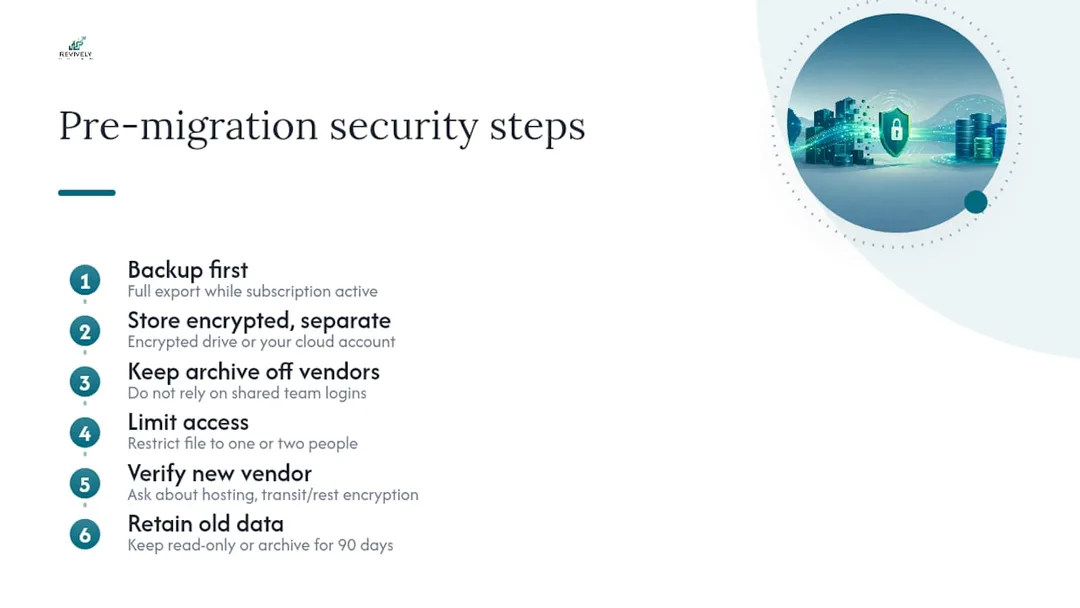
Backup discipline before your multi-resource studio scheduling software migration matters as much as the migration itself, because a failed vendor relationship or a corrupted export can leave you with nothing to fall back on.
Run your full system export while your current subscription is still active and paid. Waiting until after you've given notice risks losing access mid-export. Crucially, store that archive in an encrypted location you control, separate from both the old and new vendor. Whether that's an encrypted external drive or a cloud folder under your own account (not a shared team login), this is paramount for Australian Privacy Principles (APPs) compliance.
Check who has access to the export file itself. Client contact details, payment metadata, and waiver signatures are sensitive. An export sitting in an unsecured shared drive defeats the purpose of archiving it carefully. Limit access to the one or two people running the migration.
Confirm the new vendor's data handling before you upload anything. Ask where data is hosted (insist on Australian data residency for local client data), whether it's encrypted in transit and at rest, and what their breach notification process looks like. This isn't paperwork for its own sake; it's the difference between a controlled transition and a scramble if something goes wrong.
Finally, don't delete the old system's data the moment the new one goes live. Keep read-only access or the archived export for at least 90 days. Most reconciliation problems surface in week three or four, not on day one, and you'll want the original records to check against.
What privacy and compliance issues come up during migration?
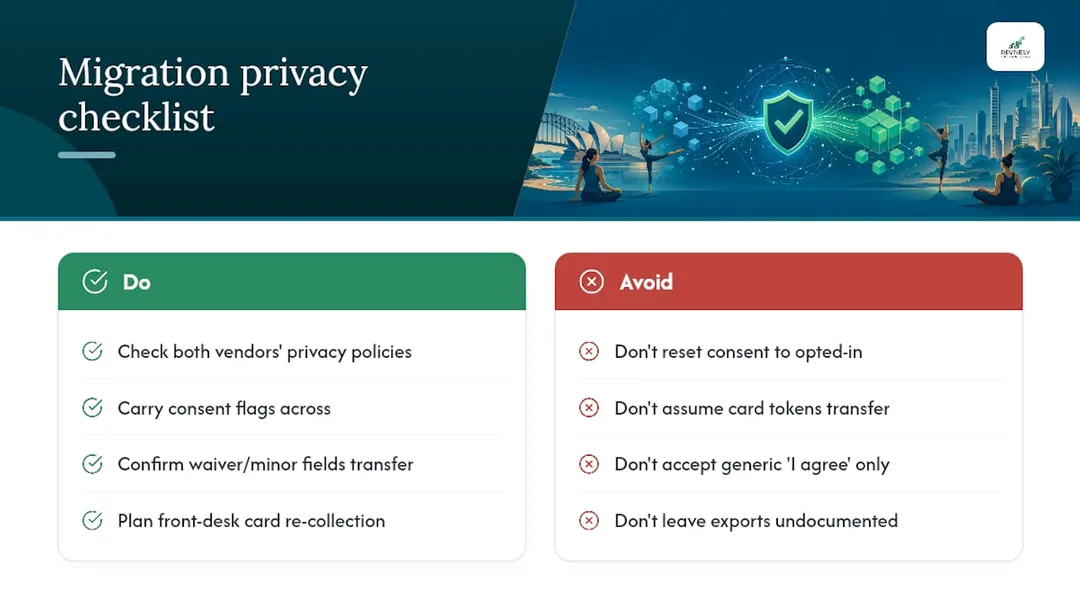
Client data moving between systems is still personal information, and it needs the same handling standards mid-migration as it does day-to-day, especially under the Australian Privacy Principles (APPs).
Check both vendors' privacy policies for how they handle data during a transfer, particularly around consent. If a client withdrew marketing consent in the old system, that flag needs to carry across, not reset to a default "opted in" state. A default reset is a common import mistake and a significant APP compliance risk.
Waivers and intake forms deserve particular attention. If your studio operates in a state with specific waiver or minor-consent requirements, confirm the new system captures the exact same fields, not just a generic "I agree" checkbox. Where signature metadata doesn't transfer cleanly, a planned re-sign fortnight solves both the operational gap and the compliance question in one go.
Payment data is the other major pressure point. Saved card tokens tied to a payment processor typically don't move between systems. This isn't a vendor failing; it's how tokenisation is designed to work for security reasons. This is exactly why front-desk card re-collection needs to be part of your cutover plan rather than an afterthought, ensuring GST compliant processing.
Document who accessed the export files and when. If a client ever asks what happened to their data during the switch, you want a clean answer, not a guess. This paper trail is vital for APP transparency.
What tools help studios manage the migration itself?
Most studios don't need highly specialised migration software. The real toolkit is simpler: robust spreadsheet software for mapping and cleaning exported files, a secure encrypted storage location for your archive (critical for Australian data privacy), and the new vendor's own import and test-import functions.
Where it gets genuinely useful is when the destination platform bundles migration support directly into onboarding, rather than leaving you to reformat CSV files solo. A platform offering AI-assisted onboarding from an existing website or system, a sandbox for test imports, and a written migration scope as standard practice removes a lot of the manual reconciliation work described above. Look for Mindbody alternatives Australia that offer this level of support.
Spreadsheet tools remain essential regardless of which platform you land on, because raw exports almost never match an import template exactly. Budget ample time for that clean-up stage, no matter how polished the new system's marketing promises.
What are the most common migration mistakes to avoid?
The same handful of mistakes show up across almost every rushed studio migration, costing owners time, money, and customer trust:
- Sampling the billing preview instead of auditing every active member. This is the single biggest cause of post-launch billing complaints and GST calculation errors.
- Trusting a vendor's "we transfer everything" claim without a written, detailed scope. Vague promises about free transfers routinely omit field-level detail, and you only find out what didn't transfer after go-live.
- No freeze window on cutover day. Bookings made in the final hours on the old system vanish or double up, causing chaos.
- Assuming payment tokens will carry across. They usually won't. Discovering this at the front desk on day one is avoidable with two weeks' notice to members.
- Deleting the old export too early. Reconciliation problems often surface in week three or four, well after most owners have already cleared their old files. Keep it for at least 90 days for BAS reconciliation.
If you hit an import error partway through, don't force the file through repeatedly hoping it resolves itself. Fix the specific rows the vendor flags, re-test that subset, then re-run the full import once it's clean.
How do you keep large data sets from slowing down the migration?
A studio with 200 active members and five years of attendance history behaves very differently during import than one with 15 members and six months of records. Splitting the import into batches (memberships first, then future bookings, then historical attendance) tends to surface errors faster than uploading everything in one massive file.
Prioritise operational data (active memberships, upcoming bookings, current pack balances) before historical data (past attendance, closed transactions). If the batch import stalls or times out, you want the live-critical data in already, rather than stuck behind a five-year attendance file.
Archive rarely-queried historical data as a static file rather than forcing it into the new platform's live database. Most studios never need attendance data from three years ago for daily operations. Keeping it as a labelled export, rather than crammed into the new system, keeps the live database lean and searches fast.
A short note on what actually breaks migrations
Most failures I've seen traced back to owners skipping the full billing audit because it felt tedious, not because the technology failed. Assign one person to own go-live day, script the front-desk answers in advance, and the rest tends to fall into place. Your business runs on people, not just software.
- Andreea
Ready for a guided migration instead of doing it solo?
If you'd rather not run the export, mapping, and forensic billing audit yourself, a platform built to absorb that complexity changes the calculation. Revively (Revively.app) is engineered as a unified cloud command centre (CRM + multi-resource scheduler) for spas, yoga, Pilates, clinics, and dance studios across Australia. It's purpose-built to eliminate the software fragmentation that makes migrations painful in the first place.

Revively provides comprehensive migration support, including:
- Flawless GST & Tax Invoice Handling: Native 10% GST calculations across casual classes, memberships, and multi-resource packages, automatically issuing legally compliant Australian Tax Invoices to clients.
- 100% Legal Xero Integration for BAS Accuracy: Automated two-way mapping of tax codes, revenue accounts, and liabilities ensures your quarterly Business Activity Statements (BAS) are flawless and audit-proof, removing manual spreadsheet errors.
- Australian Data Residency & Privacy: All client data, booking histories, and sensitive health intake forms are stored locally in Australia, fully complying with the Australian Privacy Principles (APPs).
- Memberships & Class Packs: Seamless transfer of billing logic and active balances.
- Digital Intake Forms: Easing waiver handling and ensuring compliance.
- Complex Multi-Resource & Group Class Scheduling: Complete with automatic waitlist promotion and detailed timetable management.
If you want a written, record-by-record migration scope before committing to anything, start with Revively's data import and migration features. Then compare plans on the pricing page or explore how class scheduling handles waitlists and packs day one.
Sources
- How to Handle Studio Software Migration With Zero Downtime
- Switching studio software without losing members | Praxium
- Data migration best practices - Redwerk
FAQ
How long does it take to migrate class data for an Australian studio?
Most Australian studios complete a full migration - including export, test import, critical billing preview, and cutover - within a few weeks. The forensic billing preview and audit step usually takes longer than owners expect, so build in extra time there rather than rushing cutover day and risking GST errors or BAS inaccuracies.
Will my members' saved payment cards transfer automatically?
Usually not. Payment processors tokenise card details for security. For instance, Stripe tokens are platform-specific and rarely move between competing systems. This is why front-desk re-collection during a high-traffic fortnight works better than assuming the import will handle it, ensuring smooth payment processing with correct GST.
What should I ask a new vendor before committing to a studio software switch in Australia?
Ask for a written, record-by-record migration scope, stating exactly what transfers, what partially transfers, and what doesn't. Crucially, enquire about their native support for 10% GST calculations, automated Australian Tax Invoices, Xero integration for BAS accuracy, and a commitment to Australian data residency complying with APPs. Also, ask their procedure if the first billing cycle after go-live fails for any members. Platforms like Revively support this by offering a documented migration scope before you commit to a plan.
Do I need to keep my old system data after switching?
Keep read-only access or a full archived export for at least 90 days. Most reconciliation issues, mismatched balances, or missing bookings often surface in week three or four, well after the initial excitement of go-live has settled. This archive is vital for cross-referencing and ensuring your BAS is accurate.
What does Revively cost for an Australian studio migrating from another system?
Revively's plans start at $39 AUD per month for the Solo plan, with Growth at $99 AUD per month and Pro at $199 AUD per month, all detailed on the pricing page. Annual billing is also available at a reduced equivalent monthly rate across all three tiers, offering excellent value for a comprehensive all-in-one spa booking software with Australian compliance baked in.
Recommended
- Ditching Spreadsheet Chaos: Your Australian Studio's Guide to Seamless Stripe Membership Billing
- Switching Your Studio Schedule: The Aussie Survival Guide for a Seamless Migration (2-4 Weeks, No Lost Bookings)
- The Australian Studio's Guide to Smarter Invoicing with Stripe
- Seamless Studio Flow: Mastering Class Waitlists with Automation in Australia