
GetTimely Migration for Studios: Avoid APP 11, Xero and Stripe Gaps
! Studio owner checking exported records for migration
The fastest safe route to migrate from GetTimely is to request a full account export immediately, secure that file under APP 11, map every field to your new system, run a sandbox import, test thoroughly, reconcile payments, then cut over.
You know that feeling. The one where you're juggling client bookings, managing staff rosters, processing payments, and then - bam - the thought of migrating your entire studio management system hits like a rogue kettlebell. Data held hostage, compliance nightmares, potential booking chaos, and the dreaded fear of messing up your next BAS. Especially when you're moving off a platform like GetTimely.
It's not just about shifting names and numbers. It's about protecting sensitive client data, ensuring every cent of GST is accounted for, and keeping your Xero ledger sparkling clean. This isn't just admin; it's the backbone of your business, and doing it right means avoiding headaches, fines, and sleepless nights.
The good news? A smooth, secure, and fully compliant migration from GetTimely is achievable. You just need a clear roadmap, an eagle eye for detail, and a system built for Australian realities.

Let's get your studio moved without the meltdown.
The Quick Scan: Your Non-Negotiables for a GetTimely Migration in Australia
- Export Smart: Request a full export - CSV for simple data, JSON for complex multi-resource schedules. Crucially, verify consent flags, custom fields, attachments, and time zones before you even think about mapping.
- Secure Your Data (APP 11 Compliant): Once exported, treat that file like gold. Store it in an encrypted, restricted location. Limit access to only two people. Never email it. Delete local copies as soon as verification is complete and your required retention period (if any) passes. This isn't optional; it's an Australian Privacy Principle.
- Payment & Membership Realities: Card tokens rarely migrate between processors. Plan to re-establish active subscriptions in your new system. Import old membership records as archives for historical reference. Schedule your cut-over between billing cycles to prevent duplicate charges or missed payments.
- Test, Test, Test: Run a full import into a sandbox environment. Check everything: appointment times, staff allocations, payment records, bookings, cancellations, waitlist promotions, and notifications. This is your insurance policy.
- GST & Xero Flawlessness: Ensure your new system handles 10% GST natively and provides legally compliant Australian Tax Invoices. Map transactions precisely to your Xero accounts for audit-proof BAS reports.
Table of Contents
- The Raw Truth About Moving Your Studio Data
- Your Step-by-Step Blueprint for a Painless Switch
- What Data You Actually Need (And How to Get It Right)
- Mapping Your Data: The Devil's in the Detail (And the Clean-Up)
- Payments, Memberships & BAS: Keeping the Cash Flowing (and Compliant)
- Test, Test, Then Test Again: The Sandbox Safeguard
- Your Migration Timeline: What to Expect, Who to Trust
- Common Trip Hazards: What Studios Really Get Wrong
- Revively: Your Australian Co-Pilot for a Seamless Migration
- FAQ
- Sources
- Recommended Resources
The Raw Truth About Moving Your Studio Data
Switching studio software isn't just a technical task; it's an operational reset. Approaching your GetTimely migration as an improvised scramble is a recipe for disaster. Instead, think of it as a carefully choreographed sequence where each step builds on the last, designed to protect your most valuable assets: your client relationships and your financial integrity.
This isn't about avoiding "optional admin." This is about meeting your legal obligations under the Australian Privacy Principles (APPs). Whenever you handle or transfer personal information, you must take reasonable steps to protect it from misuse, loss, or unauthorised access. That includes the export file sitting on your desktop, not just the data within the system.
Here's a snapshot of the critical checks you'll be making:
| Migration Milestone | Key Australian Compliance & Risk Considerations |
|---|---|
| Data Export Request | Ensure you request all relevant data, including consent flags, health notes, and payment histories. Missing data upfront creates APP 11 headaches later. |
| Data Storage & Access | Store exports in Australia-based encrypted storage (if you have local options) or at least highly secure, restricted cloud storage. Limit access strictly to essential personnel. Compliance with APP 11 of the Privacy Act is non-negotiable. |
| Field Mapping | Confirm custom fields like allergy notes or preferred therapists migrate correctly. Losing this means poorer client service and potential health risks. |
| Payment Reconciliation | Match every historical transaction for GST and BAS accuracy. Manual errors here lead to audit risks and financial discrepancies with Xero. |
| Data Residency | Your new system must store client data, booking histories, and health intake forms locally in Australia, fully complying with Australian Privacy Principles. This builds trust and ensures legal adherence. |
| Tax Invoicing | Your new system needs to natively handle 10% GST calculations across all services and automatically issue legally compliant Australian Tax Invoices. |
| Xero Integration | A robust, two-way Xero integration is vital for BAS accuracy. Automated mapping of tax codes and revenue accounts prevents manual errors, ensuring audit-proof quarterly Business Activity Statements. |
Your Step-by-Step Blueprint for a Painless Switch
Think of this as your mission briefing. Each stage has a clear objective, so your team knows precisely what's done and what's next, without the usual scramble.
- Request Your Full Data Export (Early!): Don't settle for summary reports. Ask GetTimely for everything: clients, appointments, staff, services, classes, resources, full payment logs, and any attachments. Be prepared for a lead time from their side; factor this into your schedule.
- Secure That File Like a Vault: The moment the export arrives, lock it down. Store it in an encrypted folder. Restrict access to only the dedicated migration owner and one backup person. Log who accesses it and when. This isn't just good practice; it's a direct compliance measure under Australian Privacy Principle 11. Never, ever email raw export files.
- Inventory & Verify Your Assets: List every table and file you've received against what you expected. Are membership records there? Intake-form answers? If anything's missing, chase it immediately before moving forward.
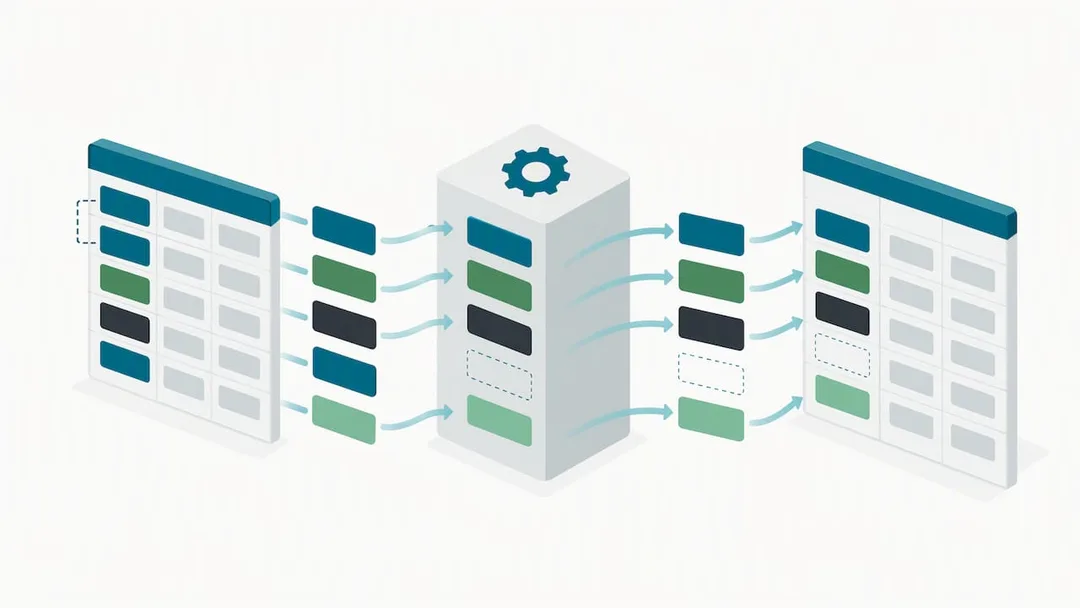
- Map Fields to Your New Platform: This is where you translate "GetTimely-speak" into "new system-speak." Cover clients, services, staff, resources, and class structures. A good mapping document is your bible here.
- Run a Sandbox Import: Crucial. Import your data into a test account on your new system. Then, meticulously check the results against your original GetTimely files.
- Reconcile Payments & Memberships: This is where you verify your financial history against Stripe and Xero. Ensure every transaction lines up.
- Schedule Your Cut-over: Pick a quiet week for the switch. Get final staff sign-off, then transition your bookings to go live on the new platform.
Pro Tip: Appoint one primary migration owner. This person coordinates GetTimely, your bookkeeper, front-of-house staff, and your new software provider. A single point of contact prevents miscommunication and streamlines the process.
What Data You Actually Need (And How to Get It Right)
GetTimely typically offers data exports in CSV or JSON. While CSVs are easy to open, scan, and hand off to a bookkeeper, they often flatten complex data. JSON is almost always preferable for multi-resource studios - especially if you manage treatment rooms, saunas, or multi-instructor classes. JSON preserves those crucial nested structures like class schedules with specific resource attachments, preventing a chaotic unravelling of your timetable.
Before you even think about mapping, confirm you've received every single file your Australian studio genuinely needs:
- Client records: Contact details, consent flags (vital for marketing under Australian spam laws), and communication preferences.
- Appointment history: Timestamps, staff allocations, and specific resource bookings.
- Services, classes, and resource definitions: Your entire offering, with pricing and durations.
- Payment transactions and membership/class pack records: Every financial interaction.
- Notes, intake-form answers, and file attachments: Crucial for client care and health records.
Don't overlook timezones. A 9:00 AM booking logged in one export can suddenly shift by an hour if the timezone wasn't correctly preserved during transfer. This kind of error is deceptively easy to miss until a client misses an appointment or shows up at the wrong time. Also, confirm that all custom fields - like allergy notes, preferred therapists, or specific recovery protocols - have come through intact, rather than silently disappearing.
Mapping Your Data: The Devil's in the Detail (And the Clean-Up)
A detailed mapping spreadsheet is your best friend here. Set up columns for:
- Source Field (GetTimely): e.g., "ClientMobile"
- Target Field (New System): e.g., "Phone"
- Transform Rule: (e.g., "Merge if duplicates," "Format to E.164")
- Sample Rows: A few examples to illustrate the transformation.
This transparency ensures anyone reviewing the sheet can immediately understand how "ClientMobile" becomes "Phone" and, critically, what happens to blank or malformed entries.
Cleaning your data now saves countless hours (and potential client complaints) later:
- Merge duplicate client records before import, not after. This avoids confusion and keeps your CRM clean.
- Fill in missing phone numbers or email addresses where possible. Flag any records you can't complete so you know what's still missing.
- Confirm consent flags migrated correctly. For ongoing marketing communications, this is paramount for Australian spam and privacy compliance.
Historical notes and intake-form answers are often tricky. They rarely fit neatly into a new schema. Decide upfront whether these become archived fields attached to the client profile or standalone attachments. Apply that rule consistently across your entire dataset, rather than making ad-hoc decisions for individual clients.
Pro Tip: Run your mapping sheet past whoever primarily handles your intake forms. They're on the front lines and will spot missing fields or potential data loss that a generic migration checklist might completely overlook.
Payments, Memberships & BAS: Keeping the Cash Flowing (and Compliant)
This is where many studio migrations go off the rails. Losing payment continuity or botching your financial records can lead to messy reconciliations, unhappy clients, and, worst of all, BAS nightmares. You must export transaction IDs and receipts alongside appointment data. These are your essential tools for reconciling against Stripe and Xero post-switch.
A critical reality check: card tokens generally cannot be migrated between payment processors. They're cryptographically tied to the originating platform's vault (e.g., GetTimely's payment gateway). The practical solution is to treat recurring billing as its own project:
- Re-establish active subscriptions in your new system.
- Import historical membership records as archived data for reference. This preserves your audit trail.
To safeguard your financial health and prevent double-billing:
- Export every single payment log before even considering closing your GetTimely account.
- Time your cut-over to land between billing cycles, never in the middle of one. This avoids duplicate charges and reduces client confusion.
- Keep all transaction-level records meticulously organised for GST reporting and accurate bookkeeping long after the switch.
Clean transaction data is paramount for Australian tax compliance. Matching every migrated payment record to its corresponding Xero entry avoids revenue mismatches that become exponentially harder to untangle once a quarter has closed and your BAS is due. Your new system must be capable of handling 10% GST calculations natively across all casual classes, memberships, and multi-resource packages, automatically issuing legally compliant Australian Tax Invoices to clients. This isn't a "nice-to-have"; it's a legal requirement.
Test, Test, Then Test Again: The Sandbox Safeguard
Never, ever import live without thoroughly testing first. A sandbox or test account is your crucial safety net, allowing you to catch problems before they impact your clients and operations.
- Import your full dataset into a test environment. Don't just skim. Spot-check a representative sample of:
- Client records (contact details, notes, consent).
- Appointment times and dates.
- Staff allocations and assigned roles.
- Resource buffers (e.g., cleaning time between treatment room bookings).
- Reconcile a sample of payments against your exported logs. Do the amounts and dates match perfectly? Are GST components correctly allocated?
- Run staff acceptance tests. Get your team to actively use the test system:
- Make a booking.
- Cancel an appointment.
- Trigger a waitlist promotion.
- Check display boards and client notifications. Do they behave exactly as expected?
A simple CSV-to-CSV import might look fine on the surface, but it often misses subtle yet critical errors like resource-buffer conflicts, class-capacity errors, or incorrect pricing structures. This rigorous testing phase is explicitly designed to surface those hidden issues.
Pro Tip: Ask two staff members who are unfamiliar with the migration process to use the test system for a day. Their fresh eyes will often find the operational gaps and usability issues that a technically focused reviewer might miss.
Your Migration Timeline: What to Expect, Who to Trust
Most Australian studio migrations from GetTimely take one to three weeks from your initial export request to the final cut-over. This aligns with Revively's migration blueprint for studios leaving Timely. Here's a realistic breakdown:
- Export Request: Allow three to five days for GetTimely to prepare and provide the export bundle.
- Mapping & Cleaning: Two to four days of dedicated focus. This stage is critical.
- Sandbox Import & Testing: Two to three days to thoroughly test and verify.
- Payment Reconciliation: One to two days to meticulously cross-reference your financial records.
- Cut-over: A single, focused day, ideally during a quieter period for your studio.
Who owns what?
- Studio Manager: Overall process ownership, vendor coordination, final sign-off.
- Admin/Front-of-House: Data entry verification, testing client-facing workflows.
- Bookkeeper: Payment reconciliation, Xero mapping, GST checks.
- Payments Contact: Liaison with Stripe (or other payment gateway) for billing continuity.
Always build in a contingency buffer of a few extra days. Crucially, agree in advance on what specific issues would trigger a rollback to GetTimely rather than pushing through a broken cut-over. Knowing your "stop loss" point minimises risk.
Common Trip Hazards: What Studios Really Get Wrong
The most common migration blockers aren't technical wizardry failures. They're often basic oversights that snowball into major headaches:
- Membership Billing Continuity: As mentioned, card tokens usually can't transfer. This means proactive client communication and re-establishing recurring payments are absolutely vital to avoid a revenue dip or frustrated clients.
- Missing Custom Fields: Those preferred therapist notes, allergy flags, or specific pre/post-session instructions often live outside the standard client record fields. Losing these damages client trust and operational efficiency.
- Underestimating Clean-up Time: Thinking you can "fix it later" is a costly mistake. Duplicates, missing data, and incorrect formats all compound.
- Rushing During Peak Season: Studios that migrate in the middle of their busiest period tend to rush the critical verification stages. This is precisely when errors slip through, leading to booking conflicts, double-charges, and a stressed team.
Having a clear checklist and a well-structured mapping template before you even request the export will cut days, if not weeks, off the process. You're not inventing the structure as you go; you're executing a well-rehearsed plan. If you can, always schedule your cut-over for a genuinely quiet week.
Revively: Your Australian Co-Pilot for a Seamless Migration
We built Revively with Australian studios in mind - and that includes making the move from platforms like GetTimely as smooth as humanly possible. Our migration blueprints and AI-assisted onboarding are specifically designed so you don't need to be a developer to switch software. Our dedicated team supports Australian studios through the critical export, mapping, and sandbox-testing stages, ensuring your client history, appointments, and membership records land correctly, the first time.

Once you're set up, Revively handles the day-to-day operations differently. We're an Australian-made, unified cloud command centre (CRM + multi-resource scheduler) designed to streamline your business with features like:
- Australian Data Residency: Your client data, booking histories, and sensitive health intake forms are stored locally in Australia, fully complying with Australian Privacy Principles (APPs). This builds trust and ensures legal adherence.
- Flawless GST & Tax Invoice Handling: Revively natively handles 10% GST calculations across casual classes, memberships, and multi-resource packages, automatically issuing legally compliant Australian Tax Invoices to clients. No more manual calculations or compliance worries.
- 100% Legal Xero Integration for BAS Accuracy: Our automated two-way mapping of tax codes, revenue accounts, and liabilities guarantees that your quarterly Business Activity Statements (BAS) are flawless and audit-proof, eliminating manual spreadsheet errors and saving you time and stress.
- Multi-resource scheduling: Optimise your entire centre with precision scheduling for treatment rooms, saunas, equipment, and even cleaning buffers - all on one intuitive grid.
- Sophisticated Class Packs & Rolling Memberships: Seamlessly manage flexible offerings with integrated, Stripe-powered billing that caters to modern client needs.
- AI-driven booking automation: Streamline your scheduling process, reduce no-shows, and free up your front desk staff for more meaningful client interactions. Learn more about AI-driven booking automation.
- Public Display Boards: Keep clients informed and engaged with customisable display boards for your foyer, alongside intelligent booking notifications.
Ready to experience a unified cloud command centre built for your Australian wellness or fitness studio? Check our pricing plans to see which tier fits your studio perfectly.
This article provides general information and is not a substitute for professional legal or accounting advice. Always consult a qualified legal or financial professional about your specific circumstances before acting on anything presented here.
FAQ
How long does it typically take to migrate from GetTimely?
Most Australian studio migrations from GetTimely take one to three weeks from the initial export request to the final cut-over. The exact timeline depends on your data volume, how quickly GetTimely provides the export, and the thoroughness of your reconciliation and staff testing phases.
What file formats does GetTimely typically export data in?
GetTimely exports usually come as CSV or JSON files. While CSV is simpler for basic data like client lists, JSON is often preferred for preserving complex, nested structures such as multi-resource class schedules or detailed appointment histories.
How do I ensure client data security during the migration process in Australia?
To comply with your obligations under the Australian Privacy Principles (APPs), especially APP 11 of the Privacy Act, you must store the exported data in an encrypted, restricted-access location. Limit access strictly to the migration owner and one backup person, and never use email for transferring raw data. Crucially, delete local copies once the import is fully verified and your required record-keeping period has passed.
Can I directly transfer existing membership billing and card tokens to a new platform?
Generally, card tokens cannot be directly transferred between different payment processors due to security protocols (they're tied to the originating vault). You'll need to re-establish active recurring billing arrangements in your new system. Historical membership records can, and should, be imported as archived data for reference and compliance purposes. Refer to OAIC's Chapter 11 guidelines for guidance on the destruction and de-identification of old records once they're no longer needed.
What should I check before trusting the migrated data on my new system?
Before going live, perform a thorough spot-check of critical data in a sandbox environment: verify client records, appointment times, staff allocations, and resource bookings. Reconcile a sample of payments against your exported logs, paying close attention to GST components. Finally, conduct staff acceptance tests by performing and cancelling bookings, triggering waitlist promotions, and checking notifications and display boards.
Sources
- Australian Privacy Principles (quick reference) - OAIC
- Privacy Act 1988 - Schedule 1 Australian Privacy Principles - AustLII
Recommended Resources
- Ditching Timely? Your 1-3 Week Australian Studio Migration Blueprint (GST, Xero & Stripe Ready)
- Ditch the Dread: A World-Class Guide to Migrating Your Australian Studio's Data Without a Meltdown
- The Australian Studio's Guide to Integrated Stripe Booking Software
- Switching Your Studio Schedule: The Aussie Survival Guide for a Seamless Migration (2-4 Weeks, No Lost Bookings)