
Cut No Shows up to 50%: Auto Booking Confirmations for Australian Studios
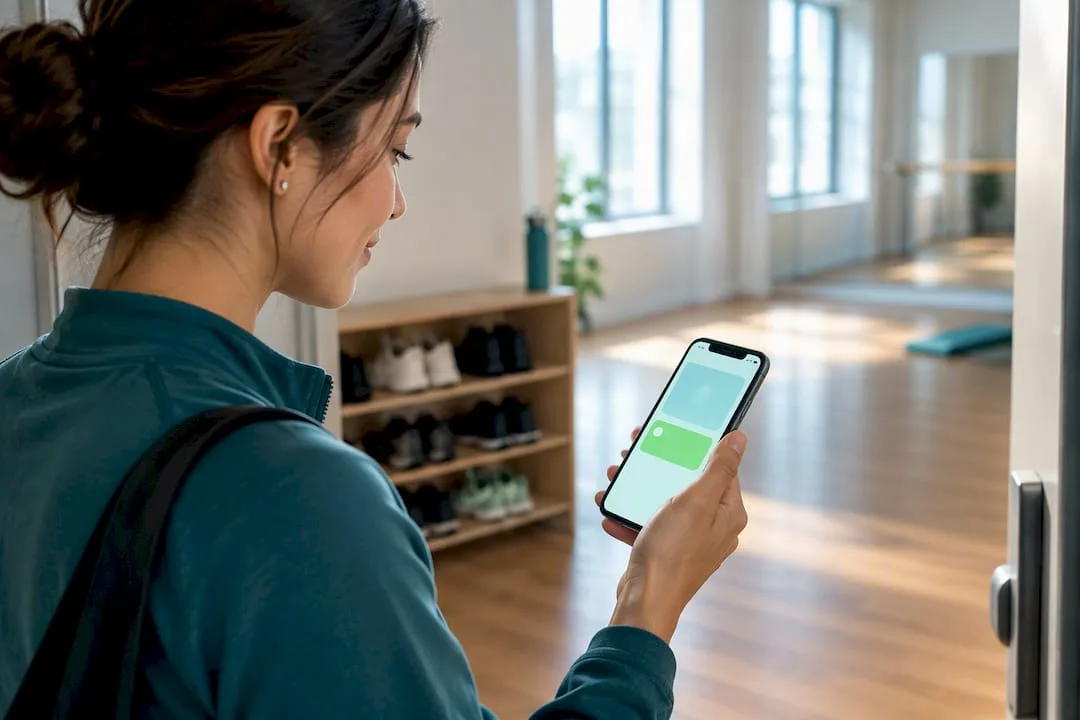
! Coordinator checking a studio booking notification
Auto booking confirmations are messages your booking system sends the moment a client books before a staff member ever touches it.
Ever feel like you're running a five-star studio, but your booking system is still stuck in the dial-up era? Picture this: a new client enthusiastically books their first reformer Pilates class or a much-needed recovery massage online. Great! But then... crickets. No immediate confirmation. They start to wonder if it went through. Next thing you know, your front desk is swamped with calls, or worse, they simply don't show up, leaving an empty spot you could have filled.
It's not just a minor annoyance; it's a silent killer of revenue and a drain on your team's precious time.
The truth? Automated booking confirmations are your secret weapon. These aren't just generic email blasts; they're perfectly timed, crystal-clear messages your unified cloud command centre sends the instant a client books. No human intervention needed. Done right, this blend of detailed emails and sharp SMS sequences, dispatched immediately, then again 24 hours and 2 hours before the session, is the single fastest way to cut chronic no-shows by up to 50%. Critically, every message needs a clear sender name and a working opt-out to meet Australian regulations. Get this sequence dialled in, and watch your studio run smoother than ever.
The Aussie Studio Owner's Cheat Sheet:
- Timing is everything: A 24-hour SMS reminder might shift to 48 hours for bookings involving client travel, boosting response and slashing last-minute cancellations.
- Know your mode: Auto-confirmation excels for fixed, capacity-limited classes or pre-paid bookings. Manual confirmation is your friend for third-party referrals or pending payments.
- Two-way street: Implementing two-way SMS with a dedicated virtual number dramatically lifts confirmation rates, letting clients simply reply 'Y' to confirm or 'N' to cancel.
- Compliance isn't optional: Every message must include a reliable sender ID, a functional opt-out, and be free of promotional content to comply with Australian legal requirements.
- Measure to improve: Consistently monitor delivery rates, reply rates, no-show figures, and cancellation timing. This data reveals automation hiccups and helps you optimise your communication strategy.
Table of Contents
- What should your auto booking confirmation actually include?
- Confirmations vs. Reminders: When to Send What
- Auto-Confirmation or Manual: Which Does Your Studio Need?
- How Do You Really Automate Confirmations for Your Australian Studio?
- Crafting Your Compliance-Ready Message Templates (Aussie Style)
- Australian Compliance: The Legal Non-Negotiables for Booking Comms
- Monitoring & Troubleshooting Your Automated Confirmations
- How Revively Builds This In For Australian Studios
- A Quick Word From The Editor
- Where Revively Fits if You're Ready to Automate Smarter
- Sources
- FAQ
- Recommended Reads From Revively
What should your auto booking confirmation actually include?
A confirmation message that doesn't arm your client with all the necessary details is just trading a no-show for an unnecessary phone call. That completely defeats the point of automation. Your all-in-one spa booking software or yoga studio management platform should make this painless.
Every confirmation, whether it's for a remedial massage, a beginner's Pilates reformer session, or a ballet class, needs to clearly cover these critical points:
- Confirmation code and status: A unique reference number that makes it easy for both the client and your front desk to quickly find the booking.
- Date, time, and timezone: Spell it out. Don't assume. If your studio operates across state borders, always specify the timezone.
- Service or resource details: The exact class name, treatment, instructor, specific room, or piece of equipment. Include the expected duration.
- Location and access notes: Your studio address, parking details, and any specific entry instructions.
- Payment status: Clearly state if it's paid, a deposit is held, or if a balance is due upon arrival.
- Reschedule or cancellation link: A direct, easy link to manage their booking, plus a contact number for anything the automation can't handle.
- Required documents or extras: Waivers, intake forms, or any specific items they need to bring.
Think about how rental car companies do it. Their confirmations are exemplary. DriveNow's booking confirmation guide lists vehicle group, depot location, and pickup requirements as standard. That's a solid benchmark for studios too - clarity removes doubt.
Confirmations vs. Reminders: When to Send What
Mixing up confirmations and reminders is where most automated sequences fall apart. They serve distinctly different purposes. A confirmation proves the booking exists and gives the client every detail they need to plan. A reminder's sole job is to bring the appointment back to the top of their mind right before it happens. This is why timing and channel are paramount for reminders, often trumping content.
Here in Australia, SMS reigns supreme for reminders. Email holds the full detail, but SMS gets read. Australian SMS open rates are incredibly high, often 90% or more, far surpassing typical email open rates (which hover around 20%). Most texts are opened within minutes, not days.
Crucial Stat for Australian Studios: A well-executed SMS reminder sequence can slash no-shows by 23-38%. Add two-way SMS confirmation replies, and that figure can jump to around 50%. Don't leave money on the table. (Source: Lumen ADL)
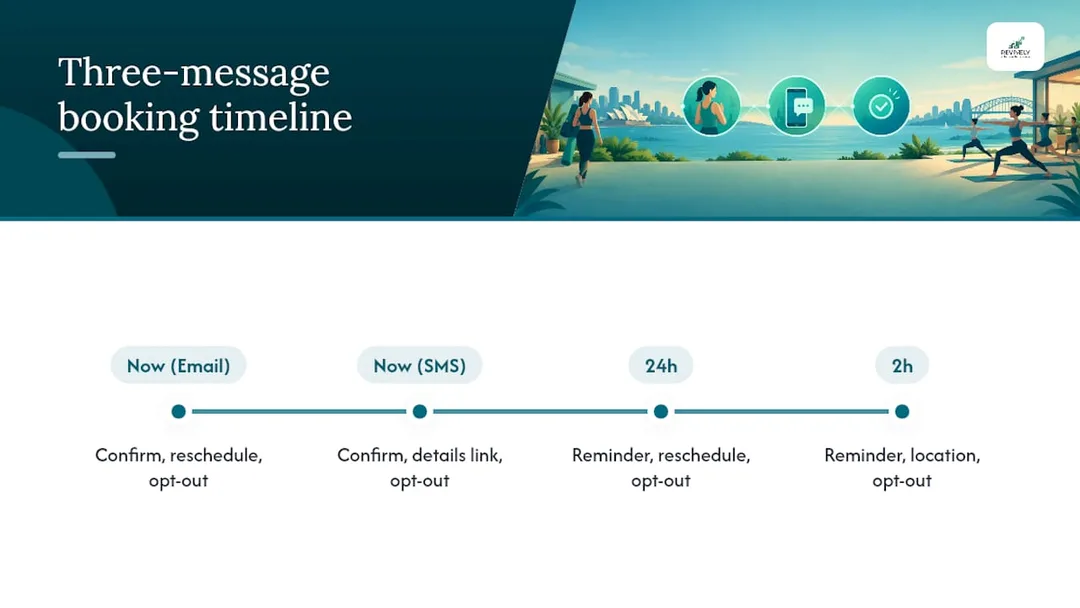
The optimal sequence to achieve those numbers looks like this:
- Immediate Confirmation: A comprehensive email (optionally paired with a short SMS) sent the exact second the booking is made.
- 24-Hour Reminder: SMS-only, including a direct reschedule link. This gives clients ample time to change their slot without calling you.
- 2-Hour Reminder: A concise, day-of SMS as a final gentle nudge before the appointment.
Pro Tip: If a client is travelling from out of town for a specialised treatment, push that 24-hour reminder to 48 hours. But for early morning classes, skip the 2-hour text - nobody wants a buzz at 5 am.
Auto-Confirmation or Manual: Which Does Your Studio Need?
Auto-confirmation instantly locks a slot without any staff review. Manual confirmation places the booking into a "pending" state until a team member checks and approves it. Both are perfectly legitimate strategies. The real misstep is defaulting to one for everything.
Most multi-resource studio scheduling platforms support both. The choice hinges on how much real-time control you have over the resource being booked and the nature of the service.
Here's a quick comparison to help you decide:
| Feature/Scenario | Auto-Confirmation (Ideal For) | Manual Confirmation (Best For) |
|---|---|---|
| Booking Lock-In | Instant, no staff intervention. | Pending until staff review/approval. |
| Resource Control | Fixed-schedule classes with known capacity (e.g., 20 mats). | Third-party dependencies (e.g., guest instructor, external equipment). |
| Inventory Tracking | Live, accurate inventory in your system (no double-bookings). | Pre-booking checks needed (e.g., eligibility, specific equipment prep). |
| Payment Status | Client paying online at the time of booking. | Payment not yet cleared, or specific invoicing required. |
| Trust/Efficiency | High trust, streamlined client experience. | Situations needing pre-validation or bespoke arrangements. |
| Risk | Potential for client error to lock in an unsuitable booking. | Slow processing can frustrate clients and lead to lost bookings. |
(Platforms like Bookinglayer support both statuses, highlighting their versatility.)
Always check your platform's expiry rule for pending bookings. A manual request left unactioned for three days does far more damage to client trust than a slightly slower, but guaranteed, auto-confirm ever would.
How Do You Really Automate Confirmations for Your Australian Studio?
You don't need bespoke software development to get this running. The foundational elements are straightforward, and the decision comes down to which combination best suits your studio's volume and budget.
Your main integration options, all designed to make your Mindbody alternatives Australia search easier, include:
- Native Booking System Features: Most modern platforms, especially those built for wellness and fitness, offer integrated email and SMS triggers linked to booking events. This is typically the lowest-friction route for online booking that actually works.
- Direct SMS Gateway Integration: For higher volumes or highly customised texts, connecting directly to a provider like MessageMedia or Twilio offers more control.
- Middleware Tools: Platforms like Make.com (formerly Integromat) can stitch together a booking system that might not natively integrate with your preferred SMS provider.
- Email-to-SMS Fallback: Useful as a backup, though often less reliable for time-sensitive reminders.
Consider the difference between one-way and two-way SMS. Two-way SMS requires a dedicated virtual number, allowing clients to reply "Y" to confirm or "N" to cancel. This is what truly boosts those higher confirmation rates. Alphanumeric sender IDs (like your studio's name) are one-way only; they can't receive replies, so they're ideal for simple reminders but not for confirmation requests.
Before flicking the switch:
- Test rigorously: Create dummy bookings for every service type. Ensure each template fires correctly.
- Simulate changes: Test cancellations and reschedules to confirm the automation updates properly, rather than sending stale messages.
- Check calendar sync: Verify shared resources (like treatment rooms) are updated under load.
Pro Tip: Book a test appointment for zero minutes from now and watch the system. Edge-case timing bugs (like a "reminder" firing after the appointment has already started) will reveal themselves immediately.
Crafting Your Compliance-Ready Message Templates (Aussie Style)
Here's some copy you can plug straight into your booking system. Just swap in your own placeholders. Remember to use Australian/UK spelling!
Immediate Confirmation Email:
"Hi [Client Name], your booking is confirmed. Reference: [Booking Code]. You're booked for [Service/Class Name] on [Date] at [Time] at our [Location] studio. Reschedule or manage your booking here: [Reschedule Link]. Got questions? Call us on [Phone Number]. Reply STOP to opt out of SMS updates."
Immediate Confirmation SMS (short variant):
"[Studio Name]: Booking confirmed for [Date] [Time]. Full details: [Link]. Reply STOP to opt out."
24-Hour Reminder SMS:
"[Studio Name]: Reminder, you're booked for [Time] tomorrow. Need to change it? [Reschedule Link]. Reply STOP to opt out."
2-Hour Reminder SMS:
"[Studio Name]: See you at [Time] today at [Location]. Reply STOP to opt out."
Crucially, keep every single message strictly administrative. No promotional taglines, no "while you're here, check out our new packs." Include your sender name and an opt-out on every message, not just the first one. This is vital for Australian privacy principles compliance.
Australian Compliance: The Legal Non-Negotiables for Booking Comms
Booking confirmations are administrative, yes, but they're not exempt from Australian regulations. The Spam Act 2003 mandates that every commercial electronic message must clearly identify the sender and provide a functional opt-out. Appointment confirmations, despite not being direct marketing, fall squarely within this requirement.
Before you go live with automation, tick these boxes:
- Sender Identification: Every message (email or SMS) must clearly identify your studio. Clients must always know who's texting or emailing them.
- Functional Opt-Out: A clear "Reply STOP" (or similar) that actually removes the client from future messages. It can't just be decorative.
- Consent Record-Keeping: While inferred consent from an existing booking relationship is common practice, you still need a record of when and how that relationship began. This also ties into Australian Data Residency & Privacy; client data, including consent, should be securely stored in Australia, adhering to the Australian Privacy Principles (APPs).
- Promotion-Free Wording: This is particularly critical for health and wellness studios. OAIC guidance distinguishes administrative communication from advertising. Slipping promotional language into a confirmation can inadvertently push it into stricter advertising territory, inviting closer scrutiny.
- Retention of Records: Keep records of consent and messages sent, in case a client disputes receiving or agreeing to the communication.
Monitoring & Troubleshooting Your Automated Confirmations
Automation, left unmonitored, will eventually drift. Common pitfalls include duplicate sends (e.g., two systems both firing a confirmation), timezone mismatches for clients or services across different states, or the wrong template attaching to the wrong service type.
Track these four metrics monthly to keep things running smoothly:
- Delivery Rate: Are your messages actually landing, or are they bouncing due to incorrect numbers or email addresses?
- Confirmation/Reply Rate: For two-way setups, how many clients are actively engaging and confirming?
- No-Show Rate: This is the ultimate number that justifies the entire exercise. Is it consistently dropping?
- Cancellation Timing: Are clients cancelling early enough for you to fill the vacated slot from your waitlist, or are they leaving it to the last minute?
Pro Tip: If you're plagued by duplicate confirmations, it's almost always two connected systems watching the same booking event. Consolidate to a single source of truth for your booking data before attempting to tweak templates.
How Revively Builds This In For Australian Studios
Revively is purpose-built as a unified cloud command centre specifically for Australian spas, yoga, Pilates, and dance studios. This means confirmations aren't an afterthought bolted onto a generic scheduler; they're integrated deeply into the same system that manages your rooms, instructors, equipment, and even cleaning buffers.
This holistic approach matters because a confirmation is only as reliable as the booking data it pulls from. Revively seamlessly supports Stripe-powered memberships, class packs, digital intake forms, and public foyer display boards - all interconnected within one intuitive dashboard, eliminating the chaotic patchwork of separate tools.
Crucially, as an Australian-made solution, Revively addresses the specific needs of local studio owners:
- Australian Data Residency & Privacy: All client data, booking histories, and sensitive health intake forms are stored locally in Australia, guaranteeing full compliance with the Australian Privacy Principles (APPs). This offers unparalleled peace of mind regarding your clients' sensitive information.
- Flawless GST & Tax Invoice Handling: Our system natively handles 10% GST calculations across casual classes, memberships, and multi-resource packages. It automatically issues legally compliant Australian Tax Invoices to your clients, simplifying your financial admin.
- 100% Legal Xero Integration for BAS Accuracy: The Xero integration is designed for robust tax compliance. Automated two-way mapping of tax codes, revenue accounts, and liabilities ensures your quarterly Business Activity Statements (BAS) are flawless and audit-proof, eradicating manual spreadsheet errors and saving you countless hours. This makes Revively a leading choice among GST compliant studio software options.
A Quick Word From The Editor
If you take one thing from this piece, make it this: consolidate your booking data first, automate the three-touch sequence second, and test relentlessly third. Most no-show problems aren't really messaging problems; they're data problems wearing a messaging costume. Run a small trial on one class type, measure the no-show shift, then scale it.
- Andreea*
Where Revively Fits if You're Ready to Automate Smarter
Revively replaces the typical jumble of a separate scheduler, a disconnected SMS tool, and a messy spreadsheet for waitlists with one powerful system that already understands your resources, your cleaning buffers, and your class capacity. This means your confirmations are built on accurate, real-time availability, not guesswork.

For studios running fixed classes, our live-availability online booking ensures auto-confirmation is safe by default, because the system genuinely knows when a spot is open. If group classes and waitlists are your biggest headaches, our class scheduling with automatic waitlist promotion keeps cancelled spots filled without a staff member lifting a finger. Even your walk-in clients get the same clarity through intuitive display boards, seeing what's confirmed without needing to ask at the desk.
Revively offers flexible plans, starting at just $39 AUD per month for the Solo tier, up to $199 AUD per month for Pro. Every tier, including confirmations, memberships, and Xero reconciliation, is detailed on our transparent pricing page. If you're currently stitching confirmations together from three different tools, that's the first thing worth checking today.
Sources
For the legal details underpinning this guide, the Spam Act 2003 guidance from the ACCC and the OAIC's guidance on patient communications are two primary documents worth bookmarking. For SMS-specific setup details, consult industry guides on automated appointment reminders.
- Communications with patients - OAIC
- Automated appointment reminders in Australia - Lumen ADL (2026)
- Automatic vs Manual Booking Confirmation - Bookinglayer support
FAQ
Got questions about mastering your studio's booking confirmations? We've got answers, tailored for Australian studio owners.
How do I know if my booking is confirmed?
A confirmed booking will generate a unique confirmation code and status change the moment it's locked in. This should be sent to you by email or SMS immediately. If you haven't received either within a few minutes, first check your spam folder. If it's still missing, contact the business directly using the number on their website.
What is a booking confirmation?
A booking confirmation is an automated message a system sends once a booking is successfully created. It contains the reference code, date, time, location, and all relevant service or resource details. While administrative (not marketing), it still needs to clearly identify the sender and offer a functional opt-out under Australia's Spam Act 2003.
What should I say to confirm a booking?
Keep the wording plain, direct, and factual. State the reference code, date, time, location, and provide a clear way to reschedule or cancel. Absolutely avoid any promotional language; under OAIC guidance, administrative messages are treated differently from advertising, and adding a sales pitch can blur that crucial distinction for Australian compliance.
What does a booking confirmation email look like?
A well-structured confirmation email will typically open with the confirmation code and status, followed by the specific date, time, service or resource detail, location, payment status, and a direct reschedule link. Studios using an integrated platform like Revively benefit from having this generated automatically from the same system that manages the booking, ensuring consistency and accuracy without manual input.
How do I set up automatic reminders alongside confirmations?
Most modern booking systems allow you to schedule reminder SMS messages at specific intervals, typically 24 hours and 2 hours before the appointment. These are triggered directly from the confirmed booking. If you want clients to be able to reply and confirm their attendance, ensure your platform supports two-way SMS, as this requires a dedicated virtual number rather than a generic alphanumeric sender ID.
Recommended Reads From Revively
Dive deeper into optimising your studio operations and cutting down on administrative chaos with these insights:
- Stop the Studio Mayhem: How to Really Reduce Double Bookings (Without More Admin Headaches)
- The Aussie Studio Owner's Guide to Automated Cancellation Policies (and Why Yours Isn't Working)
- Stop the Booking Chaos: Your Australian Studio Deserves Smarter Online Bookings
- Your Studio's Silent Killer: Australian No-Show Benchmarks & How to Beat Them