
Email confirmation templates for Australian studios
! Hands composing email on smartphone
Six confirmation templates cover every client touchpoint your studio needs: order, booking/reservation, appointment, registration, subscription, and shipping/delivery.
Another client calls, frustrated. "I never got the booking confirmation!" Sound familiar? In the frantic pace of running an Australian wellness studio - be it yoga, Pilates, a busy spa, or a bustling dance school - forgotten emails aren't just an annoyance. They're missed revenue, wasted staff time, and a quiet ding to your brand's reputation.
But here's the rub: Confirmation emails, done right, are your silent workhorses. They're not just receipts; they're trust builders, no-show reducers, and even subtle upsell engines. And for Australian studios, they're also a non-negotiable compliance checkpoint.
This isn't about generic, forgettable auto-responses. This is about crafting precise, human-sounding emails that cut through the inbox clutter, keep your clients informed, and keep your books tidy - all while ticking every Australian regulatory box.

We've distilled the chaos into six essential, ready-to-implement confirmation templates, covering every critical client touchpoint: booking, appointment, order, registration, subscription, and even shipping. Copy the one that fits your next client interaction, customise the merge tags for your unique studio, and let automation handle the rest.
The six templates your Australian studio needs running, yesterday:
- Booking/Reservation Confirmation: Your client's class or treatment slot, locked in.
- Appointment Confirmation: That crucial one-on-one session with a therapist or instructor, clearly communicated.
- Order Confirmation: Proof of purchase for a class pack, merchandise, or gift voucher, complete with a proper Australian Tax Invoice.
- Registration Confirmation: A warm welcome for new members or programme sign-ups.
- Subscription Confirmation: Your recurring membership, activated and clearly detailing billing.
- Shipping/Delivery Confirmation: For when you dispatch physical products to clients across Australia.
Each template in this guide includes a subject-line example, a copy-paste body snippet for both plain-text and branded HTML, and a field checklist to ensure you don't miss a thing. Download the full bundle or copy individual snippets directly from each section below.
The Untamed Truth: Why Your Studio Needs Flawless Confirmations (and Where Most Go Wrong)
The single most impactful action you can take today is to implement a rock-solid booking confirmation email. One with a clear subject line, a unique booking reference, specific date/time/location details, and a direct link to your cancellation policy. Everything else builds from there.
| Point of Impact | The Nitty-Gritty for Australian Studios |
|---|---|
| Prioritise Booking Confirmations | They have the highest volume and the biggest direct impact on no-show rates. Get this right, and you'll see immediate returns. |
| Use Transparent Subject Lines | Format as "Confirmed: [Class Name] at [Studio Name] on [Date]" for ultimate inbox searchability. Clarity always trumps cleverness. |
| Segment by Client Type | Send different templates to members vs. casual clients. This makes any upsell CTAs relevant and avoids frustrating regulars with "first-timer" content. |
| Automate & Rigorously Test | Configure SPF/DKIM, test across Gmail, Outlook, and Apple Mail, and verify calendar links work perfectly. Don't go live untested. |
| Revively Automates the Full Workflow | From booking triggers to Stripe receipts, Xero reconciliation, and SMS reminders - everything runs from one integrated platform, keeping your Australian studio compliant and efficient. |
The Backbone of Trust: What Confirmation Emails Are & Why They're Essential
Forget generic marketing blasts. A confirmation email is a transactional message - automatically sent the instant a client takes a specific action, like booking a Pilates class, buying a remedial massage pack, or signing up for a yoga membership. This distinction is critical: because it's triggered by their behaviour, it's highly anticipated and highly effective.
For Australian dance, yoga, Pilates, spa, and wellness studios, the tangible benefits are clear as day:
- Dramatically Reduces No-Shows: A clear, written record of booking time, date, and your studio's precise location (or online link) leaves zero room for forgetfulness. This means fewer empty mats and wasted therapist time.
- Solidifies Client Trust: Clients feel secure knowing their payment went through, their spot is reserved, and all details are confirmed. This builds confidence in your brand from the first interaction.
- Unlocks Strategic Upsell Moments: A thoughtfully placed, subtle link to a class pack or a first-timer's guide can seamlessly convert a casual visitor into a loyal regular, without feeling pushy.
- Delivers Instant, Mobile-Optimised Info: In today's on-the-go world, clients need date, time, venue, and a "manage booking" button instantly accessible on their phone. Your emails must deliver.
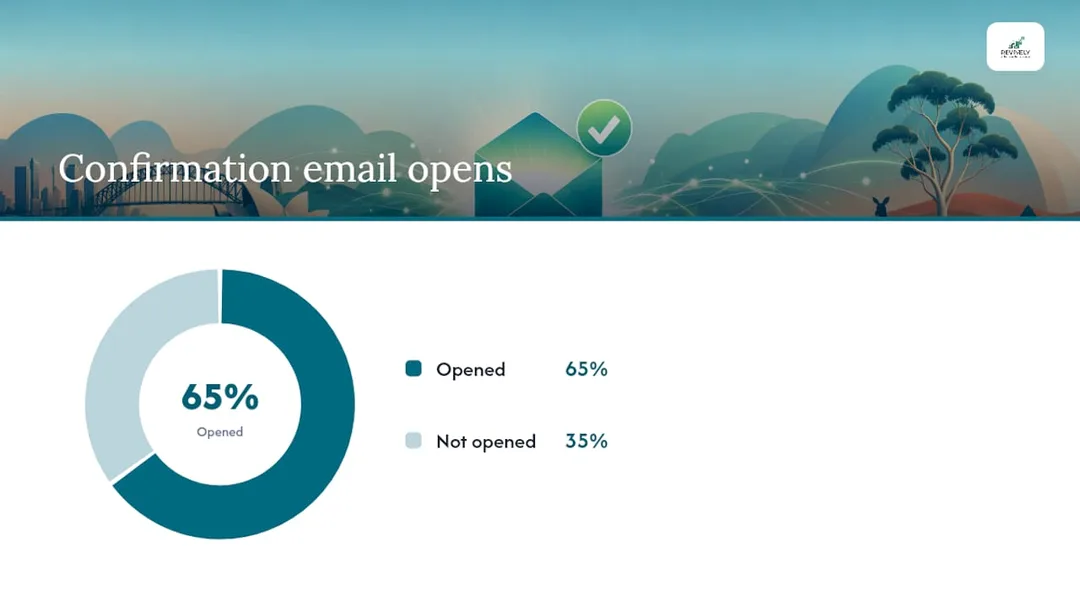
The data doesn't lie. Confirmation-style emails boast open rates around 65% and click-through rates near 17%, according to Unlayer's transactional template data. That dwarfs typical marketing email benchmarks, turning every confirmation into a genuine communication asset worth perfecting.
Copy-Paste Perfection: Ready-to-Use Email Confirmation Templates by Type
Confirmation emails are not a one-size-fits-all affair. The copy for an order confirmation needs to be precise and financial, while a class booking should be welcoming and practical. Below are copy-paste snippets and subject-line options for each critical type, followed by a summary table of the absolute must-have fields.
Booking/Reservation Confirmation (Classes, Group Sessions)
Subject line examples:
Confirmed: Your {{class_name}} at {{studio_name}} on {{booking_date}}You're booked in! {{class_name}}, {{booking_date}} at {{booking_time}}
Plain-text snippet:
Hi {{first_name}},
Your spot in {{class_name}} on {{booking_date}} at {{booking_time}} is confirmed.
Location: {{location_address}} (or {{online_link}} for virtual)
Booking Ref: #{{booking_id}}To cancel or reschedule, please visit {{cancellation_link}}.
Questions? Contact us at {{studio_email}} or {{studio_phone}}.
See you soon,
The {{studio_name}} Team
Branded HTML snippet (key blocks - designed for visual hierarchy):
<center> <img src="[Studio Logo URL]" alt="Studio Logo" style="max-width: 150px;"> <h1>✅ You're Booked!</h1> <p style="font-size: 20px; font-weight: bold;">{{class_name}}</p> <p>{{booking_date}} | {{booking_time}}</p> <p>📍 {{location_address}}</p> <p>Booking Ref: #{{booking_id}}</p> <a href="{{manage_booking_link}}" style="background-color:#007bff;color:#ffffff;padding:10px 20px;text-decoration:none;border-radius:5px;display:inline-block;">Manage My Booking</a> <p style="font-size: 14px; margin-top: 20px;"> **Cancellation Policy:** Cancel at least {{cancellation_hours}} hours prior to class for a full credit.<br> Full terms available at: {{full_terms_link}} </p> </center>
Appointment Confirmation (One-on-One Treatments, Consults)
Subject line examples:
Your {{treatment_name}} appointment is confirmed - {{booking_date}} at {{booking_time}}Appointment Confirmed: {{therapist_name}}, {{booking_date}} - {{studio_name}}
Plain-text snippet:
Hi {{first_name}},
Your {{treatment_name}} appointment with {{therapist_name}} on {{booking_date}} at {{booking_time}} is confirmed.
Location: {{location_address}}
Booking Ref: #{{appointment_id}}Please arrive 10 minutes early to complete your intake form.
To reschedule, visit {{reschedule_link}}.
Questions? Call us on {{studio_phone}} or reply to this email.
Looking forward to seeing you,
The {{studio_name}} Team
Order Confirmation (Class Packs, Merchandise, Gift Vouchers)
Subject line examples:
Order Confirmed: {{product_name}} - Your Receipt InsideYour {{studio_name}} Purchase Confirmed (Order #{{order_id}})
Plain-text snippet:
Hi {{first_name}},
Thank you for your purchase from {{studio_name}}!
Your order #{{order_id}} for {{product_name}} at ${{amount_total}} incl. GST is confirmed.
Your new classes/credits are now available in your account: {{account_link}}.
Your official Australian Tax Invoice is attached.
Questions? Please contact us at {{studio_email}}.
Warmly,
The {{studio_name}} Team
Registration Confirmation (New Member, Programme Sign-Up)
Subject line examples:
Welcome to {{studio_name}}! Your Registration is Confirmed.You're Registered: {{programme_name}} Kicks Off {{start_date}}
Plain-text snippet:
Hi {{first_name}},
Welcome aboard! You're officially registered for {{programme_name}}, beginning {{start_date}}.
Here's what you need to know:
- Start Date: {{start_date}}
- Your First Session: {{first_session_details}}
- What to Bring: {{items_to_bring_list}}
Access your member portal here: {{member_portal_link}}.
We can't wait to see you!
The {{studio_name}} Team
Subscription/Membership Confirmation
Subject line examples:
Your {{membership_name}} Membership is Now ActiveMembership Confirmed - Here's Everything You Need to Know
Plain-text snippet:
Hi {{first_name}},
Great news! Your {{membership_name}} membership is active from {{start_date}}.
Billing Details:
- Amount: ${{amount_per_period}} per {{billing_period}} incl. GST
- Payment Method: {{payment_method}}
Manage your membership, update details, or view your usage here: {{manage_membership_link}}.
To cancel your membership, please contact us at {{studio_email}} with {{notice_period}} notice.
Enjoy your membership benefits!
The {{studio_name}} Team
Shipping/Delivery Confirmation (Retail Products)
Subject line examples:
Your Order is On Its Way! Tracking Inside (Order #{{order_id}}){{studio_name}} Order #{{order_id}} Dispatched!
Plain-text snippet:
Hi {{first_name}},
Good news! Your order #{{order_id}} from {{studio_name}} has been dispatched.
Estimated Delivery: {{date_range}}
Track your parcel here: {{tracking_link}}
Questions about your delivery? Please contact us at {{studio_email}}.
Thanks for your purchase!
The {{studio_name}} Team
Must-Have Fields: Your Blueprint for Every Template Type
| Template Type | Absolutely Essential Fields |
|---|---|
| Booking/Reservation | Confirmation number, class/service name, date & time, physical location or online link, clear cancellation policy (or link to it), direct CTA to manage booking. |
| Appointment | Confirmation number, therapist/instructor name, date & time, physical location, arrival instructions (e.g., "arrive 10 mins early"), direct link to reschedule. |
| Order/Purchase | Unique order number, itemised summary of products, GST-inclusive total, direct link to (or attachment of) the official Australian Tax Invoice, link to client account/credits. |
| Registration | Programme name, start date, what to bring/prepare, link to a member portal or resource hub. |
| Subscription/Membership | Membership name, start date, GST-inclusive billing amount, billing cycle, method of payment, clear cancellation terms (e.g., notice period), link to manage membership. |
| Shipping/Delivery | Order number, dispatch date, estimated delivery window, a working tracking link. |
According to MailerSend's confirmation email guide, every confirmation should be concise, scannable, and include clear next steps - whether that's to manage a booking, view a receipt, or contact support. This principle holds true regardless of the template type.
Mastering the Inbox: Best Practices for Subject Lines, Hierarchy & Timing
These aren't just emails; they're vital client touchpoints. Getting the details right makes all the difference for your Australian wellness or fitness studio.
Subject Lines: Clarity Above All Else
Mailchimp's booking confirmation guidance nails it: subject lines must be transparent and instantly searchable, not clever. A client frantically searching their inbox for their Pilates class details will be looking for the class name or your studio's name, not a vague "We can't wait to see you!"
Do:
- Be Direct: Use the format
Confirmed: [Class/Service] at [Studio] on [Date] - Include Key Identifiers: Add the booking reference number or order ID for easy searching.
- Keep it Short & Sweet: Aim for under 50 characters to ensure full display on mobile devices.
Avoid:
- Vagueness: Lines like "Your booking" or "Important information" are unhelpful.
- Emoji Overload: While a single checkmark
✅can be good, excessive emojis obscure the crucial details. - Clever Wordplay: This sacrifices findability and wastes a client's time when they're simply trying to confirm details.
Content Hierarchy: Mobile-First, Info-First
The brutal truth of mobile screens means clients see roughly 3-4 lines before they scroll. Your confirmation emails must put the most critical information front and centre, before any branding or imagery.
Those precious first lines should contain:
- Confirmation Status: "Booked," "Confirmed," "Dispatched."
- Core Details: Date, time, and your studio's physical location or online link.
- Primary Call-to-Action (CTA): A single, clear button like "Manage My Booking" or "View My Receipt."
Move your cancellation policy, upsell links, social media icons, and other secondary information to the lower half of the email.
Personalisation & Timing: When and How to Speak to Your Client
Don't send the same message to everyone. Segment your confirmations by client type. A long-term member booking their weekly yoga class has different needs than a first-time casual client who's never visited your studio.
- Members might benefit from a gentle reminder of their membership benefits, a quick look at remaining class credits, and a "book your next class" link.
- Casual Clients (drop-ins) need a helpful "what to expect" note and a gentle, value-driven nudge toward a multi-class pack.
For timing, the rule is simple: send the initial confirmation immediately after the booking action. Then, follow up with a reminder email 24 hours before the appointment. For multi-day programmes or retreats, a preparation email 5-7 days out adds genuine value. Pairing SMS confirmations with email reminders cuts no-show rates further, particularly for high-value treatment appointments at spas or clinics.
The Australian Mandate: Compliance Basics for Your Confirmation Emails
Confirmation emails are generally considered transactional, which typically exempts them from the explicit opt-in requirements of Australia's Spam Act 2003. However, the moment you sprinkle in a promotional CTA - a class pack offer, a referral discount, or a limited-time deal - that message can attract commercial email rules under ACMA's guidelines.
Critical Warning for Australian Studios: While transactional emails don't require an unsubscribe link by law, adding one is best practice. If your email contains any promotional content, a functional unsubscribe mechanism and your studio's physical address are legally mandatory under the Spam Act 2003. Do not risk ACMA penalties.
Key compliance points for Australian studios:
- Transactional-Only Emails: (e.g., booking confirmation, payment receipt, shipping notice) generally don't require an unsubscribe link, but including one reduces spam complaints.
- Emails with Promotional Content: Must include a clear, functional unsubscribe link and your studio's valid physical address.
- Membership Communications: If these include renewal offers, upsell CTAs, or information beyond pure service updates, they are commercial messages. Always store consent records and honour opt-outs promptly.
- GST Wording is Non-Negotiable: Any receipt or order confirmation displaying a dollar amount must explicitly state whether the total is GST-inclusive (e.g., "$110.00 incl. GST"). This is a fundamental requirement for legal Australian Tax Invoices and accurate record-keeping.
- Opt-in Language: For new members, ensure any language for marketing communications is clear and separate from the basic booking agreement. For example: "Yes, I agree to receive booking confirmations and optional studio updates by email."
Always check ACMA's guidance on commercial electronic messages when considering adding promotional CTAs to your confirmation templates. When in doubt, it's safer to keep the promotional content in a separate, clearly marketing-focused follow-up email rather than embedding it within a transactional confirmation.
Powering Your Workflow: Automating Confirmations for Australian Studios
Manual emails are a time sink. Automation is your best friend.
Delivery Approaches: Which Path Suits Your Studio?
Most Australian studios adopt one of these three strategies for sending confirmations:
- Booking System Notifications: The simplest route. Your existing booking platform sends pre-built confirmations automatically. Fast to set up, but often limited in design flexibility and customisation.
- ESP Transactional Templates (e.g., SendGrid, ZeptoMail): These tools give you full HTML control, deep merge-tag personalisation, and robust deliverability. Ideal for branded, multi-block emails, but require more technical setup and integration work.
- Native Platform Automations (e.g., Revively): An integrated studio management platform handles the trigger, the template, and the delivery all in one place. This removes the need to stitch together multiple third-party ESPs, ensuring seamless data flow and compliance.
The Deliverability Checklist: Ensuring Your Emails Actually Arrive
Sending an email is one thing; getting it into the inbox is another. This is especially crucial for transactional confirmations.
| Check | Why It Matters for Your Studio |
|---|---|
| SPF and DKIM Records Configured | These are critical email authentication protocols. Without them, your emails are far more likely to land in spam folders, or be outright rejected, meaning clients miss crucial booking info. |
| DMARC Policy Set | Builds on SPF/DKIM to protect your sending domain from email spoofing and phishing attempts. Essential for maintaining trust and ensuring your messages are recognised as legitimate. |
| Plain-Text Alternative Included | Required by some email clients and crucial for accessibility standards. Ensures your message is readable even if HTML rendering fails or is blocked. |
| Tested Across Gmail, Outlook, Apple Mail | Email rendering varies significantly across different clients and devices. What looks perfect in Gmail might be broken in Outlook. Test thoroughly to avoid client frustration. |
| Calendar Link Tested (ICS or Google) | A broken "Add to Calendar" link is a common client complaint. Verify that clicking the link correctly adds the event to their chosen calendar with all the right details. |
| Unsubscribe Link Present (if promotional content included) | As per the Australian Spam Act, if your email contains any commercial content, a functional unsubscribe link is mandatory. Even for transactional emails, it's good practice and reduces spam reports. |
Twilio SendGrid's transactional email guidance stresses using merge tags for personalised values (name, booking ID, class name) and always providing a plain-text alternative. Both practices significantly improve deliverability and accessibility.
Template Placeholders & Rigorous Testing
Use consistent merge-tag naming across all your templates. A standard, Australian-friendly set for studios would include:
{{first_name}}- Client's first name{{booking_id}}- Unique confirmation number{{class_name}}or{{service_name}}- The booked item{{booking_date}}and{{booking_time}}- Formatted for Australian date conventions (DD/MM/YYYY){{location}}or{{online_link}}- Physical address or video link{{cancellation_link}}- Direct URL to manage or cancel a booking
Before pushing any template live, send test emails to at least three different email clients (e.g., Gmail, Outlook, Apple Mail). Check that all buttons render correctly, calendar links open the right event, and the plain-text version is readable. ZeptoMail's booking confirmation guidance specifically recommends this multi-client testing before enabling live automations.
Provider Notes: SendGrid and Unlayer both offer free responsive template libraries with confirmation-specific layouts. ZeptoMail is a cost-effective transactional option, often suited to lower-volume studios or those wanting API-driven control. However, for Australian studios seeking an all-in-one solution where templates, payments (Stripe), and scheduling seamlessly integrate, a unified platform like Revively removes the headache of stitching these complex tools together.
Real-World Workflow: Studio-Specific Templates & Revively Integration
Let's dive into some specific use cases and how an integrated system like Revively streamlines your operations.
Class Booking Template (Yoga, Pilates, Dance, Group Fitness)
This is your highest-volume email. Make it count.
Subject: Confirmed: Your {{class_name}} at {{studio_name}} - {{booking_date}}
Hi {{first_name}},
You're in! Here are your class details:
Class: {{class_name}}
Date: {{booking_date}}
Time: {{booking_time}}
Location: {{location}}
Booking ref: #{{booking_id}}[Manage My Booking]
Cancellation Policy: Please cancel at least {{cancellation_hours}} hours before class for a full credit. Late cancellations forfeit the session.
See you on the mat, the {{studio_name}} team!
For an added boost (sent separately via SMS automation): "Hi {{first_name}}, quick reminder: Your {{class_name}} is tomorrow at {{booking_time}}. Reply CANCEL to cancel. - {{studio_name}}"
Treatment/Appointment Template (Spa, Wellness Clinic, Physio)
For those higher-value, one-on-one sessions, clarity and preparation are key.
Subject: Your {{service_name}} Appointment Confirmed - {{booking_date}} at {{booking_time}}
Hi {{first_name}},
Your appointment is confirmed:
Treatment: {{service_name}}
Therapist: {{therapist_name}}
Date: {{booking_date}} at {{booking_time}}
Location: {{location}}
Ref: #{{booking_id}}Please arrive 10 minutes early to complete your intake form. Wear comfortable clothing.
[Reschedule Appointment] [View Intake Form]
Questions? Call us on {{studio_phone}} or reply to this email.
We look forward to seeing you,
The {{studio_name}} Team
Revively Integration in Action: The Unified Cloud Command Centre Advantage
Within Revively, each client action seamlessly maps to a pre-configured template. When a client books a class, the platform fires the class confirmation automatically, pulling dynamic merge tags directly from the booking record. No manual data entry, no missed steps.
- Payment & GST: Stripe payment data flows directly into the order confirmation, so the GST-inclusive total appears in the email without manual calculation. This is crucial for generating legally compliant Australian Tax Invoices.
- Xero Reconciliation: Revively's robust Xero integration ensures every receipt record (complete with accurate tax codes, revenue accounts, and liabilities) flows directly into your Xero account for flawless, audit-proof Business Activity Statements (BAS). This eliminates manual spreadsheet errors and guarantees 100% legal tax compliance for your Australian studio.
- Waitlist Automations: For waitlist automations, Revively sends a separate confirmation when a client moves from the waitlist to a confirmed spot. This distinct template acknowledges their patience and clearly confirms the new booking, preventing confusion.
- Australian Data Residency: Revively stores all client data, booking histories, and sensitive health intake forms locally in Australia, fully complying with the Australian Privacy Principles (APPs). This provides peace of mind for you and your clients regarding data sovereignty and privacy.
Strategic Segmentation: Members vs. Drop-Ins
As Zoho Bookings' appointment template guidance suggests, treating confirmation emails as an intelligent upsell channel is smart business. Tailor your messages:
- For Members: Highlight their membership benefits, show remaining class credits, and include a clear "book your next class" link. This reinforces value and encourages retention.
- For Casual Clients (Drop-Ins): Include a friendly "what to expect" note and a compelling class pack offer: "Love your first class? Save on your next visit - grab a 10-class pack!"
Pro Tip: Avoid the trap of sending the same generic confirmation to every client. Utilise your booking platform's client-type field to trigger distinct templates for members, casual clients, or even waitlist promotions. A single template that tries to fit everyone often ends up fitting no one particularly well.
Get Started Today: Downloadable Template Bundle & One-Hour Setup Checklist
Ready to transform your studio's communication? We've done the heavy lifting for you.
What's in the Revively Template Bundle
The downloadable pack includes:
- Copy-paste plain-text snippets for all six essential template types.
- A robust subject-line bank with 3 options per template type.
- An HTML sample template with clear merge-tag placeholders for easy customisation.
- A comprehensive testing checklist (covering clients, links, plain-text, and calendar functionality).
- An unsubscribe wording template fully compliant with Australian Spam Act requirements.
- Crucially: GST receipt wording specifically designed for Australian order and subscription confirmations.
Download the bundle or simply copy individual snippets directly from the sections above. For Australian studios using Revively, the built-in email and SMS templates feature lets you paste these snippets directly, assign automation triggers, and go live - all without ever leaving the platform.
Your One-Hour Implementation Checklist
Complete these steps in order to go live with your first, high-impact confirmation template:
- Prioritise: Pick your highest-priority template. For most, the booking confirmation is the most impactful starting point.
- Copy: Grab the appropriate snippet from this guide or the downloadable bundle.
- Customise Merge Tags: Replace our bracketed placeholders (e.g.,
{{first_name}}) with your platform's specific tag syntax. - Set the Trigger: Link the template to the "booking confirmed" event (or equivalent) within your booking platform.
- Test, Test, Test: Send a test email to yourself and at least one team member. Crucially, check it on both mobile and desktop, and across different email clients (Gmail, Outlook, Apple Mail).
- Verify Deliverability: Confirm that SPF/DKIM are correctly configured on your sending domain.
- Enable Live: Turn on the automation and monitor the first 10-20 sends for any unexpected rendering issues.
Once your core booking confirmation is live and flowing smoothly, repeat the process for your appointment and order confirmations. The full set of six essential templates can typically be configured and tested within a single afternoon, freeing up countless hours of manual effort.
Why Clarity Will Always Trump Cleverness in Your Studio's Confirmation Emails
The most common and costly mistake Australian studios make with confirmation emails is treating them as a pure branding exercise. Overly clever subject lines, elaborate visual designs, and lengthy, flowery copy all work against the primary purpose: giving the client the information they need, precisely when they need it, and fast.
Studios that shift to plain, instantly searchable subject lines and a clear content hierarchy - date, time, location, one primary CTA - consistently report fewer "where's my booking?" support queries and noticeably better attendance rates. The confirmation email is not the place to showcase your brand voice at length; it is the place to be unequivocally useful.
Upsell CTAs absolutely belong in confirmations, but only when they are brief, contextual, and unobtrusive. A single line linking a casual client to a class pack, placed below the core booking details, is effective. A confirmation that leads with a large promotional block before the essential booking details will frustrate clients and invariably increase your support load.
The booked.life booking confirmation guide makes a practical point worth ingraining: align your confirmation wording with your cancellation and refund policy, and link directly to your full terms and conditions. Studios that bury or omit critical cancellation terms in confirmations generate significantly more disputes and increase administrative burden.

Take Back Your Time: Revively Handles These Automations for Your Australian Studio
Running a thriving dance, yoga, Pilates, or spa studio means your confirmation emails aren't isolated messages. They need to connect seamlessly to your payments, your class schedule, and your client records without manual intervention or clunky integrations.
Revively's Australian-made, unified cloud command centre (CRM + multi-resource scheduler) is purpose-built for this. It automatically fires confirmation emails and SMS messages the moment of booking, pulling client names, class details, and Stripe payment data directly into the template in one seamless step.

Our 100% legal Xero integration means every GST-inclusive receipt flows straight into your accounts without re-entry, guaranteeing flawless Business Activity Statements (BAS) and audit-proof tax compliance. Waitlist promotions trigger their own tailored confirmation the moment a spot opens. Member and casual clients receive different templates based on their status, ensuring your upsell messaging is always relevant and effective.
And critically, with Revively, all your client data, booking histories, and sensitive health intake forms are stored locally in Australia, fully complying with the Australian Privacy Principles (APPs).
Stop juggling multiple systems and manual spreadsheets. Start a free trial at Revively and have your first automated, compliant confirmation live within the hour.
Sources
- Booking confirmation email tips and examples - Mailchimp
- Confirmation Email Templates | Unlayer
- How to send on-brand confirmation emails (examples & templates) - Twilio SendGrid blog
- 23 confirmation email templates and examples - Pipedrive
- Confirmation emails guide with examples - MailerSend
Recommended Reading from Revively
- Ditch the Daily Chaos: Why Your Australian Studio Needs More Than Just a Booking System - Revively
- Taming the Chaos: Why Your Australian Studio Needs Unified Management Software (and How to Spot the Pretenders) - Revively
- Seamless Studio Flow: Mastering Class Waitlists with Automation in Australia - Revively
- The Australian Studio's Guide to Smarter Invoicing with Stripe - Revively