
6 Waitlist Email Templates for Studios, Automation Workflow + 4 Metrics
! Studio owner reviewing a waitlist offer
Six templates cover every waitlist scenario a studio faces: the welcome message, the offered-spot alert, the booking confirmation, the cancellation notice, the pre-class reminder, and the referral nudge.
Picture this: your 6 AM Reformer class is bursting, the phones are ringing off the hook, and a dozen keen clients are stuck on a waitlist, just hoping a spot opens up. Meanwhile, you're juggling last-minute cancellations, manually texting people in sequence, and praying nobody double-books. Sound familiar?
That chaotic scramble to fill every available spot isn't just inefficient; it's a revenue leak. But what if you could turn that waitlist frustration into a finely tuned, revenue-generating machine - all while staying perfectly compliant with Australian tax laws and data privacy?
This isn't about magical thinking. It's about smart automation, sharp communication, and a deep understanding of your studio's operational reality. We're cutting through the noise to give you six battle-tested email templates, a bulletproof automation workflow, and the critical Australian compliance details that turn "maybe" into "booked."

These aren't just generic templates; they cover every waitlist scenario your studio faces: the initial welcome, the coveted spot offer, booking confirmations, cancellation notices, pre-class reminders, and even a gentle nudge for referrals. Copy what you need today, then set up an automated offer system with firm response deadlines. No more empty spots. No more manual chasing. Because when your booking software builds this sequencing into the flow, the admin work stays off your plate - where it belongs.
The Rapid Run-Down for the Time-Poor Studio Owner:
You need swift response deadlines for waitlist offers: think 1-2 hours for same-day openings, up to 72 hours for opportunities further out, depending on demand. This keeps your slots moving.
Automated workflows are non-negotiable. They enforce those response windows and release unclaimed spots, boosting booking conversions and eliminating endless manual follow-up.
Personalisation is key. Subject lines with the class name and time see significantly higher open and response rates. Pair that with clear calls-to-action, and you're golden.
Tailor your messaging. First-time clients need more hand-holding than your regulars. Segment your audience to match their familiarity and booking habits.
SMS is your secret weapon for urgent, same-day offers. It accelerates response times and ensures clients act within that tight window.
And critically, for Australian studios, ensure your system handles 10% GST natively, issues legally compliant Tax Invoices, and offers audit-proof Xero integration for your BAS. Your client data must reside in Australia, fully compliant with the APPs.
Table of Contents
- The Toolkit: Copy-Ready Waitlist Emails for Your Studio
- Mastering Tone, Timing & Non-Negotiable Response Rules
- Automating Your Waitlist: The Workflow & What to Actually Measure
- Subject Line Power: Formulas, Personalisation & Quick A/B Tests
- Proactive Answers: Handling FAQs & Objections Before They Arise
- Segmentation: Sending the Right Message to the Right Client
- From the Trenches: An Operations Manager's Practical Take
- Revively's Approach: Seamless Automation, Australian Compliance
- FAQs for Your Peace of Mind
- Revively Resources & Partner References
The Toolkit: Copy-Ready Waitlist Emails for Your Studio
Every waitlist email has a distinct mission. Here's a working set of templates you can adapt and deploy in mere minutes, keeping your clients informed and your schedule humming.
Welcome-to-Waitlist Email: Setting Expectations Early
This isn't just a confirmation; it's your first touchpoint to manage expectations and lay out the process. Keep it reassuring, clear, and direct.
- Subject: "You're on the waitlist for [Class Name]!"
- Body: Thank them for their interest. Clearly state they've joined the list and, if tracked, their position in the queue. Give a realistic sense of how often spots typically open for this class. Crucially, tell them exactly what happens next: an email or text the moment a seat becomes available. No guesswork.
Offered-Spot Email: The High-Stakes Conversion
This is the big one. It's time-sensitive, urgent, and needs to cut through the noise. Get to the point immediately.
- Subject: "Spot Open! [Class] at [Time] - Respond in 2 Hours!"
- Body: A single, clear line confirming the opening. A prominent button or link to accept. The exact deadline (a specific time, not a vague "soon"). Mention that a text message will follow if they haven't responded, especially for clients who've opted into SMS. This is your chance to turn a waiting client into a paying client.
Moved-Off-Waitlist / Booking Confirmed Email: Seamless Transition
Once they've accepted, this becomes a standard booking confirmation, but with the added context that they snagged a coveted spot.
- Reconfirm everything: Class, date, time, and location.
- Make it easy: Include a calendar attachment or a clear "Add to Calendar" link.
- Policy refresher: One concise sentence reminding them of your cancellation policy.
- Pre-arrival prep: Link directly to any outstanding intake forms they need to complete before stepping into your studio.
Cancellation Notice: Empathy & Swift Solutions
When you, the studio, need to cancel a class, the tone shifts. Be apologetic, transparent, and provide immediate solutions.
- Open: Start with a brief, genuine apology and the clear, concise reason for the cancellation (instructor illness, an unavoidable venue issue).
- Offer options: Provide a clear path to receive a credit, rebook, or both.
- Close: Give a direct next step: "Click here to rebook" or "Your credit has been applied." Don't leave them wondering.
Reminder for Claimed Spot: Reducing No-Shows
Sent 24 to 48 hours before class, this email is your best defence against no-shows, particularly for clients who jumped off the waitlist.
- Confirm: Reiterate the class time and location.
- What to bring: List essentials (mat, towel, water) and flag any intake forms still awaiting completion.
- Arrival instructions: Offer practical tips, especially for studios with tricky parking, specific entry codes, or unique check-in processes.
Referral or Incentive Nudge: Maintaining Goodwill
For loyal clients who've been patiently waiting through several cycles, a gentle nudge can keep goodwill alive without piling on pressure.
- Keep it light: A short, optional message mentioning a referral reward or an early-access perk for a different time slot or service.
- Crucial context: This is a supplemental message, never a replacement for genuine waitlist updates. It's about appreciation, not distraction.
Mastering Tone, Timing & Non-Negotiable Response Rules
Waitlist emails are purely transactional. Your clients expect direct, unambiguous information and a clear deadline. They're not looking for marketing fluff or a hidden incentive buried deep in the text. Treat these messages like a crucial booking confirmation: direct, courteous, and hyper-specific about what needs to happen next.
Your response windows must directly reflect the urgency of the opening:
- Same-day offers: Give clients 1 to 4 hours to respond. Speed is paramount.
- Next-day offers: Extend this to 12 to 24 hours.
- Offers more than 48 hours out: Allow 48 to 72 hours, adjusting based on the specific demand for that class or service.
The moment a deadline passes, your system must automatically release the spot and immediately notify the next person in line. No manual checks, no delays. This keeps your queue flowing and, crucially, prevents the awkward scenario where two clients mistakenly believe they've secured the same spot.
Keep your cancellation policy reminders and intake form links present, but secondary. The core call to action - accept the spot - should always be above the fold, with policy details and other info following underneath.
Pro Tip for Australian Studios: Put the response deadline in both the subject line and the first sentence of the email body. This ensures it's visible even in a notification preview, crucial for busy clients managing their schedules.
Automating Your Waitlist: The Workflow & What to Actually Measure
A truly reliable waitlist workflow, the kind that saves you hours of admin and boosts revenue, follows a clear, five-step process regardless of your studio type:
- Client Joins: A client adds themselves to the waitlist for a full class or appointment slot.
- Spot Opens & Offer Sent: A spot becomes available, and your system automatically sends an offer to the next eligible client.
- Deadline Enforced: The offer includes a fixed response deadline, dynamically set based on the class start time.
- Action & Release: If accepted, the booking confirms instantly. If not, the spot automatically releases, and the next client in line receives an offer.
- Follow-Up: A timely reminder and brief follow-up go out closer to the class date.
Email should always be your primary channel for offers, with SMS as a highly effective fallback for urgent, same-day openings (assuming the client has explicitly consented to text messages). SMS dramatically reduces the time it takes clients to confirm or decline an appointment, which is gold for last-minute spot filling.
Automating this notify-deadline-release sequence isn't just a nice-to-have; it's how you convert a significant share of waitlisted clients into confirmed bookings. This is the core reason to invest in building this workflow once, rather than constantly running it manually every single week.
When evaluating any studio scheduling tool, look for features like automatic waitlist promotion, intelligent conflict checks across multiple resources (e.g., ensuring a reformer isn't double-booked with a massage room), enforced response windows, calendar attachments on confirmations, and seamless linking of intake forms. Revively's own glossary entry on waitlists breaks down how these pieces integrate for both group classes and appointment-based services.
| Feature | Manual Waitlist Management | Automated Waitlist Management (Revively) |
|---|---|---|
| Spot Notification | Manual calls/texts, prone to errors & delays | Instant, automated email & SMS offers |
| Response Deadline | Difficult to enforce, often missed, leads to empty spots | Strictly enforced, configurable deadlines, boosts conversion |
| Spot Reallocation | Tedious, manual tracking of next in line, high error risk | Automatic release and offer to next client, zero manual effort |
| Conflict Checks | Rely on human memory, high risk of double-booking resources | Intelligent multi-resource conflict detection, prevents overlaps |
| Admin Time | Hours per week, stressful, reactive | Minutes per month (setup), proactive, stress-free |
| Revenue Impact | Missed conversions, lost income from empty spots | Maximised conversions, filled schedules, increased revenue |
| Australian Tax | Manual GST tracking, spreadsheet errors, BAS headaches | Native 10% GST, compliant Tax Invoices, Xero sync for BAS accuracy |
Once your workflow is running smoothly on its own, track these four key metrics:
- Conversion rate from offer to accepted booking.
- Median time it takes clients to respond.
- Rate of spots that go unclaimed and lapse.
- No-show rate among clients who accepted from the waitlist.
These four figures are your compass, telling you precisely whether your templates, deadlines, and communication channels are truly working in harmony.
Subject Line Power: Formulas, Personalisation & Quick A/B Tests
A waitlist email's subject line has one singular, critical job: to make the urgency and required action blindingly obvious before the client even opens it.
Here are some formulas that cut straight to the chase:
- "Spot Open: [Class] at [Time], Reply in 2 Hours!"
- "Your Waitlist Spot for [Class] - Confirm Now!"
- "Confirmed: [Class] at [Time] - See You Soon!"
Always personalise your subject lines with the client's first name, the class name, and the time, whenever space allows. Short, specific subject lines that clearly name the class and time consistently get read and acted on faster than generic alerts, which is especially crucial for time-sensitive offers.
If you're looking to optimise your templates, commit to one variable at a time for A/B testing. Change either the subject line or the send time, and then rigorously measure responses within the same deadline window. Testing both simultaneously makes it impossible to pinpoint which change actually moved the needle.
Proactive Answers: Handling FAQs & Objections Before They Arise
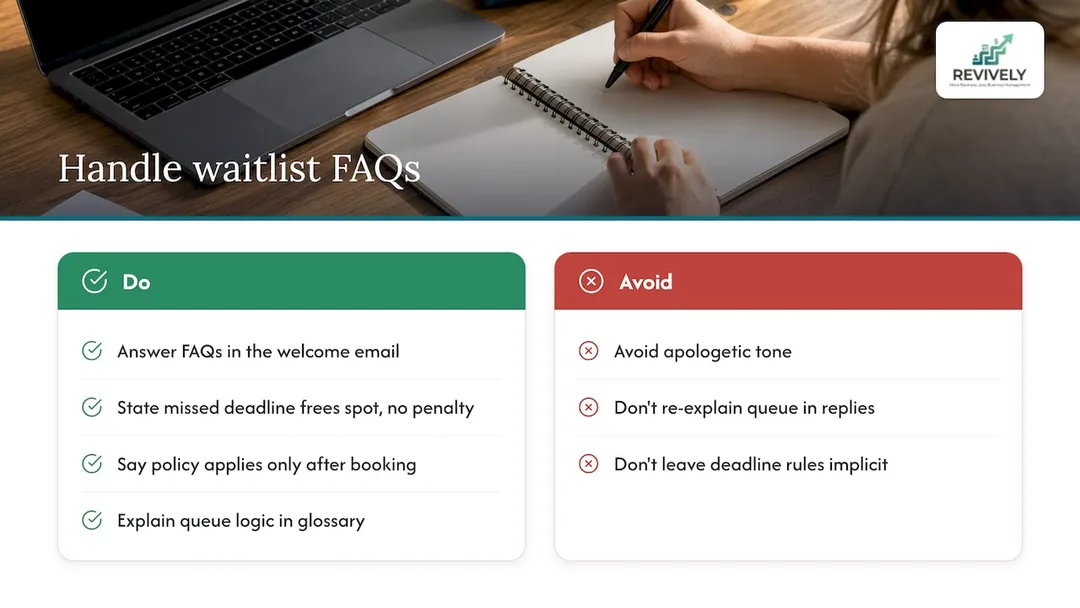
The same few questions inevitably pop up on every waitlist. By embedding the answers directly into your templates, you'll eliminate countless back-and-forth emails and free up your team. Clients consistently want to know:
- How long they're likely to wait.
- Whether their position in the queue is fixed.
- What happens if they miss the response deadline.
- Whether they still owe anything if they decline an offered spot.
Build these answers directly into your welcome-to-waitlist message. State plainly that a missed deadline releases the spot to the next client, with no penalty attached. And if your cancellation policy only applies once a booking is confirmed, explicitly say so, as waitlisted clients often mistakenly assume it applies the moment they join the list.
Objections about fairness (e.g., "Why did someone else get offered a spot before me?") are best handled by clearly explaining your queue logic once - perhaps in a glossary-style section on your website, using the same language your studio already uses for bookings (e.g., "first-in, first-offered" order). A short, factual tone usually defuses frustration far faster than an apologetic one, because it treats the client as someone seeking information, not reassurance.
Segmentation: Sending the Right Message to the Right Client
Not every waitlisted client is the same, so why send them the identical message? A first-time client keen on a popular Saturday class benefits from more context (what to expect, what to bring) than a regular who waitlists the same weekly session month after month and already knows the drill.
- Frequency: Segment by how often someone attends. For your loyal regulars, trim the offered-spot email down to the absolute essentials: class, time, deadline, confirm link. Reserve the fuller onboarding-style detail for newer clients.
- Membership Type: This is another useful differentiator. Clients on an unlimited membership or a rolling pass can be offered spots the moment they open, as there's no additional payment step to create friction. Clients paying per class, however, may need a slightly longer response window to accommodate the checkout process.
- Channel Preference: Segment by how clients prefer to be contacted. Those who've opted into SMS can receive urgent same-day offers via text first, with email serving as the detailed paper trail. Email-only clients, conversely, need a subject line that carries all the urgency on its own.
Grouping your audience in this way ensures every message feels relevant, personalised, and effective, rather than just another generic template.

From the Trenches: An Operations Manager's Practical Take
"A studio team that makes the switch from manual waitlist calls to automated, deadline-driven emails quickly notices two transformative things: a drastic reduction in time spent chasing replies, and significantly fewer empty spots on the schedule. This isn't about being impersonal; it's about being efficient. A transactional tone, clearly stating the offer and the deadline, actually protects client goodwill far better than a cheerful, marketing-style message would for something this time-sensitive. My advice? Try automating just one class's waitlist for a week. Measure the conversions. You'll see the impact, then you can scale it across your entire schedule."
- Andreea*
Revively's Approach: Seamless Automation, Australian Compliance
Running waitlist emails by hand is a constant drain. It means meticulously checking spreadsheets, desperately remembering deadlines, and constantly fretting over double-booking a vital treatment room or a busy dance floor. This is where Revively steps in as your unified cloud command centre (CRM + multi-resource scheduler), purpose-built for Australian wellness and fitness studios.
When a spot opens within Revively, the system handles it all: the offer goes out automatically, the response deadline is rigorously enforced, and an unclaimed seat seamlessly releases to the next person in line - all without anyone on your team touching a keyboard.

For Australian studios juggling more than one resource (think a yoga studio, a Pilates reformer room, and a recovery sauna all in the same day), Revively's intelligent software performs multi-resource conflict checks before any offer is sent. This guarantees a confirmed waitlist spot never clashes with another booking elsewhere in your facility. Crucially, our native Xero integration means every confirmed waitlist booking reconciles directly into your tax records, guaranteeing 100% legal tax compliance. Say goodbye to manual CSV exports; Revively ensures flawless two-way mapping of tax codes, revenue accounts, and liabilities, making your quarterly Business Activity Statements (BAS) audit-proof and completely free from manual spreadsheet errors.
And for every sensitive client intake form, booking history, and personal detail, rest assured: all your client data is stored locally in Australia, fully complying with the Australian Privacy Principles (APPs).
Here's how Revively empowers your waitlist strategy:
- Automatic waitlist promotion with enforced response windows.
- Intelligent multi-resource conflict checks before any offer is sent.
- Native Xero sync for every confirmed booking, ensuring GST accuracy and audit-proof BAS.
- Australian data residency and full APP compliance for all client information.
- Automatic handling of 10% GST calculations across all services and memberships, automatically issuing legally compliant Australian Tax Invoices.
Revively plans start with Solo at just $39 AUD a month, with Growth and Pro options available as your team and studio expand. Have a look at our current pricing or, better yet, start a free trial to experience the Revively waitlist workflow running seamlessly on your own timetable. See what an all-in-one spa booking software Australia trusts can do for you, and how it stands as a leading Mindbody alternative Australia studio owners are choosing.
FAQs for Your Peace of Mind
What should a waitlist confirmation email include?
A comprehensive waitlist confirmation email should confirm the exact class or appointment, date, time, and location. It should also include a calendar attachment or an add-to-calendar link, a concise reminder of your cancellation policy, and a direct link to any outstanding intake forms the client needs to complete.
How soon should clients respond to an offered spot?
Response windows should directly correlate with the urgency of the opening. Typically, this ranges from 1 to 4 hours for same-day offers, extending up to 48 to 72 hours for openings further in advance. Shorter windows are ideal for high-demand classes where other clients are eagerly waiting.
Should waitlist emails be automated?
Absolutely. Automating the notification, deadline enforcement, and spot-release sequence removes significant manual effort and demonstrably converts a higher percentage of waitlisted clients into confirmed bookings. Platforms like Revively are designed to handle this entire process automatically, making your studio operations more efficient.
Is SMS necessary alongside waitlist emails?
While not strictly mandatory, SMS serves as an exceptionally effective fallback, particularly for urgent, same-day offers, provided the client has opted into text messages. SMS significantly speeds up the rate at which clients confirm or decline an offer compared to email communication alone.
What is the difference between a cancellation notice and a reminder email?
A cancellation notice informs a client that their scheduled class or appointment will not be going ahead, and typically offers a credit or a rebooking link. A reminder email, conversely, confirms a booking that is still proceeding, usually sent 24 to 48 hours beforehand with essential arrival details and last-minute instructions.
Revively Resources & Partner References
For a deeper dive into waitlist automation in action, explore our blog posts on mastering class waitlists with automation and turning waitlists into guaranteed bookings. Our waitlist glossary entry provides a comprehensive overview of the underlying terminology. For best practices regarding SMS as a fallback channel, consult this valuable partner guide on appointment confirmations.