
Stripe Subscriptions for Studios: 5 Decisions Before Launch
! Studio owner testing a subscription setup
Stripe Billing supports recurring memberships, class pack subscriptions and self-service management through Checkout, Payment Links and a configurable customer portal.
Your studio's bustling. The reformer room's packed, the yoga mats are out, and reception's fielding calls. But behind the scenes, you're wrestling with membership payments. Failed cards, confusing class pack credits, late-night Xero reconciliations, and the ever-present fear of an ATO audit. Sound familiar?
You're not alone. Managing recurring revenue for a physical studio, especially here in Australia, is a complex beast. Enter Stripe Billing: a powerful tool for memberships, class packs, and self-service management. It handles the nitty-gritty of subscriptions through Checkout, Payment Links, and a configurable customer portal. Plus, it's got your back with built-in revenue recovery (hello, Smart Retries!) and webhooks to automate your workflow.
Pair Stripe with a dedicated studio command centre like Revively, and you're not just simplifying payments; you're transforming your entire member lifecycle and reconciliation process, without needing extra admin.

The Quick Scan for Busy Studio Owners:
- Go Live, Fast: No developer? Stripe Checkout or Payment Links get you selling memberships in a day. Custom integrations are for the complex stuff - think bundled add-ons or prorated plan changes.
- Know Your 'Packs': Treat recurring memberships as actual subscriptions. Sell class packs as one-off purchases; Stripe doesn't natively track credit use or expiry. Your studio management software (like Revively) needs to handle that.
- Chase Smartly: Stripe recommends starting with eight Smart Retry attempts over two weeks for failed payments. Layer in SMS reminders a few days after email for better recovery rates.
- ATO & GST Clarity: Each periodic membership payment is a separate GST supply. Good news: a single, comprehensive document can satisfy Australian Tax Invoice requirements.
- Local Trust: For Australian studios, seamless integration with Xero, 100% compliant GST calculations, and local data residency are non-negotiable for audit-proof BAS and client privacy.
Table of Contents
- Stripe Billing for Studios: The Features You'll Actually Use
- Choosing Your Integration Path: Fast Lane vs. Custom Build
- The Customer Portal: Your Front Desk's New Best Friend
- Billing Models, Fees, and Aussie Payment Methods: Budget Smart
- Failed Payments & Revenue Recovery: Your Silent Churn Killer
- GST, Xero & ATO Compliance: Nail Your Australian Studio's Financial Health
- Your Studio's Go-Live Playbook: Step-by-Step for Stripe Subscriptions
- How Revively Elevates Your Stripe Memberships and Reconciliation
- Mastering Multi-Resource Scheduling with Stripe Subscriptions
- Flexible Class Packs vs. Memberships: Getting it Right in Stripe
- Synchronising Stripe Data: Best Practices for Your Studio Dashboard
- Automating Waitlists with Subscription Tiers: Fair & Efficient
- Customising Stripe Tiers for Studio Growth: Solo to Multi-Location
- Beyond GST: Other Australian Tax Considerations for Studios
- Author's Take: What to Prioritise When Implementing Recurring Billing
- Let Revively Handle Your Stripe Setup, End-to-End
- FAQ
- Sources
- Recommended Reading
Stripe Billing for Studios: The Features You'll Actually Use
Stripe Billing was built for precisely this kind of recurring revenue. Good news: most wellness and fitness studios only need a fraction of its capabilities to smoothly run memberships, sell class packs, and offer add-on services.
You've got a few pricing models at your fingertips, depending on how your studio charges members:
- Fixed Recurring Pricing: Your bread and butter for standard monthly or annual memberships. Simple, predictable.
- Per-Seat Pricing: Ideal if you charge per family member, per linked account, or for team-based packages.
- Usage-Based Pricing: For those pay-as-you-go class credits or drop-in bundles. Think flexibility.
- Hybrid Pricing: Combine a base membership fee with metered add-ons like private sessions or spa treatments.
Need to go live yesterday? Stripe offers hosted integrations through Checkout and Payment Links. These are low-code, ready for public sign-up pages, and surprisingly robust. Studios craving tighter control over branding or a completely custom booking flow can build their own solution using Stripe Elements or the API.
And the best part? The customer portal empowers members to manage their own payment method updates, subscription pauses, and cancellations. This drastically cuts down the back-and-forth your front desk would otherwise handle, freeing them up to focus on member experience, not admin. Stripe's billing and invoicing tools also generate crystal-clear reports on recurring revenue, churn, and upcoming renewals, giving you a sharp read on studio performance without manual exports.
Choosing Your Integration Path: Fast Lane vs. Custom Build
Deciding on the right Stripe integration hinges on your need for control over the sign-up experience and the complexity of your pricing. Before you build a single thing, run through this quick checklist:
- Assess Your Technical Resources: No in-house developer? No worries. Payment Links or Checkout can get you up and running within a day with minimal coding. They're a fantastic "Mindbody alternative Australia" if you're looking to get started quickly without a huge technical investment.
- UI Control Requirements: Hosted pages work perfectly for straightforward memberships. But if you're envisioning a deeply branded, embedded booking flow, a custom build using Stripe Elements gives you that pixel-perfect control.
- Custom Entitlements: Do members need access tied to specific resources - like private sauna bookings, float tank sessions, or specific treatment room credits? A custom integration provides the flexibility to map subscription status directly to those granular permissions, crucial for multi-resource studio scheduling.
- Multi-Product Subscriptions: If your yoga studio sells a monthly membership alongside optional add-ons like private coaching or retail products, the API is often the cleanest way to bundle these line items.
- Upgrade & Downgrade Paths: Handling per-seat billing and prorated plan changes is generally smoother and more robust with a custom integration than relying solely on a hosted page.
For the vast majority of Australian dance, yoga, Pilates, and spa studios, Checkout or Payment Links cover the bulk of use cases: public membership sign-up, class pack purchases, and simple upgrades. Only consider a custom integration when you genuinely require granular entitlements or complex billing logic that a hosted page simply can't express.
Regardless of your chosen path, test thoroughly in Stripe's sandbox environment before going live. Simulate sign-up, card declines, upgrades, downgrades, and cancellations using Stripe's test card numbers. Crucially, confirm your webhooks fire correctly before taking payments from real members.
The Customer Portal: Your Front Desk's New Best Friend
A well-configured customer portal is a game-changer. It offloads a surprising amount of administrative burden from your front desk, allowing your team to focus on what matters most: your members. Members update cards, pause memberships, and change plans themselves - you only step in for the exceptions.
When setting up your portal sessions, proactively decide which flows to enable:
- Payment Method Updates: So members can swiftly fix a failing card without needing to email your team.
- Subscription Updates: Empowering members to move between membership tiers or adjust their class pack size.
- Subscription Cancellations: Crucially, build in retention options directly into the flow, rather than just a blunt cancel button. A pause option or a discount can significantly reduce voluntary churn.
- Invoice History: Members can self-serve past receipts, saving your staff from constant "can I get a copy of my last invoice?" requests.
Portal sessions are generated via the API, where you'll set a return_url that guides members back to your booking page or dashboard once they're done. Stripe's portal session configuration supports flow_data parameters, allowing you to offer a retention coupon or a pause option before a member confirms cancellation - a powerful tool for customer retention.
One minor point: the portal's branding options are more limited than a fully custom checkout page. Studios prioritising pixel-perfect brand alignment might prefer embedding portal links within their own booking interface rather than relying solely on Stripe's default styling.
Pro Tip: Always preview your portal configuration in the Stripe Dashboard before launch. It's the quickest way to catch a missing flow or a confusing cancellation path, saving you headaches down the track.
Billing Models, Fees, and Aussie Payment Methods: Budget Smart
Australian studios typically operate one of three core billing patterns. The model you choose will significantly shape how you configure Stripe products and prices.
- Membership Billing: Charges a flat, recurring fee for ongoing access. Perfect for unlimited classes, capped weekly attendance, or ongoing spa packages.
- Class Pack Billing: A one-time charge for a bundle of credits that expire after a set period. Ideal for casual attendees or specific workshop series.
- Per-Class Billing: Charges per booking. Works for drop-in heavy studios but generates more individual transactions, which can complicate reconciliation if not handled by an "all-in-one spa booking software" like Revively.
Regarding fees, Stripe's Australian pricing operates on a pay-as-you-go basis with no setup fees. Studios processing larger volumes might even qualify for custom pricing arrangements - always worth enquiring if you're scaling up.
Stripe also offers temporarily reduced rates on some local payment methods. For example, certain methods might have an introductory period with reduced per-transaction pricing before standard rates apply. This is a crucial factor for your pricing strategy if a significant portion of your members use a supported local payment method, as it can shift your effective processing costs over time.
When displaying prices to your members, decide upfront whether your listed price includes 10% GST or not, and maintain absolute consistency across your booking pages, invoices, and receipts. Inconsistent GST display is one of the most common sources of member confusion and reconciliation headaches when BAS season rolls around.
Failed Payments & Revenue Recovery: Your Silent Churn Killer
Failed payments are the quiet achiever of involuntary churn - often underestimated, always costly. Stripe's Smart Retries are specifically designed to recover these payments without your team having to manually chase every single one.
- Start with Stripe's Recommended Default: Set up 8 attempts over 2 weeks. This carefully balances giving a cardholder enough time to fix a payment method against letting a failed payment linger too long.
- Tailor to Your Audience: Highly engaged members might tolerate a tighter retry window. Studios with seasonal attendance, however, might benefit from a slightly longer runway.
- Layer in a Dunning Sequence: Combine an initial email notice with a follow-up SMS a few days later. Member-facing studios, particularly here in Australia, consistently recover more revenue when SMS supplements email alone.
- Offer a Retention Hook: On the final attempt, consider offering a retention coupon or a pause option if the member appears at risk of lapsing, rather than simply letting the subscription cancel outright.
- Watch the Essential Webhooks: Monitor
invoice.payment_failedto trigger your dunning sequence,customer.subscription.updatedto catch tier changes, andcustomer.subscription.deletedto flag lapsed members for your booking system. - Track Your Recovery Rate: Keep a close eye on your recovery rate over time. If it stalls, adjust your retry spacing or messaging until you hit that sweet spot.
Pro Tip: Log every invoice.payment_failed event directly against the member's profile in your studio management system. This empowers your front desk to see payment history at a glance, eliminating the need to dig through Stripe's dashboard mid-conversation.
GST, Xero & ATO Compliance: Nail Your Australian Studio's Financial Health
This is where Australian studios need to pay close attention. The ATO's guidance on progressive supplies is clear: each periodic component of a subscription (like a monthly membership payment) is treated as a separate supply for GST attribution purposes. However, you don't need to issue a fresh Australian Tax Invoice for every single periodic charge if one comprehensive document satisfies the ATO's requirements.
For flawless GST & tax invoice handling and 100% legal Xero integration for BAS accuracy:
- Map Stripe Line Items to Xero Flawlessly: Consistently map every Stripe invoice line item (each membership tier, class pack type, or add-on) to the correct GST fields and revenue accounts in Xero. This two-way mapping is critical. It guarantees that all 10% GST calculations are accurate and that your quarterly Business Activity Statements (BAS) are audit-proof, removing manual spreadsheet errors.
- Reconcile Stripe Payouts, Not Transactions: Instead of attempting to reconcile individual member transactions, reconcile Stripe payouts directly against your Xero bank feeds. Stripe batches multiple member payments into single payouts, which makes this process far more efficient.
- Set a Recurring BAS Reconciliation Check: Implement a regular (e.g., monthly or quarterly) check to confirm that Stripe's reported GST figures precisely match what's flowing into Xero. This proactive approach catches discrepancies before they become a BAS nightmare.
- Archive Compliant Invoices & Receipts: While Stripe retains records, having a local backup of your invoices and receipts in a format that satisfies audit requirements is always a smart move. Revively, as an Australian-made solution, ensures your client data, booking histories, and sensitive health intake forms are stored locally in Australia, fully complying with the Australian Privacy Principles (APPs) and providing robust data residency.
Getting this mapping absolutely right at the initial setup phase will save you an immense amount of time and stress compared to fixing a year's worth of misclassified transactions during BAS season. This attention to detail is what separates a smooth financial operation from spreadsheet chaos.
Your Studio's Go-Live Playbook: Step-by-Step for Stripe Subscriptions
Running through these steps in order will take you from a blank Stripe account to a fully reconciled membership system, without missing any critical dependencies.
- Define Your Products & Prices: Clearly outline all membership tiers, class pack sizes, and their tax behaviour (GST inclusive or exclusive).
- Map Entitlements: Connect each product to the specific booking access it grants - so a 'Growth Membership' or a '10-Class Pack' automatically unlocks the correct studio access.
- Choose Your Integration Path: Decide between Stripe Checkout/Payment Links for a swift public launch, or a custom API build if you require granular entitlements or bespoke branding.
- Configure the Customer Portal: Enable essential flows: payment updates, plan changes, and cancellation options, crucially embedding retention offers.
- Set Your Smart Retries Schedule: Implement a robust dunning sequence, combining automated emails and SMS reminders.
- Configure & Test Webhooks: Confirm that
invoice.payment_failed,customer.subscription.updated, andcustomer.subscription.deletedall fire correctly and trigger the right actions within your studio management system. - Connect Stripe Data to Xero: Integrate your systems and validate that a sample billing cycle reconciles perfectly against your BAS reporting requirements.
- Run End-to-End Sandbox Tests: Thoroughly test sign-up, card declines, retry sequences, upgrades, downgrades, and cancellations in Stripe's test environment before accepting live payments.
| Step | Focus Area | Why It Matters for Your Australian Studio |
|---|---|---|
| 1. Define Products & Prices | Setup | Ensures GST compliance and clear pricing from day one. |
| 2. Map Entitlements | Setup | Links subscription status directly to real-world booking access. |
| 3. Choose Integration Path | Build | Balances speed-to-market with required customisation. |
| 4. Configure Portal | Self-service | Drastically reduces admin load for card updates, pauses, cancellations. |
| 5. Set Retries & Dunning | Recovery | Minimises involuntary churn from failed cards, especially with local SMS. |
| 6. Test & Connect Xero | Compliance | Guarantees audit-proof BAS and seamless financial reporting. |
Following this sequence helps you avoid the most common pitfalls: going live with billing before entitlements and reconciliation are properly tested. Those issues tend to surface as frustrating access disputes or painful BAS discrepancies weeks or months later.
How Revively Elevates Your Stripe Memberships and Reconciliation
Our unified cloud command centre (the "all-in-one spa booking software" or "Mindbody alternatives Australia" you've been looking for) is purpose-built so Australian studios don't have to awkwardly stitch Stripe, booking software, and accounting tools together by hand.
- Built-in Stripe Support: Revively offers native, deep integration for memberships and class packs. Subscription status automatically updates booking access without requiring you to maintain a separate, clunky entitlements system.
- Flawless, Native Xero Integration: We provide automated, two-way mapping of your Stripe membership billing data directly into Xero. This means accurate 10% GST calculations and seamless reconciliation without manual exports, ensuring your BAS is always correct and audit-proof.
- Local Data Residency & Privacy: As an Australian-made solution, Revively ensures all your client data, booking histories, and sensitive health intake forms are securely stored locally in Australia, fully complying with the Australian Privacy Principles (APPs). This isn't just a feature; it's a fundamental trust pillar for your Australian clients.
- A Single, Intuitive Dashboard: Connects scheduling, member profiles, and billing in one place. No more staff checking three different systems to answer a single member question. This is the GST compliant studio software you deserve.
For studios seeking more detail on the billing side, our guides on seamless Stripe membership billing and handling membership pauses walk through common Australian studio scenarios in more depth.
Mastering Multi-Resource Scheduling with Stripe Subscriptions
Studios operating saunas, treatment rooms, multiple reformer spaces, or distinct studio areas face a unique challenge that Stripe alone doesn't solve. A subscription status confirms a member is current, but it doesn't tell your booking grid which specific resources that membership actually unlocks. This is the heart of multi-resource studio scheduling.
The practical solution is to treat each resource type as its own entitlement, mapped back to a Stripe price or product. For instance, a 'Spa Membership' might unlock sauna access and two treatment room credits per month. Conversely, a 'Pro-Tier Dance Membership' could grant unlimited studio floor bookings but cap private room hire. Your booking system must check subscription status against these mappings every single time a member attempts to reserve a resource, not just at sign-up.

Add in cleaning buffers and turnover windows, and the complexity only grows. If a treatment room needs 15 minutes between sessions, that buffer must be enforced regardless of whether the booking originated from a membership credit or a one-off payment. This highlights a critical point: subscription billing and resource scheduling need to communicate constantly, not just at renewal time.
This is precisely where an all-in-one platform like Revively, which natively combines appointment grids with real-time Stripe billing status, truly earns its keep. Checking entitlements manually against a spreadsheet of active members simply doesn't scale once you're juggling multiple rooms, varied membership tiers, and intricate buffer rules simultaneously.
Flexible Class Packs vs. Memberships: Getting it Right in Stripe
Class packs and memberships behave fundamentally differently in Stripe. Conflating them can lead to significant billing headaches.
A membership is a genuine Stripe subscription: recurring, auto-renewing, and billed on a fixed cycle. It's designed for ongoing access and predictable revenue.
A class pack, however, is closer to a one-time purchase with usage tracked separately. Stripe doesn't natively decrement "credits" in the way a dedicated studio booking system does. You can model pack purchases as Stripe products with one-time prices, but tracking how many classes a member has used (and when those credits expire) requires your booking system to maintain that count independently.
Some studios attempt a blend, offering a "rolling" membership that includes a capped number of classes per cycle, with additional classes billed as overage. This hybrid model can work in Stripe using a base subscription price plus a metered usage component, but it adds considerable complexity to both your Stripe configuration and your core booking logic.
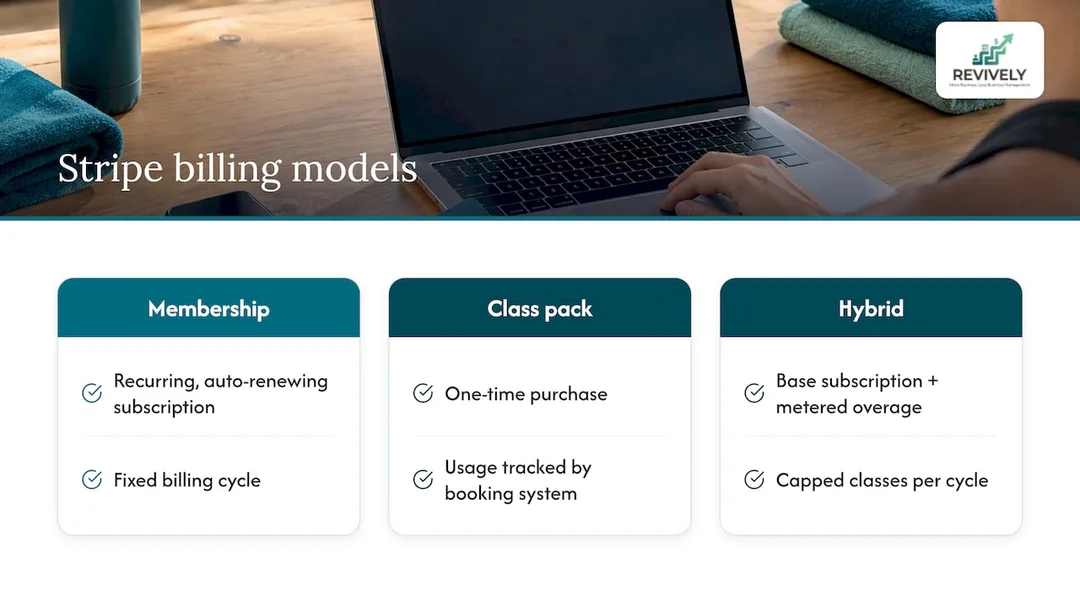
For most Australian studios, the simplest and most robust approach is: keep memberships as straightforward recurring subscriptions, and manage class packs as a separate purchase type with expiry dates and credit tracking handled by your booking system. This keeps your Stripe account clean and allows your booking system to do what it's built for (credit tracking and expiry), rather than trying to force billing software to perform a scheduling job.
Synchronising Stripe Data: Best Practices for Your Studio Dashboard
Subscription data often drifts out of sync with booking systems when the two aren't communicating in real-time via webhooks. A member who upgrades their membership in the Stripe portal should see that change reflected in their booking permissions within seconds, not after a nightly batch job or manual update.
Listen for customer.subscription.updated events and act on them immediately. Update the member's entitlements in your booking system the moment the event fires. Do the same for customer.subscription.deleted, ensuring lapsed members lose access to premium booking slots without a staff member manually revoking it.
Avoid relying solely on subscription status as your only source of truth. It's best practice to store a local copy of entitlement data alongside the Stripe subscription ID and reconcile the two periodically. This belt-and-braces approach catches the rare sync failure before a member notices they've lost access they're still paying for, or, conversely, kept access they've cancelled.
Dashboards like Revively, which pull Stripe data directly into the same interface as your booking grid and member profiles, significantly reduce this risk. With fewer integration layers to maintain and monitor, you're less prone to costly data sync errors.
Automating Waitlists with Subscription Tiers: Fair & Efficient
Waitlists perform at their peak when they automatically respect subscription tiers, rather than simply promoting members on a first-come, first-served basis.
A truly practical approach ties waitlist priority directly to membership status. For example, a 'Pro-Tier' member on a waitlist for a popular class should be promoted ahead of a casual class-pack holder when a spot opens. This reflects the value they're paying for and enhances member loyalty. This requires your booking system to check the subscription tier precisely at the moment a spot becomes available, not just when the member initially joined the waitlist.
Automating this means listening for both booking cancellation events and subscription status changes simultaneously. If a member's subscription lapses while they're on a waitlist, they should ideally drop in priority or be removed entirely, rather than being promoted into a class they're no longer paying for.
The promotion itself should immediately trigger a notification (SMS or email) so the member can confirm attendance before the spot is offered to the next person in line. Building this kind of logic manually involves writing and maintaining complex webhook listeners for both booking and subscription events - exactly the kind of cross-system automation that becomes fragile when handled across separate, disparate tools.
Customising Stripe Tiers for Studio Growth: Solo to Multi-Location
Studios scale uniquely. A solo instructor running a single space has vastly different billing needs compared to a multi-location operation with several staff members.
In Stripe, this typically involves creating separate products for each tier - think 'Solo', 'Growth', and 'Pro' equivalents - each with prices and entitlements that match the features unlocked. A 'Solo-Tier' price might cover a single location with no add-on staff seats, whereas a 'Pro-Tier' equivalent would include multiple bookable staff, additional locations, and higher-volume features.
When structuring your tiers, explicitly decide which features are entitlement-based (unlocked by the Stripe product a member or studio subscribes to) versus usage-based (metered and billed as an overage). Maintaining this clear distinction in your Stripe product catalogue prevents confusing upgrade paths later on.
For Australian studios managing their own membership tiers using Revively, our comprehensive membership and class pack features are built to integrate seamlessly with Stripe's subscription structure. This ensures your 'Solo', 'Growth', or 'Pro' plan maps cleanly to the booking entitlements your members actually utilise, making Revively a powerful Mindbody alternative Australia that caters to your growth.
Beyond GST: Other Australian Tax Considerations for Studios
While 10% GST compliance is the primary tax consideration for most recurring membership billing, a few other points are worth checking depending on your studio's specific structure.
If you're registered for GST, absolutely confirm that your Stripe product tax behaviour settings accurately reflect whether your displayed price is GST inclusive or exclusive. This impacts both your BAS reporting and your member-facing pricing. Studios operating as a company (rather than a sole trader) should also confirm their income tax obligations around subscription revenue recognition align with how Stripe reports payouts, particularly around end-of-financial-year reconciliation.
If you employ staff whose pay is linked to class attendance or membership revenue, investigate how your recurring billing data feeds into your payroll calculations. Any mismatch between booking records and billing records can complicate payroll tax obligations. While this article provides valuable insights, none of it replaces tailored advice from a registered Australian tax agent familiar with your specific studio structure. However, keeping your Stripe and Xero data cleanly reconciled, as covered earlier, will make any of these checks considerably faster when they arise.
Author's Take: What to Prioritise When Implementing Recurring Billing
If you're setting this up for the first time, cut through the noise and prioritise member self-service and reliable payment retries before anything else. A clunky portal or a weak retry schedule will cost you significantly more in lost revenue and administrative burden than a missing feature ever will.
Start with Stripe Checkout or Payment Links rather than trying to build custom entitlements on day one. Get a few billing cycles under your belt, watch your failed-payment and recovery rates closely, and then refine your dunning messages based on what actually gets cards updated. It's about practical, impactful wins first.
- Andreea, Revively Content Lead*
Let Revively Handle Your Stripe Setup, End-to-End
Instead of configuring Stripe, a separate booking system, and Xero reconciliation as three disconnected, time-consuming projects, we built Revively to run them as one cohesive platform. Memberships, class packs, and booking access stay in sync automatically. Crucially, 10% GST reconciliation flows straight into Xero without manual exports, guaranteeing audit-proof BAS.

This is the ideal GST compliant studio software for Australian dance, yoga, Pilates, and spa studios that want recurring billing live without managing complex webhooks, entitlement mapping, and portal configurations themselves. If your sign-up page needs a truly custom-designed checkout experience beyond what Stripe's hosted pages offer, Brainiac Media's membership site work is certainly worth a look as a design partner.
Check our pricing page for Solo, Growth, and Pro plans, or start a trial today to see how membership billing, class packs, and bookings work seamlessly together on one intuitive dashboard - the all-in-one spa booking software your Australian studio deserves.
FAQ
Can Stripe be used for subscriptions?
Yes, absolutely. Stripe Billing is explicitly built for recurring subscriptions, supporting fixed, per-seat, usage-based, and hybrid pricing models. It provides hosted checkout options, a self-service customer portal, and robust webhooks for automating all subscription lifecycle events.
How much does Stripe charge for subscriptions?
Stripe's Australian pricing is pay-as-you-go, with no setup fees. Studios processing larger volumes may be eligible for custom pricing arrangements. Some local payment methods also carry temporarily reduced rates; for example, an introductory period might offer 1.7% + A$0.30 per transaction before standard rates apply. Always check their official pricing page for the most current details.
What are the downsides of using Stripe payments?
While powerful, Stripe's customer portal offers more limited branding control compared to a fully custom checkout page. Studios demanding precise visual alignment may need to embed portal links within their own branded interface. Additionally, complex entitlement mapping - such as tying subscription tiers to specific resources or rooms - requires custom integration work rather than relying solely on Stripe's hosted tools.
What are the Stripe subscription statuses?
Stripe subscriptions progress through various statuses, including active, past_due, canceled, incomplete, and unpaid. These statuses reflect where a subscription is within its billing cycle. Webhooks like customer.subscription.updated and customer.subscription.deleted enable your booking system to react dynamically to these status changes, for instance, revoking access when a subscription lapses.
How do I keep Stripe membership billing reconciled with GST and Xero?
The ATO's guidance on progressive supplies treats each periodic membership charge as a separate supply for GST attribution. A single, comprehensive document can satisfy tax invoice requirements without issuing one for every single charge. To ensure accurate BAS reporting, consistently map Stripe invoice line items to Xero's GST fields and revenue accounts. Then, reconcile Stripe payouts against Xero bank feeds each period. This diligent approach keeps your BAS straightforward and audit-proof.