
5 Steps to Access Instructor Rosters and Schedules for Studios
! Coordinator opening an instructor roster
Check your teaching schedule or faculty dashboard, pick the correct term, then click the roster icon next to each class.
You know the drill. Another Tuesday, another frantic hunt for an instructor's updated roster. Is it the PDF on your desktop, the Google Sheet someone might have updated, or buried in a WhatsApp chat? Meanwhile, a client's asking about their next appointment, and you're still trying to confirm if Sarah is teaching yoga or Pilates at 6 pm.
Running a wellness or fitness studio in Australia isn't just about inspiring clients; it's a relentless juggling act of staff, schedules, spaces, and the ever-present shadow of compliance. Getting your instructor rosters and schedules locked down isn't a luxury - it's the bedrock of a smooth operation and, frankly, your sanity.
This isn't just about avoiding a double booking. It's about ensuring every client interaction is seamless, every tax invoice is spot on, and every quarterly Business Activity Statement (BAS) is audit-proof. Let's cut through the chaos and optimise how your studio handles its most valuable asset: its people and their time.

Forget the guesswork. Your master schedule, when managed correctly, becomes the single source of truth for everything from class times to client numbers. If a class you're rostered to teach isn't showing up, the fix is usually simpler than you think: confirm you're listed as the Instructor of Record with your scheduler.
The Studio Owner's Reality Check:
- Time Sink: Hours wasted chasing roster updates means less time for client experience or business growth.
- Compliance Headache: Incorrect GST calculations or mismanaged client data aren't just annoying; they're legal risks for Australian studios.
- Lost Revenue: Scheduling errors lead to cancellations, missed appointments, and frustrated clients looking elsewhere for a Mindbody alternative in Australia.
- Instructor Burnout: Conflicting schedules and constant communication breakdowns lead to unhappy, disengaged staff.
From Spreadsheet Scramble to Scheduling Savvy: Your Studio's Path
The principles of effective scheduling aren't new, but for Australian studios, they carry unique weight, especially when it comes to compliance. Let's walk through how to streamline your rostering, whether you're a burgeoning yoga centre or a multi-room spa.
Step-by-Step: Accessing Your Roster from the Studio Schedule
Whether you're managing a single Pilates reformer or a busy dance school, the process for accessing an individual instructor's schedule and client roster follows a similar logic.
- Log in to your studio management platform's staff portal. Head straight for "My Schedule," "Teaching Assignments," or "Instructor Dashboard."
- Select the correct term or period first. This sounds obvious, but picking last quarter's schedule is a classic reason a class appears "missing."
- Refine your view with filters. If your dashboard is cluttered with past or cancelled sections, filter to "show enrolled classes only" or "current term classes."
- Click the roster or class list icon next to the specific session you want to view. This should immediately pull up client details.
- Look for a photo roster option within that view. It's invaluable for connecting names to faces before a new class starts, making every client feel recognised from day one.
Important Note on Access: Permissions are key. Studio managers typically have full oversight, while instructors usually see only their assigned sections. If a new instructor can't access their roster, it's generally a permissions gap, not a system glitch. Their first port of call should be the studio administrator who manages staff assignments and can add them to the schedule record.
Most robust multi-resource studio scheduling platforms allow you to export and print directly from the roster screen. Look for icons for CSV, Excel, or PDF.
- CSV: Ideal for importing client lists into other marketing or client management software.
- PDF: Perfect for a quick, printable sign-in sheet you can carry into the studio.
How to Decipher and Utilise Your Client Roster
Once you've pulled up that class roster, you'll find consistent, critical information across most modern studio platforms:
- Client Name & Unique ID: Essential for accurate record-keeping and linking to client profiles.
- Email Address: Your direct channel for class updates, pre-session reminders, or post-class feedback.
- Registration/Enrolment Status: Clearly shows who's confirmed versus those on a waitlist. Critical for managing capacity.
- Client Photo (where available): A powerful tool for building rapport. Being able to greet a new client by name with a familiar face sets a professional tone immediately.
Your system should display enrolment counts right alongside each class, often linking directly to the full roster. This shortcut is invaluable for a quick headcount before committing to run a class. Capacity and waitlist numbers should sit clearly visible, instantly telling you if a class is full, under-subscribed, or humming with overflow potential.
From this roster view, your studio software should empower you to:
- Email the entire enrolled cohort with a single click.
- Download the list as a CSV for internal records.
- Print a photo roster for in-class identification.
- (For advanced systems) Link directly to attendance tracking or payment reconciliation.
Studio Manager Pro Tip: Export your roster as a CSV. Then, quickly open it in a spreadsheet, add a column for "Signature" or "Attendance," and you've got a custom sign-in sheet. This same file is often perfect for clean import into most Australian studio CRMs if you need to update or enrich client details.
Mastering Your Instructor Schedule: Spotting Conflicts and Optimising Load
Don't just glance at your schedule; scrutinise it. A seemingly perfect on-screen schedule can hide errors that only surface when classes are in full swing.
- Verify every detail: Double-check the date range, meeting days, start and end times, and the exact room or resource assigned to each class. A single incorrect digit can throw off an entire day.
- Sort your full studio schedule strategically: Arrange by time or day to quickly spot gaps for additional bookings, or, more importantly, glaring overlaps.
- Watch for common scheduling anomalies:
- Empty meeting times: Is a slot genuinely free, or is a section listed without a schedule yet?
- Overlapping assignments: The most common culprit for instructor burnout and client frustration.
- Sections with no Instructor of Record: A recipe for a last-minute scramble.
- Confirm hard constraints: Enforce instructor maximum teaching loads, declared unavailability, and blackout dates. Robust scheduling systems, like those built on UniTime's instructor scheduling framework, treat these as non-negotiable rules. Your all-in-one spa booking software should do the same.
If something doesn't add up, communicate clearly. Reach out to your scheduler or administrator with specifics: course type, section ID, term, and a screenshot or clear description of the issue. Vague reports get vague fixes; precise details lead to quick resolutions.
Elevating Your Studio Operations: Best Practices for Australian Businesses
University-level scheduling discipline isn't just for academics; it's a blueprint for any Australian fitness, yoga, Pilates, spa, or dance studio aiming for operational excellence and GST compliant studio software.
- Your Master Schedule: The Single Source of Truth. Ditch the fragmented system of personal calendars, whiteboards, and sticky notes. When the master schedule is the undisputed authority, instructors stop getting double-booked, and front-desk staff stop guessing.
- Seamless Client Journeys: Integrate your roster exports with your booking portal, health intake forms, and front-desk checklists. This ensures client profiles are current across every touchpoint - especially vital when considering Australian data residency and privacy principles (APPs). Your client data, booking histories, and sensitive health intake forms must be stored locally in Australia to comply with these regulations.
- Lock in Hard Constraints FIRST: Before you even think about preferences, hardwire your maximum class loads, blackout periods for instructors, and resource availability (e.g., how many reformer beds or treatment rooms). Trying to optimise for preferences before solidifying non-negotiables leads to a house of cards.
- Smart Scheduling for Multi-Resource Operations: Use waitlist automation, resource buffers between appointments, and a system capable of multi-resource bookings. This stops a packed yoga studio or a single treatment room from becoming a double-booking risk. Integrated constraint handling across a single, unified system is paramount for small teams juggling casual instructors, diverse class types, and valuable studio resources.
- Australian Compliance at Core: Ensure your systems natively handle 10% GST calculations across casual classes, memberships, and multi-resource packages. Your software should automatically issue legally compliant Australian Tax Invoices to clients - this isn't just a convenience, it's a legal requirement. For comprehensive client management, partnering with a health & fitness app developer in Australia can provide tailored solutions that fully integrate these requirements.
Your Weekly & Termly Studio Roster Checklist
Different frequencies call for different actions, and choosing the right export format can make all the difference.
| Task | Frequency | Recommended Export/Action | Why it Matters for Australian Studios |
|---|---|---|---|
| Confirm Instructor of Record & Term Selection | Term Start | Verify in system | Ensures all staff are correctly assigned and rosters accessible. |
| Export Full Roster for Records | Term Start | CSV or Excel | Essential for internal backups, auditing, and marketing outreach. |
| Print Photo Roster for Identification | Term Start | Photo roster / PDF | Improves client recognition, enhances member experience. |
| Verify Room Allocations & Check Waitlists | Weekly | Visual check in system | Prevents double-bookings, maximises resource utilisation, captures demand. |
| Generate Sign-in Sheets for Classes | Weekly | Streamlines check-ins, provides a physical attendance record. | |
| Confirm Staff Swaps & Availability | Weekly | Visual check in system | Reduces scheduling conflicts, maintains instructor satisfaction. |
| Review Client Health Intake Forms | Per new client | System report / PDF | Crucial for safety, duty of care, and APP compliance. |
| Reconcile Daily Takings with GST | Daily/Weekly | Sales report from POS/booking | Ensures accurate GST collection and future BAS reporting. |
Crucial Advice: Archive each term's exports in dated folders. This creates a clear audit trail, essential for resolving client disputes, reconciling financial records, or providing data for compliance checks. Never overwrite previous term's files; maintain a robust version history.
Escape the Spreadsheet Trap: A Unified Command Centre for Your Studio
Every minute your team spends hunting for the right roster version, deciphering scribbled notes, or manually calculating GST is a minute not spent on what truly matters: your clients and your studio's growth. The most efficient instructors and studio managers operate from a single, authoritative schedule with trusted routines for accessing and exporting data.

If your Australian dance, yoga, Pilates, or spa studio is currently running on a patchwork of spreadsheets, calendar invites, and fragmented communication, that checklist above becomes a Herculean task. That's where a true all-in-one spa booking software or comprehensive wellness studio platform like Revively changes the game.
Revively isn't just a scheduler; it's a unified cloud command centre (CRM + multi-resource scheduler) built specifically for Australian studios. We bring client profiles, class packs, automatic waitlist promotion, and multi-resource buffers into one intuitive dashboard. Beyond operational fluidity, Revively underpins your compliance and financial health:
- Australian Data Residency & Privacy: All client data, booking histories, and sensitive health intake forms are stored locally in Australia, fully complying with the Australian Privacy Principles (APPs). Rest easy knowing your clients' information is protected onshore.
- Flawless GST & Tax Invoice Handling: Our system natively handles 10% GST calculations across all your offerings - casual classes, memberships, multi-resource packages - automatically issuing legally compliant Australian Tax Invoices to your clients. No more manual calculations or compliance worries.
- 100% Legal Xero Integration for BAS Accuracy: Our two-way Xero integration isn't just a convenience; it's a guarantee of legal tax compliance. Automated mapping of tax codes, revenue accounts, and liabilities ensures your quarterly Business Activity Statements (BAS) are flawless and audit-proof, completely removing manual spreadsheet errors. This is vital for any Australian business seeking to optimise its financial backend.
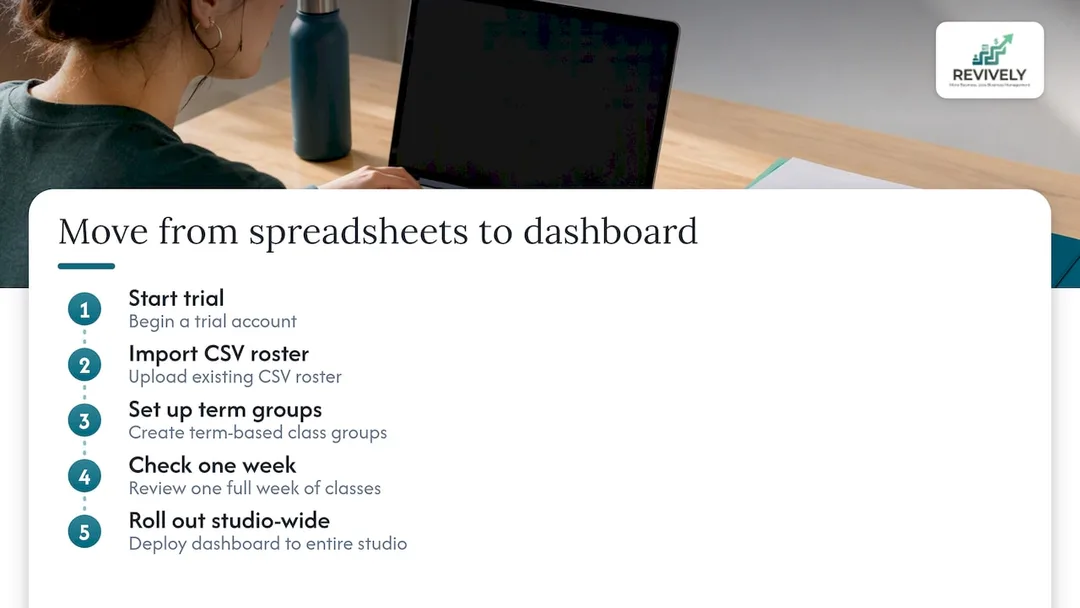
Getting started with a powerful Mindbody alternative in Australia like Revively is straightforward: begin a trial, seamlessly import your existing CSV client rosters, set up your term-based class groups, and run a full week of classes for testing before rolling it out studio-wide. Plans start at the Solo tier for $39 per month, with Growth and Pro tiers designed to scale as your team and services expand.
Frequently Asked Questions (FAQ) about Studio Rosters & Scheduling
Navigating the complexities of studio management often brings up common questions. Here are some of the most frequent queries we hear from Australian studio owners and instructors:
What exactly is a roster schedule in a studio context?
A roster schedule for a studio is the definitive list of clients enrolled in a specific class, workshop, or appointment, paired with the complete timing, location, and instructor details for that session. It typically includes client names, their enrolment status, and often photos, alongside the class's meeting days, times, and assigned resources (like rooms or equipment).
How far in advance should I receive my studio work roster?
The notice period for work rosters in Australia depends on your workplace's policy and any applicable industrial award or agreement. Always check with your studio manager or administrator for the specific notice period that applies to your role. Most advanced studio management systems make the current term's schedule and your assignments visible as soon as they are finalised, allowing you to check directly in your teaching dashboard.
What's the core difference between rostering and scheduling?
While often used interchangeably, "rostering" generally refers to the assignment of staff or instructors to specific shifts, classes, or appointments. "Scheduling," on the other hand, covers the broader arrangement of when and where those activities happen, including the timing, room, and resource allocation. In practice, particularly within comprehensive studio management software like Revively, these two functions are heavily integrated and managed together as one connected record to ensure seamless multi-resource studio scheduling.
Can I access a class roster through my learning management system (LMS) like Blackboard?
Learning management systems (LMS) such as Blackboard are primarily designed for course content delivery and student interaction. While they may display course participants, the authoritative and comprehensive class rosters, especially those linked to enrolment status and financial records, typically reside in your studio's dedicated student information system or booking and CRM platform. Always check your primary studio management dashboard or faculty portal for the most accurate and up-to-date enrolment list.
Sources & Further Reading
For those who want to dive deeper into the science and best practices behind effective scheduling and roster management, here are some foundational resources:
- Class rosters | University at Albany
- Class roster | Student Information System Training (Boston University)
- Instructor scheduling | UniTime help
- Mathematical modeling and exact optimizing of university course scheduling considering preferences of professors (MDPI, 2023)
Recommended for Your Australian Studio
Ready to further optimise your studio's operations, navigate compliance, and ditch the scheduling headaches for good? Explore these related articles from Revively:
- Ditch the Roster Ruckus: Fair Work Compliant Scheduling for Australian Studios
- Stop the Studio Scheduling Circus: Your Blueprint for a Unified Command Centre
- Stop the Scheduling Chaos: How Australian Studios Can Master Multi-Resource Scheduling (and Stay BAS-Ready)
- Studio Scheduling Chaos? Your Resource Utilisation Report Holds the Key to a Calmer Roster