
Fix Rosters Fast: Fair Work Compliant Staff & Resource Scheduling
! Coordinator planning linked studio resources
Get four things right and resource and staff scheduling stops being a daily headache: Fair Work-compliant rosters, multi-resource-aware booking, a gross-profit-driven headcount method, and automation for waitlists and reminders.
It's 6 PM on a Friday. Your phone buzzes. An instructor just called in sick for tomorrow's 7 AM Pilates class. Suddenly, your carefully planned weekend vanishes into a flurry of frantic texts, whispered phone calls, and the sinking feeling you might have to cancel - again. This isn't just an inconvenience; it's a silent leak in your studio's revenue and reputation.
Running an Australian wellness or fitness studio means juggling more than just class times. You're orchestrating staff, managing specialist equipment like reformers and saunas, and ensuring every booking complies with Fair Work, GST, and privacy laws. Trying to do that with a jumble of spreadsheets and sticky notes? That's a recipe for chaos.
What if you could publish your roster today, sleep soundly tonight, and know your studio is fully booked, legally compliant, and actually turning a profit - without a single frantic phone call? That's not a pipe dream. It's about getting four core things right: Fair Work-compliant rosters, multi-resource-aware booking, a gross-profit-driven headcount method, and smart automation for waitlists and reminders.

A tool like Revively can handle the multi-resource and Xero side of this without you touching a spreadsheet, but the underlying principles are what truly transform your operations.
The Short Story:
- Profit-First Rostering: Aligning staff levels to actual demand using gross-profit-per-staff calculations stops overstaffing on quiet days and understaffing on peak times.
- Multi-Resource Mastery: Dedicated logic for rooms, equipment, and staff - not just a single calendar - eliminates double-bookings and enforces essential cleaning buffers.
- Automation, Optimisation, Localisation: Auto-filling class waitlists, sending smart reminders, and ensuring Australian data residency while automating 10% GST calculations and Xero integration for seamless BAS.
- Fair Work Forward: Systems that display rosters two weeks ahead, manage break compliance, and provide clear communication channels aren't just good practice; they're legal necessities.
- Strategic Implementation: Moving from chaotic spreadsheets to a disciplined multi-resource studio scheduling system like Revively isn't a headache; it's a phased roadmap to operational calm within days.
Table of Contents
- The Non-Negotiable Checklist: What to Lock in Before You Start
- How to Staff Smarter: The Gross-Profit-Per-Staff Method
- Multi-Resource Booking: Beyond the Single Calendar Chaos
- Automation & Compliance: Cutting Admin, Not Corners (Especially for AU Studios)
- Your Roadmap: From Spreadsheets to a Seamless Schedule
- The Art of the Pivot: Handling Last-Minute Staff Changes
- Preventing Burnout: Fair Work, Fair Load
- Seamless Sync: Scheduling, Payroll, and BAS-Ready Xero Integration
- Beyond Rosters: Overtime, Breaks, and Fair Work Obligations
- Crystal Clear Communication: Everyone on the Same Page
- The Daily Difference: Life with Disciplined Scheduling
- Revively: Your Australian-Made Command Centre
- Sources
- FAQ
The Non-Negotiable Checklist: What to Lock in Before You Start
Before you even think about software or rewriting a single roster, run through this list. It's the difference between a thriving wellness studio scheduling software experience and constantly putting out fires.
- Roster Publication & Notice Policy: Does it align with Fair Work's guidance on displaying rosters and giving reasonable notice for changes? For permanent staff, consultation isn't optional.
- Multi-Resource Booking Logic: Your treatment rooms, saunas, reformers, and even the main studio floor need their own booking logic, not just a single shared calendar. This is critical for any all-in-one spa booking software.
- Cleaning & Turnover Buffers: These aren't suggestions. Build mandatory, un-bookable gaps between sessions to ensure every resource is ready for the next client.
- Class Caps & Enrolment Limits: Protect client safety, comfort, and instructor workload by setting strict limits per class or session type.
- Waitlist Automation & Reminders: Stop manually chasing cancellations. Automate the filling of spots and send smart reminders to cut no-shows.
- Utilisation & No-Show Reports: You can't improve what you don't measure. Track which classes and rooms are underused, and how many waitlist spots convert to paying attendance.
- Digital Intake Forms & Waivers: Ensure all client onboarding, from health questionnaires to consent forms, is digital, mobile-friendly, and securely stored. Collecting digital intake forms and waivers before a client arrives saves reception time and ensures compliance.
Most studios nail two or three of these and quietly bleed revenue or goodwill on the rest. The Fair Work Ombudsman's rostering guidance is your baseline for item one; read it in full. The others are operational choices - and they're where the wasted capacity (and hidden stress) truly lives.
How to Staff Smarter: The Gross-Profit-Per-Staff Method
Rostering by gut feeling is how studios end up overstaffed on a quiet Tuesday and desperately understaffed on a bustling Saturday morning. The gross-profit-per-staff calculation replaces intuition with a repeatable, data-driven number. And no, you don't need a fancy system to start.
- Calculate Trailing Gross Profit Per Class/Appointment Block: Look back at three months. What was the revenue from that specific time slot, minus direct costs like instructor pay and consumables? That's your real profit figure, not just a booking count.
- Set a Studio-Wide Gross-Profit-Per-Staff Target: This isn't a number handed down from on high. Involve your team. Staff who understand the target are far more likely to flag when a block is genuinely under-resourced or surprisingly lucrative.
- Divide Block Gross Profit by the Target for Required Headcount: A slot that clears the target twice over can probably run lean. One that barely covers it needs review, not just more hours thrown at it.
- Reassess Overlapping Blocks: For shared peak windows (e.g., reformer classes and massage appointments running concurrently), combine the gross profit across them, divide by your target once, then allocate staff by task rather than just by a single class.
Pro Tip: Run this calculation quarterly, not annually. Seasonal shifts in an Australian Pilates or yoga studio - think January sign-ups or pre-summer bookings - move the numbers more than most managers expect.
The maths is only half the job. Award conditions, staff availability, and skills coverage will sometimes override the pure number. That's a legitimate adjustment, not a failure of the method.
Multi-Resource Booking: Beyond the Single Calendar Chaos
A single shared calendar will break the moment your studio needs a room, an instructor, and a piece of equipment all to be free at the same time. Multi-resource scheduling treats each of those as a separate, linked constraint rather than one generic appointment slot. This is where you move beyond basic yoga studio management software to a truly integrated solution.
The failure modes are utterly predictable once you've seen them:
- A sauna booked for a treatment that also needs the adjoining treatment room.
- A reformer class scheduled without accounting for the ten-minute reset between sessions.
- Two instructors both assigned to the same 6 PM class because nobody flagged the clash.
None of these show up on a simple calendar until a client is standing at reception, confused, or worse, annoyed.
Three rules fix most of it for any all-in-one spa booking software:
- Enforce buffers as hard constraints, not optional gaps. This ensures cleaning and turnover time can never be booked over.
- Mark resource ownership explicitly for every booking: room, equipment, and staff member. Stop assuming a shared calendar will magically sort itself out.
- Set per-resource caps so a single sauna or treatment room can't be scheduled beyond its physical capacity in a day.
This is where constraint-based solvers shine. While you don't need to build one yourself, understanding what it automates helps you judge whether a scheduling tool (like an Australian Mindbody alternative) is doing the job properly. For instance, open-source projects like StaffScheduler validate schedules against hard rules (no double-booking) and softer preferences (fairness, rest periods).
Automation & Compliance: Cutting Admin, Not Corners (Especially for AU Studios)
Fair Work expects rosters to be displayed where staff can access them, with reasonable notice given before changes and consultation for permanent staff. While specific guidance for sectors like aged care suggests rosters visible at least two weeks ahead (with seven days' notice for changes where practicable), that timing benchmark is a sensible default for any Australian studio.
"Studios that combine peak-hour optimisation with waitlist automation and buffer protection report measurable gains in utilisation and lower no-show rates."
Beyond compliance, a handful of smart policies do most of the heavy lifting for modern fitness centre scheduling software:
- Automate waitlists and reminders. A cancelled spot should fill itself instead of sitting empty until someone manually checks.
- Build a clear shift-request and swap workflow. Staff need to know exactly how to ask for time off and who approves it.
- Set alerts for overtime and broken-shift risk. A scheduling gap should never quietly turn into a wages problem.
None of this replaces human judgement, but it strips away the administrative load that makes consistent judgement so hard to apply.
Your Roadmap: From Spreadsheets to a Seamless Schedule
Moving off spreadsheets doesn't have to be disruptive. Rushing the switch is the single biggest cause of staff resistance to new multi-resource studio scheduling tools. Phase it properly.
- Audit Your Resources, Classes, & Current Pain Points: List every room, instructor, and piece of equipment. Then, note where double-bookings or missed buffers have actually happened in the last quarter.
- Agree Your Gross-Profit-Per-Staff Target & Gather Historical Data: You need at least three months of trailing figures before the headcount method produces anything reliable.
- Configure Resources, Caps, Buffers, & Automation Rules: This is where multi-resource logic gets set up properly in your chosen studio management software, rather than patched around.
- Pilot on One Location or Studio Room: Run live data for four weeks. Measure utilisation before expanding further.
- Publish, Train, & Review: Roll out the new roster, train staff on the new workflow, and set a recurring review cadence so the schedule keeps adapting rather than calcifying.
Pro Tip: Pilot the timetable changes described in Revively's guide to smart timetable templates on your quietest room first. Mistakes there cost you far less than testing on your busiest Saturday slot.
The Art of the Pivot: Handling Last-Minute Staff Changes
A sick instructor an hour before a Pilates reformer class isn't a scheduling failure; it's a certainty you plan for. Studios that handle this well have a standing backup list, not a frantic scramble through group chats.
Keep a short roster of staff who've agreed in advance to cover short-notice gaps, with their availability updated weekly rather than assumed. A simple tiered response works better than an all-hands panic:
| Tier | Action | Benefit |
|---|---|---|
| 1 | Backup List (Pre-arranged casuals) | Fastest, least disruptive, often highest success rate. |
| 2 | Qualified Casual Staff (Wider pool) | Expands options, requires quick outreach. |
| 3 | Class Consolidation / Cap Adjustment | Reduces impact on other clients, avoids cancellation. |
| 4 | Cancellation (Last Resort) | Minimises financial loss, but impacts client trust. |
Cancelling should be the last resort, not the first instinct. A cancelled class often costs more in client trust than in wages.

Digital Fair Work compliant rostering Australia tools that let staff flag availability changes in real-time remove most of the friction here. When a therapist updates their availability the moment they know they're unwell, the gap is visible to whoever's managing the roster immediately, not discovered at opening time. Build a clear, short chain of who gets contacted first, second, and third for cover, and put it in writing so it doesn't rely on one manager's memory.
The goal isn't zero disruption. It's making sure disruption gets absorbed by a process instead of by whoever happens to answer their phone first.
Preventing Burnout: Fair Work, Fair Load
Overloading your best instructor because clients request them by name feels like good service until that instructor quits. Burnout in spa and studio settings tends to creep in through uneven load, not obvious overwork. It's the harder pattern to spot on a roster.
Watch for staff consistently rostered on the busiest blocks, back-to-back sessions with no recovery time, or the same two people covering every last-minute gap because they're reliable. Rotate premium and quieter slots deliberately rather than letting demand dictate the roster on its own. A therapist running five deep-tissue sessions in a row needs a different recovery buffer than a receptionist covering the same hours. Treating both the same is a common oversight.
Utilisation reports help here in a way managers often miss: a staff member with high client demand and no schedule gaps isn't necessarily thriving; they might be the person most at risk of burning out. Cross-train where you can, so coverage doesn't depend on one or two people every single week. A roster that looks efficient on paper can still be quietly unsustainable for the humans running it.
Seamless Sync: Scheduling, Payroll, and BAS-Ready Xero Integration
A roster that doesn't talk to payroll creates two versions of the truth: what was scheduled and what was actually worked. Reconciling the two by hand is where errors creep in, especially with GST compliant studio software. Integrated systems capture actual clock-in and clock-out data against the published roster automatically, so discrepancies surface immediately instead of at pay run.
This matters immensely for Australian spa and studio settings. Casual and part-time staff often work variable hours across multiple class blocks or appointment slots in a single day. Manually tallying those hours against award rates is slow, prone to mistakes, and a compliance risk. Software that links scheduling, time tracking, and payroll cuts that reconciliation down to a review step rather than a painful rebuild.
For Australian studios, this pairing is critical at tax time. A scheduling system that flows into your accounting platform - Revively syncs natively with Xero, for instance - means wage costs, 10% GST, and staff hours are already reconciled. More importantly, automated two-way mapping of tax codes, revenue accounts, and liabilities ensures your quarterly Business Activity Statements (BAS) are flawless and audit-proof, removing manual spreadsheet errors. This isn't just about convenience; it's about not discovering a payroll error three months after it happened.
Beyond Rosters: Overtime, Breaks, and Fair Work Obligations
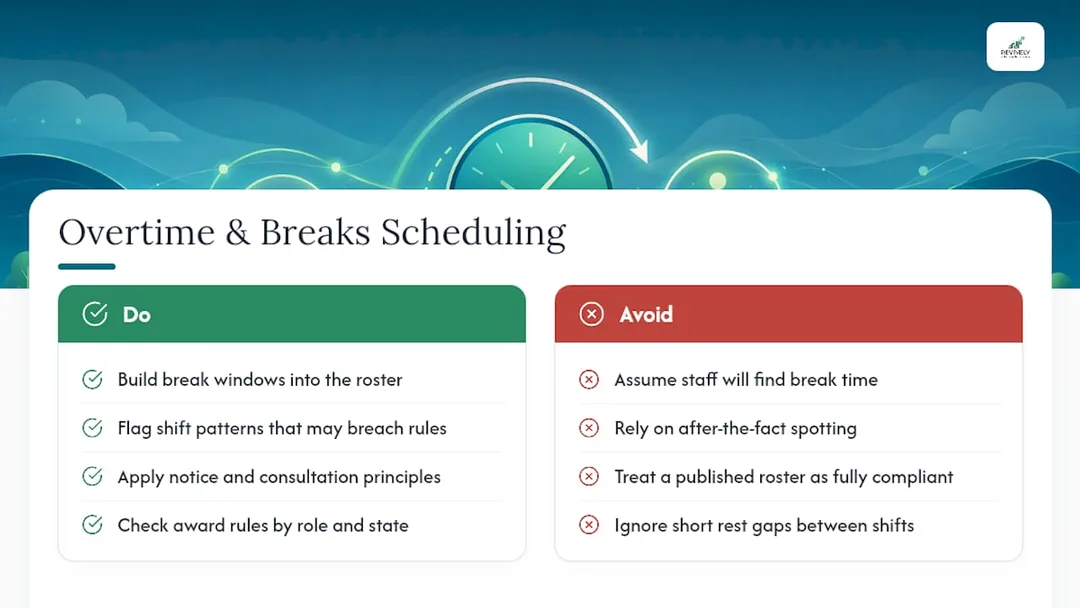
Getting the roster published on time solves one compliance problem. Overtime thresholds, meal breaks, and rest periods between shifts are separate obligations that a roster can easily overlook, even when it's technically published correctly. This is particularly true for Mindbody alternatives Australia built without local compliance in mind.
Award conditions vary by role and by state. Overtime triggers and break entitlements for a beauty therapist won't necessarily match those for a front-desk casual or a Pilates instructor on a different classification.
- Build break windows directly into the schedule. Don't assume staff will "find time" between clients. In a fully booked treatment room, they usually won't.
- Monitor rest periods between shifts. If the gap between a closing shift one evening and an opening shift the next morning is too short, that's a compliance risk, regardless of how good the coverage looks on paper.
Set your scheduling software or process to flag when a shift pattern risks breaching these rules, rather than relying on someone noticing after the fact. The Fair Work Ombudsman's guidance on hours and rostering is a sound benchmark for any studio rostering casual and permanent staff side by side.
Crystal Clear Communication: Everyone on the Same Page
The best roster in the world fails if half the team finds out about a change from a colleague instead of a system. Communication breakdowns around scheduling are rarely about the software; they're about which channel staff are actually expected to check.
Pick one source of truth. Whether that's a display board, a shared app, or a printed roster near the staff room, commit to it. Stop distributing changes through side channels like personal text threads. A foyer display board showing live bookings gives both staff and clients the same information at the same time, which removes a surprising amount of low-level confusion. Always confirm changes in writing, even informally, so nobody can reasonably claim they weren't told.
Give staff a direct way to request changes or flag conflicts that doesn't rely on catching a manager between clients. A simple structured request process - whether a form or an in-app message - beats a hallway conversation that gets forgotten by the next shift. The studios with the fewest scheduling disputes aren't necessarily the ones with the fanciest software; they're the ones where everyone knows exactly where to look and exactly who to tell.
The Daily Difference: Life with Disciplined Scheduling
The gap between a studio running on spreadsheets and one running disciplined multi-resource studio scheduling shows up faster than most managers expect.
- Admin time spent untangling clashes drops first, often within the first few weeks of a proper rollout.
- Double bookings become rare enough to be noteworthy, rather than a routine, awkward conversation at reception.
- Payroll gets cleaner almost as a side effect, because hours worked finally match hours rostered instead of requiring a manual reconciliation every fortnight.
- Clients notice too, even if they can't name why: fewer scheduling complaints, shorter waitlists that actually clear, and rooms that feel consistently used rather than either empty or overbooked.
None of this needs a dramatic software overhaul. It needs the four priorities - compliance, multi-resource logic, headcount maths, and automation - applied consistently. An Australian-built CRM like Revively is designed around exactly that combination for spa and studio operators, ensuring Australian data residency & privacy for all your client data, booking histories, and sensitive health intake forms.
Revively: Your Australian-Made Command Centre
Every checklist item above maps directly onto a feature built for how Australian spa and studio schedules actually work, not how a generic calendar assumes they work.
Revively handles multi-resource grids, so a sauna, a treatment rooms, saunas, and instructors are all scheduled as linked constraints with mandatory cleaning buffers enforced automatically. Waitlists auto-promote when a spot opens, so a cancelled Pilates reformer session fills itself instead of sitting empty while reception makes calls. Reporting shows utilisation and no-show trends without a spreadsheet. And because it's built for Australian businesses, our GST compliant studio software automatically handles 10% GST calculations, issuing legally compliant Australian Tax Invoices, and our 100% legal Xero integration for BAS accuracy keeps payroll reconciliation off your to-do list entirely. Plus, all your client data, booking histories, and sensitive health intake forms are stored locally in Australia, fully complying with the Australian Privacy Principles (APPs).

If you're weighing this up, start small: import one week of your real class timetable, turn on buffers for your busiest room, and test waitlist auto-promotion on a single popular class. You'll see where the current setup is quietly costing you within days, not months. Revively's plans start at $39 a month on the Solo plan, scaling up through Growth and Pro as your team and resources grow, with add-ons for extra staff seats or locations as you expand. Check the class scheduling features against your own resource list, or head straight to pricing to pick the plan that matches your studio's size.
Sources
- Rosters - Fair Work Ombudsman
- Maximize dance studio capacity with strategic scheduling - Dance Studio Journal
- StaffScheduler (GitHub) - schedule and optimisation reference
FAQ
What Is Resource and Staff Scheduling?
Resource and staff scheduling is the process of coordinating people, rooms, and equipment against demand so bookings don't clash and staff hours are matched to workload. For Australian spas and studios, it means rooms, saunas, and instructors are all scheduled as linked constraints rather than one shared calendar.
What Does Fair Work Require for Roster Notice?
Fair Work expects rosters to be displayed where staff can access them, with reasonable notice given before changes and consultation for permanent employees. Australian sector guidance suggests publishing rosters at least two weeks ahead where practicable.
How Do I Calculate Staff Headcount for a Class Block?
Divide the trailing gross profit for that class or appointment block by your studio's gross-profit-per-staff target to get the required headcount. Always adjust the result for real-world constraints like staff availability, skills coverage, or award conditions before finalising the roster.
What Does Multi-Resource Scheduling Actually Prevent?
It stops double-bookings where a room, instructor, and equipment are needed simultaneously but only one gets checked on a simple calendar. Tools like Revively's multi-resource booking system enforce cleaning buffers and resource caps automatically so these clashes can't be booked in the first place, ensuring efficient use of your Australian studio's resources.
How Much Does Revively Cost?
Revively's Solo plan starts at $39 a month, with Growth at $99 and Pro at $199, or discounted annual pricing on each tier. Full details, including add-ons for extra staff seats and locations, are on the Revively pricing page. All plans include robust Australian data residency and GST compliant invoicing.
Recommended
- Stop the Scheduling Circus: A Practical Guide to Multi-Resource Booking for Australian Studios & Spas
- Studio Scheduling Chaos? Your Resource Utilisation Report Holds the Key to a Calmer Roster
- No More Double-Bookings: The Australian-Made Multi-Resource Studio Scheduler That Stops Operational Chaos Cold
- Master Your Space: Why Multi-Resource Scheduling is Non-Negotiable for Australian Wellness Studios