
A resource utilization report shows what your team is really doing
! Hands interacting with studio scheduling panel
A resource utilization report shows how much of your available staff and room capacity is actually being used, and it gives you the numbers to right-size your schedule instead of guessing.
Picture this: your studio's buzzing, the phone's ringing off the hook, and your instructors are flat out. Great, right? Except you're also paying for dead time, rooms sitting empty, or worse - pushing your team to the brink of burnout. You're constantly guessing if you need more staff, fewer classes, or just a better way to juggle everything. This isn't a strategy; it's a daily fire drill.
What if you could cut through the noise with actual data, not just a gut feeling? That's precisely what a resource utilisation report delivers. It's the no-nonsense breakdown of how much of your available staff and room capacity is actually being used, giving you the cold, hard numbers to right-size your schedule instead of just crossing your fingers. For any Australian spa, recovery centre, or yoga studio, it answers one critical question: are you paying for hours nobody's booking, or booking more than your instructors and rooms can safely handle?
Run one, and you'll immediately zero in on three crucial figures:
- Utilisation Rate: Booked or operating hours as a percentage of what you could offer.
- Available Hours: Your roster's true capacity, once leave, training, and those essential cleaning buffers are factored out.
- Booked Hours per FTE: How client demand stacks up against a full-time equivalent, giving you an apples-to-apples comparison across roles or studios.
Take last month's booking export, grab your rostered hours, and run one simple calculation: booked hours divided by available hours. That single number will tell you more about your studio's operational health than a year of just hoping things balance out.
The Raw Truth: What a Resource Utilisation Report Actually Reveals
Forget the fancy jargon. A resource utilisation report works when it cleanly separates booked hours, truly available hours, and those non-negotiable buffers. This clarity is what empowers you to make sharp, data-driven decisions about your schedule without second-guessing the numbers.
| Core Principle | The Nitty-Gritty Detail |
|---|---|
| Start with one formula | For an instructor, it's booked hours ÷ available hours × 100. For a room with variable uses (e.g., spa treatments, yoga, physio), factor in each booking type's specific requirements. Why you need to optimise it: Why you need to optimise it: Resource utilisation directly impacts profitability. For every hour your fitness centre, spa, or health clinic is operational, staff and resource costs are ticking over. An under-utilised resource means wasted payroll and missed revenue. Conversely, over-utilised resources lead to burnout, decreased service quality, and client dissatisfaction. Optimising this figure ensures you're maximising revenue potential while maintaining a healthy work environment and high service standards. ## What on earth is a resource utilisation report, actually? |
Imagine the chaos of running a fitness empire: juggling trainers, studio space, treatment rooms, and that one pesky yoga mat everyone always loses. You've got schedules, bookings, memberships... and a nagging sense you're leaving money on the table or overworking your star Pilates instructor.
This is where a resource utilisation report steps in. Think of it as your secret weapon against operational guesswork. It doesn't just show you what your team might be doing; it paints a crystal-clear picture of what your staff and facilities are actually achieving, giving you the solid numbers to fine-tune your operations like a maestro.
For any fitness studio, day spa, or recovery clinic here in Australia, this report answers a primal business question: Are you paying for hours nobody's booking, or are you pushing your instructors and treatment rooms beyond their sustainable limits? It's time to stop the guessing game and start acting on data.
Diving Deep: The Core Metrics You Need to Track
When you generate this report, you'll immediately see three critical data points that dictate your next move:
- Utilisation Rate: This is the percentage of your available operational hours that are actually booked or in use. It's the ultimate efficiency gauge.
- Available Hours: Don't just look at a shift length. This is your true capacity after stripping out planned leave, public holidays (we know how many of those we get down under!), and those crucial buffer times between appointments for cleaning or equipment setup.
- Booked Hours per FTE: Need to know if demand warrants another reformer instructor or if your current team can absorb more? This metric normalises booked hours against a Full-Time Equivalent (typically 38 hours a week in Australia), making cross-role or multi-location comparisons simple and effective.
Here's the kicker: Pull a booking export for any given period. Divide the total booked hours by your true available hours. That single calculation will reveal more about your studio's operational health than a year spent hoping for the best.
What a Resource Utilisation Report Actually Measures (and Why it Matters)
Let's clear up the fog around three terms often tossed around interchangeably. Getting these wrong is where most reporting blunders begin.
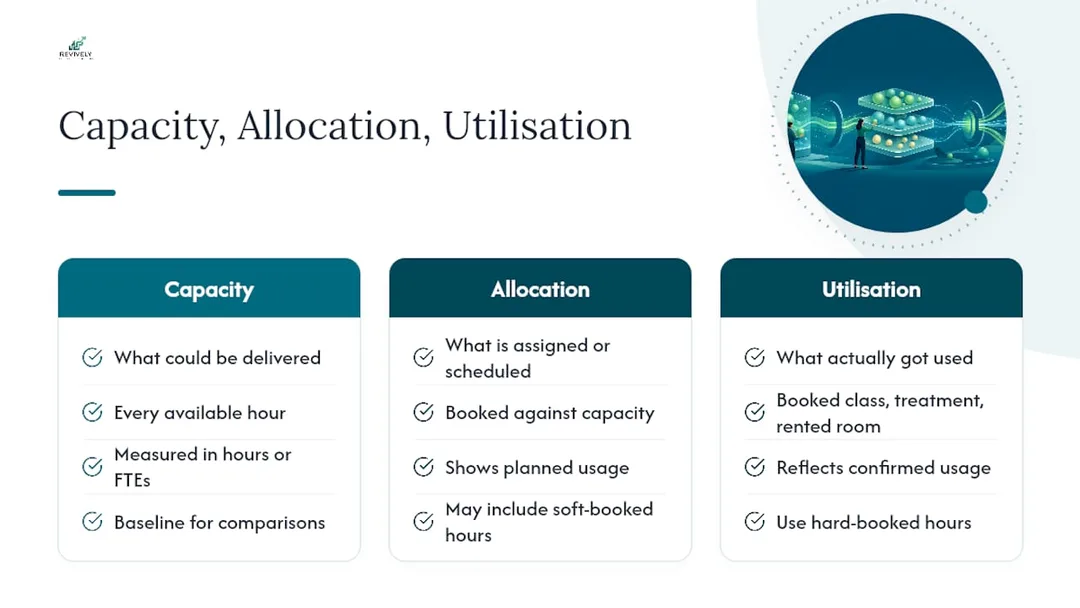
- Capacity: This is the absolute maximum a resource could deliver if every single hour were utilised. Think of it as a treatment room running back-to-back facials from open to close, with no breaks.
- Allocation: What you've actually assigned or scheduled against that capacity. So, if the room could run 10 facials, but your schedule only has 7, that's your allocation.
- Utilisation: This is the real deal - what actually got used. A booked class, a completed massage appointment, or a yoga studio floor rented out. This is the metric that directly impacts your bottom line.
A full-time equivalent (FTE) is your standard yardstick, generally 38 hours a week for most Australian roles. It lets you accurately compare, say, a casual yoga instructor working 15 hours against a full-timer. Use raw hours when you're managing a single roster; switch to FTEs when you're comparing performance across studios or mapping out future headcount across your network.
And here's another distinction that catches many studios out: soft-booked hours versus hard-booked hours. Soft bookings are tentative - pencilled in, maybe awaiting payment or confirmation. Hard bookings are locked in, paid for, and confirmed. Many vendor documentation for utilisation reporting separates these for a reason. Blend them, and you'll wildly overstate how solid your future demand truly is. Don't fall for the false sense of security.
The Maths Behind the Magic: Key Formulas for Your Studio
The core formula is deceptively simple, but getting the inputs right is where the mastery lies:
Utilisation Rate = (Booked or Operating Hours ÷ Available Hours) × 100
So, if your Pilates instructor is available for 30 hours and delivers 24 booked hours of classes and private sessions, that's a rock-solid 80% utilisation rate.
For broader comparisons, especially when deciding whether to hire another therapist or redistribute existing classes, use the FTE-based version:
Total Booked Hours ÷ (FTE Count × Standard Hours per FTE)
Getting your Available Hours right is where most reports stumble. It's never just "shift length times days worked." You need to build it with precision:
- Start with rostered shift hours from your timetable or staff management system.
- Subtract approved leave and those pesky public holidays.
- Crucially, subtract mandatory buffers. Think the cleaning turnover between treatment rooms or prep time for a new class. These aren't idle; they're essential.
- What's left? Your true available hours. Not some theoretical maximum.
Most resource utilisation reports will compare demand against capacity and let you flip between hours and FTEs. For weekly check-ins, hours are intuitive. For quarterly hiring reviews, FTEs clean up cross-role comparisons. Many Australian studios find that presenting utilisation as a percentage, with raw hours in a secondary column, offers the best balance of insight and detail.
Beyond the Numbers: Reading Your Report and Knowing What's Next
A flat utilisation rate is like a single note in a symphony - it tells you almost nothing. The pattern around it, that's where the real music happens.
- Consistently under 60%? This usually screams "overstaffed for current demand" or a roster built on optimism, not actual bookings. The solution isn't always cutting staff; it might mean redeploying hours to busier slots or smartly trimming underperforming shifts.
- Consistently above 90%? This isn't a badge of honour; it's a burnout warning. Operational management guidance frames high utilisation as a right-sizing problem, not a productivity win. Why? Because your margins evaporate rapidly once staff or rooms have zero slack for no-shows, unexpected delays, or vital cleaning. You're sacrificing long-term sustainability for short-term gain.
- Wild week-to-week swings? This points to a deeper issue with your scheduling or demand forecasting. Investigate this before you even consider touching headcount. Volatility eats away at predictability and client experience.
Idle time and downtime might look the same on a spreadsheet, but they demand entirely different responses. Idle time is available capacity that simply went unused - a treatment room with zero bookings. That's a scheduling, marketing, or pricing problem. Downtime is capacity that was unavailable in the first place - a room closed for maintenance. That's a facilities or equipment issue. Lump them together, and you'll send a scheduling fix to a maintenance problem, or vice versa. It's like prescribing panadol for a broken leg.
Pro Tip: Don't knee-jerk react to one quiet week. Before you hire, cut hours, or make any significant operational change, look at a rolling three-month average. This smooths out anomalies, ensuring a single slow fortnight doesn't trigger a decision you'll deeply regret next quarter.

Applying This in the Real World: Australian Studios, Spas, and Multi-Purpose Rooms
Let's be real. Most Australian studios don't run a simple, single-purpose schedule. Your multi-resource studio might host high-intensity Pilates in the morning, pivot to tranquil remedial massages in the afternoon, and then become a dance studio at night. Each transition demands its own cleaning buffer, eating into those 'available' hours. And group classes? They fill one time slot, whether there are three attendees or thirty, but the revenue impact is wildly different.
This is precisely where automated, integrated booking data becomes non-negotiable. Trying to manually reconcile this information is a recipe for errors and late nights. Fields that drastically reduce reporting friction include:
- Booking exports that already differentiate between soft and hard bookings.
- Resource buffers natively built into your scheduling software, not scribbled in a notebook.
- Attendance records directly linked to specific class and appointment bookings.
- Seamless Stripe payment and Xero-synced revenue data, so you can analyse utilisation and revenue per hour side-by-side.
Consider an instructor running four Pilates classes and two private sessions across a 30-hour available week. If those six sessions total 24 booked hours, their utilisation sits at 80%. This is a healthy figure for a class-based role where some essential idle time between sessions (for client changeovers or a quick tea break) is normal, not a red flag. The key is understanding why time is unbooked.
Revively's sophisticated resource buffers and flexible multi-resource booking grid automatically capture these complex, layered schedules. This means those critical buffers show up in your reports as legitimate capacity constraints, rather than mysterious 'idle time' that sends you on a wild goose chase.
Why Templates Won't Magically Fix Your Australian Studio's Reporting Issues
Most advice on resource utilisation treats it like a simple spreadsheet problem: get the formula right, format the columns, done. That completely misses the glaring Achilles' heel of any reporting: data collection.
The fundamental formula for utilisation hasn't changed in decades. What has changed is the fragmented digital landscape of most modern studios. You're likely juggling a separate system for bookings, another for timesheets, a third for payments, and a fourth for client notes. Every gap between these systems is a fertile breeding ground for errors: soft bookings accidentally counted as hard, critical buffers mislabelled as idle time, and reports that subtly become completely unreliable.
My honest read? Studios desperately chasing a "perfect" utilisation threshold are often optimising the wrong variable. An Australian yoga studio consistently operating at a 78% utilisation rate with predictable, rolling averages is in vastly better operational health than one violently bouncing between 60% and 95% week-to-week. Even if their average looks similar on paper, the latter is a business on a rollercoaster. Volatility is the real signal you should be chasing down, not just the raw percentage.
If there's one thing to prioritise first, it's fixing where your available hours and booking data actually live. Get that single, verifiable source of truth sorted. Everything downstream, from your quarterly BAS to your staff retention, depends on it.
Turning Your Utilisation Report into Fewer Scheduling Headaches (and Better BAS Compliance!)
Let's be honest: building this report manually every month is a soul-crushing exercise. Especially when you're juggling a complex roster of instructors, multiple treatment rooms, and diverse studio floors across separate, error-prone spreadsheets.
Revively is engineered to pull every critical field this report demands - booked hours, buffers, attendance, and that vital soft vs. hard booking distinction - directly from the same unified system that manages your bookings, memberships, and client interactions. This means the data doesn't need painful reconciliation before you can truly trust it.

Our class scheduling and online booking tools feed directly into Revively's reporting dashboard. Your utilisation figures update in real-time as bookings come in, removing the need for end-of-month manual exports and frantic spreadsheet updates. Resource buffers for cleaning, setup, and turnaround are already built into our intelligent scheduling grid, ensuring they're correctly accounted for in your available hours, not erroneously flagged as idle time.
Built for Australian Businesses: Compliance You Can Trust
Beyond just smart scheduling, Revively is meticulously built for the Australian market:
- Australian Data Residency & Privacy: Your client data, booking histories, and sensitive health intake forms are all stored securely in Australia, fully complying with the strict Australian Privacy Principles (APPs). No more worrying about offshore data vulnerabilities.
- Flawless GST & Tax Invoice Handling: We natively handle 10% GST calculations across casual classes, memberships, and complex multi-resource packages. The system automatically issues legally compliant, professional Australian Tax Invoices to your clients - saving you hours of manual fiddling and ensuring you're audit-ready.
- 100% Legal Xero Integration for BAS Accuracy: Our deep, two-way integration with Xero isn't just a convenience; it's a guarantee of 100% legal tax compliance. Automated mapping of tax codes, revenue accounts, and liabilities ensures your quarterly Business Activity Statements (BAS) are flawless and audit-proof, completely removing the risk of manual spreadsheet errors. Focus on your clients, not tax nightmares.
Want to see how your own studio's numbers would look on a live, compliant dashboard? Book a demo with our team. Bring last month's roster and let us show you what clarity looks like.
Next Steps: Making Your Report Actionable
Before you even open a spreadsheet, take a moment to scope out your report. Decide on your reporting window (weekly for operational check-ins, monthly or quarterly for bigger staffing decisions) and precisely which resources you need to analyse: specific instructors, individual therapists, particular treatment rooms, or studio floors.
Every row in your report needs the same core fields for consistency and accuracy:
- Resource Utilization (report) - Business Central | Microsoft Learn
- Saviom - track resource utilization
- Toolsense - idle time definition and difference to downtime
- Resource Utilization by Organization - Deltek Vantagepoint help
When it comes to your data sources, resist the urge to mix estimates with hard data. A practical utilisation template built for equipment tracking makes a point equally valid for people and rooms: favour a single, reliable source (your booking system export, verified timesheets, etc.) over blending multiple, potentially conflicting inputs. Timesheets tell you attendance. Booking exports tell you what sold. Roster data tells you what was planned. Pick the source that directly answers the question you're asking, and use the others for cross-checking, not averaging.
Once your fields are populated, group by role or room in a pivot table, then sort by utilisation rate to instantly pinpoint your outliers. A simple bar chart, with a clear threshold line at your target rate (say, 75%), makes under- and over-utilised resources obvious at a glance. No one needs to squint at numbers.
Pro Tip: From day one, keep a dedicated "buffer" column separate from your "idle" column. Merge them later, and you'll face the painful task of recalculating every historical report just to answer a simple question about your essential cleaning or prep time. Future you will thank you.