
Multi resource scheduling for studios and spas: a practical guide
! Hands managing spa resources scheduling
Multi resource scheduling is the practice of assigning more than one resource type - staff, rooms, and equipment - to a single booking or unit of work simultaneously.
You know the drill. It's 8 AM, the phones are ringing, and your Pilates instructor just called in sick. You need to reschedule 10 clients, find a new instructor (who is qualified for reformers), open up a different studio room, and somehow avoid triple-booking the spin bikes. All before your first client walks in.
This daily operational chaos? It's the symptom of a single-resource scheduling system trying to manage a multi-resource reality. You're not just booking a person; you're booking a person, a room, a piece of equipment, and often a non-negotiable cleaning buffer in between. Miss one piece, and the whole booking unravels.
That's where multi-resource scheduling steps in. It's the practice of assigning more than one resource type - staff, rooms, and equipment - to a single booking simultaneously. For an Australian studio manager looking to rein in the mayhem, three actions matter right now:
- Build a single, cross-roster visibility view: Every resource - from your senior therapist to your hot yoga studio - needs to appear on one screen.
- Set allocation caps and cleaning buffers: Lock these in as hard constraints before you go live. No exceptions.
- Run a pilot with real bookings: Use a scheduler that supports requirement groups and offers a native Xero integration for flawless GST reconciliation.
The industry standard for effective multi-resource scheduling hinges on three critical proof points: the ability to group requirements (one booking locks multiple resource types at once), a real-time capacity view across all resources, and a robust local accounting integration - which, for Australian studios, absolutely means Xero.

Table of Contents
- What does multi-resource scheduling actually mean in practice?
- How does multi-resource scheduling differ from single-resource approaches?
- What features should you require in a multi-resource scheduling tool?
- How does multi-resource scheduling work in Australian studios and spas?
- Typical implementation timeline and cost drivers for studios
- Copyable pilot checklist and acceptance criteria
- Integration with your existing tools and systems
- Training and change management for your team
- Scalability considerations for growing studios
- Key takeaways
- The part most studios get wrong about resource scheduling
- Revively handles multi-resource scheduling for Australian studios
- Useful sources and further reading
What Does Multi-Resource Scheduling Actually Mean in Practice?
Forget the enterprise jargon for a moment. In your studio, multi-resource scheduling means that a single client booking - whether it's a hot yoga class, a deep tissue massage, or a dance choreography session - automatically reserves all necessary components at the same time.
Think of it this way: A Pilates reformer class doesn't just need an instructor. It needs a specific studio room (with a defined capacity), and a set of reformer beds. All three must be available * simultaneously*, or that booking simply cannot proceed. The system ensures this tight alignment.

Enterprise platforms like SAP Multiresource Scheduling detail this as graphical planning with automatic assignment based on availability and qualifications. It's the same core logic you need when matching a senior yoga instructor to the correct room with the right props.
In essence, a multi-resource booking is like a row that spans several "resource lanes" simultaneously on your schedule. If any one of those lanes is blocked, the booking can't be placed. This constraint logic is what truly separates intelligent multi-resource scheduling from a glorified calendar.
You can delve deeper into the technicalities of these concepts with resources like the Application Help for SAP Multiresource Scheduling or explore how Microsoft Dynamics 365 can schedule multiple resources with requirement groups. For those interested in the underlying algorithms, academic papers such as Improving multiresource job scheduling with Markovian service rate policies (IEEE/ACM ToN) and MRSch: an intelligent scheduling agent for multi-resource scheduling (arXiv) offer fascinating insights. Open-source projects like pratikdeoke/Resourcia also provide practical implementations. For a real-world application, consider how Revively functions as the unified command centre for modern wellness & fitness studios, offering class scheduling software for studios that expertly manages shared resources, as discussed in the Atlassian Community.
How Does Multi-Resource Scheduling Differ from Single-Resource Approaches?
The fundamental distinction lies in what drives your schedule. Are you prioritising a task (when does this class need to happen?) or constraints (what do we have available, and can all the pieces align for this booking?)
Opt for multi-resource scheduling when:
- Your studio employs shared specialists (e.g., a single senior instructor who covers multiple class types or treatment modalities).
- Bookings are intrinsically tied to room or equipment availability alongside staff.
- You run group classes where room capacity limits, waitlists, and specific equipment interact.
- Appointments require two practitioners simultaneously (think couples' massage or partner-based coaching).
- You operate across multiple locations and desperately need cross-site visibility for resources like expensive equipment or highly-sought after instructors.
Single-resource or task-driven scheduling might suffice if:
- Your team is small with minimal equipment dependencies.
- Bookings primarily involve one staff member and no specific room or equipment requirement.
- You mostly manage one-off tasks with no linked assets or concurrent resource needs.
Quick Checklist: Which model fits your operation?
- Do any of your bookings require more than one resource type (e.g., staff + room + equipment) to proceed?
- Do you have rooms or specialised equipment that can only be used by one booking at a time?
- Do you run group classes with waitlists, capacity limits, and varying equipment needs?
- Do you need to enforce cleaning or turnover time between bookings as a non-negotiable rule?
If you answered "yes" to two or more of those questions, multi-resource scheduling isn't just a nice-to-have; it's the right model for your business.
What Features Should You Require in a Multi-Resource Scheduling Tool?
The chasm between a basic calendar app and a purpose-built multi-resource scheduler is vast. Here's a breakdown of the non-negotiable features versus the useful "nice-to-haves" for wellness and fitness studios:
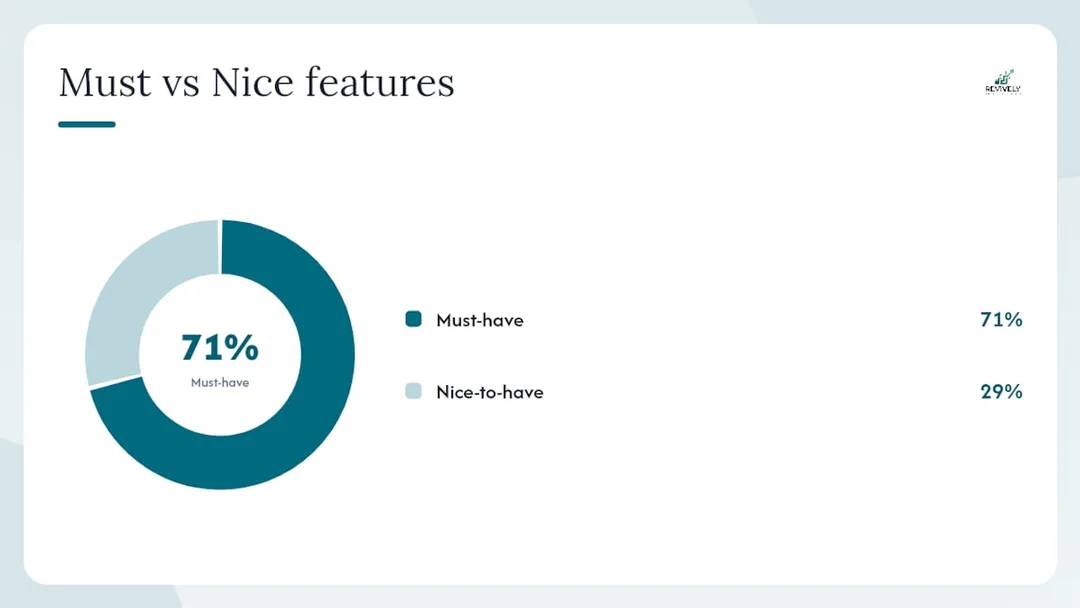
| Feature | Must-Have (Non-Negotiable for Australian Studios) | Nice-to-Have (Adds Significant Value) |
|---|---|---|
| Multi-assignment (one booking → many resources) | ✓ | |
| Requirement groups (link resources to booking types) | ✓ | |
| Resource pools (manage shared assets) | ✓ | |
| Cleaning/turnover buffers (hard constraints) | ✓ | |
| Real-time availability view across all resources | ✓ | |
| Mobile staff app and notifications | ✓ | |
| Waitlist auto-promotion | ✓ | |
| Group class and capacity management | ✓ | |
| GST & Tax Invoice Handling | ✓ | |
| Analytics and utilisation reporting | ✓ | |
| AI scheduling suggestions | ✓ | |
| Scenario simulation (what-if planning) | ✓ | |
| Multi-location support | ✓ | |
| Display boards for foyer/reception | ✓ |
When evaluating vendors, push them to demonstrate three specific tasks:
- Book a multi-resource appointment: Ask them to book, for example, a massage that requires a specific therapist, a treatment room, and a hot stone warmer. Then, show you how the system highlights and handles a conflict on just one of those resources.
- Enforce a cleaning buffer: Configure a 15-minute cleaning buffer between two back-to-back room bookings. Now, try to override it. A robust system should block this or at least require manager-level authorisation with a clear warning.
- Automatic waitlist promotion: Set up a full group class with a waitlist. Then, simulate a cancellation and watch how the system automatically promotes the next person on the waitlist, notifying them instantly.
While not a day-one requirement, the future of scheduling leans heavily towards automation. Tools utilising intelligent scheduling agents with multi-objective reinforcement learning can vastly improve outcomes beyond what static rules achieve, so it's worth asking vendors about their roadmap for AI-assisted suggestions.
How Does Multi-Resource Scheduling Work in Australian Studios and Spas?
For Australian studio owners, "multi-resource scheduling" isn't just about efficiency; it's about compliance. Two local requirements often trip up generic scheduling tools: flawless GST reconciliation and adhering to operational standards like cleaning buffers. Both are non-negotiable for any studio operating under Australian tax law and health regulations.
Consider a typical class booking in an Australian yoga or Pilates studio. It consumes three resources simultaneously: an instructor (named or by role), a studio room (with a defined capacity), and shared equipment like blocks, straps, or reformers. If any one of those is unavailable, the booking is a no-go. A system like Revively maps all three resource types onto a single appointment grid, ensuring availability is meticulously checked across every lane before a booking is confirmed.
Crucial Local Considerations for Australian Studios & Spas:
- Flawless GST & Tax Invoice Handling: Every payment processed through your scheduler needs to correctly calculate and map 10% GST on both inclusive and exclusive line items. A native, purpose-built Xero integration is paramount. It eliminates manual journal entries, reduces month-end reconciliation from hours to minutes, and most importantly, ensures that legally compliant Australian Tax Invoices are automatically issued to your clients. This isn't a nice-to-have; it's a compliance cornerstone.
- 100% Legal Xero Integration for BAS Accuracy: It's not enough to simply "connect" to Xero. Your software must guarantee automated two-way mapping of tax codes, revenue accounts, and liabilities. This ensures your quarterly Business Activity Statements (BAS) are flawless and audit-proof, removing the dreaded manual spreadsheet errors that plague so many studios.
- Australian Data Residency & Privacy: In an age where client data is gold, knowing where your sensitive information lives is critical. Your booking histories, client profiles, and health intake forms are personal and confidential. A system that offers Australian data residency guarantees that all client data is stored locally, fully complying with the stringent Australian Privacy Principles (APPs). This builds trust with your clients and protects your business legally.
Revively's class scheduling platform supports complex multi-resource class setups - handling teachers, rooms, and equipment - alongside sophisticated waitlist management and automatic promotion, all from one intuitive dashboard tailored for the Australian market.
Typical Implementation Timeline and Cost Drivers for Studios
Transitioning to a new scheduling system often feels daunting, but it doesn't have to be. Most studios move through four distinct phases: audit, configuration, pilot, and scale.
Typical Timeline:
- Audit (Weeks 1-2): Map all your resources (staff, rooms, equipment), current utilisation rates, and every type of booking you offer. Crucially, identify your most conflict-prone scenarios.
- Configuration (Weeks 2-4): This is where you input all your resource data, precisely define your requirement groups and cleaning buffers, and set up critical integrations like Xero and Stripe.
- Pilot (Weeks 5-12): Go live with one location or one specific class/service type. Measure its performance weekly against your baseline. This is your chance to iron out kinks without impacting your entire operation.
- Scale (Ongoing): Once the pilot is a success, gradually roll out to additional locations, class types, or resource pools based on your validated results.
Primary Cost Drivers:
- Data Cleanup: Often the largest hidden cost. Studios moving from legacy spreadsheets or outdated systems will spend significant time cleaning and standardising their existing data before it can be imported.
- Staff Training: Particularly for front desk teams who are used to manual processes, and instructors using the mobile app. Factor in dedicated training sessions.
- Number of Resources and Locations: More resources and sites naturally mean more configuration time and, potentially, higher ongoing subscription fees.
- Integration Setup: Configuring Xero and Stripe, especially the precise GST mapping, requires careful attention to detail.
- Vendor Onboarding Fees: These vary significantly between platforms and subscription tiers.
Budget Tip: Don't just look at the upfront cost. Calculate your time-to-value (TTV). Estimate the hours your team currently spends each week on manual scheduling, conflict resolution, and GST reconciliation. Multiply that by your hourly labour cost. Compare this against the subscription and onboarding fees. For most Australian studios with more than five unique resources, the payback period is surprisingly short.
Copyable Pilot Checklist and Acceptance Criteria
A pilot phase is your secret weapon for a smooth rollout. Use this table - paste it into a spreadsheet or project tool - to assign owners and track progress before you commit to going live across your entire operation.
| Action | Owner | Due Date | Status | Notes |
|---|---|---|---|---|
| Resource audit complete | Studio Manager | Week 2 | All staff, rooms, equipment documented | |
| Requirement groups defined | Studio Manager | Week 3 | One group per unique booking type | |
| Buffers configured as hard constraints | System Admin | Week 3 | Cleaning and turnover times locked in | |
| Xero and Stripe integrations tested | System Admin | Week 4 | GST mapping verified as 100% accurate | |
| Test bookings executed (all scenarios) | Studio Manager | Week 4 | Multi-resource, buffer, waitlist - every possible case | |
| Pilot bookings go live (real clients) | Front Desk | Week 5 | One location, limited class/service type | |
| Fortnightly utilisation review | Studio Manager | Weeks 6, 12 | Compare actual utilisation vs. target for all resources | |
| Pilot sign-off against acceptance criteria | Studio Manager | Week 12 |
Pilot Acceptance Criteria:
- Scheduling conflict rate below 2% of all pilot bookings for two consecutive weeks.
- Utilisation for all shared resources consistently within the 70-80% target band.
- Planner time spent on manual scheduling and conflict resolution reduced by at least 50% compared to the pre-pilot baseline.
- Zero critical booking errors (e.g., wrong room, wrong therapist, missing cleaning buffer) in the final two weeks of the pilot.
Integration with Your Existing Tools and Systems
Multi-resource scheduling doesn't exist in a vacuum. For most Australian studios, your scheduler becomes the central hub of a critical ecosystem: your accounting platform (Xero), your payment processor (Stripe), your CRM or client database, and sometimes, a real-time display system for your foyer.
Your integration priority order should be clear:
- Xero first: For paramount GST compliance and audit-proof BAS reporting.
- Stripe second: For seamless payment processing, membership billing, and secure client transactions.
- CRM sync: For unified client profiles, health intake forms, and communication histories.
Tools like Jira or Asana are relevant for project management during studio fit-outs or multi-location expansions, but not for your day-to-day operational scheduling.
A truly conflict-free booking architecture requires transactional consistency. When two clients try to book the exact same resource at the exact same time, the system must resolve that conflict without allowing a double-booking. Engineering approaches using distributed locking - as demonstrated in the Resourcia open-source project - highlight how robust, timezone-aware, concurrent booking systems handle this at scale. For your studio, the practical takeaway is simple: choose a platform that handles concurrency and conflict resolution natively, rather than leaving it to manual checks or hoping for the best.
Training and Change Management for Your Team
Here's the blunt truth: the most common reason a scheduling rollout stalls isn't the software itself - it's the people. Front desk staff who have masterfully managed complex bookings manually for years can naturally resist a system that enforces constraints they previously navigated with their intuition and a bit of frantic improvisation.
Three proven tactics to reduce resistance and ensure smooth adoption:
- Involve staff early in the audit phase: When your front desk team and instructors help define resource groups, establish cleaning buffers, and identify conflict scenarios, they develop a deeper understanding of why these constraints exist. This sense of ownership significantly reduces pushback later. The SAP Multiresource Scheduling Application Help even outlines this principle from an enterprise perspective.
- Run a parallel period: For the first two to four weeks of your pilot, keep your old system running alongside the new one. This offers a crucial safety net, reducing anxiety and giving your staff space to build confidence with the new platform without feeling overwhelmed. Think of it like training wheels for your operations. Some systems, like Planisy, advocate for this approach.
- Communicate the "why" clearly: Change management for studio owners boils down to articulating the benefits in a way that resonates with everyone. Focus on the positive outcomes for them: fewer double-bookings, drastically less administrative burden, and cleaner, stress-free GST reporting. Tie your training to these tangible benefits, not just a list of software features.
Scalability Considerations for Growing Studios
A scheduling system that perfectly manages one location and ten resources today needs to seamlessly handle three locations and thirty resources tomorrow - without requiring a complete manual rebuild. Before committing to a platform, evaluate these key scalability factors:
Architecture: Does the platform truly support multi-location resource pools, or does each location operate as a separate silo? Cross-location visibility - allowing you to see staff availability or equipment usage across all your sites - is the critical difference between a scalable system and one that creates a new scheduling nightmare with every new studio you open. Revively's multi-location features are designed specifically for this, supporting cross-site resource mapping and scheduling.
Resource Limits & Pricing: Some platforms charge per resource, per location, or per user. Understand the pricing model before you scale. A per-resource fee that seems negligible at ten resources can become a significant operational expense when you grow to fifty.
Fluctuating Resources: Your studio likely deals with casual instructors, seasonal equipment, or temporary room hires. Your scheduler needs to gracefully handle resources that appear and disappear from the available pool without requiring constant, manual reconfiguration every time.
Demand Forecasting: As your studio grows, forward-looking capacity planning becomes infinitely more valuable than reactive conflict resolution. A platform that offers utilisation forecasting - showing projected demand against available capacity for the next four to eight weeks - empowers you to hire ahead of demand rather than scrambling after a bottleneck has already appeared.
Key Takeaways
Multi-resource scheduling truly shines when you enforce requirement groups, cap shared resources at a realistic 70-80% utilisation, and give every planner a single, comprehensive cross-roster visibility view.
| Point | Details |
|---|---|
| Central visibility is the priority | A single cross-roster view reduces conflicts and optimises resource allocation faster than any other single change. |
| Buffers must be hard constraints | Cleaning and turnover times, if configured as overridable "suggestions," will always be overridden. Lock them in. |
| Require multi-assignment & groups | Any scheduling tool you evaluate must demonstrate both multi-resource assignment and requirement groups before you commit. |
| 70-80% is the target utilisation band | Consistently above 85% signals a serious capacity problem; below 50% points to pricing, marketing, or scheduling inefficiencies. |
| Revively for Australian studios | Revively maps staff, rooms, and equipment in a unified appointment grid with native Xero integration for flawless GST reconciliation. |
The Part Most Studios Get Wrong About Resource Scheduling
Here's the gut-punch truth: Most studio operators approach scheduling as a simple calendar problem. It's not. It's a constraint problem. The calendar is merely where those constraints become glaringly visible.
The practical consequence of this distinction is enormous. Studios that invest in a scheduling tool but then configure it like a basic calendar - one resource per booking, no hard buffers, no requirement groups - end up with a faster version of the same problem they already had. The double-bookings still happen; they just pop up in a shinier, more expensive interface.
The studios that achieve genuine operational improvement, reduced stress, and significant time savings are the ones that tackle the unglamorous work first:
- Auditing every single resource (staff, rooms, equipment).
- Defining every requirement group (what combination of resources does this specific booking type need?).
- Setting every cleaning and turnover buffer as a hard constraint before a single real booking goes through the system.
That initial audit phase typically takes one to two weeks. It feels like overhead, like wasted time. But it is, in fact, the entire foundation upon which efficient, conflict-free operations are built. Skip it, and you're just kicking the can down the road.
There's also a pervasive myth that 100% utilisation is the ultimate goal. It isn't. A resource running at 100% capacity has absolutely no buffer for administrative tasks, routine maintenance, essential cleaning, or the inevitable last-minute cancellation that demands a same-day replacement. The practical, sustainable cap for shared resources is a target of 70-80% utilisation. This crucial buffer is what keeps your system functioning smoothly when reality, as it always does, diverges from the perfect plan.
And for Australian studios specifically, the Xero integration question isn't optional. Manual GST reconciliation from a scheduling system that doesn't natively map payments to the correct tax codes is a monthly accounting exercise that siphons off valuable time and introduces real, audit-risking errors. A native, intelligent integration is the non-negotiable standard you must hold vendors to. It's about protecting your business and your sanity.
Revively Handles Multi-Resource Scheduling for Australian Studios
Running a thriving spa, recovery centre, yoga studio, Pilates studio, clinic, or dance school means your bookings are rarely simple. A single client appointment can require a specific therapist, a particular treatment room, a specialised piece of equipment, and a 20-minute cleaning buffer - all confirmed simultaneously, or not at all.

Revively is engineered specifically for this complex reality, proudly Australian-made for Australian businesses. Our platform meticulously manages multi-resource appointment grids, robust requirement groups, and hard-constraint cleaning buffers all from one unified cloud command centre.
Forget manual scramble: Waitlist auto-promotion seamlessly fills cancelled spots, eliminating front desk involvement. Our native Xero integration handles your 10% GST calculations and reconciliation flawlessly, ensuring your month-end reporting is accurate, compliant, and free of manual journal entries. Stripe powers your memberships, class packs, and one-off payments securely. Real-time display boards keep your foyer updated, enhancing client experience. And if you operate across multiple sites, our advanced multi-location support maps all your resources across every location, consolidating your operations without juggling separate systems. We also guarantee Australian data residency for all your sensitive client and booking information, fully complying with Australian Privacy Principles.
Revively operates on a transparent subscription model with tiered monthly fees based on your team size and feature requirements. Start a free trial at Revively today and run your first perfect multi-resource pilot booking within the week. Take back control of your schedule, your finances, and your sanity.
Useful Sources and Further Reading
| Source | Why it's relevant |
|---|---|
| SAP Multiresource Scheduling Application Help | Enterprise documentation covering requirement groups, graphical planning, and automatic assignment by qualifications and availability - fundamental concepts for any multi-resource system. |
| Microsoft Dynamics 365: Schedule multiple resources with requirement groups | Practical field-service documentation on requirement groups and automated resource optimisation, directly applicable to complex studio booking models. |
| IEEE/ACM ToN: Improving multiresource job scheduling with Markovian service rate policies | Academic evidence highlighting multi-resource scheduling as a complex optimisation problem; surveys advanced algorithmic approaches for improving utilisation. |
| arXiv: MRSch - an intelligent scheduling agent for multi-resource scheduling | Demonstrates that adaptive, learning-based schedulers consistently outperform static heuristics in dynamic multi-resource environments. |
| Resourcia (GitHub) | An engineering reference for building conflict-free, timezone-aware resource booking systems using distributed locking and transactional consistency. |
| Revively - unified command centre for wellness and fitness studios | Platform documentation and feature overview for Australian studios requiring multi-resource scheduling, native Xero integration, and waitlist management. |
| Revively class scheduling software | Product detail on class scheduling, multi-resource class setups, and comprehensive timetable management for modern studios. |
| Atlassian Community: Manage shared resources in cross-functional teams | Pragmatic steps for building cross-project visibility, defining allocation caps, and running regular rebalancing reviews - principles applicable to studio resource management. |
Recommended for Your Studio
- No More Scheduling Headaches: The Aussie Spa Owner's Guide to Smart, Stress-Free Software - Revively
- Class scheduling software for studios - Revively
- The Hidden Drain: Booking Software vs. Manual Scheduling for Australian Wellness Studios - Revively
- Stop the Studio Mayhem: How to Really Reduce Double Bookings (Without More Admin Headaches) - Revively