
Get bookings from Instagram: one booking link for Australian studios
! Studio owner testing Instagram booking link
Add a booking link to your Instagram profile now: use Edit profile, then Links, to paste your booking URL, or connect an approved scheduling partner to enable the native Book button.
You're juggling client appointments, class schedules, staff rosters, and that mountain of admin. Then there's the Instagram feed, buzzing with potential new clients, all ready to book... if only they knew how. You pop a link in bio, cross your fingers, and hope it actually converts into a real, paying client booking. Sound familiar?
For Australian wellness and fitness studios - think your local yoga and Pilates studio, bustling Pilates studio, high-energy dance school, or serene recovery centre - getting discovered and booked on Instagram isn't just a 'nice-to-have'. It's non-negotiable. But the path from a curious scroll to a confirmed booking often feels like a digital maze, especially when you're trying to keep up with Meta's ever-changing rules.
This isn't about chasing likes. It's about turning engagement into revenue, seamlessly, and without adding another layer of operational chaos to your already packed day. And yes, it absolutely needs to work flawlessly with Australian tax laws.
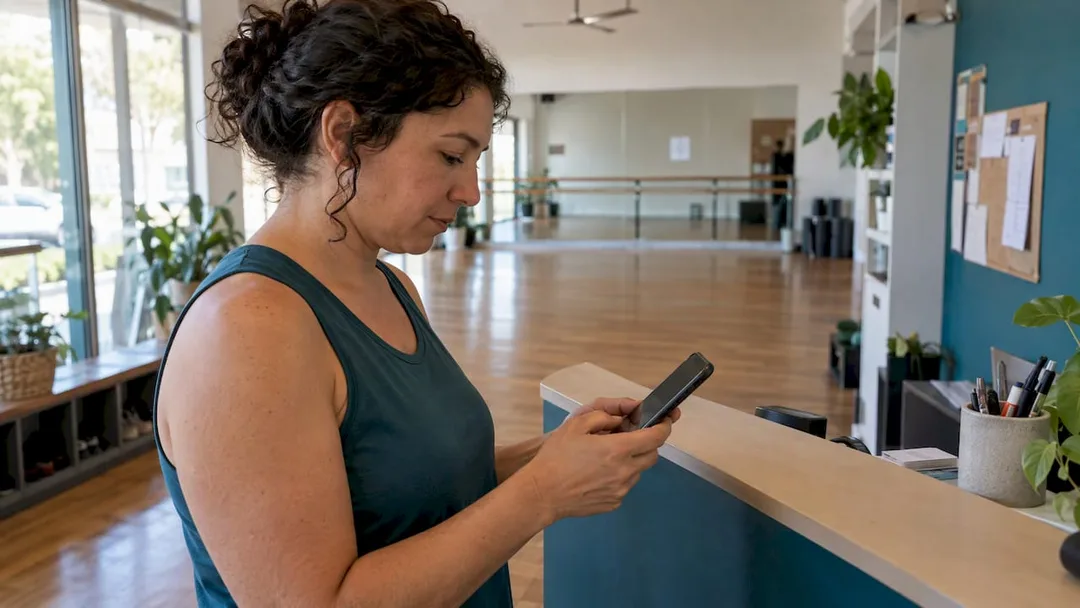
So, how do you slice through the noise and optimise your Instagram profile for bookings, ensuring every tap is a step closer to a filled class or treatment room? Whether it's a direct link, a native button, or a clever Story tactic, the goal is always the same: make it drop-dead simple for clients to book. Right now.
Let's cut through the tech jargon and get to what actually works for busy Australian studio owners.
Table of Contents
- The Quick Win: Add a Booking Link to Your Profile
- Go Native? The "Book" Action Button (and its Quirks)
- Story Stickers: Your Secret Weapon for Time-Sensitive Offers
- Beyond the Bio: Link-in-Bio Pages and DM Funnels
- Don't Get Stuck: A Troubleshooting & Testing Checklist
- What Actually Works for Busy Australian Studios
- Revively: Your Seamless Instagram Booking Partner in Australia
- FAQs for Instagram Bookings
- Sources & Further Reading
- Recommended Resources for Australian Studio Owners
The Quick Win: Add a Booking Link to Your Profile
Got two minutes? That's all it takes to get your primary booking link live. This is your fastest path to converting interest into action, no approvals, no waiting. It works with any booking URL you already have.
Here's the drill:
- Open your profile and hit Edit profile.
- Tap Links, then Add external link.
- Paste your full booking URL. Seriously, include the
https://prefix. Every single time. - Add a short, snappy, action-focused title. Ditch the raw URL; tell people what they'll do.
- Tap Done to save your changes.
Instagram displays your first link prominently, directly under your bio. If you add more, they're neatly bundled into a single clickable "link" that expands into a popup. You can add up to five profile links in total, which is ample for most studios needing to direct clients to a booking page, a class timetable, or a contact form.
Crucial Checkpoint: Before you move on, test that link properly. Open it from a logged-out browser on both iOS and Android. Instagram often re-routes links through its own redirect domain, and this can unexpectedly break or block URLs before your clients ever see them. Steer clear of dodgy link shorteners that Instagram's filters might flag. And if you're a data fiend (you should be!), add UTM parameters to accurately track how many bookings actually originate from your bio link.
For that link title? Think verbs and outcomes. "Book a Class," "Reserve Your Spot," or "Book a Massage" are far more compelling than a bland "Click here." They set clear expectations.
Pro Tip: Keep your link title concise - ideally under four words. Instagram's bio real estate is precious, and a short, clear phrase cuts through the clutter better than a clunky sentence.
Go Native? The "Book" Action Button (and its Quirks)
If you're running an Instagram professional account, you might have spotted the option to add a dedicated Book action button. This can offer a super-slick, in-app booking experience. The catch? It only works if your studio is already rocking an active account with one of Instagram's officially supported booking partners, and you can only have one action button active at a time.
Here's how to set it up:
- Head to Edit profile, then Add an action button.
- Select Book, and then pick your scheduling partner from the list.
- You'll need to authorise your partner account, giving Instagram permission to pull your studio's availability.
- Once done, confirm the button appears, and critically, tap through to ensure it opens the correct booking flow.
This option is fantastic for those lucky enough to have their scheduler on Instagram's partner list. It creates a truly native feel. However, if your current booking system isn't supported, don't wait around. A simple profile link or a dedicated link-in-bio page will achieve the same outcome without the dependency on a third-party partner list that could change at any moment. Your bookings shouldn't hinge on Instagram's whims.
Story Stickers: Your Secret Weapon for Time-Sensitive Offers
Instagram Stories are gold for urgent calls to action - a last-minute class opening, a new teacher launching a session this week, or a flash sale on a recovery package. This is where the Link sticker shines.
- Open the Story composer and tap the sticker icon.
- Select Link, then paste your booking URL.
- Customise the sticker text! Make it a clear call to action, not just a bare URL. "Grab Your Spot," "Book Now," "Last Chance!"
- Publish your Story.
Remember, Story links vanish after 24 hours. If a particular Story link is performing well, save it as a Highlight on your profile. This keeps it visible long after it disappears from your live feed and provides ongoing access. Always pair it with a matching link in your main bio for anyone who discovers your profile later.
If the Link sticker is playing hide-and-seek, first update your Instagram app. Then, double-check your account's standing - newer accounts or those with policy flags sometimes face temporary feature limitations. Try it on a different Story type to rule out any glitches.
Beyond the Bio: Link-in-Bio Pages and DM Funnels
While a single bio link works brilliantly for a singular destination, most thriving Australian studios need more. You might be directing clients to a class timetable, a specific class pack purchase, a wellness treatment booking form, or even an introductory offer. This is where a link-in-bio service truly earns its keep. It aggregates multiple links, often adding analytics and branding on top - just ensure your primary booking button remains the most obvious one.
- Link-in-bio pages are your go-to when you're juggling three or more key destinations. They declutter your Instagram profile while still providing access to everything.
- For posts that inevitably spark questions before someone's ready to book (think detailed workshop descriptions or nuanced recovery programs), build a DM funnel or comment-to-DM flow. This allows you to answer specific queries and nurture the lead, then guide them to the booking link.
There's always a trade-off. DM funnels introduce a touch more friction, but they excel at qualifying leads earlier. This is invaluable if you're fielding inquiries about class levels, specific therapist availability, or package suitability before a direct booking makes sense. As industry guidance at Music Teacher Pros consistently reminds us, your Instagram profile should function as a clear funnel: compelling content drives people to one clear Call To Action. Resist the temptation to scatter attention across too many links on your main profile page.
Pro Tip: If you're using a comment-to-DM automation, keep the direct message reply concise. Get to the point, provide the necessary information, and always end with the booking link - don't ask another question.
Don't Get Stuck: A Troubleshooting & Testing Checklist
It's not enough to think your booking link works. Run a full, genuine test booking after any change you make. Are confirmation messages arriving? Does the calendar invite reflect the correct time zone (crucial for studios Down Under!)? Has your booking partner sync managed to drop a class, leaving a client staring at an empty schedule? Don't assume - verify.
| Problem | Likely Cause | Fix |
|---|---|---|
| Link not clickable | Missing https:// prefix or blocked shortener |
Re-add the full URL, including https://. Avoid problematic link shorteners. |
| "Couldn't add link" error | URL on a domain Instagram's filters disallow | Test on a logged-out browser. If blocked, swap to an approved domain or a link-in-bio service. |
| Link sticker missing in Stories | Outdated app or account standing issue | Update the Instagram app, check your account status (no policy violations), try on another Story type. |
| Partner authorisation fails | Partner account not active or permissions denied | Reconnect the partner account, check all permissions. If persistent, revert to a standard bio link. |
Crucial Advice for Australian Studios: If a partner integration ever fails, always maintain a visible bio link as a solid backup. You don't want your bookings to grind to a halt while you're troubleshooting a tech issue. Your clients need a reliable path to book, always.
What Actually Works for Busy Australian Studios
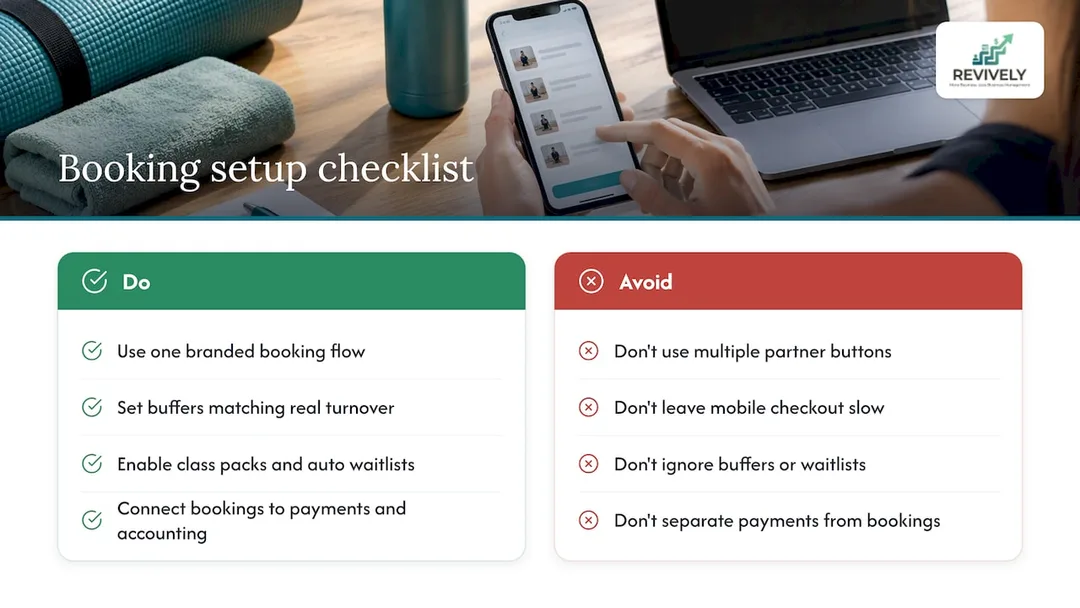
Here's the brutal truth: most studios, especially those just starting out or still clinging to a patchwork of systems, tend to overthink this. The simplest, most direct path to booking wins every single time. One branded, intuitive booking flow that seamlessly handles your class scheduling, multi-resource buffers, and waitlists, linked clearly from your bio, will always outperform juggling a partner-dependent Book button alongside three different tools.
Think about your actual operations. Do you set realistic buffers to ensure proper clean-up or transition time between client sessions? Are you leveraging class packs and automatic waitlist promotion so a cancelled spot instantly fills itself? Time your own mobile checkout process. Is it so quick and painless that a client books instead of getting frustrated and scrolling away?
The real cost of a clunky, disjointed booking experience isn't just a missed click; it's the avalanche of admin that causes missed confirmations, frustrating double bookings, and ultimately, lost revenue. Connecting your bookings directly to payments and, critically, to your accounting system (like Xero for BAS accuracy in Australia) is the ultimate game-changer. It slashes admin, streamlines reconciliation, and frees you up to do what you do best: look after your clients.
- Andreea*
Revively: Your Seamless Instagram Booking Partner in Australia
We built Revively (Revively.app) specifically to solve the precise problems we've just unpacked. That single bio link? It's only as powerful as the engine behind it. Our branded booking portal gives you one incredibly robust destination to put in your Instagram bio, engineered to handle the complexities that generic schedulers simply can't.

Here's how Revively empowers Australian studios:
- Unified Multi-Resource Bookings: Imagine managing treatment rooms, saunas, and cleaning buffers alongside your yoga classes - all scheduled together, not as separate, error-prone entries. We make it happen.
- Automated Waitlist Promotion: Our class scheduling with automatic waitlist promotion means a cancelled class spot fills itself - no more frantic calls or manual updates.
- Seamless Memberships & Class Packs: Sell memberships and class packs directly through your branded booking portal.
- Australian Data Residency & Privacy: Sleep easy knowing all client data, booking histories, and sensitive health intake forms are stored locally in Australia. We are 100% compliant with the Australian Privacy Principles (APPs), safeguarding your clients' trust.
- Flawless GST & Tax Invoice Handling: Forget manual calculations. Revively natively handles 10% GST calculations across casual classes, memberships, and multi-resource packages. It then automatically issues legally compliant Australian Tax Invoices directly to your clients. No guesswork, no errors.
- 100% Legal Xero Integration for BAS Accuracy: Our two-way integration with Xero isn't just convenient - it's your guarantee of 100% legal tax compliance. Automated mapping of tax codes, revenue accounts, and liabilities ensures your quarterly Business Activity Statements (BAS) are flawless, audit-proof, and completely free from manual spreadsheet errors.
Revively is the command centre Australian spas, yoga and Pilates studios, clinics, and dance schools need when they demand one link that does the job of several apps - beautifully and compliantly.
Ready to see it in action against your own class list? Explore our online booking features or compare our Solo, Growth and Pro pricing to find the perfect plan for your team size.
FAQs for Instagram Bookings
How do I add a ticket link to an Instagram post?
Instagram doesn't support clickable links directly within a regular feed post caption. Your best bet is to add the link to your bio (via Edit profile, then Links), and then direct your post captions to "link in bio." For time-sensitive ticket sales, a Story Link sticker is an excellent, dynamic alternative.
How do I add a Book now link on Instagram?
A native Book action button is only available if you have an active account with an Instagram-supported scheduling partner, configured through Edit profile, then Add an action button. If your preferred scheduler isn't on that list, simply add your booking URL as a standard profile link - it's a reliable alternative.
How do I make a link for booking?
Your booking link is quite simply the URL of your dedicated booking page. This could be your branded Revively portal, a hosted page from another scheduling tool, or a link-in-bio service pointing to multiple destinations. Just copy that exact URL and paste it into Instagram's profile link field or a Story Link sticker.
How do I set up a booking link on Instagram?
Head to Edit profile, tap Links, then Add external link. Paste your full booking URL (starting with https://) and give it a concise, action-oriented title like "Book a Class." If you prefer a native in-app booking flow and your scheduler is supported, use Add an action button and connect your chosen booking partner.
Why isn't my Instagram link working?
A broken link usually stems from a missing https:// prefix, a link shortener that Instagram's filters have flagged, or a domain that Instagram doesn't permit. Always test your link from a logged-out browser first to rule out these common issues before assuming it's an account problem. If a Story Link sticker is missing entirely, ensure your app is updated and your account is in good standing.
Sources & Further Reading
- Instagram Help - Add action buttons
- How to Add a Link to Instagram Bio (2026 step-by-step) - UniLink
- How to add clickable links on Instagram (2026) - iTech Guides
Recommended Resources for Australian Studio Owners
- Ditch the WordPress Booking Headache: Why Studios Need a CRM, Not Just a Widget (Especially in Australia)
- Stop the Booking Chaos: Your Australian Studio Deserves Smarter Online Bookings
- Booking App vs. Integrated Platform: Why Australian Studios Need a Connected Command Centre
- Ditch the Generic: Why a Branded Booking Portal isn't Just a 'Nice-to-Have' for Australian Studios