
QR Code Booking Links for Studios: Set Up, Print and Reconcile
! Studio client scanning a printed booking QR code
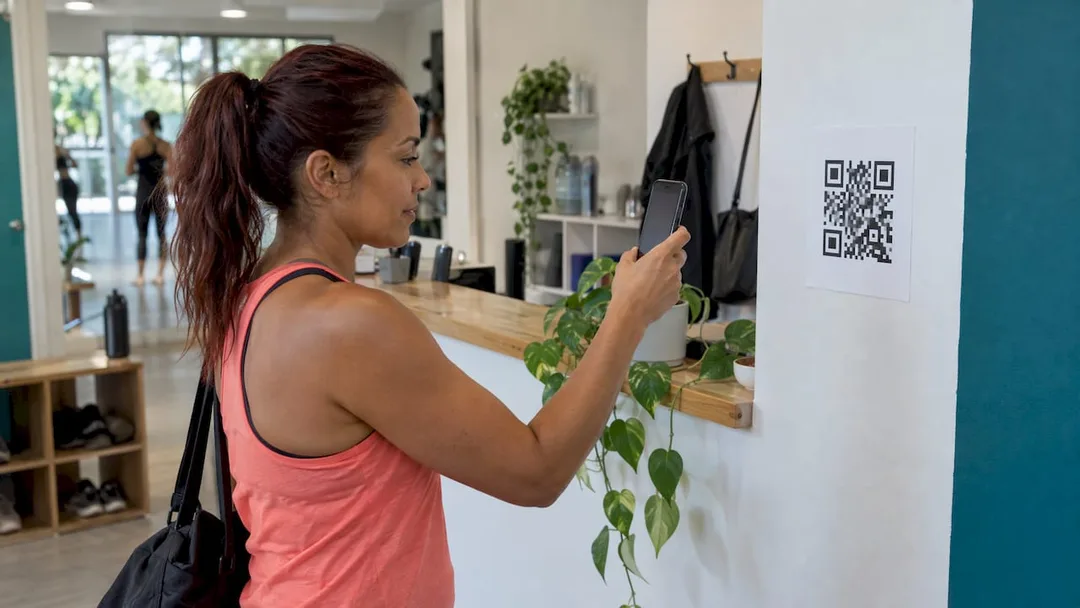
A QR code booking link is a normal web address for your booking page, drawn as a square pattern that a phone camera reads.
You're a studio owner in Australia. That means you're not just an instructor or a therapist; you're a marketing guru, a customer service champion, and, let's be honest, often an unpaid admin assistant. Your days are a blur of classes, appointments, memberships, and the endless pursuit of that elusive "smooth workflow."
And then someone suggests QR codes for bookings. Your first thought might be, "Another thing to manage? Is it really worth it?"
Here's the truth: a well-implemented QR code isn't another thing. It's a silent, always-on booking powerhouse. It's a normal web address for your studio's booking page, distilled into a square pattern that any phone camera can read. Get three things right - the code points to the exact page where clients can book and pay, it's printed correctly, and the payments that follow reconcile cleanly - and it transforms casual interest into concrete bookings.
This isn't about chasing the latest tech fad. It's about streamlining your operations, making it effortless for your Australian clients to sign up, and ensuring every single dollar (and every bit of GST) is accounted for. This guide will show you how.
The Scan-to-Sign-Up Shortcut: What a Booking QR Code Actually Is
Forget the mystique. A QR code is simply a digital shortcut. It stores a direct link, and when your client scans it, their phone instantly opens that link. It doesn't hold your timetable, your prices, or your live availability. It's a bridge, a direct line from curious glance to confirmed booking.
This is why the page behind the code is critical. If that link leads to a slow, clunky page, or one that demands they call you during peak class, that quick scan was a wasted opportunity. Your client expects a seamless, mobile-friendly experience where they can see your offerings, check live availability, and finalise payment in moments.
For Australian wellness and fitness studios - be it a yoga studio, a Pilates centre, a recovery clinic, or a bustling dance school - the ideal destination is your own branded online booking portal. This is where clients see your timetable, choose a class or appointment, purchase a membership or class pack, and pay, all from their phone. No redirects, no confusing third-party branding. Just pure, unadulterated your studio.
Revively's branded online booking portal is purpose-built for this, ensuring your clients enjoy a smooth, intuitive journey from scan to sign-up.
Step 1: Charting the Course - Choosing the Right Destination Page
Before you even think about generating a QR code, nail down where you want clients to land. Different studio types, and different marketing goals, demand different destinations.
| Studio Type or Goal | Best Destination Page | Why It Works |
|---|---|---|
| Dance Studio | Term timetable or class list | Parents and adult students need to see specific classes, not a generic studio overview. |
| Pilates or Yoga Studio | Live class timetable with class packs & memberships | Clients want to pick a session and a payment option - casual, pack, or ongoing membership. |
| Spa or Treatment Centre | Treatment menu with real-time booking | Clients select a service, a therapist, and a specific time slot instantly. |
| Intro Offer or Open Day | A dedicated page for that specific offer | Easy to track conversions, easy to retire the offer once it's complete. |
| General Enquiries | Your full branded booking portal | A comprehensive, always-current view of all your services and availability. |
Crucial tip: Always use a permanent address. Imagine printing hundreds of window decals, only to change your booking page URL later. Every single printed code would break. Link to a page whose address will stay consistent, and simply update the content on that page as your offerings evolve.
This consistent booking page can also serve multiple channels. Our guide on Instagram bookings and GST shows how one robust booking page can effectively capture leads from social media, your website, and yes, your shiny new QR codes.
Step 2: Generating Your Digital Shortcut
The actual creation of the QR code itself is surprisingly straightforward.
- Grab Your Link: Open your chosen booking page in your web browser and copy its full public address. Double-check it works!
- Head to a Generator: Paste that URL into the link field of a reliable QR code generator.
- Choose Your Design: Opt for a dark pattern on a light background. This is the standard for maximum scan reliability.
- Download & Save: Download the file. For anything printed, choose SVG or PDF. These vector formats maintain sharpness at any size. PNG is perfectly fine for digital use on screens.
- Test It Immediately: Before doing anything else, scan the downloaded file yourself with both an iPhone and an Android phone. Confirm it opens the correct, live page.
Pro-tip: Keep your URL concise. A long, complex web address translates into a dense QR pattern with tiny squares, making it harder to scan, especially from a distance. Steer clear of fancy colours, logos that obscure the centre, or inverted designs (light pattern on dark). They might look aesthetically pleasing but often perform poorly in real-world scanning conditions.
Step 3: Printing Perfection - Ensuring Your Code Actually Scans
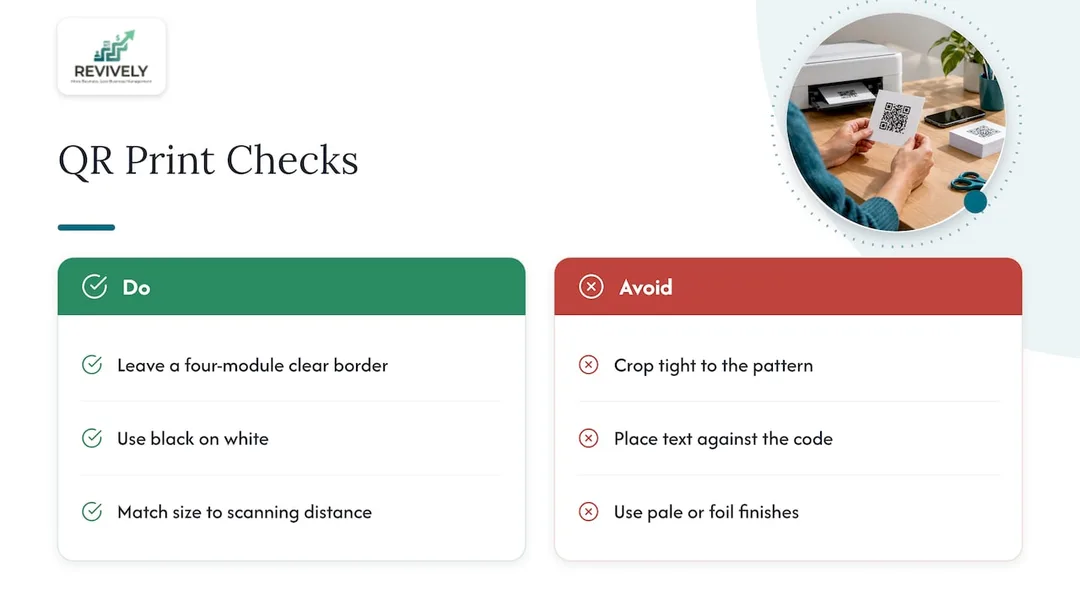
This is where most QR code efforts fall flat. It's rarely a link problem; it's almost always a print problem. Three golden rules cover nearly every scanning fail:
-
The "Quiet Zone" is Non-Negotiable: The international QR standard demands a blank border of four "modules" (those small squares) around every side of the code. If your designer crops it too tightly or places text right against the pattern, scanners simply can't find or interpret the code. Don't let aesthetics trump functionality here.
-
Contrast is King: Black on white is the gold standard. Pale grey, pastel tones, or shiny foil finishes on a studio's brand colour might look sleek, but they often fail miserably in low light - and let's face it, many dance studio foyers or treatment room waiting areas aren't exactly flooded with daylight.
-
Size Matters (for Distance): A QR code on a business card can be tiny. A code on your front window, a reception desk poster, or a studio display board needs to be significantly larger, scaled to the distance from which people will be scanning.
Always, always test. Get physical. Print a proof, then test the code on several devices (iOS and Android) in different lighting conditions. Crucially, test the printed proof, not just the file on your screen, and ensure it loads your live booking page. Do this before you commit to printing hundreds of flyers or costly window decals.
Strategic Placement: Where Your QR Codes Belong
Once perfected, strategically place your QR codes for maximum impact:
- Front Window or Door: Capture passers-by outside opening hours.
- Reception Desk & Foyer: For walk-ins, parents waiting, or those needing a last-minute booking.
- Class Posters & Term Flyers: Perfect for dance studios announcing new terms or workshops.
- Business Cards & Gift Vouchers: For spa clients gifting treatments, or connecting with new leads.
- Inside the Studio: Next to a waitlist board, or a class-pack notice, allowing clients to join or buy without interrupting staff.
- Digital: In email footers, text messages, or social profiles - here, a direct link or tap often replaces a scan, but the principle is the same.
Always add a clear, concise call to action next to your code, e.g., "Scan to book your next Pilates session" or "Scan for our full treatment menu." A code without instruction is often ignored.
Guarding Trust: Keeping Clients and Your Studio Secure
QR codes, like any technology, can be misused. The Canadian Centre for Cyber Security warns that codes can redirect users to phishing sites designed to steal credentials and payment data. It's a legitimate concern, and as an Australian studio owner, you have a responsibility to your clients' data.
For your studio's security:
- Regular Checks: Periodically inspect printed codes on windows and posters for any signs of tampering or fake stickers placed over yours.
- Branded Destination: Ensure your booking page uses your own branded web address (e.g., yourstudio.com.au/book) so clients immediately recognise the name after scanning.
- Clear Communication: Educate your clients. Emphasise that you will never send unexpected payment codes via text message or email.
For your clients' peace of mind (and their data):
Tell your clients: Always use your phone's built-in camera to scan. Crucially, check that the web address displayed on your screen after scanning matches your studio's known domain before proceeding. And never scan a code that looks tampered with, covered, or suspicious. Trust is built when clients know the code leads somewhere safe and familiar.
This emphasis on trust is paramount, particularly given Australian Privacy Principles (APPs). Your clients' data, booking histories, and sensitive health intake forms must be stored securely and locally in Australia, fully complying with these principles.
From Scan to Settlement: Flawless Reconciliation (and Australian Tax Compliance)
A successful QR scan that leads to a booking and payment creates a steady stream of transactions: a single class, a multi-session pack, an ongoing membership, or a treatment deposit. This is where reconciliation can become a genuine headache for studio owners.
Stripe, your payment processor, pays out in batches. A single bank deposit can cover dozens of bookings, minus fees, minus refunds. The challenge? Matching that lump sum deposit back to individual bookings and ensuring every transaction is accounted for, especially for your Business Activity Statement (BAS).
Understanding Stripe Payouts
Stripe details its balance activity as sales, refunds, adjustments, other activity, and payout fees, which combine into a gross payout and a net amount. When your bank account shows one deposit, it's this net total, encompassing all activity over a specific period.
Your Audit-Proof Reconciliation Routine:
- Clear Payment References: Every payment needs a clear, unique reference (e.g., invoice or order number). Stripe advises that transactions carry these references, sync with accounting software, and appear in daily sales reports. This is critical for tracing funds.
- Gross Sales Visibility: Always record the full sale amount first, then account for fees separately. Stripe's revenue recognition methodology treats processing fees as expenses and refunds as reductions of revenue. This is vital for accurate financial reporting.
- Link Refunds to Original Payments: A refund should remain unequivocally linked to the original sale. This ensures statements, payouts, and sales reports align, with the original sale, refunded amount, and reason all recorded. Remember, processing fees may be retained by Stripe, making the net impact larger than just the refund amount.
- Match the Payout, Not Every Booking: Instead of trying to match each individual booking to a specific bank transaction, compare the bank deposit against Stripe's total payout summary. Then, verify that the bookings within that payout period add up correctly.
- Month-End Loop Closure with Xero: The final, crucial step for Australian studios is to reconcile all transactions within your accounting system (like Xero). This guarantees that your 10% GST calculations are spot-on for every sale, every membership, and every class pack.
This is where Revively's native Xero integration becomes your secret weapon. Automated two-way mapping of tax codes, revenue accounts, and liabilities ensures that your quarterly Business Activity Statements (BAS) are flawless and audit-proof. No more manual spreadsheet errors, no more frantic searching for missing invoices. Just clean, legally compliant books, ready for tax time.
When your booking, payment, and refund processes are unified within a single platform, you have one comprehensive record to reconcile, not three disparate sources. Our guide to integrated Stripe booking software delves deeper into this operational efficiency.
Revively: Your Australian Studio's Unified Command Centre
Revively is engineered as the complete studio management platform for Australian spas, yoga studios, Pilates centres, recovery clinics, and dance schools. It's an all-in-one spa booking software and multi-resource studio scheduler, built with your unique needs (and Australian compliance) in mind.
Your branded booking portal is the perfect, seamless destination for every QR code scan. Clients effortlessly book classes or appointments, purchase class packs or start memberships, and pay securely through Stripe. When a class fills up, our automatic waitlist promotion ensures no spot ever goes to waste.
Beyond bookings, Revively takes the stress out of your financials. Payments flow through our native Xero integration, specifically designed for Australian GST and tax reconciliation. This means your bookings, payments, and accounting records are always aligned, living on one intuitive dashboard.
Beyond seamless bookings and payments, Revively ensures your client data, booking histories, and sensitive health intake forms are stored locally in Australia, fully complying with the Australian Privacy Principles (APPs). This commitment to data residency provides peace of mind for both you and your clients, solidifying Revively as a leading Mindbody alternative Australia can trust.
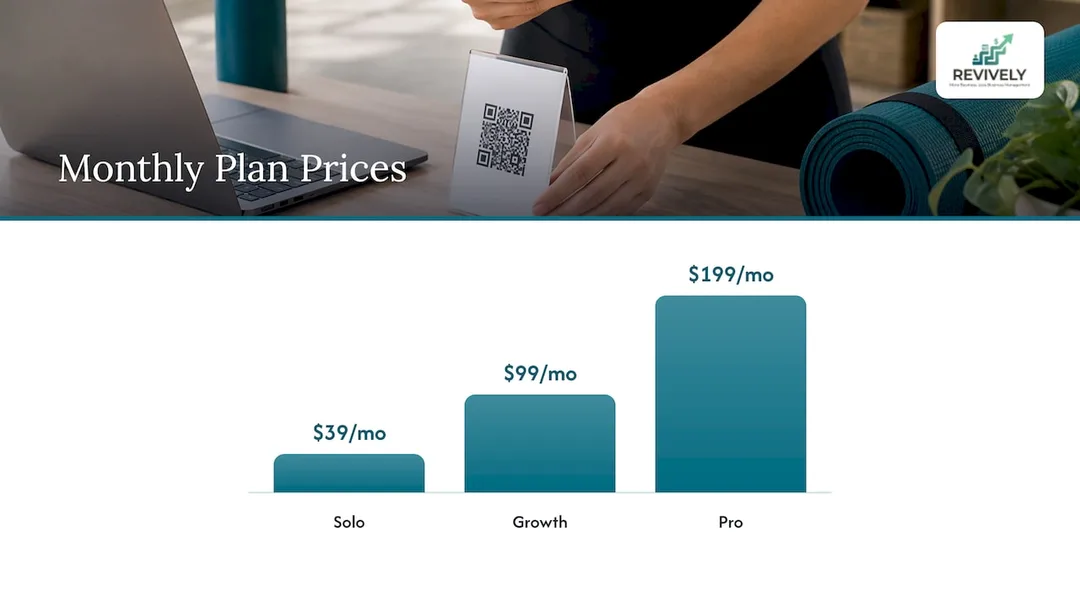
Our plans start at $39 per month (AUD) for Solo, $99 per month for Growth, and $199 per month for Pro. Or choose annual plans at $390, $990, and $1990 per year for added value. Rolling memberships add $15 per month per 50 active members. Discover all plans and add-ons, or start your journey from our homepage.
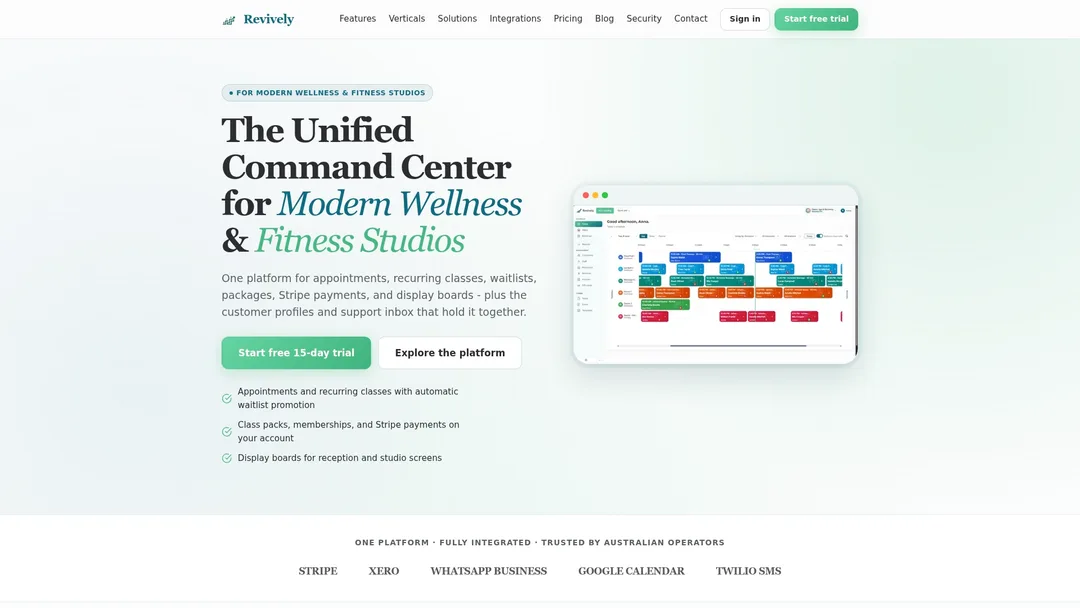
Once your Revively booking page is live, digital display boards in your foyer can showcase upcoming classes and bookings, with a prominent QR code offering walk-ins an immediate, clear path to book. If your current booking system is a patchwork of confusing widgets, understand why a branded online booking system is not just a luxury, but a vital investment.
Our View
A QR code is the cheapest part of your booking system. It costs nothing to make, and it's deceptively easy to get wrong - because the real work, the magic, happens after the scan.
We built Revively around that very idea. The scan should land on a branded page that instantly shows live availability, takes payment through Stripe, and updates your timetable in real-time. For a dance studio, that means a term timetable with waitlists that promote automatically. For a spa, it means treatment rooms, saunas, and even cleaning buffers tracked together, ensuring a client never books a room that isn't absolutely ready.
The second half of that equation is the money - specifically, keeping it clean. Australian studios lose countless hours at month-end matching payouts to bookings across disconnected tools. We designed Revively so that bookings, memberships, class packs, and payments all live in one single, intelligent place, with a robust Xero integration for Australian GST. Then, that simple code on your front window leads to a business that truly runs on one seamless, stress-free dashboard. It's an all-in-one solution for those looking for robust Mindbody alternatives in Australia.
Andreea
Frequently Asked Questions (FAQ)
Can I use one QR code for both classes and treatments?
Yes, absolutely, provided the page it opens allows clients to choose between your different service types. A studio offering both group classes and private sessions can link to a single, comprehensive booking page. However, if you target distinct audiences (e.g., kids' dance vs. adult Pilates), consider using separate codes and dedicated pages for each to ensure the scan lands exactly where the client expects.
Will the QR code break if I change my timetable or prices?
No, the code itself is merely a shortcut to a web address. It doesn't store your actual timetable or pricing information. If you update the classes, prices, or times behind that address in your Revively portal, the same printed QR code will automatically display the updated version. Only a change to the web address (URL) itself will render the printed code useless.
How large should the QR code be on a poster or window decal?
The size of your QR code directly relates to the distance from which it will be scanned. The international standard mandates a clear, blank border of four "modules" (the small squares) around the entire pattern. As a general rule, the further away a client will be, the larger the code needs to be. Always test the printed proof from the actual scanning distance, using both an iPhone and an Android device, to confirm readability.
How do I match a Stripe payout to my bookings and stay GST compliant?
To ensure accurate reconciliation for your Australian studio: treat the bank deposit from Stripe as a net total. Then, use your Revively dashboard to review the sales, fees, and refunds contained within that specific payout period. It's crucial to keep any refunds linked to the original payment and, most importantly, sync all payments to your accounting software (like Xero) via Revively's integration. This ensures every sale, along with its correct 10% GST, is meticulously recorded, making your BAS submissions audit-proof.
Resources & Further Reading
- Free URL to QR Code Generator
- How to use QR codes for businesses | VistaPrint AU
- ISO/IEC 18004:2015 QR Code standard
- Security considerations for QR codes | Canadian Centre for Cyber Security
- QR codes | Healthify
- Stripe Sigma
- QR code payments in Australia explained | Stripe
- How Revenue Recognition works | Stripe Documentation
- Partial Refunds: A Guide for Businesses | Stripe
- Booking system with payment: A guide for businesses | Stripe
Recommended Articles for Australian Studio Owners
Ready to optimise more than just your QR codes? Dive into these Revively insights:
- Ditch the Booking Chaos: Get Your Google Booking Link Live (and Why Australian Studios Need More)
- Stop the Studio Mayhem: How to Really Reduce Double Bookings (Without More Admin Headaches)
- Stop the Leakage: 10 Operational Fixes to Supercharge Your Studio Bookings
- How to Avoid Double Booking: A Studio Owner's Checklist