
5 Step Franchise Reporting Dashboard Rollout for Studio and Spa Chains
! Team planning a franchise dashboard rollout
A franchise reporting dashboard pulls booking, payment, and accounting data from every location into one live view, so owners spot underperforming units before they become a crisis.
Running one studio is a delicate dance between passion and spreadsheets. Managing a network of them? That's a full-blown circus with spreadsheets from five different ringmasters, all defining "profit" in their own unique way. You're chasing numbers, not leading your business. You know the drill: email chains asking for "last week's class utilisation," frantic calls about why Xero isn't matching the POS, and the constant dread of an underperforming site turning into a quiet crisis you only spot at month-end.
Imagine a clear, unified view that cuts through that noise. That's not just a nice-to-have; it's essential infrastructure for any growing fitness or wellness empire.
A franchise reporting dashboard isn't about more data. It's about better data, pulled from every location into one live, actionable view. It means you can spot a dip in Pilates class bookings or a surge in spa treatment cancellations the day it happens, not weeks later. The real win? Speed of intervention, not just reporting volume.
But here's the kicker: A beautiful dashboard built on inconsistent numbers just hides problems faster. Your first move should be simple: standardise your KPIs, centralise your data feeds, and only then shop for software. Don't build a mansion on quicksand.

TL;DR: The Multi-Location Studio Owner's Cheat Sheet
- Standardise first, software second: Define your KPIs and centralise your data before you even look at a platform. Garbage in, gospel out is not a strategy.
- Focus on the KPIs that move the needle: Think revenue, net margin, customer acquisition cost (CAC), Net Promoter Score (NPS), and resource utilisation (hello, saunas and studio floors!).
- Non-negotiable integrations: Your all-in-one spa booking software needs to talk to your booking system, POS, Xero for BAS accuracy, and marketing tools. No manual exports. Ever.
- Roll-out smart, not fast: Start with a pilot. Keep it simple. Avoid trying to track everything, everywhere, all at once. Build trust.
- Aussie compliance isn't optional: Demand Australian data residency, GST compliant invoicing, and rock-solid Xero integration to keep the ATO happy and your BAS flawless.
Table of Contents
- What a Franchise Reporting Dashboard Actually Is (and Why Australian Studios Can't Live Without One)
- The KPIs That Matter: Cutting Through the Noise for Multi-Location Studios
- Must-Have Features & Integrations for Australian Studio Networks
- Choosing Your Reporting Home Base: What to Ask Every Vendor
- Rolling It Out: Your Multi-Location Implementation Checklist
- Revively in Action: A Practical Example for Studio & Spa Chains
- Common Pitfalls: Why Dashboard Rollouts Fail (and How to Avoid Them)
- Tailored Views: Who Needs to See What?
- Security & Australian Data Privacy: Non-Negotiables for Your Network
- Revively: Your Unified Cloud Command Centre for Australian Studios
- Sources
- FAQ
- Recommended Reads
What a Franchise Reporting Dashboard Actually Is (and Why Australian Studios Can't Live Without One)
Forget the monthly scramble for spreadsheets. A franchise reporting dashboard is your single pane of glass showing how every location in your network is performing, updated automatically, not cobbled together by hand. For multi-location spa, yoga, Pilates, or dance studio operators, this means ditching the old routine of chasing numbers from five managers who all define "utilisation" or "net sales" slightly differently.
The value isn't theoretical; it's practical, palpable relief.
- Unified Visibility: A franchisor sees all units at once. A franchisee logs in and sees only their site, thanks to clever role-based access. No more sharing sensitive data across the network by accident.
- Early Warning System: Automated alerts flag a slipping metric the day it happens, not six weeks later when it's already a problem. Catch that sudden drop in casual class attendance before it impacts revenue.
- One Source of Truth: Everyone's reading the same numbers, finally. Arguments about "whose data is right" disappear, replaced by conversations about what to do next.
This means faster corrective action when a location's bookings or margins drop, clearer accountability between franchisor and franchisee, and less manual admin spent reconciling disparate spreadsheets.
Centralising location data into a single dashboard with role-based roll-ups is what turns scattered numbers into decisions you can actually act on. This is how you go from chasing chaos to commanding your empire.
The KPIs That Matter: Cutting Through the Noise for Multi-Location Studios
Not every metric deserves a prime spot on your main screen. The KPIs that truly matter for a multi-resource studio scheduling platform split into three core groups, each answering a different question for different stakeholders.
Financial Metrics: The Bottom Line Builders
These tell you if the business model is actually working.
- Revenue & Same-Store Sales Growth: Are we growing? Where?
- Cost of Goods Sold (COGS) & Labour Percentage: Are our expenses in line?
- Net Margin: The ultimate health check.
These are the numbers a franchisor watches across the whole network, and the numbers a franchisee lives (or dies) by locally.
Customer & Marketing Metrics: Fueling Sustainable Growth
These reveal if your growth is built to last.
- Customer Acquisition Cost (CAC) & Customer Lifetime Value (CLV): Are we spending wisely to attract clients who stick around?
- Average Order Value (AOV) & Conversion Rate: Are clients spending more, and are we converting leads effectively?
- Net Promoter Score (NPS): Are our clients raving fans?
A studio with rising CAC and flat CLV is buying growth it can't keep, simple as that.
Operational Metrics: Keeping the Floor Humming
These show how efficiently your physical spaces and people are working.
- Bookings & Appointments: The pulse of your business.
- Resource Utilisation: How efficiently are your studio rooms, treatment beds, saunas, and instructors being used? (Crucial for multi-resource facilities!)
- Inventory Turnover: For retail-heavy locations, are products moving?
Pro Tip: Keep your executive view lean. Roll up only five to seven core KPIs to the top level. Everything else belongs at the regional or site level. Otherwise, your dashboard becomes a noisy mess that no one bothers to check.
A franchise KPI guide from Reach Reporting champions interactive drill-downs over static monthly PDFs. Why? Because a manager can click straight from a network average into their own site's detail, answering "why" directly instead of wondering. This fosters true engagement with the numbers.
Must-Have Features & Integrations for Australian Studio Networks
Your dashboard is only as good as the data feeding it. Before comparing a single vendor, get crystal clear on which connectors and controls are absolutely non-negotiable for your unique Australian operation.
Four integrations are mission-critical:
- Booking & Appointment System: This is your engine.
- Point-of-Sale (POS) & Payments: Where the money changes hands.
- Accounting Platform: For most Australian operators, this means seamless Xero integration for BAS accuracy.
- Marketing Tools: To track campaign performance, lead sources, and true CAC.
Miss one, and you'll be back to manual exports within a month - guaranteed.
Beyond integrations, demand these capabilities:
- Live connectors to your core operational systems (booking, POS, Xero, marketing).
- Role-based views: A site manager sees only their location; a regional manager sees their entire patch.
- Drill-down capability: From the network roll-up straight to an individual site, class, or even booking.
- Automated report templates with scheduled delivery. No more manual pulls.
- Automated alerts when a KPI crosses a pre-defined threshold.
- Standard field definitions: "Gross takings" must mean the exact same thing at every single site.
For Australian operators specifically, flawless GST and tax invoice handling and robust Xero integration for BAS accuracy aren't just features; they're compliance lifelines. Inconsistent numbers between locations are a red flag the ATO doesn't forgive. Your dashboard must natively handle 10% GST calculations across casual classes, memberships, and multi-resource packages, and automatically issue legally compliant Australian Tax Invoices.
Choosing Your Reporting Home Base: What to Ask Every Vendor
Buying the wrong dashboard isn't just a budget drain; it's a time sink. You'll lose months to manual workarounds before anyone admits the tool isn't fit for purpose. Run every vendor through this shortlist of pointed questions.
| Question Category | What to Ask (and Why It Matters) This is a blog post about a franchise reporting dashboard for Revively.app.
The chaotic daily reality of running a wellness or fitness studio in Australia? It's not just a balancing act; it's a full-contact sport. You're spinning plates: managing client relationships, organising instructors, optimising class schedules, making sure those treatment rooms are always humming, and somehow staying on top of the financials. Now, multiply that by five, ten, or even fifty locations across the country.
Suddenly, those plates aren't just spinning; they're in orbit.
How do you know if that new yoga studio in Bondi is pulling its weight? Is your latest recovery centre rollout in Perth struggling with resource utilisation? Are your multi-resource studio scheduling efforts actually paying off in membership renewals, or are you just guessing?
This isn't about guesswork anymore. It's about knowing.
A franchise reporting dashboard for your studio or spa chain isn't just a fancy spreadsheet. It's your nerve centre. It pulls booking, payment, and accounting data from every single location into one live, unified view. The goal? So you can spot an underperforming unit before it becomes a full-blown crisis, or identify a high-flyer whose winning strategy you can replicate across the network.
The biggest benefit here isn't more data, it's faster, smarter intervention.
But let's be brutally honest: a beautiful dashboard built on inconsistent numbers only hides problems faster. Before you even think about software, your first move has to be standardising your Key Performance Indicators (KPIs) and centralising those messy data feeds. Without that foundation, you're just automating the chaos.
TL;DR: The Revively Perspective for Aussie Studio Chains
- Foundation First: Standardising KPIs and centralising data feeds before picking software is non-negotiable for accurate reporting and spotting genuine issues.
- Crucial KPIs: Focus on financial (revenue, net margin), customer (CAC, NPS), and operational metrics (bookings, multi-resource utilisation like saunas or studio floors).
- Integrations are King: Demand seamless connections to your booking systems, POS, and especially Xero for 100% legal BAS accuracy. Manual data exports are a relic of the past.
- Pilot to Perfection: Roll out in stages. Pilot in one region, test rigorously, and build trust. Don't over-engineer with too many metrics from day one.
- Aussie Compliance Demands: Emphasise Australian data residency (APPs compliant), flawless 10% GST calculations, and legally compliant Australian Tax Invoices. Role-based access protects sensitive data.
Table of Contents
- What a Franchise Reporting Dashboard Actually Is (and Why Australian Studios Can't Live Without One)
- The KPIs That Matter: Cutting Through the Noise for Multi-Location Studios
- Must-Have Features & Integrations for Australian Studio Networks
- Choosing Your Reporting Home Base: What to Ask Every Vendor
- Rolling It Out: Your Multi-Location Implementation Checklist
- Revively in Action: A Practical Example for Studio & Spa Chains
- Common Pitfalls: Why Dashboard Rollouts Fail (and How to Avoid Them)
- Tailored Views: Who Needs to See What?
- Security & Australian Data Privacy: Non-Negotiables for Your Network
- Revively: Your Unified Cloud Command Centre for Australian Studios
- Sources
- FAQ
- Recommended Reads
What a Franchise Reporting Dashboard Actually Is (and Why Australian Studios Can't Live Without One)
Let's call it what it is: a sanity-saver. A franchise reporting dashboard is a single, intuitive screen showing exactly how every location in your network is performing, updated automatically. This isn't about some poor soul manually assembling spreadsheets each month. For multi-location studio and spa operators, it's the end of chasing disparate numbers from five different managers who all define "utilisation" or "net sales" slightly differently.
The value here isn't theoretical; it's operational relief that directly impacts your bottom line.
- Centralised Visibility: You, the franchisor, see the entire network at a glance. Your individual franchisee logs in and sees only their site's data, thanks to intelligent role-based access.
- Automated Alerts: A key metric starts to slip? You know about it the day it happens, not six weeks later when it's a full-blown problem.
- One Shared Language: Everyone across the network is reading from the same hymn sheet. The endless debates about "whose data is correct" simply disappear, replaced by productive discussions.
This means faster corrective action when a location's class bookings or treatment room margins dip, clearer accountability between head office and franchisees, and a unified language for KPIs across your entire business. And perhaps most importantly, less soul-crushing admin spent reconciling incompatible spreadsheets.
Centralising location data into a single dashboard with smart, role-based roll-ups is what transforms scattered numbers into decisive, profitable action. This is the difference between reacting to problems and proactively optimising your network.
The KPIs That Matter: Cutting Through the Noise for Multi-Location Studios
You don't need every number on your main screen, just the right ones. The most impactful KPIs for a studio network fall into three distinct groups, each answering a different strategic question for different roles within your organisation.
Financial Metrics: Your Cash Flow Compass
These are the bedrock, telling you whether the business model is actually working at each location.
- Revenue & Same-Store Sales Growth: Are we growing? Where are the strongest performers?
- Cost of Goods Sold (COGS) & Labour Percentage: Are costs in check? Are we staffing efficiently?
- Net Margin: The ultimate health check. This is what a franchisor watches across the network, and what a franchisee lives or dies by locally.
Customer & Marketing Metrics: Fuel for the Future
These reveal if your growth is sustainable and if your marketing efforts are hitting the mark.
- Customer Acquisition Cost (CAC) & Customer Lifetime Value (CLV): Are we acquiring clients cost-effectively, and are they staying long enough to make it worthwhile?
- Average Order Value (AOV) & Conversion Rate: Are clients spending more, and are our sales funnels effective?
- Net Promoter Score (NPS): Are your clients happy enough to recommend you? A studio with rising CAC and flat CLV is buying growth it simply can't maintain.
Operational Metrics: Keeping the Engine Running Smoothly
These give you the real-time pulse of your day-to-day operations on the floor.
- Bookings & Appointments: The clearest indicator of immediate demand.
- Resource Utilisation: How efficiently are your studio rooms, treatment rooms, saunas, instructors, and equipment being used? This is gold for multi-resource studio scheduling.
- Inventory Turnover: For those retail sections, are products moving or gathering dust?
Pro Tip: For the executive overview, limit yourself to five to seven mission-critical KPIs. Anything more and your dashboard quickly becomes noise, not signal. Detail belongs at the regional or site level.
As a franchise KPI guide from Reach Reporting points out, interactive drill-downs are far superior to static monthly PDFs. Why? Because a manager can click directly from the network average to their own site's granular detail, quickly understanding the "why" behind the "what." This fosters genuine engagement and actionable insights.
Must-Have Features & Integrations for Australian Studio Networks
A dashboard is only as useful as the information it receives. Before you compare a single vendor, be absolutely clear on which integrations and controls are non-negotiable for your unique Australian operation.
Four integrations are absolutely critical:
- Your booking or appointment system: The heart of your studio operations.
- Your point-of-sale (POS) and payments system: Where the money actually changes hands.
- Your accounting platform: For Australian operators, this means seamless, deep integration with Xero for 100% legal BAS accuracy.
- Your marketing tools: To accurately track CAC, campaign performance, and client journeys.
Miss just one of these, and you'll find yourself back to manual data exports within a month, guaranteed.
Beyond these core integrations, demand these capabilities:
- Live connectors to all the systems listed above.
- Role-based views so a site manager only sees their location, while a regional manager sees their entire region's performance.
- Drill-down capability from a high-level network overview down to individual site, class, or even client details.
- Automated report templates with scheduled delivery. No more manually pulling reports.
- Threshold-based alerts that trigger automatically when a KPI crosses a critical line.
- Standardised field definitions across the network so that "gross takings" truly means the same thing at every single site.
For Australian operators specifically, flawless GST and tax invoice handling and robust Xero integration for BAS accuracy are non-negotiable. Our local compliance doesn't forgive inconsistent numbers across locations. Your system must natively handle 10% GST calculations across all casual classes, memberships, and multi-resource packages, automatically issuing legally compliant Australian Tax Invoices to clients. Furthermore, the Xero integration needs automated two-way mapping of tax codes, revenue accounts, and liabilities to ensure your quarterly BAS is flawless and audit-proof, eliminating manual spreadsheet errors.
Choosing Your Reporting Home Base: What to Ask Every Vendor
Picking the wrong dashboard is an expensive mistake that rarely shows up on the initial invoice. It costs you months of productivity, endless manual workarounds, and ultimately, eroded trust in your data. Put every vendor through this brutal but necessary shortlist of questions.
- Integration Breadth & Depth: Does it natively connect to your existing booking, POS, and accounting systems, or does it require clunky custom middleware? For Australian businesses, how deep is the Xero integration? Can it automate tax code mapping and ensure GST compliant studio software?
- Scalability & Simplicity: When you add a fifth or fifteenth location, is it a simple configuration change, or does it feel like rebuilding the entire system? You need to grow without growing pains in your reporting.
- Onboarding Speed: How long from signing the contract to getting your first live, accurate report? Time is money.
- Role Permissions & Data Security: Can you confidently give a franchisee access to their own data without risking exposure of the entire network's sensitive financials or client lists?
- Local Accounting Fit: Does it genuinely support Xero and Australian tax rules, or does it just "export a CSV and figure it out"? We need GST compliant studio software, not a wish and a prayer.
Pro Tip: Always ask every vendor to run a live demo using a roll-up of at least three real locations, not just a polished single-site sample. This is where integration gaps, slow data latency, and clunky workflows truly reveal themselves.
Watch for these red flags during a demo: if the sales rep can't explain how "revenue" is defined consistently across different POS systems, if role-based access feels like an afterthought, or if their "reporting" is actually just a scheduled CSV export you still have to open in a spreadsheet. Heavy manual data wrangling at the demo stage means heavy manual data wrangling forever.
Rolling It Out: Your Multi-Location Implementation Checklist
Rolling out a unified dashboard across a franchise network is a strategic sequence, not a single launch day. Skipping steps is how you end up with five sites reporting five different versions of "same-store sales."
- Define KPIs & Assign Data Owners: Before touching any software, gather your key stakeholders (franchisees, managers, head office) and agree precisely what each number means. Who is responsible for ensuring data accuracy for each metric?
- Map Data Sources & Field Names: This is where discrepancies surface. What one POS calls "net sales" another might call "gross takings." Get these definitions aligned and mapped meticulously.
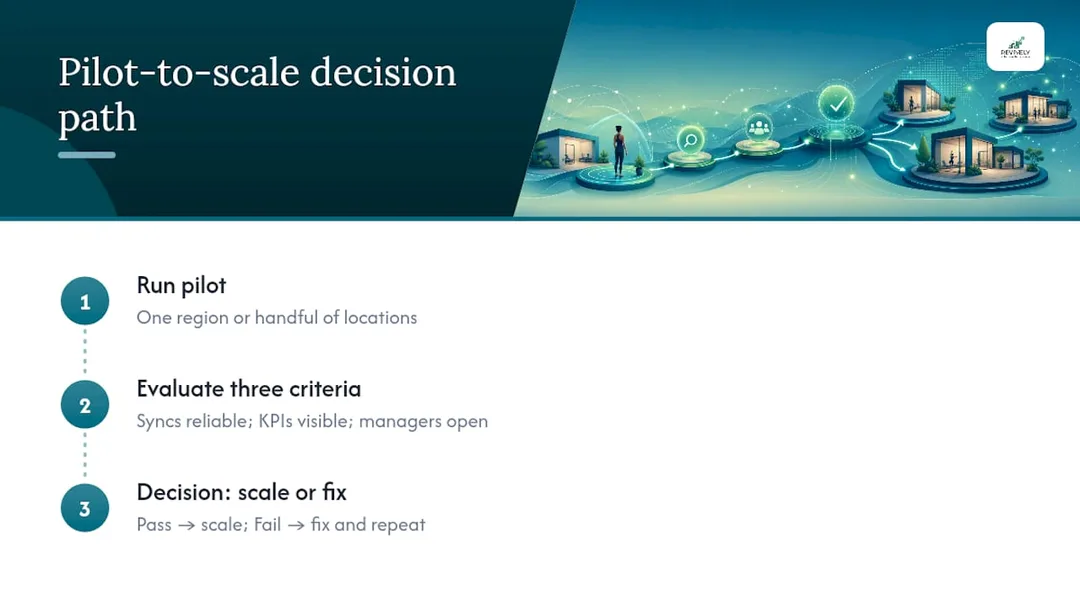
- Centralise Connectors & Run a Pilot: Configure all data connectors and run a pilot program with just one or two locations. Rigorously test that data syncs reliably and consistently before a wider rollout.
- Build Smart Report Templates: Develop three clear report templates:
- Daily operational alerts for site managers.
- Weekly summaries for regional managers.
- Monthly executive roll-ups for head office.
- Train Users & Document Definitions: Provide thorough training. Crucially, document every single KPI definition and data source. Then, set a fixed review cadence to ensure reporting doesn't quietly decay post-launch.
Starting with KPIs before mapping sources prevents the frantic month-end scramble that inevitably follows automating reports nobody agreed on in the first place.
Revively in Action: A Practical Example for Studio & Spa Chains
Revively was purpose-built to solve exactly this problem for Australian spas, yoga, Pilates, and dance studios running multiple sites. It's your unified cloud command centre (CRM + multi-resource scheduler) that speaks the language of your business. Bookings, Stripe payments, and Xero data all feed into one intuitive dashboard.
This means a franchisor can see the entire network's performance, while each individual studio manager sees only their own site's metrics.
Imagine gaining clarity on:
- Resource Utilisation across saunas, cryo chambers, treatment rooms, and studio floors - including critical cleaning buffers between bookings.
- Class-pack and Membership Revenue broken down by each location, helping you pinpoint successful sales strategies.
- Waitlist Conversion Rates for popular group classes, revealing which sites are leaving demand on the table or successfully converting interest into income.
A typical Revively pilot starts with one or two locations. We recommend syncing booking and payment data first, as that's where early wins in resource utilisation reporting and immediate operational insights show up fastest - usually within the first few weeks of live syncing. This proves the value quickly and builds internal trust.
Common Pitfalls: Why Dashboard Rollouts Fail (and How to Avoid Them)
The technology itself rarely sinks a rollout. More often, it's the human and process gaps surrounding it. Here's what to watch out for:
- Inconsistent KPI Definitions: This is the most common failure point. If Site A counts a "booking" the moment it's made, and Site B counts it only after payment clears, your network-wide conversion rate is meaningless. No matter how beautiful the dashboard, bad data will always look official. Fix this by locking definitions in writing before connecting a single data source.
- Franchisee Resistance: If reporting feels like surveillance rather than support, franchisees will find ways to work around it, delay data entry, or quietly maintain their own spreadsheets. Frame the dashboard as a tool that genuinely helps them run their site better. Give them a view they'd want to check daily, not just one designed solely for head office's benefit.
- Data Latency & Sync Failures: Trust erodes fast. If a manager pulls up "yesterday's numbers" and they're actually three days old, they'll stop checking. Rigorously test sync reliability during the pilot phase, not just feature completeness.
- Over-engineering the Rollout: Trying to connect every location and every single metric on day one is a common, costly mistake. A staged rollout, starting with one region and a handful of core KPIs, gives you crucial room to identify and fix data mapping issues before they multiply across fifteen sites.
- Alert Fatigue: If every minor fluctuation triggers a notification, users will quickly ignore them. Set thresholds that genuinely matter and require action, not just those that are easy to configure.
Tailored Views: Who Needs to See What?
A dashboard that shows the exact same screen to everyone is a dashboard no one truly uses effectively. Franchisees, regional managers, and franchisors all have different needs, different levels of detail, and different urgencies.
- Franchisees: Need granular, site-level detail with daily operational relevance. Think today's bookings, this week's resource utilisation, any immediate conflicts, or cancellations. They don't need to see the network average unless it's for direct benchmarking against their own performance. Give them a comparison view, but keep their primary landing screen focused on their four walls.
- Regional Managers: Sit in the middle. They need both perspectives: enough site-level detail to coach underperforming locations effectively, and sufficient roll-up visibility to spot patterns and trends across their entire patch. Weekly summaries often work better here than daily alerts, as regional managers typically manage trends, not individual shifts.
- Franchisors & Executives: Require the top five to seven KPIs across the entire network, with the ability to drill down, but not as the default view. Monthly or quarterly roll-ups, with the power to click into any underperforming region or site, suit this strategic role far better than a dense daily feed.
The practical rule: Match reporting cadence and detail to the decisions each role actually makes. A site manager makes daily operational decisions and needs daily data. An executive makes quarterly strategic calls, and drowning them in daily noise just trains them to stop looking.
Security & Australian Data Privacy: Non-Negotiables for Your Network
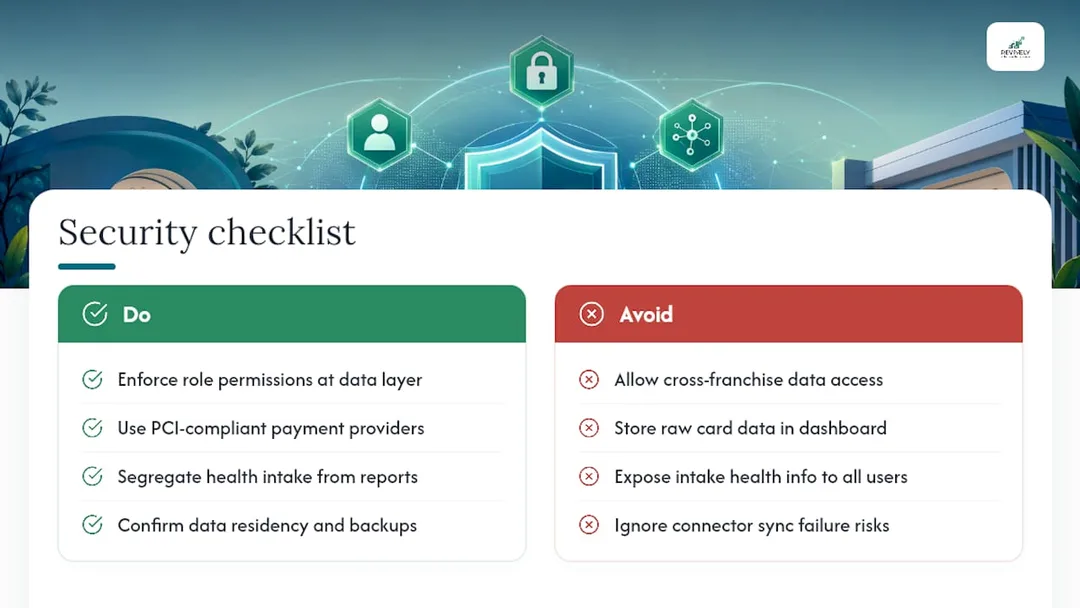
Franchise networks juggle client payment details, potentially sensitive health intake information (especially for spas and wellness studios), and commercially sensitive financial data across multiple legally separate businesses. This combination dramatically raises the stakes on how your dashboard handles access and stores data.
- Role-Based Access is a Privacy Control: It's not just about convenience. A franchisee should never be able to see another franchisee's revenue, customer list, or margins. These are often separate legal entities with their own commercial interests. During evaluation, confirm that role permissions are enforced at the data layer, not just hidden in the interface. A determined user finding another site's numbers through a clumsy export function is a very real risk, not a hypothetical one.
- Payment Data Handling: Client payment data should always flow through PCI-compliant providers (like Stripe or Square, common in Australia). Ask any vendor directly: how are customer payment details handled? Does the dashboard store raw card data, or simply report on transaction outcomes? (The latter is always preferred).
- Sensitive Health Information: For health-adjacent businesses like spas offering specific treatments or wellness clinics, intake form data can include highly sensitive health information. Confirm precisely where that data lives, who can access it, and whether it's appropriately separated from the general reporting layer. This data must comply with the Australian Privacy Principles (APPs).
- Australian Data Residency & Backup: Critically, for Australian businesses, confirm where your client data, booking histories, and sensitive health intake forms are physically stored. For compliance with the APPs and to build client trust, it's essential that this data is stored locally in Australia. Also, ask about backup practices and disaster recovery. A partial sync that silently drops records is often worse than an obvious outage.
Revively: Your Unified Cloud Command Centre for Australian Studios
Beyond the chaotic DIY route of stitching together spreadsheets, manual exports, and separate accounting logins for every single site, Revively offers multi-location studio and spa operators a singular, powerful dashboard. It speaks the precise language of resource bookings, class packs, and treatment rooms - not generic retail metrics forced into an ill-fitting mould.
Revively centralises your reports and analytics across every location, providing a truly all-in-one spa booking software experience. It features native Xero integration for GST reconciliation, detailed multi-resource utilisation tracking for every room and instructor, and even public display boards for foyer bookings - all without you ever needing to export a single CSV by hand.

Whether you're running complex class scheduling across a dance studio group, managing diverse therapy bookings across a wellness clinic network, or handling online bookings across a multi-site spa operation, the same Revively dashboard rolls up every single site while intelligently giving each manager their own role-specific view.
Crucially, Revively is Australian-made, meaning your client data, booking histories, and sensitive health intake forms are stored locally in Australia, fully complying with the Australian Privacy Principles (APPs). It natively handles 10% GST calculations across all transactions, automatically issuing legally compliant Australian Tax Invoices. Our deep Xero integration ensures automated two-way mapping of tax codes, revenue accounts, and liabilities, guaranteeing your quarterly Business Activity Statements (BAS) are flawless and audit-proof, eliminating manual spreadsheet errors. This makes Revively a leading Mindbody alternative Australia-wide for studios prioritising local compliance and streamlined operations.
If you're weighing up a pilot program, start by checking how your current booking and payment data would map into a single report. Then, take a look at Revively's platform to see what a truly live, compliant, multi-location view actually looks like. It's time to replace the chaos with clarity.
The Andreea Audit: My First Fix for Your Dashboard
The biggest gap I consistently see isn't a missing feature. It's weak, undefined KPIs that nobody caught before the expensive tooling went live. Before you sign anything, run a short, focused workshop with your franchisees and managers to agree, in painstaking detail, what each number actually means. A perfect dashboard reporting on flawed definitions simply makes bad data look official.
- - Andreea*
Real-World Dashboard Use in Franchise Networks
Franchise networks that truly nail reporting share a common thread: they treat the dashboard as essential infrastructure, not just a flashy decoration. Industry bodies like Franchise Australia continuously emphasise why standardised KPIs and robust franchisor oversight are critical across an entire network, not just within one site's four walls.
In practice, successful networks always run a genuine pilot before a full rollout. They typically select one region or a handful of locations and take the pilot's success criteria seriously. Key questions they ask: are data syncs reliable? Are the core KPIs visible without constant manual cleanup? And crucially, are managers actually opening their weekly summaries and using them, rather than ignoring them? A pilot that quietly fails on any of these three fronts and gets scaled anyway is almost guaranteed to produce a network-wide reporting system nobody trusts within six months.
Data and analytics specialists like 121 Group work with portfolio-style businesses on precisely this kind of roll-up reporting. Whether you're running a national retail franchise or a five-site yoga studio group, the same logic applies: the high-level roll-up must earn trust at the individual site level before anyone higher up will genuinely rely on the summarised data.
The common denominator across all successful rollouts isn't the software brand; it's the discipline. The discipline of defining KPIs before connecting data, of piloting before scaling, and of treating role-based access and Australian data privacy as a fundamental design requirement, not an afterthought.
Sources
- How to Master Multi-Location Reporting: A Complete Guide for Growing Businesses
- Build Multi-Location Franchise Financial Reports - Reach Reporting
- Franchise Council of Australia
FAQ
What is a reporting dashboard?
A reporting dashboard is a visual display that pulls key data from various sources into one screen, providing real-time insights for rapid decision-making. It eliminates the need to dig through raw reports or disparate spreadsheets.
What are the four P's of franchising?
The four P's commonly referenced in franchising mirror the traditional marketing mix: Product, Price, Place, and Promotion. These are applied to how a franchise brand strategises and positions itself across its entire network.
What's the best franchise reporting setup for a small multi-location studio group in Australia?
There's no single "best" solution for every budget or studio type. However, for Australian studio and spa groups, a dashboard built specifically around bookings, class packs, and robust Xero integration for BAS accuracy - like Revively - tends to be a much better fit than generic retail reporting tools. Prioritise Australian data residency and GST compliant studio software.
What are the top reporting tools franchise networks should consider?
The strongest options for multi-location reporting share four crucial traits: extensive native integration with existing POS, booking, and accounting platforms (especially Xero for Australia), intelligent role-based access, automated alerts for critical metrics, and seamless drill-down capability from network roll-up to individual site detail.
How often should franchise reports run?
To optimise decision-making, most networks implement a tiered reporting cadence:
- Daily operational alerts for site managers, addressing immediate issues.
- Weekly summaries for regional managers, focusing on trends and team coaching.
- Monthly executive roll-ups for franchisors, guiding strategic decisions.
The cadence should always match the types of decisions each role needs to make.
Recommended Reads
- Studio Scheduling Chaos? Your Resource Utilisation Report Holds the Key to a Calmer Roster
- Master Your Studio's Chaos: The All-in-One Platform Built for Australian Wellness & Fitness Operations
- Stop the Studio Scramble: Mastering Spa & Wellness Bookings Without the Mayhem
- Stop the Revolving Door: Real-World Spa Retention Strategies for Australian Studios