
Two Week Daylight Saving Checklist for Australian Studio Classes
! Studio clock checked before class
Get daylight saving classes right in Australia by auditing recurring schedules and confirming each location's IANA timezone at least two weeks out, then testing reminders and payroll before and after the change.
That sinking feeling when a client calls, confused about their 6 AM class, because your booking system and their calendar are an hour out of sync? It's not just annoying; it's a direct hit to your studio's reputation and revenue. Daylight saving adjustments in Australia trip up even the most organised wellness and fitness studios in a predictable pattern, leaving a trail of missed classes, payroll headaches, and frustrated clients.
But it doesn't have to be a scramble. With a proactive, two-week game plan, you can sidestep the usual operational chaos. It's about auditing those recurring schedules, confirming IANA timezones across all locations, and testing every client touchpoint before the clock even thinks about shifting. Because while robust multi-resource studio scheduling software like Revively handles the complex timezone logic automatically, the human checks? They're still on you.

Consider this your definitive playbook for a flawless daylight saving transition, from Perth to Sydney, ensuring your yoga, Pilates, spa, or dance studio sails through without a hitch. We'll even tackle the nitty-gritty of GST compliant studio software and audit-proof Xero integration to keep your BAS flawless.
The Quick Scan: Your Daylight Saving Survival Kit
- Audit Early: Two to three weeks out, scan every recurring class. Confirm it's tied to local time, not a fixed clock value, to prevent costly hard-coded time errors.
- Validate Timezones: 48-72 hours prior, double-check your IANA timezone assignments (e.g., Australia/Sydney) and ensure all automated reminders, waitlist rules, and display boards read from it.
- UTC is King: Technically, store event timestamps in Coordinated Universal Time (UTC). This minimises scheduling drift, especially for all-in-one spa booking software operating across different states.
- Test, Don't Guess: A week before the switch, run test bookings and reminders. This is your chance to catch and fix timezone conversion glitches before Sunday morning.
- Unify Your Tech: Ditching a patchwork of tools for a unified cloud command centre like Revively vastly simplifies daylight saving, eliminating manual corrections and ensuring consistent client data.
Table of Contents
- Your Two-Week Operational Checklist: What to Tackle and When
- Mastering Timezones: UTC Storage & IANA Best Practices
- Client Communication & Staff Briefing: Keeping Everyone in the Loop
- Payroll & Payments: Nail Your BAS & Avoid Discrepancies
- Testing Your System: Bookings, Reminders & Waitlists
- The Revively Advantage: Why Unified Australian Scheduling is Non-Negotiable
- Experience Seamless Transitions: Book a Revively Demo
- Sources
- FAQ
Your Two-Week Operational Checklist: What to Tackle and When
It's the same story every year: someone clocks a booking error after daylight saving hits, when three clients have already missed their Saturday morning hot yoga. A structured, proactive checklist ensures that's not your studio.
Two to Three Weeks Out: The Deep Dive Audit
This is your crucial window to catch systemic issues. Pull every recurring class rule. Are they anchored to local time, or are they hard-coded to a fixed clock value that'll suddenly be an hour off? This is where you prevent that 6:00 AM Monday spin class from accidentally starting at 5:00 AM come daylight saving.
Microkeeper, a trusted Australian payroll provider, strongly recommends auditing recurring schedules and automated communications before the transition. Why? Fixing errors is exponentially cheaper (and less embarrassing) when no one has received a confusing message yet. For more specific guidance on this, check out Microkeeper's insights on daylight saving and payroll.
| Checklist Item | Action | Why it Matters |
|---|---|---|
| Recurring Schedule Audit | Review all classes, workshops, appointments. Confirm they're set to local time, not absolute clock time. | Hard-coded times are DST landmines. Ensure your multi-resource studio scheduling honours the state's local timezone rules. |
| Payroll System Review | Alert your payroll team or software. Confirm how it handles overlapping shifts on transition night. | Avoid over/underpaying staff for shifts straddling the 2 AM (or 3 AM) changeover. Critical for BAS compliance. |
| Marketing Comms Draft | Prepare client notification emails/SMS. Emphasise local time for changes. | Clear, early communication prevents confusion and builds client trust in your all-in-one spa booking software. |
| Website/App Updates | Schedule updates for your public timetable and studio app. | Ensure a consistent experience. Mismatched times between your website and actual booking system lead to client frustration. |
| Staff Briefing Outline | Plan how to brief instructors and front desk teams on potential client queries and payroll logging. | Empower your team to confidently answer questions and resolve minor issues without escalating to management. |
| Integrations Check | Verify how any third-party tools (e.g., specific reporting tools) handle the time shift. | Data from different sources needs to speak the same temporal language to maintain accuracy for Mindbody alternatives Australia users. |
Pro Tip: Don't just audit your live system. Print a copy of last month's timetable and compare it side-by-side with your system's output for the week after the daylight saving change. This often reveals those quirky, less-frequent classes (like a Sunday-only Pilates block or an annual holiday workshop) that are easy to overlook.
48 to 72 Hours Before: The Final Check & Client Nudge
This is crunch time. Run through this shortlist to guarantee everything's locked down:
- IANA Timezone Confirmation: Verify each studio location has the correct IANA timezone assigned (e.g., Australia/Sydney, Australia/Brisbane, Australia/Perth). This is non-negotiable for multi-location studio software.
- Automated System Validation: Check that automated reminders, waitlist promotion rules, and class pack expiry dates are all reading from that local timezone, not some centralised server clock.
- Public Timetable Sync: Update your public-facing timetable and any foyer display boards. Walk-ins need to see the same times your online yoga studio booking system shows.
- First Client Reminder: Send the initial staged reminder to clients. Flag the change in clear, local-time language. Never mention UTC to your clients - it just confuses them.
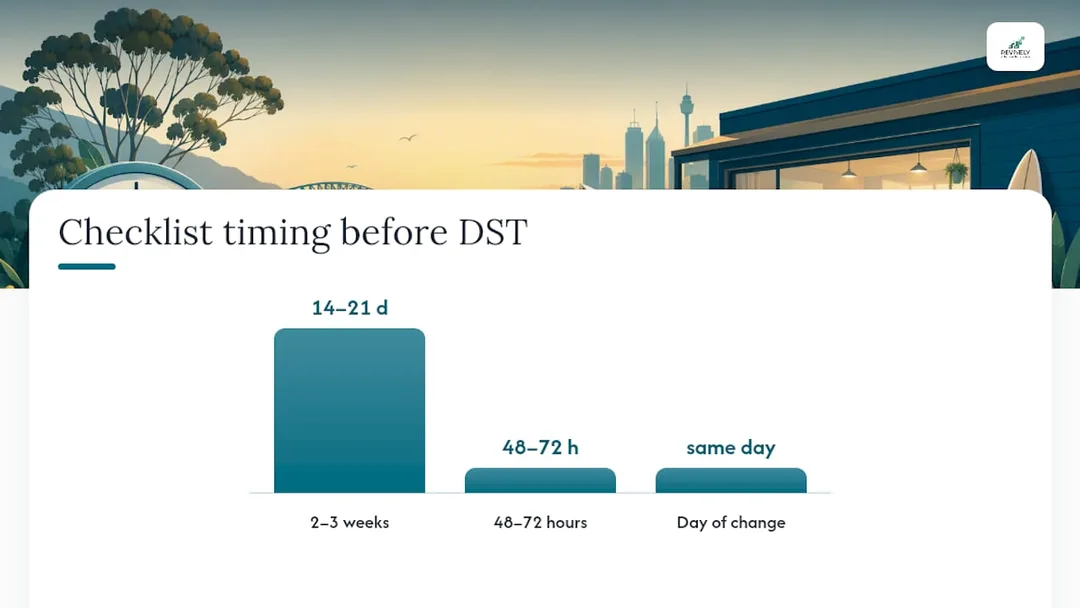
On the Day Itself: Your Frontline Support
Even with perfect planning, a casual client might still show up at the "wrong" time. Keep someone on hand who can manually fix a booking or gently guide them to the correct class. Empathy goes a long way here.
Mastering Timezones: UTC Storage & IANA Best Practices
The technical fix for most daylight saving headaches is elegant in its simplicity: store event timestamps in UTC (Coordinated Universal Time). Meanwhile, your business rules - like opening hours and recurring class times - should be stored in local time, explicitly tagged with an IANA timezone name (e.g., Australia/Sydney or Australia/Adelaide).
The Perils of Single Timezone Assumptions
National Digital, an Australian digital product development firm, points out that many off-the-shelf booking software solutions assume a single national timezone. This immediately breaks down if your business operates across states. A studio with locations in Melbourne and Brisbane needs both sites to independently resolve their own local offset; they can't share one central clock. This is why Australian-made booking systems designed for multi-location businesses are crucial.
Technical guidance on timezone handling in booking systems emphasises the correct build order: your system should generate availability slots in the studio's local time first, then convert those slots to UTC only for storage and transport. Doing it the other way around - storing local time and converting on the fly - is where insidious time drift creeps in.
Practical Timezone Checks for Your Studio:
- Keep Software Current: Ensure your server's
tzdataand timezone libraries are up-to-date. Outdated timezone databases are notorious sources of scheduling errors. - Calendar Integration Check: Test your Outlook and Google Calendar integrations separately. Microsoft itself warns that unpatched systems and calendar platforms can cause appointment woes during the transition.
- Know Your States: Remember that Queensland, Western Australia, and the Northern Territory do not observe daylight saving. Cross-state bookings therefore involve a genuine time offset change, not just a clock shift. Your unified cloud command centre needs to account for this.
- Lord Howe Island Anomaly: This remote NSW island is the ultimate outlier. It shifts by 30 minutes rather than a full hour. If you run workshops there or take remote bookings, this is a niche but vital detail to note.
Client Communication & Staff Briefing: Keeping Everyone in the Loop
Even with a flawless technical setup, human perception matters. Clients and casual staff will act on the message they receive, so your wording must be crystal clear.
Staggered Client Notifications: Less is More (with timing)
Avoid a single, overwhelming email. Stagger your client notifications for maximum clarity:
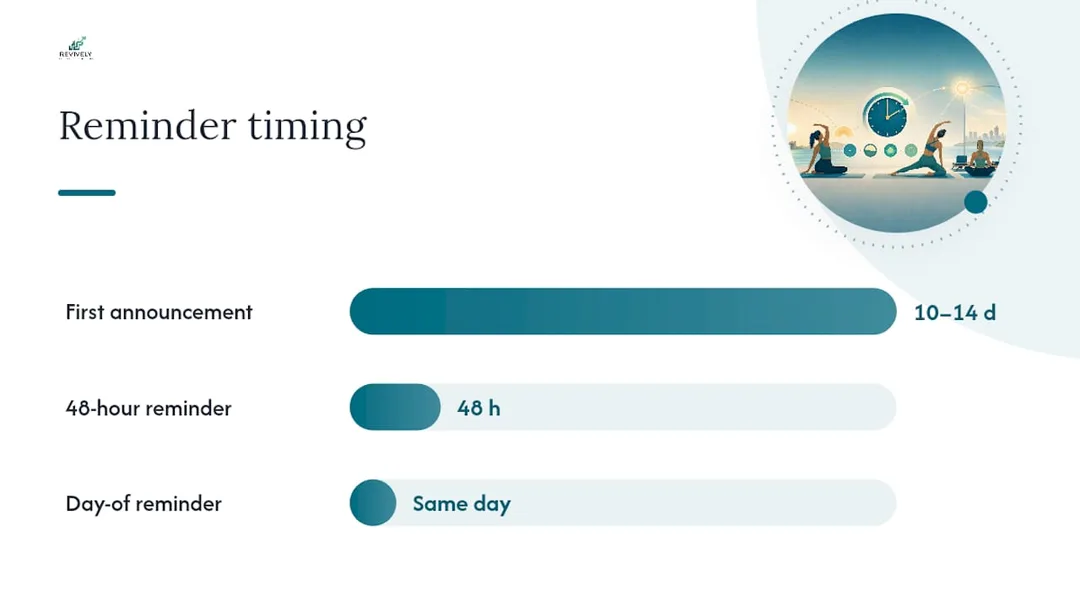
- First Announcement (10-14 days out): Gently flag that class times are changing due to daylight saving. State the new local time plainly: "Your usual 6:00 PM class is still 6:00 PM, but double-check the date it kicks in."
- 48-Hour Reminder: Reiterate the local time. Crucially, do not mention UTC offsets or server time. Your clients just need to know their class is still at 7:00 AM Sydney time.
- Day-Of Nudge: A short, final reminder, especially critical for early morning classes on the Sunday of the switch.
Pro Tip: When messaging clients, focus solely on the local time impact. "Your class stays at 7:00 AM Sydney time" is far more helpful than any technical explanation. Let your Mindbody alternative Australia system handle the behind-the-scenes conversion.
Empowering Your Staff
Brief your staff separately and thoroughly. Instructors and front desk teams are your frontline. They need to know:
- Who owns anomaly resolution: A clear chain of command for fixing scheduling issues on the day.
- Timesheet logging: How to accurately log shifts that straddle the time change to avoid payroll errors.
- System Consistency: Reassure them that the public timetable and website booking widget update simultaneously with your internal system, preventing customer-facing discrepancies.
Payroll & Payments: Nail Your BAS & Avoid Discrepancies
This is where daylight saving can hit your bottom line and your compliance. The clock shift impacts payroll twice a year, in opposite directions. In April, the "fall-back" adds an hour to the day, potentially meaning an overnight or early morning staff shift registers an extra hour worked. In October, the "spring-forward" does the reverse, making a staff member appear to have worked an hour less than rostered.
Post-Change Payroll & Payment Checks:
- Targeted Timesheet Review: Export your payroll and timesheet reports. Specifically scan for shifts that cross 2:00 AM or 3:00 AM on the transition day. These are the prime culprits for automatic systems miscalculating hours.
- Manual Cross-Check: Any flagged shifts need a manual verification. Microkeeper highlights that while rosters often auto-update for daylight saving, timesheets spanning the actual transition hour frequently require a manual correction to avoid overtime errors or missing hours. This is essential for accurate BAS reporting.
- Payment Settlement Cutoffs: Verify your payment settlement batch cutoffs against the new local time. This is particularly important if you run membership billing or class pack renewals on a fixed schedule.
- Expiry & Billing Date Integrity: Confirm class pack expiry dates and membership billing dates are still landing on the correct local business day, not shifting a day earlier or later. This is crucial for your all-in-one spa booking software to maintain financial integrity.
- Escalate Discrepancies: If, after manual checks, discrepancies persist, escalate immediately to your payroll provider or accountant before the next pay run. Don't wait.
Compliance Mandate: Australian businesses frequently encounter reconciliation failures around DST when settlement logic doesn't account for state-based timezone rules. This is why a dedicated check of your payment systems is non-negotiable for GST compliant studio software. Ensure your system automatically handles 10% GST calculations across casual classes, memberships, and multi-resource packages, issuing legally compliant Australian Tax Invoices without a manual headache.
Testing Your System: Bookings, Reminders & Waitlists
Trust, but verify. The safest way to be confident in your system is to test it thoroughly, not simply assume it'll work.
Your Daylight Saving Test Protocol:
- Cross-Transition Test Booking: Book one test class in each location your studio operates, dated to span the daylight saving transition.
- Local vs. UTC Verification: Confirm the local display time for that test booking remains the same on both sides of the change, while the underlying UTC value correctly shifts. This confirms your unified cloud command centre is handling conversions correctly.
- Reminder Log Scrutiny: Pull your reminder logs for the test booking. Confirm the stored timestamps are in UTC, but the messages clients actually received show the correct local time.
- Waitlist Promotion Test: If your studio uses waitlists, test a waitlist promotion scenario during the transition window. Confirm cutoff times and promotion rules still trigger at the intended local hour.
- Document a Fallback: Before the change, not during it, document a simple rollback or manual-fix process. Empower your on-shift staff to handle minor glitches without improvisation.
Pro Tip: Run your test booking a full week before the actual daylight saving transition, not the night before. This provides ample time to diagnose and fix any broken rules, saving you from a frantic Sunday morning fire-fight.
The Revively Advantage: Why Unified Australian Scheduling is Non-Negotiable
Most daylight saving problems aren't really about timezone bugs. They're the frustrating byproduct of a studio trying to glue together five different tools - one for bookings, another for SMS reminders, a spreadsheet for payroll, a separate screen for the foyer display - each with its own, often conflicting, idea of what time it is. This is the operational chaos that Mindbody alternatives Australia like Revively are built to solve.
Revively was engineered precisely to eliminate these pain points. Here's how:
- Location-Specific Timezones: Each studio location within Revively carries its own IANA timezone setting. This means your Perth and Sydney sites each resolve daylight saving correctly and independently, no manual overrides required.
- Seamless Integration: Multi-resource scheduling, waitlist promotion, class pack expiry, and membership billing all read from that same, single, per-location clock. Your foyer display updates from the exact same source as your online yoga studio booking system, so there's no second system to forget.
- Flawless Australian Tax Compliance: Revively's robust Xero integration is a game-changer for BAS accuracy. Automated two-way mapping of tax codes, revenue accounts, and liabilities ensures your quarterly Business Activity Statements are flawless and audit-proof, regardless of when a payment settlement lands or how daylight saving impacts reporting periods. No more manual spreadsheet errors or frantic reconciliations.
- Australian Data Residency: Critically for Australian studio owners, Revively ensures all client data, booking histories, and sensitive health intake forms are stored locally in Australia, fully complying with the Australian Privacy Principles (APPs). This isn't just a feature; it's a legal and ethical cornerstone of trust.
- Native GST Handling: The system natively handles 10% GST calculations across casual classes, memberships, and multi-resource packages. It automatically issues legally compliant Australian Tax Invoices to your clients, removing yet another compliance burden from your plate.
Trying to patch this together across a booking app, a separate SMS tool, a manual timesheet, and your accounting software is an unnecessary burden. Revively replaces that disjointed stack with a single dashboard where the timezone, the timetable, and client communications all originate from the same reliable source.
Experience Seamless Transitions: Book a Revively Demo
If you're currently fighting your way through daylight saving changes with a collection of disparate tools - one for bookings, another for SMS, a spreadsheet for payroll, and a paper sign taped to the front desk - it's time to see what a truly unified system looks like.

Revively provides a single, intuitive platform for your entire operation. Every location on your account boasts its own IANA timezone, ensuring your Melbourne studio and Gold Coast studio each correctly resolve daylight saving without you ever needing to touch a setting. Recurring class rules, waitlist automation, and class pack and membership expiry dates all run off that same local clock. Plus, our deep Xero integration keeps your GST reconciliation clean and BAS-ready, regardless of when settlements land.
Don't let the next clock change dictate your studio's efficiency. Explore our Solo, Growth, and Pro plans, starting from just $39 a month. Discover how an Australian-made multi-resource studio scheduler can transform your operational flow and ensure your timetable not only survives but thrives through the next daylight saving switch - completely unattended.
Sources
For official dates and state coverage, refer to the RBA's daylight saving schedule and timeanddate's Australia page. For payroll specifics, Microkeeper's guidance is invaluable.
- How daylight savings impact your business and payroll | Microkeeper
- Custom software development for AU customer management | National Digital
- When does daylight saving time start and end in Australia? | timeanddate
FAQ
Which Australian states observe daylight saving?
New South Wales, Victoria, South Australia, Tasmania, and the ACT observe daylight saving. Queensland, Western Australia, and the Northern Territory do not. Lord Howe Island, a unique case, shifts by 30 minutes instead of a full hour.
What happens to recurring class bookings during the changeover?
A properly configured system ensures a recurring class (e.g., 6:00 PM Tuesday) remains at 6:00 PM local time. The system simply adjusts the underlying UTC timestamp. Issues arise when systems store a fixed clock time instead of a local time tied to an IANA timezone, which is why an audit before the change is critical.
Do I need to manually adjust staff timesheets after daylight saving?
Often, yes. While most rosters auto-update for the date change, timesheets that span the actual transition hour (typically 2:00 AM or 3:00 AM) frequently require a manual check. This ensures staff are paid correctly for the exact hours worked, avoiding overpayment or underpayment.
Can Revively handle multiple studio locations across different time zones?
Absolutely. Revively is designed for multi-site operations. Each location on a Revively account is assigned its own specific IANA timezone, ensuring correct local scheduling and daylight saving adjustments without manual overrides. Multi-location support is available on our Growth and Pro plans.
How far ahead should I update my class timetable for daylight saving?
Begin your comprehensive audit several weeks before the transition date - ideally two to three weeks out. Schedule a final check a few days before the actual change. This proactive approach gives you ample time to identify and fix any misconfigured recurring rules before any client receives an incorrect reminder.
Recommended
- Switching Your Studio Schedule: The Aussie Survival Guide for a Seamless Migration (2-4 Weeks, No Lost Bookings)
- Stop the Studio Scramble: 4 Smart Timetable Templates for Australian Wellness Businesses
- Studio Scheduling Chaos? Your Resource Utilisation Report Holds the Key to a Calmer Roster
- No More Double-Bookings: The Australian-Made Multi-Resource Studio Scheduler That Stops Operational Chaos Cold