
Private Session Scheduling for Studios: A Practical Setup Guide
! Dance instructor checking a private session time
Private session scheduling means matching one client with one instructor, in the right room, at a time that suits both, without clashing with your group timetable.
The bell rings, a client walks in for their private Pilates session, and... oops. Your instructor is still teaching a reformer class next door. Or worse, the dedicated treatment room is double-booked with another therapist.
If that scenario makes your stomach clench, you're not alone. Juggling private client bookings, instructor availability, specific rooms, and specialist equipment alongside a bustling group timetable is a constant operational tightrope. It's the kind of complex dance that can turn studio owners into full-time admin assistants, battling spreadsheet errors and endless client calls.
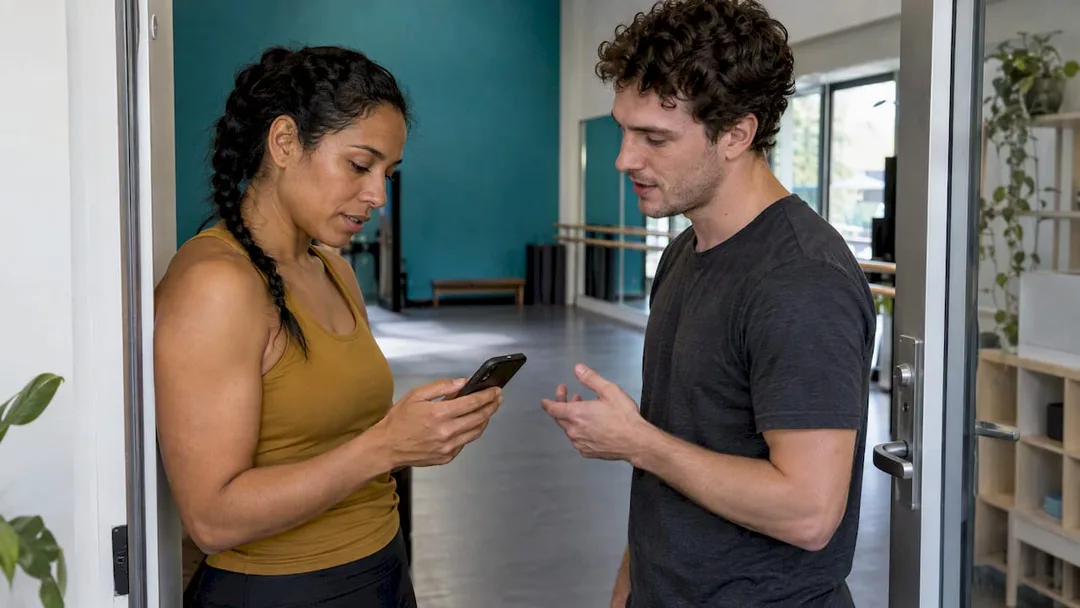
At its core, private session scheduling is about precision: matching one client with one instructor, in the right room, with the right gear, at a time that works for everyone - all without sabotaging your group classes. Get four things right, and you'll find your flow: instructor availability, session lengths (plus those crucial buffers), room and equipment allocation, and crystal-clear booking rules.
This guide cuts through the noise, showing you how to optimise your private session workflow, minimise no-shows, and ensure every booking is GST-compliant and stress-free. We'll even dive into the vital Australian privacy and tax requirements often overlooked by generic booking systems.
Why Private Sessions Aren't Just Smaller Group Classes
You know the drill with group classes: set a recurring time, pick a room, define capacity, and clients fill the spots. Simple, right? Private sessions flip that script. Here, the client's unique goals, specific injuries, or advanced experience drive the format, and the timing needs to align perfectly with one specific instructor.
It's a nuanced difference that Australian studios understand intimately. Ground Zero Gym in Newcastle explicitly highlights how their private sessions are tailored to the client's style, goals, and experience, contrasting them with their structured group classes. Similarly, Sydney's Sp2 Kinetics details its private or semi-private offerings as a solo or small-group experience with individual planning, distinct from their larger group formats.
For your scheduling software, this means three critical distinctions:
- Personalised Availability: Each instructor operates on their own schedule, not a fixed, shared class timetable. Their specific expertise dictates when and what they can teach.
- Flexible Formats: You might offer one-to-one, duet, or small-group sessions, each demanding different lengths, pricing structures, and capacities.
- Assessment First: Many studios wisely require new private clients to start with an assessment or consultation. Your scheduling software needs to guide clients through this prerequisite seamlessly.
Crafting Bulletproof Instructor Availability (Beyond the Spreadsheet)
It all starts with knowing who can teach what, and when. This isn't just about blocking out personal time; it's about strategically opening slots that make sense for both your clients and your business.
- List Your Bookable Professionals: Go beyond just instructors. Include every therapist, coach, or specialist who conducts private sessions.
- Define Weekly Windows: Instead of leaving their entire calendar open, set specific blocks for private bookings - think "Tuesdays 9 am to 1 pm" or "Thursday afternoons." This sets clear expectations and prevents burnout.
- Account for Class Commitments: If an instructor is leading your 6 pm yoga flow, their private availability must end early enough for them to transition, prepare, and not feel rushed. Your system needs to recognise these overlaps automatically.
- Map Services to Staff Levels: Not all instructors are equal, and neither are their prices. A senior Pilates teacher might command a higher rate for the same session type than a newer hire. The Pilates Body, for example, lists casual private prices of $95 or $100 depending on the teacher's level. Your scheduling tool needs to handle these tiered pricing structures.
Revively Pro Tip: If you're running a spa alongside your studio, the same logic applies to therapists. Our guide to flawless couples massage scheduling demonstrates how to book two therapists and a single room as one cohesive appointment - eliminating frustrating overlaps.
The Art of Session Lengths and the Power of Buffers
Picking a small, consistent set of session lengths is a game-changer for predictability and clear pricing. The Pilates Body runs all its sessions at 45 minutes, whether it's one-to-one, duet, or small circuit formats. Ground Zero Gym, conversely, publishes its private pricing by coach and duration, starting from $50 for 30 minutes. Choose what suits your discipline, but keep it simple.
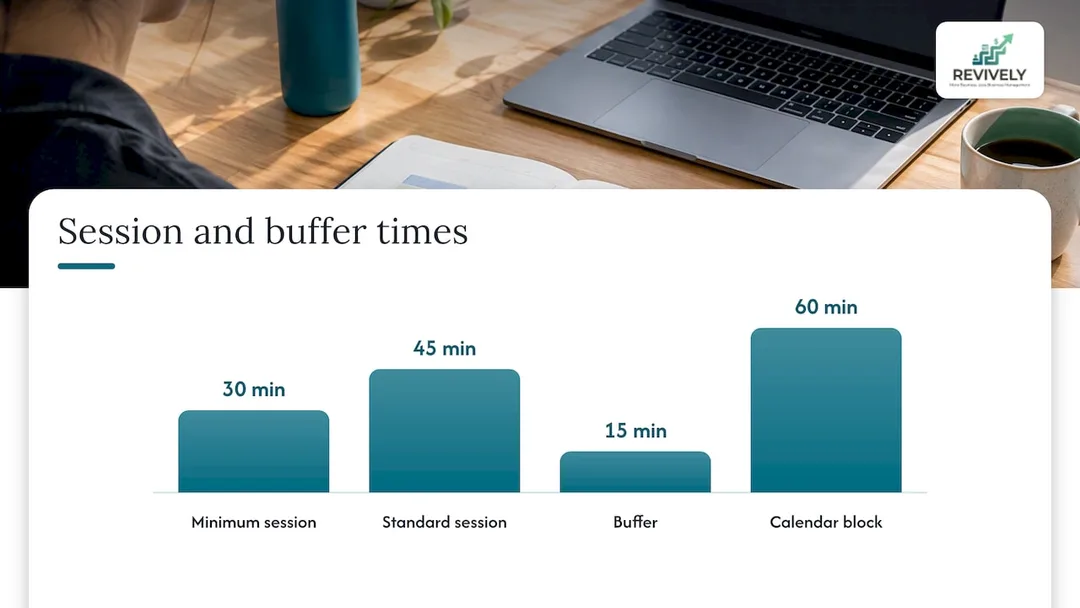
Fixed lengths aren't just for clients; they make your entire calendar predictable and pricing easy to explain (and manage for GST purposes).
Now, for the secret weapon against studio chaos: buffers.
A buffer is that crucial block of time before or after a session that your client never sees. It's the breathing room that prevents back-to-back booking meltdowns and keeps your studio running smoothly. Use it for:
- Cleaning & Resetting: Wiping down reformers, mats, treatment tables, or saunas between clients.
- Equipment Changeovers: Swapping out props, adjusting apparatus, or setting up for the next session.
- Instructor Transition: Allowing your team to move between rooms, grab a quick tea, or review client notes without feeling rushed.
Imagine a 45-minute private session. With a 15-minute buffer, it takes a full hour out of your calendar. If your booking system only blocks the 45 minutes, you're inviting a "back-to-back booking squeeze" that will quickly erode your team's morale and your studio's cleanliness standards.
Linking Sessions to Resources: Rooms and Equipment
A private session often demands more than just an instructor. It needs a specific room, and sometimes, a particular piece of equipment - whether it's a reformer, a Cadillac, or a dedicated sauna. These aren't just static assets; they're bookable resources that need to be managed as meticulously as your instructors' time.
| Resource | Examples | What to Optimise in Your System |
|---|---|---|
| Instructor | Pilates teacher, dance coach, therapist | Weekly availability, services offered, price tier |
| Room | Private studio, treatment room, sauna | Capacity, essential cleaning/reset buffer, availability |
| Equipment | Reformers, Cadillac, barre sets, massage beds | Quantity available per session, maintenance schedule |
When a client books a private session that requires both a specific instructor and a particular room and a reformer, your scheduling software should check the availability of all these resources simultaneously. This is the non-negotiable step that prevents double-bookings. Without it, two instructors could unknowingly book the same room at the same time, leading to frustrated clients and frazzled staff.
Revively's unified online booking software precisely manages the instructor, room, equipment, and buffer as one cohesive unit for each appointment, ensuring your resources are never overstretched.
What Your Clients Must See Before They Book
Most booking nightmares start with missing information. A client books, then realises the price, location, or cancellation policy is different from what they expected. Transparency is your best defence.
Take The Pilates Body's page as a gold standard. It clearly lists session formats, pricing by teacher level, locations, the 45-minute duration, essential introductory bookings, and a 24-hour cancellation notice. It even recommends an introductory consultation for newcomers.
Your online booking page should clearly display:
- Session Type & Suitability: One-to-one, duet, small group - and who it's for.
- Duration & Price (including GST): Clearly state the full cost, ensuring 10% GST is factored in automatically for Australian tax compliance.
- Instructor or Level: Let clients choose their preferred professional or understand the experience level.
- Location & Room: No one wants a scavenger hunt.
- Cancellation & Late-Change Rules: Crucial for managing expectations and protecting your revenue.
- Any Prerequisites: E.g., an intro session or assessment for new clients.
- A Concise Intake Form: For injuries, health conditions, or goals, completed before the first visit, not scribbled on arrival.
While some smaller studios, like T-Power Pilates, manage private sessions via enquiry for a more personal touch, that manual back-and-forth quickly becomes a bottleneck as your private diary grows. Self-service booking against live availability is the only scalable solution.
Payment, Reminders, and the Unbreakable Cancellation Policy
The decision of when a client pays can significantly impact your no-show rate. Collecting payment upfront commits the client and reduces flaky bookings. Some studios, like Sp2 Kinetics, prefer to take payment at the studio after the first session for new clients, but for ongoing privates, an upfront payment or session bundles, memberships, or class packs keep repeat clients paying consistently without you chasing invoices.
BAS-Ready Payments & Invoices: The Revively Difference for Australian Studios
This is where Revively truly shines for Australian studio owners. Our system natively handles:
- Automated 10% GST Calculations: Whether it's a casual private, a multi-session pack, or a monthly membership, GST is calculated and applied correctly, every single time.
- Legally Compliant Australian Tax Invoices: Clients automatically receive invoices that meet all ATO requirements, complete with your ABN, GST breakdowns, and all necessary details. No more manual calculations or worries about audit trails.
- Seamless Xero Integration for BAS Accuracy: This isn't just a simple connection; it's a robust, automated two-way mapping of tax codes, revenue accounts, and liabilities. This ensures your quarterly Business Activity Statements (BAS) are 100% accurate, audit-proof, and free from manual spreadsheet errors. Focus on your clients, not your tax returns.
Now, for that all-important cancellation rule. Write it down, make it clear, and apply it consistently. A 24-hour window is standard: The Pilates Body requires 24 hours' notice to avoid a full fee or a deduction from a session pack. Sp2 Kinetics is equally clear: late cancellations under 24 hours and missed classes receive no credit.
To make your policy truly effective:
- Instant Confirmation: Send a booking confirmation immediately, with the full cancellation policy explicitly repeated.
- Automated Reminders: Send SMS or email reminders before the session, including a direct link to reschedule or cancel (within the permitted window).
- Self-Service Rescheduling: Empower clients to reschedule themselves within the cancellation window. This removes you as the middleman and reduces admin.
- Automated Fee Enforcement: If your system can automatically apply the late fee or deduct from a pack, use it. Consistency builds trust and reinforces boundaries.
We delve deeper into this in our guide to automated cancellation policies and why yours might not be working.
Privacy Matters: Protecting Client Data (The Australian Way)
When you collect names, phone numbers, payment details, and often sensitive health information, you're holding your clients' trust. For Australian studios, this isn't just good practice; it's a legal obligation.
Business.gov.au clearly states that businesses covered by the Privacy Act must protect personal information and maintain a clear, up-to-date privacy policy explaining what they collect, how it's used, and how it's protected. Crucially, private sector health service providers - including gyms, yoga studios, and clinics - must comply with the Privacy Act, even if their turnover is $3 million or less.
Revively takes this seriously. We understand the Australian Privacy Principles (APPs). This is why client data, booking histories, and sensitive health intake forms are stored locally in Australia, ensuring full compliance with local regulations.
In practice, this means:
- Collect Only What's Necessary: Don't hoard data you don't need.
- Secure Storage: Keep intake forms and client notes inside your secure booking system, not in vulnerable email threads or scattered paper files.
- Limited Access: Restrict who can view sensitive client notes within your team.
If you're unsure whether your studio falls under the Privacy Act, it's always best to check with the Office of the Australian Information Commissioner or your legal adviser.
Choosing a Scheduling Tool: Beyond the "Free" Tag
"Free" schedulers might seem tempting for a solo instructor with a simple diary. But for a growing studio, they quickly become an administrative liability. You'll outgrow them the moment you need more than just a single calendar.
Before you commit to any booking software, especially as an Australian studio owner, ensure it can:
- Handle per-instructor availability and per-service pricing.
- Block rooms, equipment, and cleaning buffers together to prevent double-bookings.
- Run group classes and private sessions on one unified timetable.
- Process payments securely, sell packs/memberships, and automatically apply 10% GST.
- Collect secure digital intake forms before the first session.
- Send automated reminders and enforce cancellation rules.
- Seamlessly connect to Xero for flawless BAS reporting and audit-proof accounting.
- Store all client data locally in Australia, complying with APPs.
Our comprehensive guide to choosing the right booking system for your Australian wellness studio dives into these criteria in far more detail.
Our View: Consolidate Your Calendars. Reclaim Your Weekends.
We've seen the pattern repeat endlessly in growing studios across Australia. Private sessions start in a notebook or a separate Google Calendar. Group classes live in another specialised tool. Payments are tracked (or guessed at) in a third.
The result? A room gets double-booked, a client buys the wrong pack, GST calculations become a nightmare, and the studio owner spends their precious Sunday reconciling disparate systems. It's an unnecessary drain on time and energy.
We built Revively to eliminate that split. Our platform is designed as a unified cloud command centre. Private appointments and group classes share the same rooms, staff availability, and critical cleaning buffers, so one booking can't quietly undermine another. Waitlists automatically fill group classes, and the seamless Stripe payments and Xero integration keep the money side tidy and BAS-ready.
Our advice is simple: pick fixed session lengths, set your buffers honestly, put your cancellation rule in writing (and let the software enforce it), and choose a system that understands the unique compliance needs of Australian businesses.
At Revively, we believe your energy should be spent on your clients, not on fighting your calendar.
- Andreea, Co-founder, Revively
See it on your own timetable
Ready to experience a unified booking system tailored for Australian studios? Revively offers flexible plans to suit your needs: Solo at $39/month, Growth at $99/month, and Pro at $199/month, with annual billing discounts available. Additional bookable staff seats are $15/month each, and extra locations are $79/month.
You can compare plans on our pricing page and start with a free trial to test your own private and group sessions together. If you run group sessions, explore our dedicated class scheduling software.
Frequently Asked Questions
How do I stop double-booking private sessions?
The key is to book the instructor, the room, and any necessary equipment as linked resources. Your software should only show a slot as available when all required resources are free. Always add a cleaning or reset buffer to each session. Crucially, use a self-service booking page where every booking is instantly checked against this single, live, multi-resource calendar.
How long should a private session be?
Keep it consistent. Choose a small set of standard lengths that suit your discipline. The Pilates Body uses 45 minutes for all its sessions, while Ground Zero Gym prices privates by coach and duration, starting from 30 minutes. Once you decide, remember to add that crucial buffer time on top of the client-facing duration.
Should clients pay when they book a private session?
Taking payment at the time of booking significantly commits the client and reduces no-shows. This is generally the most secure option. However, some studios opt to collect payment after a client's first session. Whichever approach you choose, make sure it's clearly stated on your booking page and paired with a transparent cancellation policy, such as a 24-hour window. Remember, Revively handles automated 10% GST collection for all payments.
Is there a free scheduling program that works for an Australian studio?
While free tools exist for a single instructor with a basic diary, they rarely provide the comprehensive features needed for a multi-resource studio in Australia. They typically lack the ability to manage multiple rooms, equipment, cleaning buffers, class packs, digital intake forms, and automated GST/Xero integration. Before committing to any free tool, thoroughly assess if it truly meets the complex operational and compliance needs of your growing studio.
Sources
- Private Sessions - Ground Zero Gym
- Prices and schedule - Sp2 Kinetics
- Studio Sessions and Pricing - The Pilates Body
- Frequently Asked Questions - T-Power Pilates
- Protect your customers' information - business.gov.au
Recommended for Your Studio
- Stop the Studio Mayhem: How to Really Reduce Double Bookings (Without More Admin Headaches)
- Stop the Roster Roulette: Your Studio's Guide to Bulletproof Instructor Schedules (and BAS-Ready Books)
- Stop the Scheduling Circus: A Practical Guide to Multi-Resource Booking for Australian Studios & Spas
- Stop the Scheduling Chaos: How Australian Studios Can Master Multi-Resource Scheduling (and Stay BAS-Ready)