
Studio Display Boards Keep Foyer Schedules Live Without Daily Edits
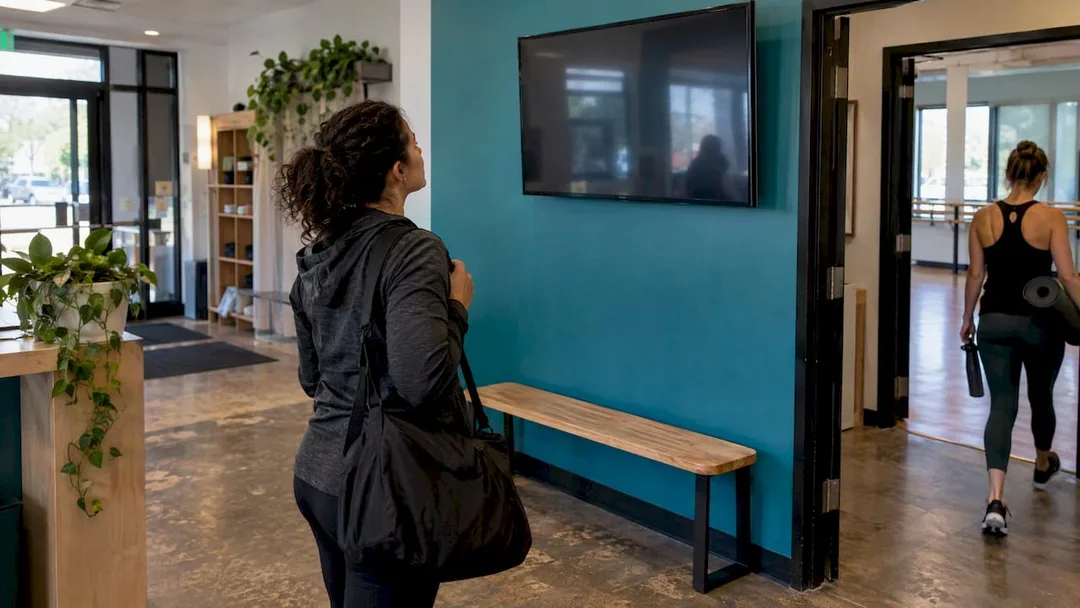
! Visitors checking a studio foyer schedule display
A studio display board should show a live, integrated feed from your booking system, not a sign someone updates by hand each morning.
Picture this: your studio foyer is a buzzing hive of energy. New clients, eager regulars, parents dropping off kids. And right there, at the heart of the chaos, is your front desk staff, fielding the same questions, over and over: "What class is next?", "Which room is Pilates?", "Is there still space in spin?" It's a daily ritual of repetition, a drain on valuable time, and frankly, a bit of a relic.
Now, imagine a different scene. Clients walk in, glance at a sleek display, and instantly see the current class, the next few sessions, available spots, and exactly where they need to go. No questions, no queues, just smooth transitions. That's the power of a well-implemented studio display board. It's not just a fancy screen; it's your silent, ever-vigilant concierge, optimising your client flow and freeing your team to focus on what truly matters: your members.
It's time to retire the whiteboard and sticky notes. Your studio deserves a live, integrated feed from your booking system, not a sign someone updates by hand each morning. The screen needs to highlight the class running right now, flag which rooms are occupied or free, and update itself the moment a booking changes. If you're choosing software, pick one that connects natively to your scheduler. Non-touch screens with a QR code for bookings work best in busy foyers, keeping interaction clean and efficient.
The Quick Scan for Savvy Studio Owners:
- Go Integrated: Prioritise software that pulls directly from your booking system. No manual updates, no outdated info.
- Size Matters: A 43-55 inch landscape commercial LCD is ideal for most foyers, balancing visibility and cost. Smaller panels work wonders at individual room doors.
- Offline Ready: Insist on cached playback. Your display keeps showing relevant info, even if the NBN decides to take a smoko.
- Touch-Free is Key: Non-touch screens with a QR code for mobile bookings cut down on maintenance and confusion in high-traffic zones.
- Test Live: Don't just set it and forget it. Simulate a last-minute change during peak arrival times to confirm instant updates.
Table of Contents
- What a foyer display board does for a studio
- Key features to insist on when choosing software and a display workflow
- Hardware choices: screens, players and mounting for lobby monitors and room panels
- Content strategy and daily operation: set-and-forget scheduling and daypart playlists
- Installation checklist: viewing-distance testing, network, power and go-live test
- Why we built live displays into studio management instead of treating them as an add-on
- How Revively.app supports foyer display boards and where to learn more
- FAQ
- Sources
What a Foyer Display Board Actually Does for Your Studio
Think of a foyer screen as your self-service secret weapon. It instantly answers the two nagging questions every visitor has walking through the door: "Where's my class?" and "What time does it start?" When done right, members find their room before they even reach your desk, which is exactly the role industry providers describe when they talk about digital signage as an operational layer, not just a pretty picture.
The tangible benefit? A calmer, more efficient front desk. When the current class and the next few sessions are prominently displayed, your team spends less time repeating the timetable to every walk-in. This isn't just anecdotal; it's a point backed by signage research for class-based businesses, confirming the direct link between clear information and reduced staff workload.
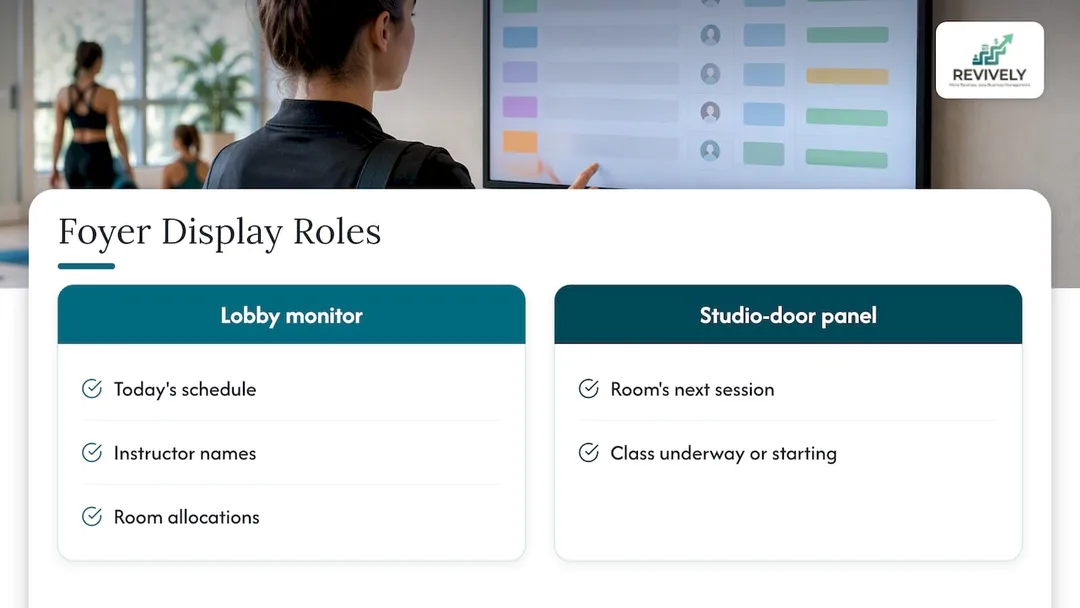
You can use lobby monitors to broadcast the day's entire schedule, instructor names, and room allocations. For an extra layer of clarity, smaller panels at individual studio doors can confirm that specific room's next session, letting clients know at a glance whether a class is underway or about to begin. It's about empowering your clients and streamlining their experience from the moment they arrive.
Key Features to Insist On: Your Blueprint for a Flawless Display Workflow
Before you even think about buying a screen, you need to understand what powers it. The software driving your display is infinitely more critical than the hardware. Here's what to demand from your studio management platform:
Non-Negotiable Display Software Features
- Direct Booking Integration: This is the absolute cornerstone. Your display must pull data from your scheduling system automatically. A cancellation, a last-minute room change, a waitlist promotion - it all needs to appear instantly, without manual intervention. This is a critical failure point signage specialists flag repeatedly when systems aren't truly integrated.
- Live Current-Class Highlighting: The board needs to scream "THIS IS ON NOW!" It should clearly mark what's in progress and which rooms are occupied. This matters most at drop-in times when new or confused clients are most likely to arrive.
- Availability and Waitlist Visibility: If your booking platform knows how many spots are left, or who's next on the waitlist, your display should show it. Transparency builds trust and encourages last-minute bookings.
- Daypart Scheduling: Your foyer isn't static. The system should be able to run different content during peak arrival times compared to quiet hours. This "set-and-forget" pattern is common in signage for yoga and Pilates studios and keeps your screen relevant without manual swaps.
- Offline Fallback (Cache Playback): Let's be real, Australian internet can be... unpredictable. Look for software with cached playback so your screen doesn't go blank if the network drops. It keeps showing useful content, a feature commercial signage platforms build in for exactly this reason.
- Non-Touch Operation with a QR Code: In a busy studio, touchscreens become smudgy, prone to accidental taps, and require more cleaning. A persistent QR code on screen allows visitors to book or check details on their personal devices, avoiding the wear and confusion that touchscreens create in busy foyers.
PRO TIP for Australian Studios: When evaluating any vendor, demand a live demonstration. Ask them to change a class time or cancel a session in their system right in front of you and confirm that it appears on the display promptly, not after a manual sync or a scheduled refresh. This is your acid test for true integration.
Hardware Choices: Screens, Players, and Mounting for Your Foyer and Rooms
Choosing the right screen comes down to viewing distance and location.
| Feature | Lobby Screens (Foyer) | Room Panels (Door Level) |
|---|---|---|
| Size & Orientation | 43 to 55 inch landscape commercial LCD panel. Reads well at typical foyer distances, cost-effective compared with larger formats. Portrait orientation suits a single room's running list. | Tablet or small dedicated display. Purpose-built panels offer a flush, finished look. |
| Screen Technology | Commercial LCD: Sharp, affordable, ideal for most foyers. | Commercial LCD: Same benefits as lobby screens, but smaller. |
| Alternative Tech | LED Walls: Suit seamless, large-format installations or spaces needing very high brightness, a distinction commercial screen suppliers outline. Generally overkill for standard foyers. | N/A (LED walls are too large). |
| Media Player | Built-in (SoC): Tidy with fewer cables. | Built-in (SoC): Simple and clean. |
| External Android Box: More flexibility for connecting to web-based booking pages. | External Android Box: Useful if integrating with existing web-based info. | |
| Touch vs. Non-Touch | Non-touch: Cuts accidental taps and maintenance calls. A static QR code lets visitors book from their own phones instead. | Non-touch: Simpler, less prone to damage at accessible heights. |
Mounting Best Practices: Always mount for VESA compatibility, conceal all cabling for a professional look, and leave ample room for ventilation behind the panel to prevent overheating. Run the screen through a surge-protected outlet - a must for Australian power grids. Set the height so the content is easily readable from a standing position without inviting people to lean on it.
Content Strategy & Daily Operation: Embrace the Set-and-Forget Dream
The ultimate goal for your studio display? A board that requires virtually no daily attention once it's configured. This is where smart content strategy meets powerful software.
- Dynamic Scheduling: Configure your live timetable to run during peak arrival windows, then seamlessly switch to promotional content (think new workshops, retail offers, or testimonials) during quieter stretches. This set-and-forget pattern ensures your screen is always relevant without any manual swaps.
- Multi-Zone Layouts: Leverage software that supports multi-zone layouts. This allows the current class, upcoming sessions, an instructor photo, and a booking QR code to all show at once, a structure commercial signage CMS platforms support out of the box.
- Visual Hierarchy is King: Keep the design clean and intuitive. Make the current class the most prominent element, place upcoming sessions clearly below it, and show spots remaining where your booking system allows. Don't make clients search for information.
- Branded Fallback: Always prepare a branded fallback screen for network outages. Your display should never go blank or show an error message. A "We'll be back shortly!" message with your logo and a contact number is far better than a black screen.
The Go-Live Checklist: Ensuring a Smooth Debut for Your Display Board
A seamless launch comes down to thoroughly testing the basics before your members see the screen. Don't rush this vital step.
- Check Legibility from Real Viewing Distances: Don't just look from the installer's ladder. Stand where visitors actually walk (and sit!) and confirm that font size, contrast, and layout are perfectly readable. What looks fine on a laptop often isn't at a distance.
- Confirm Network Reliability: Verify Wi-Fi strength at the mount point. Crucially, ensure your signage software caches content for offline playback - essential for preventing downtime in Australia.
- Sort Power and Cabling: Double-check that surge protection is in place, cables are concealed, and there's adequate ventilation clearance. These seemingly small details prevent future headaches.
- Mount at a Safe, Visible Height: The screen should be readable for someone walking past, but out of easy reach if it's a non-touch screen, discouraging casual leaning or accidental bumps.
- Run a Live Test (The Real Deal): Change a class time or cancel a session in your booking system and confirm it appears on screen immediately, with absolutely no manual refresh needed.
- Document Publish Access: Clearly define who has the authority to edit display content. A stray change by an untrained staff member shouldn't accidentally go live.
PRO TIP for Australian Studio Owners: Conduct your comprehensive go-live test at the busiest time of day, not a quiet morning. This is when you'll truly catch any load, refresh, or network-related issues before your members do.
Why We Built Live Displays into Studio Management (Not as an Afterthought)
At Revively, we deeply understand the daily ballet of running a physical studio. A foyer screen is only as reliable as the system behind it. That's why we engineered our display board feature as an intrinsic part of our unified cloud command centre, not a bolt-on add-on.
When your booking data, waitlists, multi-resource scheduling, and the display all live in one cohesive place, there's nothing to keep in sync. There's only one source of truth. This seamless integration is critical, especially during those frantic arrival windows when a class fills or a room changes at short notice.
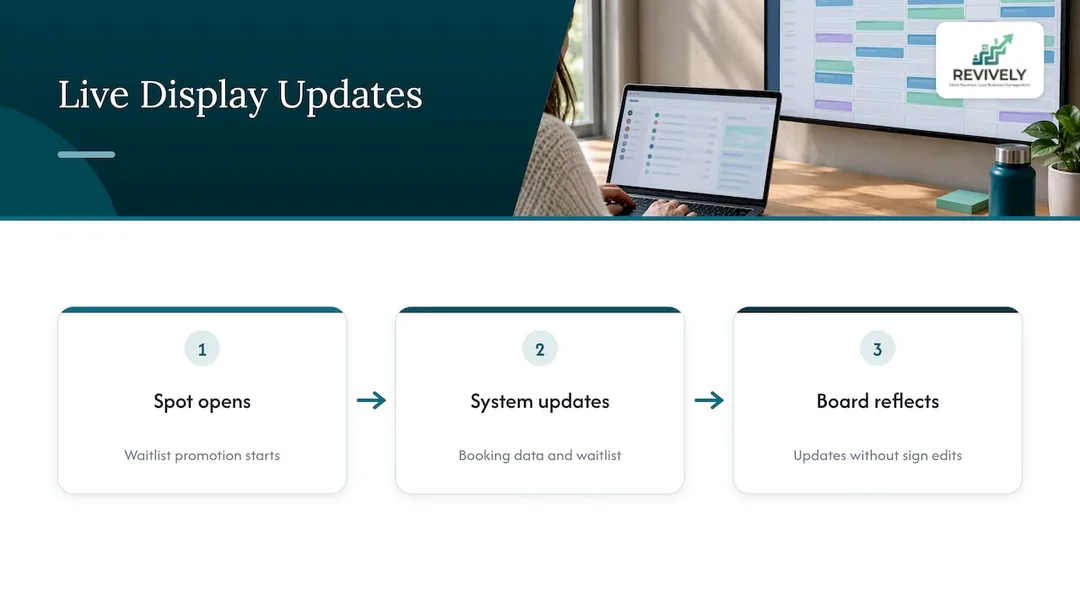
Automated waitlist promotion and our robust multi-resource scheduling pair naturally with a live display. When a spot opens up, the board reflects it the very moment the system does, not after someone remembers to update a manual sign. The practical payoff for you, the Australian studio owner, is fewer repetitive questions at the front desk, reduced administrative burden, and members who effortlessly find their room without breaking stride.
Beyond the visible efficiency, our unified approach means everything under the Revively roof adheres to a singular standard of excellence and compliance. Knowing your client's sensitive information - booking histories, payment details, and health intake forms - is securely housed right here in Australia, fully complying with the Australian Privacy Principles (APPs), brings a different kind of peace of mind.
And because it's all unified within Revively, your GST calculations are flawless, your Australian Tax Invoices are automatically compliant, and you're always BAS-ready, without a single manual adjustment. This meticulous attention to detail extends to critical areas like finance; our native Xero integration isn't just a basic sync. It's a two-way conduit that precisely maps tax codes, revenue accounts, and liabilities, ensuring your quarterly Business Activity Statements (BAS) are always audit-proof and free from those pesky spreadsheet errors. That's true peace of mind for Australian studio owners.
Our core belief is simple: technology should remove complexity, not add to it. A truly integrated display board gives you back time and reduces stress, letting you focus on your passion, not your paperwork.
- Andreea (Founder, Revively.app)*
How Revively.app Supports Foyer Display Boards & Where to Learn More
We built our display board feature so Australian studios never have to choose between a polished foyer screen and a schedule that's actually current. It draws directly from the same powerful system that runs your class scheduling, waitlists, and memberships, keeping everything unified in one intuitive platform.

If you're running recurring timetables across multiple rooms, our deep dive on recurring class management covers why a single, intelligent scheduling source cuts down on the errors that spreadsheets and sticky notes tend to introduce. Studios running multiple locations from one screen, as shown in this multi-studio case study, see the same tangible benefits at a larger scale.
- Compare plans and billing on our transparent pricing page.
- Dive into the class scheduling solution to see how seamless display boards connect to your entire timetable.
- Start with a foyer screen, experience the difference, and expand as your studio thrives.
FAQ
What is a studio display board used for?
A studio display board is a foyer or room screen that shows live class and booking information. It allows visitors to find their class and check availability without needing to ask at the front desk. It typically highlights the current session, upcoming classes, and room status in real-time.
Should a foyer display be touchscreen or non-touch?
Non-touch is generally the superior choice for busy foyers in Australia. It significantly reduces accidental taps, smudges, and the need for frequent cleaning and maintenance, a preference field-tested in dance studio settings. A persistent QR code on screen provides a hygienic alternative, allowing visitors to book or check details on their own mobile phone instead.
What size screen suits a studio foyer?
A 43 to 55 inch landscape commercial LCD panel is ideal for most studio foyers. This size offers excellent readability at typical viewing distances without being excessively expensive. Smaller panels, like tablets or compact displays, work exceptionally well for individual room doors.
How does a display board stay updated without manual work?
A truly effective display board connects directly to your booking and scheduling software. This means any change - a cancellation, a time swap, a room reassignment, or a waitlist promotion - appears on screen automatically, immediately, and without any staff intervention. Our display board feature at Revively pulls directly from the same live data as your class schedule.
What does it cost to run a studio display board?
The hardware cost for a single foyer screen is typically a one-off investment. The operational cost usually runs alongside your existing studio management software subscription, rather than requiring a separate system. Revively's Solo plan is available for 39 AUD per month on our pricing page, with Growth and Pro tiers offering comprehensive options as your studio expands.
Sources
- Class Schedule Digital Signage: Setup, Software, and Disp... - Digital Signage Hub
- Digital Signage Software Australia - Digital Solutions Provider - Advertise Me
- Six Studios, One Beat: The Taylor Dance Company - Joan Workplace
Recommended for Australian Studio Owners
- Stop the 'What's On?' Chaos: Four Decisions for a Studio Display That Works Like a Concierge
- Class display boards
- Stop the Scheduling Chaos: How Australian Studios Can Master Multi-Resource Scheduling (and Stay BAS-Ready)
- Stop the Clock Chaos: How Smart Studios Master Cleaning Buffer Times (10-60 Mins, Enforced)