
Stop double bookings for studios & spas with multi-location scheduling
! Coordinator managing schedules across wellness spaces
Multi-location scheduling puts every site's calendar, staff roster and resource booking into one central system, so a manager stops chasing five separate spreadsheets to find one open treatment room.
Remember that Monday morning? The one where you had three phone calls about a double-booked reformer, two staff members texting about a shift clash at the other end of town, and a client waiting for their massage in a room that was still occupied from the last appointment? That's the real cost of juggling multiple calendars, spreadsheets, and booking systems across your studios. It's not just a headache; it's lost revenue, frayed nerves, and a brand image taking a hit.
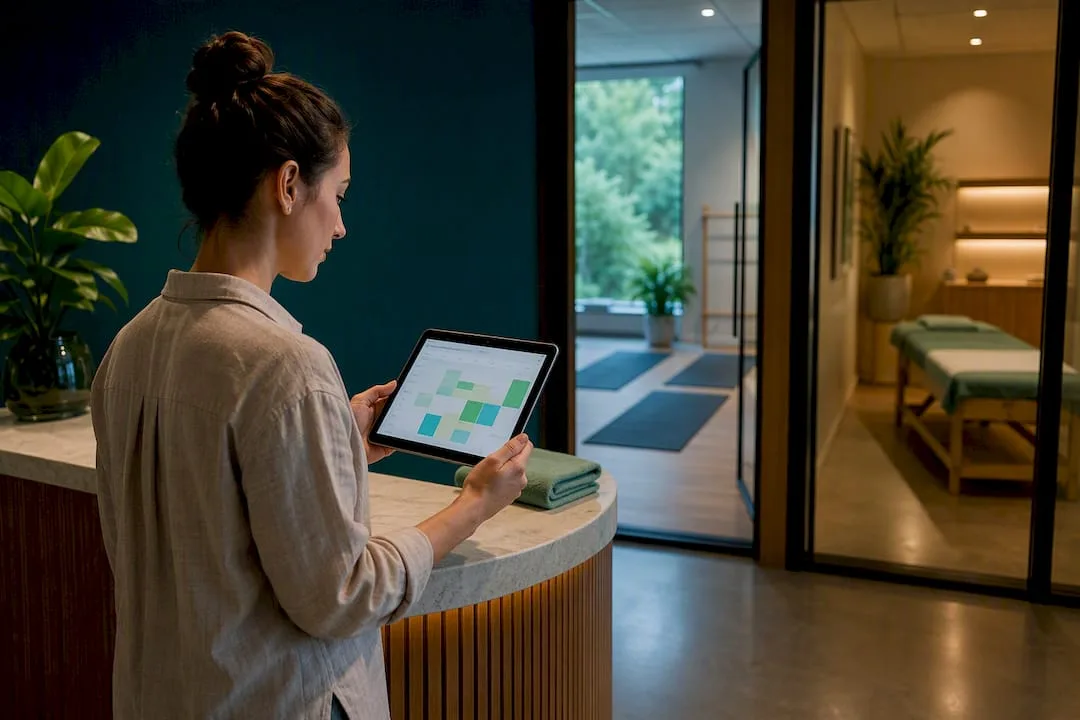
For Australian wellness studios - think yoga, Pilates, spas, recovery centres, clinics, or dance schools - running more than one location often feels like you've unlocked an 'admin chaos' achievement. But what if every site's calendar, staff roster, and resource booking lived in one central system? No more chasing five separate spreadsheets to find one open treatment room or confirm an instructor's availability across two suburbs. A unified cloud command centre isn't just a nice-to-have; it's the non-negotiable next step to stop double bookings before they happen and scale your business without rebuilding your operational foundations from scratch.
The Quick Takeaway for Time-Poor Studio Owners:
You're running a business, not an admin marathon. Juggling multiple locations with disconnected systems is a fast track to double bookings, staff burnout, and missed revenue. The fix? A single, intelligent platform that centralises everything: staff, rooms, equipment, and client bookings across all your sites. It'll slash admin time, prevent costly errors, and free you up to actually grow, rather than constantly putting out fires. Especially critical for Australian studios, this means bulletproof GST compliance, seamless Xero integration for BAS, and local data residency that protects your clients and your business.
Table of Contents
- What is multi-location scheduling and why Aussie studios need it
- What features actually matter in multi-location scheduling software?
- How do you stop double bookings across multiple sites?
- How to implement multi-location scheduling across your sites
- What metrics prove your multi-location rollout is working?
- Why Revively fits Australian studios and spas specifically
- Common challenges when running multi-location schedules
- How to choose the right multi-location scheduling solution
- What running scheduling across five studios taught me
- Ready to centralise your studio's scheduling?
- Sources
What is multi-location scheduling and why Aussie studios need it
At its core, multi-location scheduling means one intelligent dashboard controls the calendars, staff, and bookable resources for every studio you run. No more disjointed diaries, no more frantic phone calls between sites. For a spa chain or a growing dance studio group, that single, unified view is the difference between knowing instantly which treatment room is free at your Bondi site and phoning the front desk to check. This is your answer to finding Mindbody alternatives Australia actually needs.
The moment you switch from manual coordination to an all-in-one spa booking software or a unified Pilates studio management platform, the benefits hit hard and fast:
- Zero Double Bookings: Every location pulls from the same live, always-up-to-date calendar, not a copied spreadsheet that's an hour behind. Your clients get what they booked, every time.
- Rapid New-Site Launches: Instead of rebuilding service lists, pricing, and staff profiles from scratch, simply clone a proven template. You're ready to operate site number four with the same admin effort it took to launch site one.
- Centralised Reporting & Insights: See occupancy rates, staff hours, and revenue across every site from one dashboard. No more chasing five managers for numbers or manually consolidating data.
- Flexible Staffing Pool: Often called a 'flexpool,' this allows instructors or therapists to seamlessly pick up shifts wherever coverage is needed, optimising your payroll and reducing last-minute scramble.
For wellness and fitness studios specifically, these benefits play out in the granular, daily chaos you know well: a Pilates reformer booked at two locations at once, a sauna that needs a mandatory 15-minute cleaning buffer before the next client, or a dance class timetable that has to sync across three suburbs without a scheduling clash. A yoga studio with three rooms and two front-desk staff faces the same complex coordination load as a large spa chain - just at a different scale. The solution, however, remains consistent: a systemic fix, not another tab in a spreadsheet.
What features actually matter in multi-location scheduling software?
Not every scheduling tool built for a single site scales cleanly to five locations. Generic appointment software simply won't cut it for a multi-resource studio scheduling environment. Industry review platforms consistently flag centralised dashboards and robust resource management as baseline expectations for any software serving multi-site businesses. Consider these not as 'nice-to-haves,' but as non-negotiables for your unified cloud command centre.
Run your shortlist against this crucial checklist:
- A Centralised Dashboard with Per-Location Settings: Your flagship studio in Surry Hills might have different opening hours or pricing structures than your satellite site in the Northern Beaches. The system must accommodate these differences without forcing a one-size-for-all setup.
- Multi-Resource Booking with Mandatory Buffers: This is critical. A treatment room, sauna, or specific piece of equipment (like a reformer) cannot be double-booked back-to-back without a non-negotiable cleaning or turnover gap. The software should enforce these buffers, not just suggest them.
- Shared Staff Profiles with Cumulative Hours: Your instructors and therapists often work across multiple sites. The system must track their availability and cumulative hours across every location they serve, preventing costly overtime surprises.
- Cloning and Templating for New Locations: Launching a new site shouldn't mean starting from zero. The ability to clone an existing location's service lists, pricing, and timetable templates saves countless hours.
- Native Waitlists, Class Packs, Memberships, and Public Display: All essential for studios. These shouldn't be add-ons or workarounds but core functionalities, seamlessly integrated.
- Deep, Native Integrations: Seamless connections with payment processors (like Stripe), robust accounting software (specifically Xero for Australian studios), calendar sync, and automated SMS/email notifications are repeatedly cited by buyer reviews on Capterra as deciding factors.
Pro Tip: Ask any vendor to show you cumulative staff hours across two locations in one report before you sign on the dotted line. If they can't, your overtime costs will easily hide in plain sight, creeping up on your bottom line.
How do you stop double bookings across multiple sites?
Scheduling across several sites is fundamentally a logistics problem, not just a calendar issue. That's according to operational guidance from recreation and facility management bodies. Treating it like just a calendar problem is where most studios, spas, and clinics go wrong.
Before you publish any multi-site roster, run it through these four critical checks:
- Availability. Confirm that both the staff member and the resource (room, sauna, reformer, studio space) are genuinely free. Not just 'unbooked on paper,' but truly available. A single source of truth is paramount here; two versions of a schedule will inevitably create phantom availability.
- Constraints. Double-check skill and certification fit. A casual instructor qualified only for Pilates mat work should never be rostered onto a reformer class without the correct, verified training on file. This is about client safety and your studio's reputation.
- Reachability. Be honest about travel time between sites. Don't use the optimistic Google Maps number. That 15-minute gap that looks perfectly fine on a spreadsheet can unravel the moment traffic does what traffic does, leading to client delays and staff stress. Factor in realistic buffers.
- Confirmation. Verify high-risk assignments, such as a therapist covering three sites in one day, before the roster goes live. One missed handoff, one late arrival, and the domino effect can cascade across the entire day, impacting multiple clients and appointments.
While head office should always set the overarching standards (brand consistency, default buffer times, clear naming conventions), local managers must retain day-to-day flexibility to swap shifts or adjust for last-minute cancellations. It's a balance between control and operational agility.
How to implement multi-location scheduling across your sites
Rolling out a unified scheduling system works best as a staged project, not a chaotic, 'rip-the-band-aid-off' weekend switch. Follow this sequence for a smoother transition:
- Audit Current Processes. Don't guess. Map exactly where double bookings, scheduling conflicts, and travel waste actually happen. This gives you a baseline and helps identify critical pain points the new system needs to solve.
- Build Standard Templates and Naming Conventions. This step is crucial and often overlooked. Decide now how sites, rooms, equipment, and staff roles will be consistently labelled. Retrofitting names later creates confusion and undermines data accuracy.
- Migrate Staff Profiles and Resources. Carefully transfer all staff data: who can work where, their certifications, existing availability, and preferred sites. Then, bring your multi-resource bookings (rooms, saunas, equipment) across in one comprehensive pass.
- Set Permission Levels. Before anyone starts editing live schedules, define who can publish a roster, who can only view it, and who has the authority to override (with clear flags!) mandatory buffers.
- Pilot at One or Two Sites. Don't go live everywhere at once. Train local managers at one or two 'pilot' sites first. Gather their feedback for two to three weeks, iron out kinks, and then roll out to the rest of your locations. Cloning a proven template at this stage dramatically cuts setup time for every subsequent site.
What metrics prove your multi-location rollout is working?
Five key numbers will tell you whether your investment in an all-in-one studio management software has actually paid off and if you've truly tamed the scheduling beast:
- Double-Book Rate: This should trend toward zero within the first month. If it's not, dig into why.
- Fill Rate: The percentage of shifts and bookable slots that are actually filled versus left empty. An optimised multi-location system should improve this.
- Time-to-Fill: How long an open shift sits unclaimed before a staff member picks it up. A good flexpool system should reduce this significantly.
- Overtime Hours: Tracked across all sites combined, not just per location. Shared-staff models can easily hide cumulative overtime if hours aren't aggregated accurately.
- Manager Admin Time: The hours your site leads spend wrangling schedules instead of actually running the floor, engaging with clients, or developing staff. This should see a significant drop.
Pull these into reports that specifically flag travel waste (e.g., staff crossing town for a two-hour shift) so you can rebalance your flexpool more intelligently. Critically, feeding the same accurate data into payroll and your Xero accounting integration keeps labour cost control precise and audit-proof, rather than reconciled after the fact.
Why Revively fits Australian studios and spas specifically
Revively was built from the ground up to solve the exact problems this guide covers, not retrofitted from generic salon software. It maps directly onto that critical feature checklist for GST compliant studio software and more:
- Multi-Resource Booking with Built-in Buffers: Forget accidental double-bookings. Our system enforces cleaning and turnover buffers for every sauna, treatment bay, or reformer, so your space is always ready for the next client.
- Automatic Waitlist Promotion & Flexible Payments: For group classes, waitlists promote clients automatically. We natively handle class packs and Stripe-powered memberships, designed for how Australian studios operate.
- Native Multi-Location Workspaces: Each of your locations is a distinct workspace within Revively, with its own settings. But you can clone existing templates for opening new sites, saving you days of setup. Explore our multi-location features.
- Flawless Australian Financial Compliance: This is crucial. Revively offers direct, two-way Xero integration for seamless reconciliation of 10% GST and tax across every location on one dashboard. It guarantees your quarterly Business Activity Statements (BAS) are flawless and audit-proof, removing manual spreadsheet errors and ensuring legally compliant Australian Tax Invoices are automatically issued to your clients.
- Australian Data Residency & Privacy: Your client data - booking histories, sensitive health intake forms, payment details - it's all stored securely right here in Australia, fully complying with the stringent Australian Privacy Principles (APPs). Peace of mind, locally.
Imagine a dance studio opening a second site: they can clone their existing template rather than rebuild pricing and services from scratch. Or a spa chain running saunas and treatment rooms across three suburbs, benefiting from one unified flexpool of therapists instead of three disconnected rosters. That's the Revively difference.
Common challenges when running multi-location schedules
Even with the right yoga studio software multi-location solution, a few recurring problems tend to surface. Being prepared for them is half the battle:
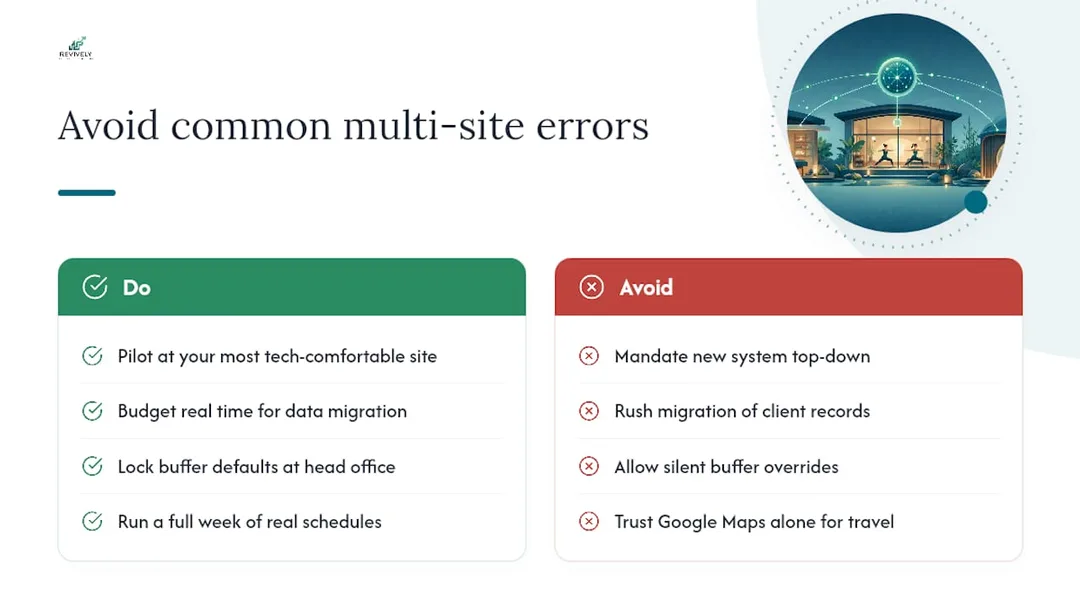
- Staff Resistance: Therapists and instructors accustomed to paper diaries or shared Google Calendars often push back on a new system. This is especially true if training is rushed or perceived as complex. The fix: Pilot with your most tech-comfortable location first, then let them champion the system to their peers, rather than mandating it top-down. Peer influence is powerful.
- Data Migration Headaches: Old client histories, membership balances, and staff certifications rarely map cleanly into a new platform. Rushing this step is how double bookings, incorrect class packs, or unqualified staff sneak back in during week one. The fix: Budget ample time for migration. Specifically check certification and skill data - a mismatched skill tag is how an unqualified staff member ends up rostered onto a reformer class.
- Buffer Settings Ignored: A manager under pressure might override a cleaning buffer to squeeze in one more booking. If the system allows silent overrides, brand standards can drift within weeks. The fix: Lock buffer defaults at the head-office level. Allow local overrides only with a visible flag, reason required, and perhaps even an approval workflow. Transparency matters.
- Underestimated Travel Time: This gets overlooked constantly. A 15-minute gap that looks fine on paper utterly fails the first time there's roadworks or school pickup traffic. The fix: Run a full week of real schedules through the system before trusting it to auto-suggest cross-site coverage. Adjust travel buffers based on what actually happens, not what Google Maps says on a quiet Tuesday.
How to choose the right multi-location scheduling solution
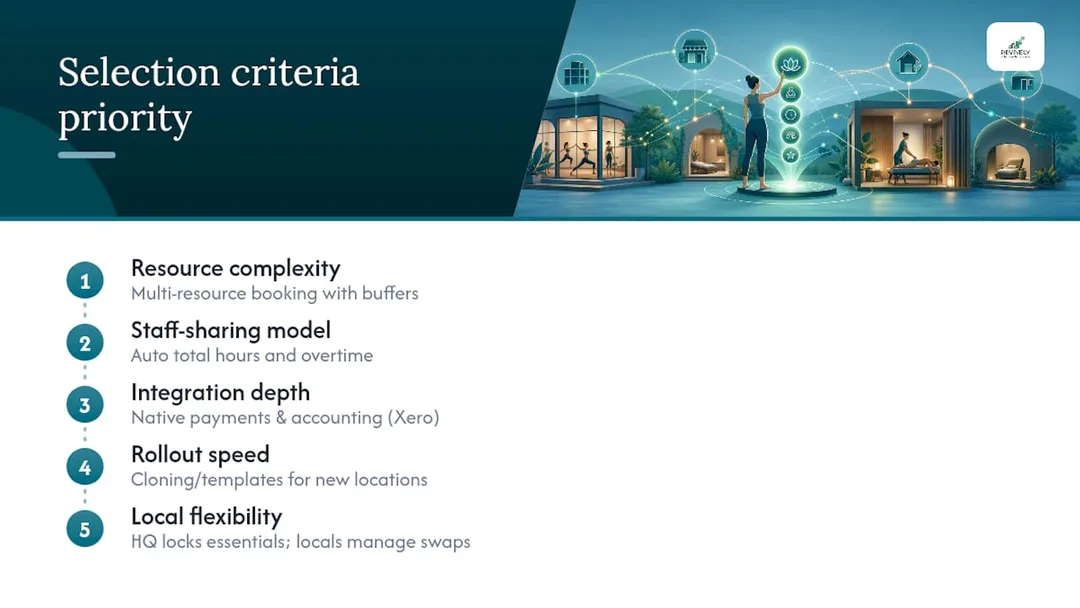
Picking software for three sites is a fundamentally different exercise to picking it for one. Weigh these criteria in order of priority for your all-in-one studio management platform:
| Criteria | Basic Single-Site Software | Revively's Multi-Location System |
|---|---|---|
| Resource Complexity | Simple room bookings; no mandatory buffers. | Multi-resource (rooms, saunas, equipment) with enforced buffers. |
| Staff-Sharing Model | Individual staff rosters per location; manual hours aggregation. | Shared staff profiles; cumulative hours/overtime calculated across all sites. |
| Integration Depth | Basic payment integration; manual accounting export. | Native Stripe, Xero (two-way for BAS/GST), calendar, SMS/email. |
| Rollout Speed (New Sites) | Rebuild services/pricing from scratch for each new site. | Clone templates, launch new sites in minutes, not days. |
| Local Flexibility | Either rigid central control or fragmented local control. | Head office locks essentials; local managers manage daily shifts/swaps. |
- Resource Complexity First. If you're juggling treatment rooms, saunas, specific equipment (like reformers), and multiple studio spaces with mandatory buffers, prioritise platforms specifically built for multi-resource booking over generic appointment tools. A studio running only single-instructor classes has simpler needs than a spa with six bookable spaces per site.
- Staff-Sharing Model Second. If your instructors or therapists work across multiple sites, the software must calculate cumulative hours and overtime automatically. Manually adding up hours from three separate reports is how compliance issues and costly errors slip through the cracks.
- Integration Depth Third. Confirm the platform connects to your payment processor and, crucially for Australia, your accounting software (Xero integration) natively. Avoid third-party workarounds that often break with every software update. GST reconciliation across multiple ABNs or cost centres matters more than it sounds.
- Rollout Speed Fourth. Ask specifically about cloning or templating for new locations. If launching site number four takes the same painstaking admin effort as site number one did, the platform hasn't actually solved your scaling problem.
- Local Flexibility Last (but not least). The best systems strike a balance. They let head office lock in the essentials (buffers, brand pricing, naming conventions) while empowering local managers to retain control over day-to-day shift swaps and last-minute adjustments.
What running scheduling across five studios taught me
Travel friction breaks more schedules than bad staff planning ever does. Naming conventions matter more than anyone expects - "Studio 2" and "Bondi PM" describing the same room will cause real confusion. My advice? Name sites, rooms, and resources consistently from day one, buffer travel time honestly, and always pilot before you roll out everywhere. If you're tackling a rollout, circle back to the implementation checklist again before launch. It'll save your sanity.
- - Andreea*
Ready to centralise your studio's scheduling?
Revively gives you the multi-location dashboard, critical resource buffers, shared staff profiles, and the robust Australian compliance features (GST, Xero, APPs) this guide just walked through. It's built specifically for spas, yoga studios, Pilates studios, clinics, and dance schools - not adapted from generic salon software. Out of the box, it covers the checklist that matters most: multi-resource booking with cleaning buffers, automatic waitlist promotion for classes, Stripe-powered memberships and class packs, and native Xero reconciliation across every site on one secure login.

If you're planning a rollout, the practical next step is small and low-risk: import your existing staff profiles, clone your best-performing location as a template, and run a pilot at one site before expanding. You can explore how our online booking system handles multi-location bookings, or look at the class scheduling tools if group timetables are your bigger pain point. Either way, start with a trial and see how quickly your admin time drops once every site runs off one intuitive calendar.
Sources
- Pabau practice management reviews - G2
- Pabau CRM - Capterra
- NRPA - National Recreation and Park Association
Recommended Reading
Looking for more strategies to cut the chaos and optimise your studio's operations? These articles dive deeper:
- How to Avoid Double Booking: A Studio Owner's Checklist
- Stop the Scheduling Circus: A Practical Guide to Multi-Resource Booking for Australian Studios & Spas
- Master Your Space: Why Multi-Resource Scheduling is Non-Negotiable for Australian Wellness Studios
- Stop the Studio Mayhem: How to Really Reduce Double Bookings (Without More Admin Headaches)