
Australian Studio Software Migration: Protect Bookings in 2 - 4 Weeks
! Dance studio owner checking migrated class bookings
Migrate studio software safely by running a staged migration: audit your data, test exports in a sandbox, run both systems in parallel, then cut over once verified.
The calendar just double-booked a reformer session and a remedial massage in the same room. Again. You're wrestling with clunky software that doesn't understand your unique studio rhythms, constantly chasing failed payments, or patching together spreadsheets because your "all-in-one" solution is anything but. Sound familiar?
For Australian wellness and fitness studio owners, the idea of switching core management software can feel like staring down a major renovation - daunting, disruptive, and riddled with hidden costs. But what if a seamless, APP-compliant migration could happen in just 2-4 weeks, preserving every client booking, every hard-won membership, and every dollar earned?
It's not just about moving data; it's about safeguarding your entire operation. A safe studio software migration isn't a pipe dream. It's a staged process: audit meticulously, test in a sandbox, run both systems in parallel, and only then, cut over. It typically takes a few weeks, with a dedicated lead coordinating staff, vendors, and your IT (or lack thereof). Crucially, the right platform is designed to support this handover, not complicate it.

Straight Talk Summary for Busy Studio Owners:
- Before you even think about cancelling, check your current provider's termination windows, export fees, and transition support. Then, critically, test a live sample data export against your new platform's field mapping.
- Simple migrations (think memberships-only) might wrap up in under two weeks. Schedule-heavy studios with multi-resource bookings, waitlists, and complex class packs often need three to four weeks for thorough testing.
- Budget wisely: Account for potential export charges, a period of overlapping subscriptions, staff training, manual reconciliation time, and even legal advice on sticky exit clauses. Get written confirmation of data retrieval access before you give notice.
- Don't rush the cutover. Only proceed when your field mapping works flawlessly, daily booking and payment checks match up perfectly, and every automation (from waitlist promotions to client notifications) performs as expected in a test environment.
- The 72-hour rule: Maintain a final verification period for at least 72 hours after your last data sync. Resolve any booking or payment discrepancies here. Only decommission the old system and obtain written data deletion confirmation once you're 100% confident.
Table of Contents
- Why Aussie Studios Jump Ship (It's Never for Fun)
- Your Pre-Migration Audit: What to Confirm Before You Give Notice
- Realistic Timelines & Cost Considerations for a Smooth Switch
- The Bulletproof, Step-by-Step Migration Process
- Revively's 2-4 Week Migration Playbook for Schedule-Heavy Studios
- The Golden Rule for Any Software Switch
- How Revively Supports Your Flawless Migration
- FAQs for Australian Studio Owners
- Sources
Why Aussie Studios Jump Ship (It's Never for Fun)
Let's be honest, no studio owner wakes up buzzing to migrate their core software. It's an operational headache, a risk to revenue, and a drain on precious time. So why do so many Australian studios make the leap? Because their current system is actively costing them peace of mind, profits, and precious members.
You've probably felt it:
- Hidden fees mysteriously appearing on invoices, never mentioned during the sales demo.
- Payment failures or delayed syncs forcing your team to play detective, chasing clients for money they've already "paid."
- Glaring feature gaps that mean you're running a crucial spreadsheet or a clunky secondary app alongside your main platform - hello, operational chaos.
- Fragmented tools that make admin staff re-enter the same client details, booking information, or sales data three times a week.
- The ultimate headache: Double-booking a high-demand Pilates reformer or a premium treatment room because two systems simply don't talk to each other. This kind of preventable operational pain is what truly pushes owners to act and seek out Mindbody alternatives Australia can trust.
Before you even commit to switching, pull out that old contract. Check the renewal and exit clauses. It's worth noting that since 9 November 2023, standard-form small business contracts in Australia gained protection against unfair terms under broader consumer contract protections. This covers many rolling software agreements, safeguarding your right to exit cleanly - but you still need to be smart about it.
Your Pre-Migration Audit: What to Confirm Before You Give Notice
A rushed exit notice is a recipe for disaster, leaving studios locked into contracts with no usable data export. Work through this list before you tell your current vendor you're leaving. Forewarned is forearmed.
- Inventory every single data type: This isn't just client names. Think member records, recurring billing histories, payment gateway details, class pack balances, gift cards, staff rosters, sensitive health intake forms, waivers, attachments, and any integration credentials. Understand what you have before you try to move it.
- Confirm your current contract terms: What's the termination notice window? Are there specific export windows? Are there any sneaky exit fees? And, crucially, does the vendor offer any genuine transition assistance? Get the facts.
- Request a sample export while your service is still live. This is non-negotiable. Test this sample against your new platform's field mapping before you send any notice. Does the data make sense? Does it align with how your new system (like Revively, an all-in-one spa booking software that handles this natively) organises information?
- Plan your privacy obligations thoroughly: As an Australian studio, your client data is paramount. You'll need written confirmation that your old vendor has securely deleted or de-identified all personal data once your migration is complete. This is entirely consistent with your APP 11 security obligations under the Australian Privacy Principles. Don't assume; confirm.
- Assign clear owners and realistic deadlines for each migration task. Nothing stalls a migration faster than ambiguity. This ensures accountability and keeps momentum high in the critical final weeks of your old contract.
Our comprehensive guide to migrating your studio's data walks through field mapping in much more detail, offering templates to streamline your process.
Pro Tip: Always ask for your sample data export before you send a cancellation notice. Vendors are remarkably more cooperative when you're still a paying customer. It's simply human nature - leverage it.
Realistic Timelines & Cost Considerations for a Smooth Switch
The speed of your migration often hinges on your studio's complexity. A membership-only studio with straightforward billing can often migrate in under two weeks. However, a schedule-heavy operation running multi-resource bookings, complex group classes, tiered memberships, and waitlists needs closer to three or four weeks to test automations and ensure every integration performs perfectly.
Beyond the new software subscription itself, budget for a few key cost buckets:
- Vendor Export Fees: Some legacy providers charge a hefty fee for accessing your own data. Factor this in.
- Overlapping Subscriptions: You'll likely need to run both systems in parallel for a period, so budget for concurrent subscription costs.
- Staff Time: This isn't a "set and forget" project. Allocate staff time for training on the new system, data verification, and manual reconciliation during the transition.
- Legal Advice: For particularly complex contracts or sticky exit clauses, a small investment in legal advice can save you significant headaches down the line.
A thoroughly tested exit plan absolutely must include a sample data export while the service is still live, clear pricing on any transition assistance (if offered), and a confirmed read-only retrieval window, as highlighted by Sprintlaw's guidance on vendor exit terms. Skipping this step is one of the most common causes of mid-migration nightmares. Plan your final cutover for a quieter week, and commit to running both systems in parallel for at least several days of rigorous verification before you even think about switching off the old one.
The Bulletproof, Step-by-Step Migration Process You Can Follow
Break your migration into five distinct phases, each with clear "go" or "no-go" checkpoints. Only move to the next phase when the previous one is fully green.
-
Audit and Field Mapping:
Start by building a comprehensive data dictionary for every field in your current system. Then, identify where the new platform's structure might differ. Common mismatches? Intricate membership models, custom class pack rules, or unique pricing tiers. This phase is about understanding the landscape before you build the bridge. -
Export and Verify:
Generate full data exports from your old system. Crucially, verify them. Use file hashing or checksum verification to ensure data integrity, then test a full restoration in a secure sandbox environment. Don't touch live data until you're certain the export is clean. NIST's guidance on backup testing recommends inventorying datasets and running restoration tests on non-production systems to confirm usability. This applies directly to your studio's vital client information. -
Configure the New System (with an Aussie lens):
This is where Revively shines. Recreate all your memberships, class pack logic, and intricate billing rules exactly as they ran before. Rebuild your automations, calendars, and webhook integrations, testing each one individually. Here's where Australian compliance is critical:- GST Handling: Configure Revively to automatically apply 10% GST to all casual classes, memberships, and multi-resource packages. Ensure the system is set up to issue legally compliant Australian Tax Invoices to clients, every time.
- Xero Integration: Set up the two-way mapping for your Xero integration, ensuring tax codes, revenue accounts, and liabilities align perfectly. This guarantees that your quarterly Business Activity Statements (BAS) will be flawless, audit-proof, and free from manual spreadsheet errors.
-
Run Both Systems in Parallel:
This isn't a formality; it's your ultimate stress test. Run your old and new systems concurrently for a pre-defined period. Reconcile bookings and payments daily. Log every single discrepancy manually. This parallel run is your real-world verification, not just a theoretical exercise. Look for anomalies in client scheduling, payment processing, membership renewals, and class pack deductions. -
Cut Over and Decommission:
Once you're confident, run a final incremental data sync. Verify that the last payment cycle processed correctly across both systems. Rotate any API credentials you might be using. Then, and only then, officially cut over to your new Revively system. Finally, request written confirmation that your old vendor has securely deleted your data, aligning with your APP 11 obligations.
| Go Criteria for Cutover | No-Go Criteria for Cutover |
|---|---|
| Sample export matched new system fields with zero manual fixes required. | Export fields require repeated, ongoing manual correction to align. |
| Parallel run showed matching bookings and payments for several consecutive days. | Daily reconciliation logs show unresolved payment mismatches or discrepancies. |
| All automations (waitlists, notifications) and integrations tested successfully in sandbox. | Webhooks or calendar syncs fail intermittently with no clear, repeatable cause. |
| Old vendor confirmed data deletion in writing and provided proof. | No written deletion confirmation received despite requests. |
Pro Tip: If any "go" criterion fails, delay the cutover by a few days rather than forcing it through. A short delay to fix an issue costs incomparably less than cleaning up live booking errors or payment discrepancies after the fact.
A single sample export and sandbox restore test, done early in the process, consistently reveals critical mapping gaps that would otherwise surface weeks later during the high-pressure cutover, according to NIST's robust backup testing framework. Don't skip it.
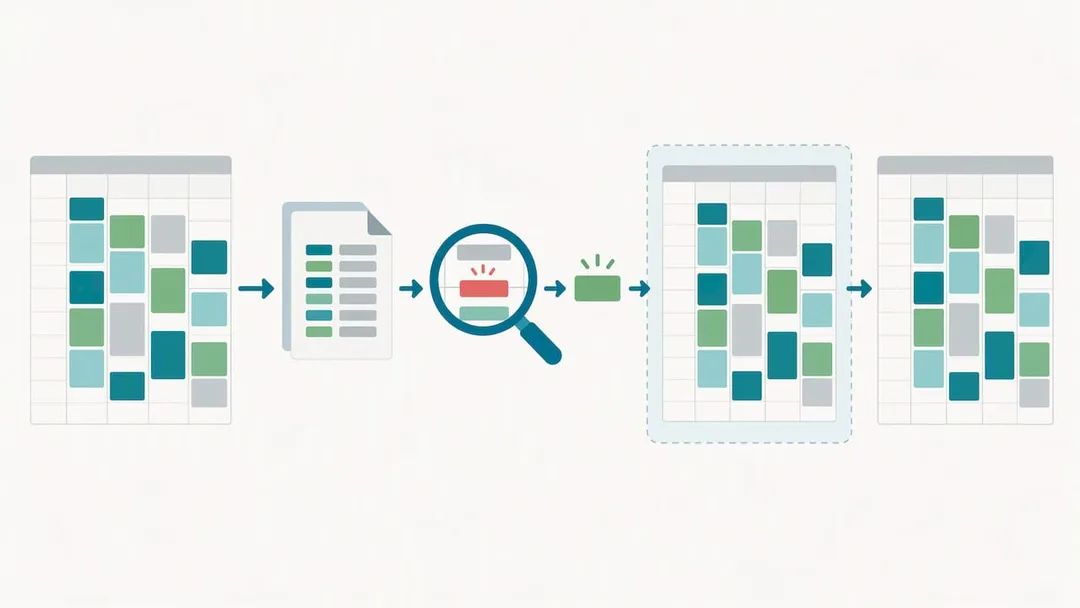
Revively's 2-4 Week Migration Playbook for Schedule-Heavy Studios
We built Revively as an Australian-made, unified cloud command centre specifically to eliminate the chaos of managing wellness and fitness studios. Our single dashboard handles multi-resource scheduling, memberships with integrated payment support, and native accounting reconciliation. This design approach removes much of the arduous reconciliation work that typically drags migrations out. We understand the specific needs of an Australian studio, from GST to privacy.
A typical, streamlined rollout for an Australian studio juggling complex schedules and multiple resources looks like this:
- Week 1: Comprehensive data audit, detailed sample export review, and precise field mapping against your unique class structures, pack rules, and membership tiers. This is where we ensure your Australian client data (including health intake forms) is meticulously prepared for its new, secure home.
- Week 2: In-depth configuration of staff rosters, resource buffers (think treatment rooms, reformers), and automations. Rigorous sandbox testing of waitlists, payment flows, and membership renewals. We specifically test for correct 10% GST application and automatic Australian Tax Invoice generation.
- Week 3: Critical parallel run alongside your existing system. This week is dedicated to daily, meticulous reconciliation of bookings, payments, and any client-facing interactions. We're looking for absolute alignment.
- Week 4: Final cutover to Revively, confirmation of old vendor data deletion, and staff sign-off. Your team is fully trained and confident, ready to leverage your new, GST-compliant studio software with seamless Xero integration.
Our detailed guide to switching studio schedules without lost bookings and our APP-compliant migration walkthrough delve deeper into planning your precise timeline.
The Golden Rule for Any Software Switch
After overseeing countless migrations, one habit consistently matters more than any item on a checklist: maintain a 72-hour parallel verification window after your final data sync. Even when everything looks perfectly clean, discrepancies in billing timing, recurring payments, or class pack deductions often surface a day or two after the cutover, not during it. Treat this 72-hour window as an integral part of the migration, not an optional extra. It's your final, critical safety net.
- Andreea*
How Revively Supports Your Flawless Migration
Switching studio software is dramatically less stressful when the receiving platform is purpose-built to absorb the complexity you're leaving behind. We designed Revively to be the ultimate unified cloud command centre for Australian wellness and fitness studios. This means your multi-resource scheduling, Stripe-powered memberships and class packs, and native Xero integration for GST reconciliation all live harmoniously within one intuitive dashboard. Your migrated data lands in a structured, compliant, and efficient home.

With Revively, you get:
- An intuitive, unified scheduling grid for rooms, equipment, and staff, complete with automatic waitlist promotion - banish double-bookings forever.
- Native, robust Xero integration that ensures your financial data is always accurate, your 10% GST calculations are flawless, and your quarterly BAS statements are audit-proof. No more manual spreadsheets or reconciliation headaches.
- Flexible membership and class pack structures that natively mirror common Australian billing models, significantly reducing rework during your configuration phase.
- Advanced multi-resource scheduling built from the ground up for studios running concurrent group classes alongside dedicated treatment rooms or specialised equipment bookings.
- Guaranteed Australian data residency and privacy compliance, ensuring all client data, booking histories, and sensitive health intake forms are stored locally in Australia, fully complying with the Australian Privacy Principles (APPs).
Our plans start at just $39 AUD per month on the Solo plan, with Growth at $99 AUD per month and Pro at $199 AUD per month, each also available annually. Check our pricing page for the full breakdown, or get started directly through our mobile sign-up to begin shaping your own seamless migration plan today.
FAQs for Australian Studio Owners
What does it really mean to migrate studio software?
Migrating studio software means meticulously moving all your vital operational data - client records, billing history, class schedules, staff rosters, and payment details - from one management platform to another. The goal is a seamless transition, preserving every booking and cent of revenue along the way. It involves careful data export from your old system, rigorous verification, and precise configuration in your new one, like Revively.
How long does a studio software migration usually take for an Australian business?
A straightforward, membership-only migration can often be completed in under two weeks. However, for a schedule-heavy Australian studio with complex multi-resource bookings, waitlists, and custom class packs, you'll typically need three to four weeks. This extended timeline allows for thorough configuration, parallel testing of automations, and robust verification to ensure GST and Xero compliance are perfect from day one.
How do I avoid losing bookings during the switch?
The most effective safeguard against lost bookings is to run both your old and new systems in parallel for several days. During this critical period, reconcile all bookings and payments daily. This parallel run will surface any mismatches or discrepancies while you still have the opportunity to fix them without impacting your clients or revenue. Only switch off the old platform once you have absolute confidence.
What happens to my member data after I leave my old provider in Australia?
Under the Australian Privacy Principle (APP 11), your old vendor has an obligation to take reasonable steps to destroy or de-identify any personal information once it's no longer needed for its original purpose, including any backups. It's crucial to request written confirmation of this data deletion as an integral part of your exit process to ensure your compliance and your clients' privacy.
Can I migrate billing and membership data directly into Stripe?
Yes, if your new platform (like Revively) uses Stripe for payments, you can absolutely migrate your existing membership and class pack billing data into that structure. Once your data export from your old system is correctly mapped to Stripe's requirements via Revively, recurring billing can be seamlessly transferred, greatly simplifying reconciliation during your migration.
Sources
- Contracts | ACCC
- APP guidelines chapter 11 - OAIC
- Leaving an AI vendor: data access and exit terms | Sprintlaw
- OT Backup Quick Start Guide (NIST.SP.1339)
Recommended for Australian Studio Owners
- Switching Your Studio Schedule: The Aussie Survival Guide for a Seamless Migration (2-4 Weeks, No Lost Bookings)
- Ditching GetTimely? The Australian Studio Owner's Guide to a Flawless, APP-Compliant Migration (GST & Xero Ready)
- No More Double-Bookings: The Australian-Made Multi-Resource Studio Scheduler That Stops Operational Chaos Cold
- Stop the Studio Mayhem: How to Really Reduce Double Bookings (Without More Admin Headaches)