
Studio Software Migration Checklist for Australian Studios
! Studio owner exporting booking records
Moving your spa, yoga, Pilates or dance studio to new software takes two to four weeks if you work in order: audit what you have, clean it, check the vendor, rehearse the move, then cut over with a rollback plan.
The thought of moving your spa, yoga, Pilates, or dance studio to an entirely new software platform probably makes your eye twitch. It's not just about porting data; it's about untangling years of workflows, ensuring client continuity, and - crucially for Australian studio owners - nailing those complex compliance requirements. From GST to client privacy, getting it wrong can turn a simple upgrade into a full-blown nightmare.
But it doesn't have to be. With a clear head and a solid plan, a smooth, stress-free migration is absolutely achievable, typically within two to four weeks. This isn't just a checklist; it's your battle plan for auditing what you have, cleaning it up, vetting your new vendor, rehearsing the big move, and cutting over with confidence, all while keeping Australian record-keeping and privacy rules front and centre.

The Gist (For When You're Swamped):
- Clean house first. Before touching new software, export your data, then merge duplicates, standardise fields, and archive anything stale.
- Vet your vendor's privacy. You're still accountable for client data. Confirm where it's stored (ideally onshore in Australia) and scrutinise their privacy policy against Australian Privacy Principles (APPs).
- Rehearse, then rehearse again. Matching client counts isn't enough. Verify class pack balances, memberships, and multi-resource bookings in a dry run (or two!).
- Keep old records. The ATO mandates you hold business records for at least five years. Ensure you can access archived data even after you switch.
- Plan for the unexpected. Define your rollback criteria before cutover. Pick a quiet week, give clients ample notice, and don't be afraid to run both systems side-by-side for a brief safety net.
Table of Contents
- Before You Start: Scope Your Sanity
- Step 1: Decide What Moves, What Gets Left Behind
- Step 2: Export Everything (and Lock it Down)
- Step 3: Your New Vendor, Your Privacy Partner (or Problem)
- Step 4: Map Your Studio's Soul to the New System
- Step 5: Nail Payments, GST, and Xero Integration
- Step 6: Rehearse the Import (Twice, At Least)
- Step 7: The Rollback Plan: Your Safety Net
- Step 8: The Grand Cutover & Client Communication
- What We've Learnt From Studio Migrations
- Experience a Seamless Move with Revively
- FAQ
- Sources
Before You Start: Scope Your Sanity
Think of a studio migration not as a tech upgrade, but as a mini-business transformation. The parts you forget are always the parts that break. Before you dive into spreadsheets, grab a cuppa and map out your current operational landscape.
- Systems: List every piece of tech: your current booking software, payment gateway, email/SMS platform, intake forms, website booking widget, and your accounting link (hello, Xero!).
- Data: What client data do you hold? Think profiles, appointment histories, future bookings, active memberships, class packs, waitlists, intake forms, notes, and invoices.
- People: Who's the project owner? Who approves the final switch? Who's fielding client queries when things get spicy? Pin down responsibilities early.
- Dates: Identify your studio's quietest week. Are there school holidays for dance studios? Any major workshops or events to avoid? Timing is everything.
Don't forget the hidden connections. That booking widget on your website? That Xero feed? The card reader you've had forever? Ensure you know how they all talk to your old platform to avoid any go-live day surprises.
Step 1: Decide What Moves, What Gets Left Behind
The urge to drag every single client record, every ancient booking, into your shiny new system is strong. Resist it. This migration is your golden opportunity for a digital detox. Industry specialists often advise that a software switch is the perfect time to archive or delete stale data, deduplicate profiles, and standardise formats before anything enters the new system. Importing years of digital clutter will only make your new platform feel old from day one.
Here's a practical breakdown for your wellness or fitness studio:
| Data Type | Action | Why? |
|---|---|---|
| Active Clients | Migrate in full | Essential for ongoing business. |
| Future Bookings | Migrate in full | Maintain seamless operations, avoid client confusion. |
| Current Memberships | Migrate in full (including billing details if possible) | Crucial for recurring revenue & client retention. |
| Unused Class Pack Balances | Migrate in full | Clients expect their valid purchases to carry over. |
| Active Waitlists | Migrate in full | Don't leave eager clients behind. |
| Purchase & Attendance History | Migrate summary for last 12-24 months | Useful for reporting, client engagement, but avoid overwhelming. |
| Inactive Clients | Archive outside the new system | Reduces database bloat, minimises privacy risk. |
| Old Treatment Notes/Invoices | Archive as exports you can open later | Important for historical reference, ATO compliance, but not needed in daily operations. |
| Duplicate Profiles | Fix before import | Improves data integrity, streamlines communication. |
| Incomplete/Inconsistent Data | Fix before import (e.g., phone numbers without area codes, mixed-case names, missing emails) | Ensures data is usable and accurate in the new system. |
For spas and treatment centres, treat sensitive health and intake information with extra care. Only bring across what you genuinely need for ongoing treatment safety and compliance. Everything else is a risk you no longer need to carry in your live system.
Step 2: Export Everything (and Lock it Down)
Before you even think about cancelling that old subscription, export every report your current system allows. Save these files somewhere secure, timestamped with the date. This "frozen copy" is your single source of truth - your reference point for checking migrated data, and your emergency fallback if something goes pear-shaped.
This export isn't just a good idea; it's a compliance necessity in Australia. The ATO generally requires you to keep business records for at least five years. You must be able to produce these digital records in a standard format (like CSV or Excel) if asked. Specifically for GST, the ATO expects you to retain sales, tax invoices, and other GST-related transactions that back up your BAS reports.
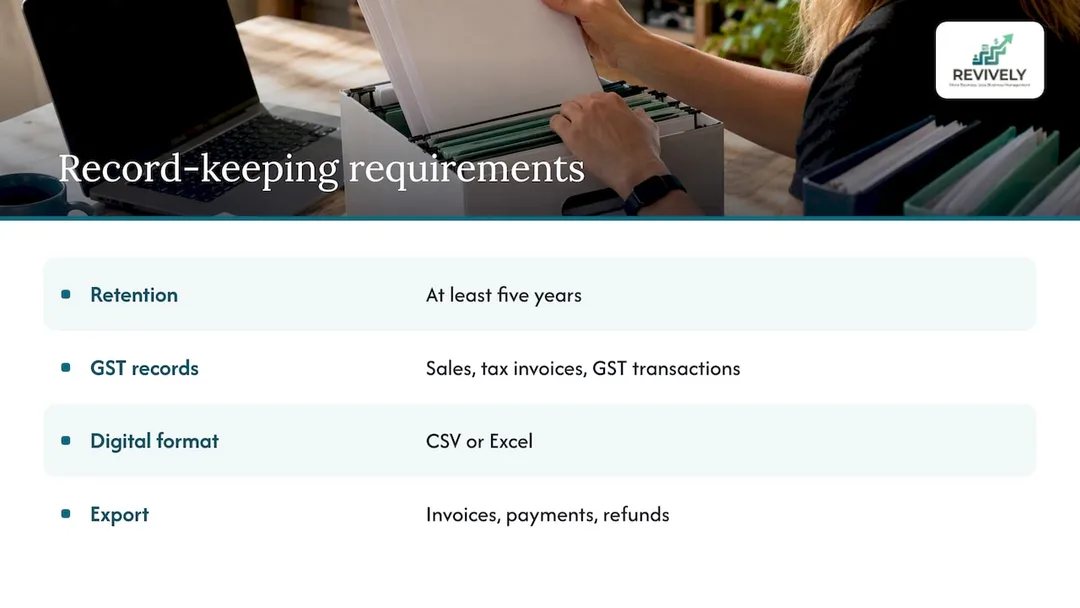
Crucial tip: Confirm you have a complete export of all invoices, payments, and refunds before you even consider cutting off your old system. Cancelling first and begging for data later is often the most expensive mistake on this list. For a deeper dive into client data retention under Australian law, consult our guide: client record retention under APP 11 and ATO audits.
Step 3: Your New Vendor, Your Privacy Partner (or Problem)
Choosing new software isn't just a features comparison; it's a significant privacy decision. Australian guidance treats vendor assessment as a core compliance task. You must document where the vendor stores data and review its privacy policy against the Australian Privacy Principles (APPs). Remember, a vendor's policy doesn't absolve you of liability if there's a data breach.
Your vendor assessment checklist should include:
- Data Hosting Location: Where exactly is your client data stored? Don't assume "cloud" means "onshore." Explicitly ask if it sits in an Australian data centre. This is critical for meeting APP requirements.
- Offshore Data Protections: If data is sent offshore, what safeguards are in place? Under APP 8, you can remain accountable for overseas disclosures of personal information. Understand these implications.
- Sub-processors: Who are their third-party partners (e.g., payment gateways, SMS, email providers)? Where do they store data?
- Data Exportability: How easily can you export your data if you decide to leave later?
- Access Controls: How does the system manage staff roles and permissions? Can you finely control who sees what?
APP 11 requires you to take reasonable steps to protect personal information and to destroy or de-identify it when it's no longer needed (unless legally required to keep it). The OAIC's APP 11 guidelines clarify that "reasonable steps" depend on your circumstances, including your studio's size and resources. Make sure to save a brief written note of your privacy assessment. If in doubt about how APP 8 applies to your specific setup, consult a privacy lawyer or the OAIC.
Step 4: Map Your Studio's Soul to the New System
This is where generic business software falls short. Your wellness or fitness studio has unique operational rhythms. Take the time to map out how your studio actually runs, then check if your new platform can authentically express it.
Spas and Treatment Studios:
- Multi-Resource Scheduling: Can it book rooms, saunas, specific equipment (e.g., cryotherapy chambers, float tanks) alongside staff calendars? This is key for efficient spa scheduling software.
- Buffer Times: Does it automatically add cleaning or turnover buffers between appointments?
- Complex Service Needs: Can it handle services requiring both a therapist and a specific room/resource simultaneously?
- Digital Intake Forms: Are these native, customisable, and required before arrival for compliance and safety?
Yoga, Pilates, and Dance Studios:
- Flexible Timetables: Does it support recurring timetables by term, season, or ongoing schedule?
- Capacity & Waitlist Management: Can you set class capacity, reformer limits, room restrictions, and automate waitlist promotions?
- Membership & Pack Management: How does it handle various memberships, class packs, and their expiry rules? See how memberships and class packs work in Revively.
- Pricing Flexibility: Can you easily configure concession, trial, and casual pricing options?
- Client Display: Does it offer a clear client check-in or class display for the foyer? Here is what a display board does.
For each item, note whether it can be imported, needs to be rebuilt by hand in the new system, or requires a new process altogether. Often, rebuilding specific timetables or pricing structures is quicker and cleaner than trying to force-import old, complex rules.
Step 5: Nail Payments, GST, and Xero Integration
Payments are a common hidden snag during migrations. First, tackle existing recurring memberships: will clients need to re-enter card details, or can your payment provider port them across? Ask your payment gateway provider directly what's possible before making any promises to clients.
Then, pivot to the financial backbone:
- GST Settings: Ensure correct 10% GST application (or GST-free status) is configured for every single service, class pack, and membership. This is non-negotiable for Australian businesses.
- Xero Account Codes: Verify your Xero chart of accounts maps perfectly to your new product and service list. This two-way mapping is vital for accurate financial reporting.
- Clear Cutover Date: Establish an exact cutover date for financial transactions to prevent any sales from being booked in both systems - a headache for BAS reporting.
- First Week Reconciliation: Rigorously reconcile the first week's takings against bank deposits, Stripe reports, and your Xero ledger to confirm everything is flowing correctly. This ensures your BAS is audit-proof.
If you're switching from a specific scheduler, our targeted migration guides cover the nitty-gritty, including switching without losing bookings and the specific GST and Xero checks you'll need.
Step 6: Rehearse the Import (Twice, At Least)
Simply matching record counts on import day proves very little. Robust migration testing guidance points out that true reconciliation isn't just about volume; it's about verifying that your core business rules - like remaining class pack balances or membership billing dates - survived the move intact. This source recommends at least two full dry runs with representative data to expose any edge cases before the real cutover.
For your studio, a meaningful dry run involves checking a sample of:
- 20 Clients with Active Packs: Do their balances and expiry dates match precisely?
- 10 Members: Are their billing dates, amounts, and plan details accurate?
- One Busy Week of Future Bookings: This includes any multi-resource appointments (spa rooms + therapist).
- A Full Waitlist: Is the order unchanged, and are clients correctly queued?
- Three Sample Intake Forms: Are the content and submission dates intact?
- One Refund & One GST-Free Sale: Was the tax treatment correct in Xero?
Log every single mismatch. Fix the source data or refine your mapping, then run the import again. Your second rehearsal should be nearly flawless.
Step 7: The Rollback Plan: Your Safety Net
Even with meticulous planning, things can go sideways. A sound migration plan includes defined rollback criteria established before cutover. Who has the authority to pull the plug and revert to the old system? What's the point of no return? How will bookings taken during the transition be reconciled? Improvising during a live crisis is how a small hiccup turns into a studio-wide meltdown.
For a smaller studio, your rollback plan can be concise:
- Decision Maker: One named individual empowered to make the call.
- Trigger: Specific, measurable failures (e.g., bookings not syncing, payments consistently failing for more than X hours).
- Point of No Return: The precise moment the old subscription is cancelled or client card details are irrevocably moved.
- Reconciliation: A clear process for copying any bookings made in the 'wrong' system during a rollback scenario.
Keep your old subscription active until you've successfully navigated the first full week and at least one complete billing cycle on the new system. Peace of mind is priceless.
Step 8: The Grand Cutover & Client Communication
Give your clients at least two weeks' notice about the upcoming change. Clearly explain what will change (e.g., a new booking link, a new client app or portal, potentially a slightly different payment flow) and what will remain the same. On cutover day, update your website booking button, Google Business Profile, social media links, and email signatures simultaneously.
On the day of the switch:
- Freeze Data: At an agreed time, lock down any changes in your old system.
- Final Import: Execute your final, pre-rehearsed data import.
- Spot Check: Re-verify your sample list from Step 6.
- Switch Links: Update all your public-facing booking links.
- Brief Your Team: Ensure reception staff and instructors are fully up-to-speed on the new roster, check-in flow, and any new procedures.
- Test Live: Personally make a test booking, a cancellation, promote a waitlisted client, and process a payment. Ensure the experience is smooth.
Then, for the first week, monitor everything closely. Keep an eye on your inbox for confused clients, cross-reference daily takings against your Stripe and Xero reports, and log anything that needs tweaking.
What We've Learnt From Studio Migrations
We built Revively specifically for Australian spas, yoga, Pilates, and dance studios, and a consistent pattern emerges from every migration. Studios rarely struggle with the technical import itself. The real challenges arise from decisions postponed: which clients truly need to be retained, how membership billing should actually work, or the exact buffer needed between treatments.
Our advice? Make those operational decisions first, on paper, outside the context of any software. Let the platform then support your ideal workflow. This is precisely why we focus on unifying scheduling, class management, payments, digital intake forms, and native Xero reconciliation into one seamless platform. Fewer disconnected tools mean fewer points for a migration to break, and significantly less to troubleshoot afterwards.
We also advocate for treating this move as a clean slate. Archive what you don't need, and be honest about which parts of your old setup were clunky workarounds. If you're after a more detailed chronological breakdown, our 2 to 4 week migration playbook lays out the entire schedule week by week.
- Andreea*
Experience a Seamless Move with Revively
Revively is an Australian-made, unified cloud command centre designed to streamline your studio operations. It effortlessly handles multi-resource appointments, dynamic group classes with automatic waitlist promotion, Stripe-powered memberships and class packs, customisable digital intake forms, and robust Xero integration for precise GST reconciliation. Crucially, all client data and sensitive information are stored locally in Australia, ensuring full compliance with Australian Privacy Principles (APPs) and providing complete peace of mind. Our system natively calculates 10% GST across all offerings and automatically generates legally compliant Australian Tax Invoices. Plus, our 100% legal Xero integration ensures automated two-way mapping of tax codes, revenue accounts, and liabilities, making your quarterly Business Activity Statements (BAS) flawless and audit-proof, eliminating manual spreadsheet errors.
Plans start at AUD $39 per month for Solo, AUD $99 per month for Growth, and AUD $199 per month for Pro, with annual options at AUD $390, $990, and $1990 per year. Extra bookable staff seats are AUD $15 per month per seat, and additional locations are AUD $79 per month. See the full plan details or visit the Revively homepage to start your free trial and discover a truly integrated, compliant, and efficient multi-resource studio scheduling and CRM solution.
FAQ
How long does a studio software migration usually take?
Most small Australian studios can complete a migration within two to four weeks. The bulk of this time is dedicated to data clean-up, performing two crucial dry-run rehearsals, and communicating effectively with your clients - not the actual data import itself. Larger, multi-location studios or those managing a high volume of complex memberships should allow a bit more time.
Should I migrate all my historical data?
No, not necessarily. You should absolutely move active clients, future bookings, current memberships, and any unused class pack balances in full. However, for older history, it's often more efficient to keep it as accessible exports rather than cluttering your live system. Remember, you still need to retain tax-related records for the ATO's minimum period, but this doesn't mean every single historical detail needs to reside within your day-to-day operational software.
Do Australian privacy laws apply when changing software vendors?
Absolutely, yes. Your new platform will house your clients' personal information, and you remain the primary responsible entity under the Australian Privacy Principles (APPs). It's critical to thoroughly check where the vendor stores this data, carefully review their terms and privacy policy, and maintain a written record of your assessment. For any specific concerns related to your studio's unique situation, we recommend consulting a privacy professional.
Can I run my old and new systems concurrently during the switch?
Briefly, yes, and it's a smart safety net. If you choose this approach, set a very firm end date for the overlap. Ensure that new bookings are only ever taken in one system at a time to avoid confusion and double-bookings. Always have a clear plan for copying across any data that might accidentally be entered into the 'wrong' system during this transition period.
When's the optimal time to switch studio software in Australia?
Aim for your studio's quietest period. For dance schools, this might be a school holiday break. For spas or yoga/Pilates studios, identify a historically low-demand week. Definitely avoid the end of the financial year (June 30) or any week coinciding with a major event, workshop, or term launch.
Sources
- Overview of record-keeping rules for business, Australian Taxation Office
- GST records for business, Australian Taxation Office
- APP 11 guidelines: security of personal information, OAIC
- Which SaaS tools create Australian Privacy Act obligations, PrivacyReady
- ERP selection checklist for Australian SMBs, ERP Search
- Data migration and conversion rehearsal, IF4IT
- ERP implementation, data migration and go-live, Exactlly
Recommended Reading from Revively
Ready to dive deeper into making your Australian studio migration a breeze? Check out these related articles for more expert insights:
- Aussie Studio Software Migration: Your 2-4 Week Playbook for Zero Chaos & Total Compliance
- Switching Your Studio Schedule: The Aussie Survival Guide for a Seamless Migration (2-4 Weeks, No Lost Bookings)
- Ditching GetTimely? The Australian Studio Owner's Guide to a Flawless, APP-Compliant Migration (GST & Xero Ready)
- Ditch the Dread: A World-Class Guide to Migrating Your Australian Studio's Data Without a Meltdown