
How daily summaries work
Why accountants in Australia and New Zealand love Revively
Revively is built for GST in Australia and New Zealand from the ground up, so your bookkeeper gets clean, correct numbers with no monthly clean-up, no manual journals to "fix" bad data, and no spreadsheet workarounds. Package revenue defaults to cash / upfront; accrual (defer until sessions are attended) is an optional setting.
- GST is handled correctly at the source. Prices are GST-inclusive the way local customers expect (10% in Australia, 15% in New Zealand), and every line is posted to your accounting provider with the right tax code - GST on Income for taxable sales, GST Free for exempt items, and BAS Excluded for movements that are not a supply (like recognising previously-deferred revenue). GST returns reconcile without adjustments.
- Gift cards and customer account credit are treated as liabilities, not premature income. Stored-value top-ups sit in liability accounts until they are spent on services, so funding a wallet or selling a card does not inflate income.
- Prepaid packages default to cash / upfront. The full pack is income on the sale day. Switch to accrual / redemption and Revively holds unused value as deferred revenue and recognises it as sessions are attended - the treatment your accountant would otherwise have to build by hand.
- One clean journal per day, not hundreds of messy ones. Revively consolidates a day of activity into a single balanced invoice in Xero or QuickBooks (plus a revenue-recognition journal when you use accrual on Xero), so the audit trail is tidy and reconciliation is trivial.
- The rules are locked in at the moment of sale. Every sale carries its own tax and recognition treatment for life, so changing a setting never silently rewrites history.
The rest of this article shows exactly how each transaction type flows through the daily summary and into your accounting provider. Examples below use Xero terminology; QuickBooks Online receives the same economic result with Invoices, Payments, and Purchases.
What the daily summary is
The daily summary is your end-of-day sales and cash report. For each business day it gathers every payment you collected and every invoice you settled, so you can reconcile the till, hand clean numbers to your bookkeeper, and (when Xero or QuickBooks is connected) push a single summary invoice instead of hundreds of individual ones.
You will find it under Reports - Daily summary. Each row is one business day in your account timezone.
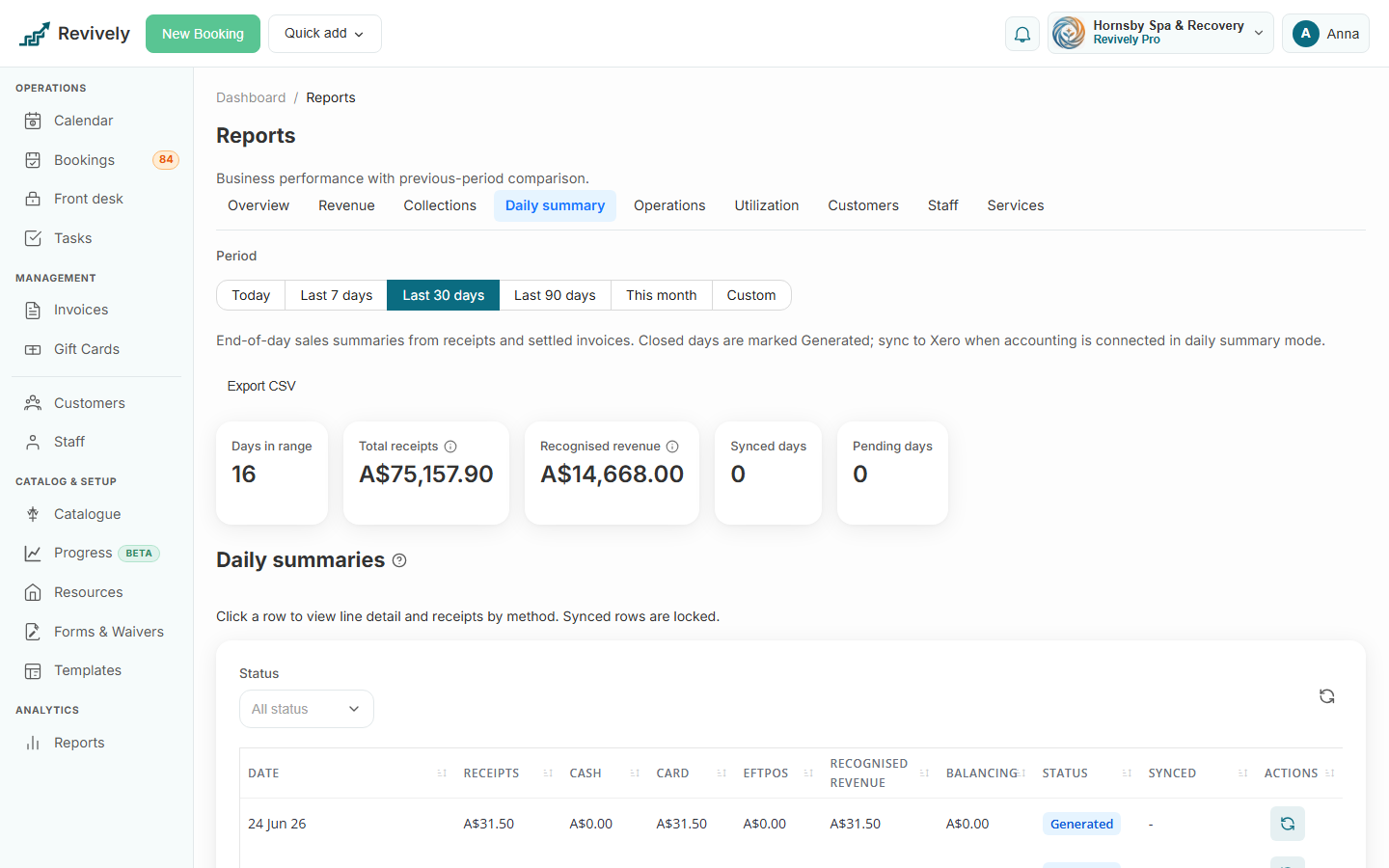
The two headline numbers
Every summary is built from two independent measures. They answer different questions, so they will not always be identical - and that is by design.
Total receipts
Money that actually moved that day. The sum of all successful payments minus refunds, counted on the day the payment was recorded, split by method - Cash, Card (Stripe online, in-person terminal taps, and SmartPay are grouped under Card in the till view; the detail drawer can show SmartPay separately), EFTPOS, Bank deposit, and PayID. Gift card redemptions and Account credit spends appear as their own methods (no new cash on those lines). Confirmed bank deposits and PayID payments count on the day staff (or Xero) mark them received, not the day the customer was asked to pay.
Total receipts answers: how much money hit my accounts today?
Recognised revenue
Invoices settled that day - not accrual-basis delivery. The sum of settled invoice line items plus tax, counted on the day each invoice was marked fully paid.
Recognised revenue answers: how much did I settle as sales today?
- A pay-in-full visit shows here on the payment day.
- A deposit does not; the full invoice shows on the day the balance is paid.
- On cash / upfront (the default), a prepaid pack shows here in full on the sale day. Accrual packs post to Deferred Revenue instead, then income as sessions are attended.
The balancing line
Each day also shows a Balancing figure:
Balancing = Total receipts - Recognised revenue
- Balancing is $0 - cash in matches settled sales. The common case for pay-in-full visits.
- Balancing is positive - you took more money than you settled as sales today (for example a deposit, or a prepaid package on accrual).
- Balancing is negative - you settled more sales than money collected today (for example an invoice settled with a gift card or account credit, where no new cash moved).
When you sync to Xero, any non-zero balancing is posted as a single "Daily summary balancing adjustment" line so the summary invoice still reconciles to the cash you banked.
How the daily summary maps to Xero
In daily summary sync mode, Revively posts one consolidated accounts-receivable invoice per closed day to a shared Revively contact. On that invoice:
- Each revenue line is posted to an account and tax code based on what it is (see the table below). Service sessions are consolidated to one line per service category (or service name when no category is set), with quantity 1 and a description like
1:1 Personal Training/12 x sessions. Amounts are GST-exclusive with the tax code carrying the GST, so Xero calculates GST the same way your other sales do. - Each payment method (cash, card, SmartPay, EFTPOS, gift card, account credit, bank deposit, PayID) is posted as a payment against the appropriate bank, clearing, or liability account. SmartPay uses its own clearing account when mapped, otherwise it shares the Stripe card clearing account. Bank deposit and PayID use the mapped Bank deposits account, or your checking account if that mapping is empty.
- The balancing adjustment squares the invoice to the receipts.
Revively can auto-create the accounts it needs, including Revively Gift Card Liability, Revively Customer Account Credit, Revively Customer Goodwill Credit (expense for manual grants), and Revively Deferred Revenue (a current liability), and you map the rest (revenue, cash, card clearing, GST) in Settings - Integrations - Xero. If you leave Customer account credit liability unmapped, Revively uses your gift card liability account.
Separately, when you use accrual (redemption) revenue recognition, Revively posts a daily revenue-recognition Manual Journal that moves earned amounts out of Deferred Revenue and into income. This is a second, purpose-built journal - it is not part of the receipts-driven daily summary invoice, because recognising a prepaid session moves no cash.
Revenue recognition: Cash vs Accrual
Revively supports two revenue-recognition bases for packages and package gift cards, set once per account and editable from both the Daily Summary settings and the Xero settings (it is a single shared setting):
- Option A - Cash / Upfront (default). The full package sale is recognised as income on the day it is sold. Simplest, and ideal for smaller setups. GST is still charged at the point of sale.
- Option B - Accrual / Redemption. The sale is booked to Deferred Revenue (a liability) on day one, and income is recognised in slices as each session is marked Attended. Any sessions left unused when the package expires are recognised as breakage income. GST is still charged in full at the point of sale.
Either way, GST is collected at sale for packages because a package (for example "10 x PT sessions") is a voucher for a specific, identified supply. This is different from a plain dollar-value gift card, which is treated as a face-value voucher with GST deferred to redemption.
Immutable snapshot. The basis in force when a sale happens is stamped onto that transaction and used for its entire life. If you switch the account from accrual to cash, the packages you already sold keep recognising on accrual until they are used up - only new sales adopt the new basis. Nothing is ever rewritten retroactively.
How each transaction type is posted to Xero
The table below shows where each event lands. "Daily summary" means it appears on the consolidated day invoice; "Recognition journal" means the separate accrual Manual Journal.
| Transaction | In the daily summary? | Xero account | Tax code | Notes |
|---|---|---|---|---|
| Service / product sold and paid in full | Yes | Revenue (or the mapped item account) | GST on Income (or GST Free) | Cash/card/EFTPOS receipt balances it. |
| Bank deposit / PayID (Xero connected) | No (pushed as its own invoice) | Bank deposits (or checking) | GST on Income on the invoice lines | Requesting details pushes an unpaid Xero invoice with reference INV#. Matching the statement in Xero marks it paid here. Left off the daily summary so it is not posted twice. |
| Bank deposit / PayID (no Xero) | Yes, on the confirmation day | Bank deposits (or checking) | GST on Income | Counts when staff confirm the deposit, not when details were requested. |
| Booking deposit taken | Yes (as a receipt) | Bank / clearing | n/a | Revenue recognised later when the invoice settles. |
| Gift card sold (dollar value) | Yes | Gift Card Liability | GST Free / Exempt | No GST at sale; it is stored value, not a sale yet. |
| Gift card redeemed against an invoice | Yes | Gift Card Liability is drawn down by the "gift card" payment; the goods/service line posts to Revenue | GST on Income on the service line | No new cash moves, so receipts do not rise but revenue does. |
| Account credit top-up (paid wallet deposit) | Yes | Customer account credit liability | GST Free / Exempt | Like a gift card sale: stored value, not earned income yet. Cash or card receipt balances the day. |
| Account credit spent at checkout | Yes | Liability drawn by Account credit payment; service/product posts to Revenue | GST on Income on the service line | No new cash; same pattern as gift card redemption. |
| Refund to account credit | Yes | Reverses sale lines; Account credit (refund) receipt restores liability | mirrors the original | Not a cash refund. |
| Staff account credit adjust (goodwill grant or clawback) | Yes | Goodwill credit expense and customer account credit liability (paired lines) | GST Free / Exempt | Dr expense / Cr liability on grants; reversed on clawbacks. Pairs net to $0 so no balancing line. |
| Migration opening credit | Yes | Customer account credit liability only | GST Free / Exempt | Opening balance, not expense. Balancing adjustment may apply when no cash moved. |
| Package sold - Cash basis | Yes | Revenue | GST on Income | Full amount earned on the sale day. |
| Package sold - Accrual basis | Yes | Deferred Revenue | GST on Income | GST charged now; income deferred. |
| Package gift card sold | Yes | Deferred Revenue (accrual) or Revenue (cash) | GST on Income | Same treatment as a package; it is a voucher for a specific supply. |
| Package gift card claimed by a customer | No | none | n/a | Just converts the voucher to the customer's package; the money was already booked at sale. |
| Package session attended - Accrual basis | No (Recognition journal) | Dr Deferred Revenue, Cr Revenue | BAS Excluded | One slice recognised per attended session; no GST movement. |
| Package expires with unused sessions - Accrual basis | No (Recognition journal) | Dr Deferred Revenue, Cr Revenue (breakage) | BAS Excluded | Remaining balance recognised as breakage income. |
| Package session attended - Cash basis | No | none | n/a | Already recognised at sale. |
| Refund | Yes (reduces receipts; posts a credit note) | Reverses the original accounts, including proportional GST | mirrors the original | For an accrual package, the unearned portion and its GST reverse out of Deferred Revenue. |
A few things worth calling out:
- Deposits (a payment-policy percentage taken at booking) count as receipts the moment they are captured, even though the sale is recognised later.
- Bank deposit and PayID count as receipts when staff confirm the transfer (or Xero marks the invoice paid), not when the customer was asked to pay. See payment methods.
- Selling a gift card is different from redeeming one - selling stores value (a liability); redeeming spends it (draws down the liability while the service line books revenue). Account credit follows the same split between top-up (liability) and spend (liability draw + service revenue).
- Package gift cards carry GST at sale and follow your recognition basis, exactly like a package sold directly.
- Accrual recognition and breakage are the only events that appear in the separate recognition journal rather than the daily summary invoice.
- Refunds reduce receipts on the day the refund is processed, which is often a different day from the original sale.
Worked examples
Example 1 - straight pay-at-visit (balanced)
A client books a $120 massage and pays by EFTPOS at the desk.
- Total receipts: +$120 (EFTPOS)
- Recognised revenue: +$120
- Balancing: $0
Xero: revenue line $109.09 + GST $10.91, EFTPOS payment $120.
Example 2 - deposit now, balance later (crosses days)
A $200 facial is booked on Monday with a $50 deposit, and the $150 balance is paid on Wednesday.
Monday - receipts +$50, revenue $0, balancing +$50. Wednesday - receipts +$150, revenue +$200 (invoice now settled), balancing -$50.
Across both days receipts ($200) and revenue ($200) net out; each day is intentionally unbalanced.
Example 3 - dollar gift card: sale then redemption
Friday you sell a $100 gift card, paid cash. Saturday a customer redeems $80 of a gift card against an $80 treatment.
Friday - receipts +$100 (cash), revenue +$100 (posted to Gift Card Liability, no GST), balancing $0. Saturday - receipts $0, revenue +$80 (treatment settled by the gift card), balancing -$80. In Xero the $80 draws down Gift Card Liability while the treatment line books revenue + GST.
Example 3b - account credit top-up then spend
Monday a customer tops up $100 account credit and pays cash. Tuesday they spend $60 of it on a treatment.
Monday - receipts +$100 (cash), revenue +$100 (posted to Customer account credit liability, no GST on the top-up), balancing $0. Tuesday - receipts +$60 (Account credit method, no cash), revenue +$60 (treatment), balancing -$60. The liability account is drawn down while the treatment line books revenue + GST.
Example 4 - 10-session PT package on Accrual basis
You sell a 10 x PT pack for $1,100 (GST-inclusive) on 1 March, paid by card. The client attends one session per week.
1 March (daily summary)
- Total receipts: +$1,100 (card)
- Xero posts: Deferred Revenue +$1,000 with GST on Income +$100, card payment $1,100.
- Recognised income (P and L): $0 - nothing earned yet, but GST is already reported to the ATO.
Each attended session (recognition journal)
- Dr Deferred Revenue $100, Cr PT Revenue $100, BAS Excluded (no GST).
- After 10 sessions, Deferred Revenue is $0 and $1,000 has been recognised as income across the weeks it was earned.
If the client only attends 7 sessions and the pack expires, the remaining $300 is recognised as breakage income at expiry.
Example 5 - package gift card
You sell the same 10 x PT pack as a gift card for a customer to give away. It is posted exactly like Example 4 at sale (Deferred Revenue + GST on accrual, or Revenue + GST on cash). When the recipient later claims the code, no journal is posted - the pack simply becomes theirs and, on accrual, starts recognising as they attend.
Example 6 - refund
A client paid $90 by card on Tuesday, refunded $90 on Thursday.
Tuesday - receipts +$90, revenue +$90, balancing $0. Thursday - receipts -$90 (refund), revenue -$90 (credit note reverses the sale and its GST), balancing $0 with both sides reduced. For an accrual package, the unearned portion and its GST reverse out of Deferred Revenue rather than out of income.
Statuses and syncing to Xero
Each daily summary moves through three states:
- Pending - the day is still open (it is today or has unsettled activity).
- Generated - the day has closed and the summary is finalised.
- Synced - the summary has been pushed to Xero as a single invoice.
Only closed, generated days can be synced, and only when Xero is connected in daily summary mode. Synced rows are locked so your books stay consistent - if you need to change a synced day, adjust it in Xero. You can Regenerate any day that is not yet synced if underlying invoices or payments changed.
The accrual revenue-recognition journals follow the same daily, closed-day rhythm and post as Xero Manual Journals once the day is finalised.
To open a day, click its row. The detail drawer breaks down receipts by method and lists the individual revenue lines that make up recognised revenue for that day.
Investigating a difference
If a balancing figure looks wrong:
- Open the day and review the receipts-by-method split and the revenue lines.
- Look for deposits, gift card or account credit redemptions, prepaid packages, staff credit adjustments, refunds, or a bank deposit confirmed on a different day from the sale.
- For a specific sale, open the invoice itself. Its paid date is the revenue-recognition day, and each payment row shows its own date - if those fall on different days, that is your cross-day case.
For setup, see connect Xero for accounting, payment methods, bank deposits, and PayID, customer account credit, and sell and redeem gift cards.