
Payment policies and payment plans
A payment policy is a reusable payment plan. You define it once under Catalogue → Payment policies, attach it to the things you sell, and checkout applies it to that sale.
New workspaces start with Pay in full and 50% deposit, balance at checkout. Those policies do nothing until you attach them. A service with no policy books online with nothing due now, and staff collect at the visit. A sale (package, product, course, or event) with no policy still charges 100% at checkout.
How a plan applies at checkout
- Checkout loads the policies attached to that item (service, class, course, package, or event).
- Archived policies and plans that fail a lead-time window are hidden.
- If more than one plan is eligible, the customer or staff pick one. The default is used when nobody picks.
- Any policy discount comes off the price first. The remaining total is the payment-plan total.
- The amount due now is charged on the invoice (full price, deposit percent, or the first instalment).
- The rest is stored as a payment plan on that sale - later instalments are invoiced or auto-charged on their due dates.
The chosen plan is snapshotted onto the sale. Editing or archiving the policy later does not change amounts or dates already sold.
Create a policy
Go to Catalogue → Payment policies and click New payment policy. The drawer shows only the fields that matter for the policy type you pick.
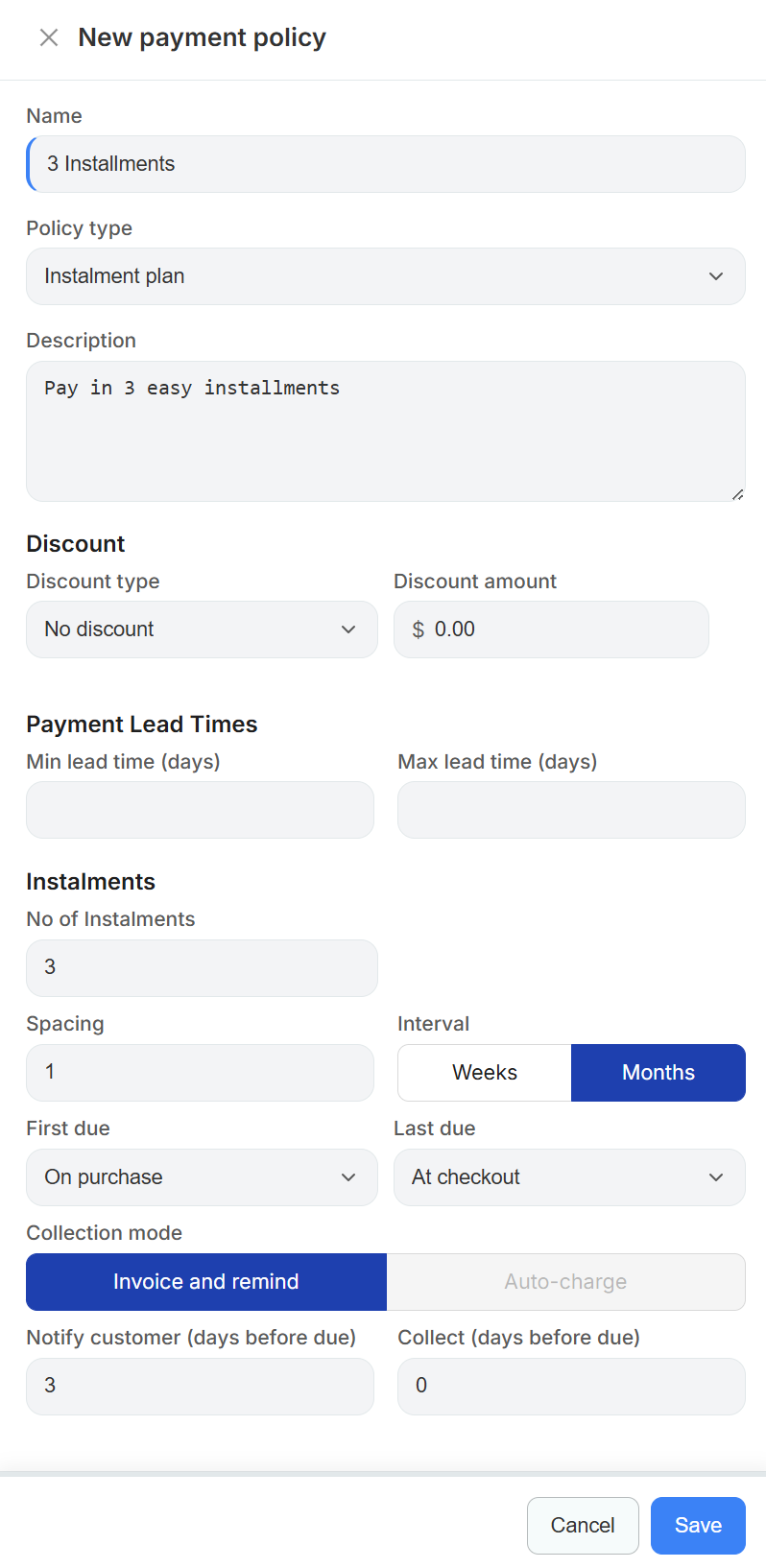
Policy type
| Type | Charged at checkout | Rest of the money | Plan |
|---|---|---|---|
| Pay in full | Whole discounted total | Nothing outstanding | Solo+ |
| Deposit + balance at checkout | Your deposit percent | One balance instalment, collected at the visit | Solo+ |
| Instalment plan | First equal share (or nothing, see First due) | Equal instalments on dated invoices or auto-charge | Growth / Pro |
Deposit + balance adds a Deposit percent field (1-100, default 50). Use it to hold a slot without taking the full fee.
Instalment plan splits the discounted total into equal shares - the last share absorbs any rounding cents. Use it for courses, programs, packages, and high-value treatment plans.
Solo includes pay-in-full and simple deposit policies. Instalment plans, lead-time windows, due-date timing, collection mode, and custom notify/collect offsets all require Growth or Pro.
Name and description
Name is what staff and customers see in the payment-option picker, so write it from the customer's side - "3 Installments" or "50% deposit today" beats "Policy B". Names must be unique in your workspace.
Description is optional supporting copy, for example "Pay in 3 easy installments".
Discount
A policy can reward the payment behaviour you want.
| Discount type | Discount amount means |
|---|---|
| No discount | Full catalogue price |
| Percent off | Percentage off the catalogue price, e.g. 5 = 5% |
| Fixed amount off | Dollar amount off the catalogue price |
The discount is applied before the plan is built, so the deposit percent and instalment shares are all calculated from the discounted total. A common pattern is 0% on the instalment plan and 5-10% off on pay-in-full so clients have a reason to settle up front.
Payment lead times (Growth / Pro)
Min lead time (days) and Max lead time (days) hide the policy when the booking or session start is too close or too far out.
- Min lead time 14 - a 3-instalment plan disappears for someone booking next week, because there is not enough runway to collect it.
- Max lead time 90 - a deposit-only option only shows for bookings inside the next quarter.
Leave both empty and the policy is always eligible. Lead-time filters are only evaluated when checkout knows a start date, so they do not apply to open-ended package or gift-card style sales.
Instalments (Growth / Pro)
These fields only appear for the Instalment plan type.
| Field | What it does |
|---|---|
| No of Instalments | How many equal shares the discounted total is split into |
| Spacing | How many intervals sit between instalments |
| Interval | Weeks or Months - Spacing 1 + Months is monthly, Spacing 2 + Weeks is fortnightly |
Monthly spacing steps in 30-day blocks rather than calendar months, so a plan starting on the 31st does not skip a month.
First due and Last due
Both dropdowns offer the same three options, and together they decide the dates on the plan.
| Option | Meaning |
|---|---|
| On purchase | The share is charged at checkout, on the card the client is already using |
| At checkout | No fixed date - the share is collected when the client arrives, at the desk or on the final invoice |
| Days before start | The share is due that many days before the booking, session, or course start. Choosing this reveals a days before start number field |
Practical combinations:
- First due: On purchase - client pays share 1 now, then the rest run on your spacing. This is the usual "pay in 3" setup.
- First due: Days before start - nothing extra at checkout unless that date has already passed; the plan starts before the course does.
- First due: At checkout - the final share is collected in person when the client turns up, and the earlier shares are dated invoices.
- Last due: Days before start - the plan must be fully paid by that cut-off. Revively ignores your spacing and instead spreads all instalments evenly between the first due date and the cut-off, which is the safest option for courses you refuse to start unpaid.
Dated instalments become invoices labelled like Course name - Instalment 1 of 3 of $200.00.
Collection mode (Growth / Pro)
| Mode | What happens on each dated instalment |
|---|---|
| Invoice and remind | Revively raises the invoice and emails it. The client pays it themselves by card, bank transfer, or at the desk |
| Auto-charge | Revively charges the card saved at checkout off-session, with no action from the client |
Auto-charge needs Stripe connected - the option stays disabled until it is. The client's first card payment saves the payment method against the plan, and later dated instalments reuse it.
When an auto-charge fails
Revively tells the difference between a card that might work tomorrow and one that never will.
- Soft decline (insufficient funds, a bank timeout) - the plan goes past due and Revively tries again after 2 days, then 4, then 7. The client gets an email each attempt, naming the date of the next try.
- Hard decline (expired, lost, or stolen card, or one that needs the client to authenticate) - Revively stops trying straight away and emails the instalment invoice so the client can pay it another way. Chasing the same dead card would only annoy them.
Either way the plan sits at past due until the money arrives, and it returns to active on its own once the instalment is paid. A plan that runs out of retries needs a human: ask the client for a new card and take the payment against the outstanding invoice.
To find those plans, open Invoices and set Type to Payment plan. The Plan column shows which instalment each invoice is (2 of 3) and its state: Retrying with the next attempt date, or Needs new card once Revively has given up.
Balance-at-visit instalments (anything with no fixed date, including the remainder after a deposit) are never auto-charged - see below.
Collecting the balance at the visit
Deposit policies (and instalment plans with First due: At checkout) leave a balance for the day of the visit. Revively never charges that automatically - a client who paid a deposit weeks ago should not get a surprise card charge. Staff collect it face to face.
Open the booking and the payment action reads Invoice balance, with the outstanding amount in the tooltip. The booking's total also carries a balance due line under the payment status, so front desk can see what to ask for before the client is standing there. Front desk → Check out opens the same thing.
That invoice is the full price with the deposit already credited, so the amount due is exactly the balance. Take it however the client wants to pay - card, cash, EFTPOS, terminal, or bank transfer. Settling the invoice closes the payment plan; the booking flips from Partially paid to Paid and the plan is marked complete.
Take deposit disappears once a plan balance is outstanding, because the deposit has already been collected. The balance always goes through the invoice.
Notify and collect timing
Two fields control the timing around each dated due date. Defaults are notify 3 days, collect 0 days.
- Notify customer (days before due) - when the upcoming-payment email goes out.
- Collect (days before due) - when the invoice is raised. On Auto-charge this field is labelled Charge (days before due) and controls when the card is charged.
0means on the due date itself.
Collect can never be earlier than notify, so the client always hears from you before money moves. Lower notify and Revively clamps collect to match.
Emails your clients receive on a payment plan: upcoming payment due, invoice sent (Invoice and remind), payment charged or charge failed (Auto-charge), and an overdue reminder if a manual instalment passes its due date unpaid.
Attach a policy to what you sell
A policy does nothing until it is attached. Open the item editor and expand Financials:
- Services - Catalogue → Services
- Classes, courses, and programs - Catalogue → Classes
- Packages - Catalogue → Packages
- Events - the event editor
Attach one or more policies and mark one as the default at checkout. Leave the list empty to charge 100% now.
Attaching several policies to one item is how you offer a real choice - for example pay in full with 5% off, a 50% deposit, or a 3-month plan on the same course.
Where the picker appears
The payment-option picker shows whenever at least one eligible policy is attached:
- Portal service booking, course purchase, package sale, event ticket, and class drop-in
- Staff booking, sell course, sell package, sell event ticket, class roster casual sale, and a mixed invoice cart that is a single package, event, or drop-in
Retail products, gift cards, and the mobile staff app do not use these policies yet. Recurring memberships have their own billing schedule - they are not payment policies.
After you edit a policy
| Change | New checkouts | Sales already made |
|---|---|---|
| Edit name, percent, dates, collection mode | Use the new rules | Keep the snapshot from the sale |
| Archive | Hidden from the picker | Existing plans keep invoicing / charging |
| Attach or detach on an item | Next sale only | Existing plans unchanged |
If you leave Growth, advanced policies stop appearing on new checkouts. Payment plans already sold keep collecting.
Refunds still go through the original invoice - see invoices and refunds.
Tips
- Connect Stripe before selling online or turning on auto-charge.
- Let customers pay the amount due now by bank deposit or PayID instead of card.
- Pair deposits with cancellation rules on your online booking portal.
- See reduce no-shows for reminder and deposit strategy.
- Spread a multi-week course fee with an instalment plan on the course's Financials.